# rainie-doc
**前端文档网站生成工具**
`rainie-doc`工具根据注释自动生成文档静态网站。
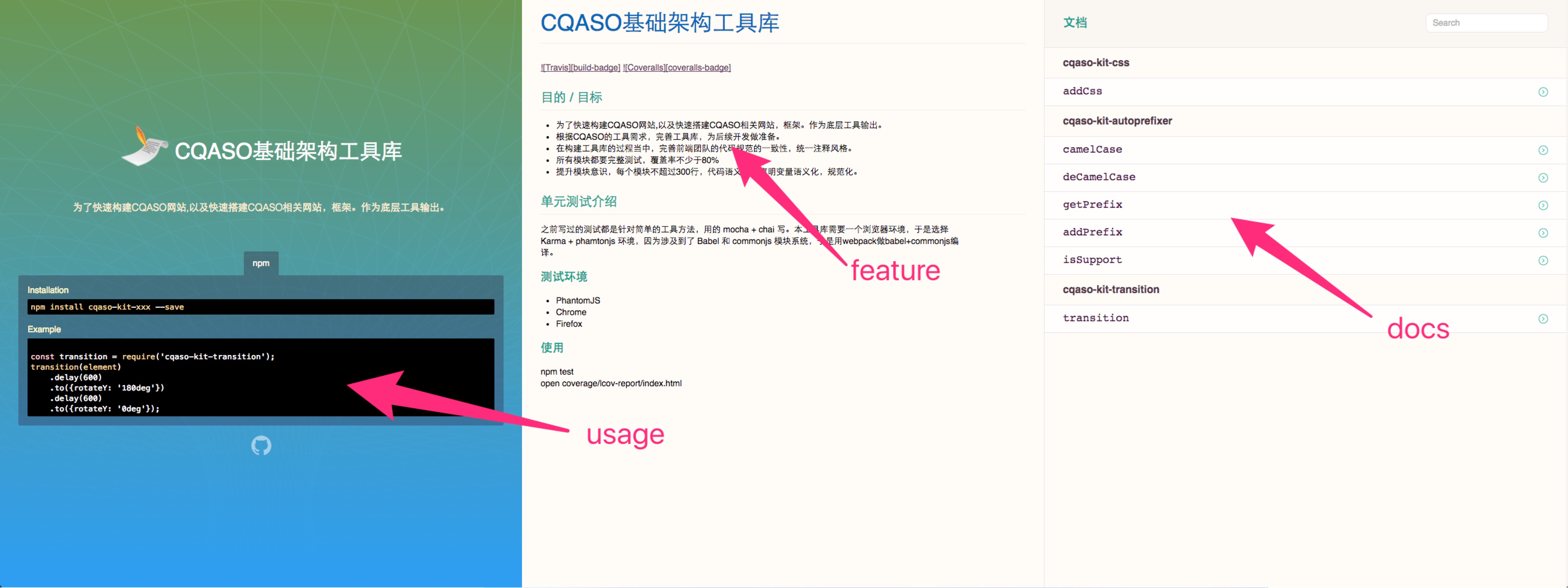 ## 特点
- 借助`jsdoc`解析注释生成json数据
- 根据json数据自动生成静态网站
- 可添加markdown文档
- 预留`使用说明`和`特点介绍说明`到生成页面指定位置
## 文档
* [使用指导](https://lanjingling0510.github.io/rainie-doc)
## 介绍
### 安装
使用 [npm](https://www.npmjs.com/):
$ npm install rainie-doc -g
### 选项
#### `-c / --config `
说明:配置文件路径
默认值: `rainie-doc.json`
```javascript
rainieDoc -c rainie-doc.json
```
### 配置文件
配置文件`rainie-doc.json`模板:
```javascript
{
"github_url": "https://github.com/lanjingling0510/rainie-doc",
"name": "文档web自动生成工具",
"title": "",
"description": "根据代码注释自动生成说明网站",
"logo_icon": "",
"entry_path": "./src/*.js",
"categories": [
"介绍",
"API"
],
"staticDocs": [
{
"type": "markdown",
"urlId": "readme",
"category": "介绍",
"title": "readme",
"description": "",
"path": "README.md"
}
],
"feature": "Feature.md",
"usage": "./docs/usage.js"
}
```
具体内容请看[配置文件说明](https://lanjingling0510.github.io/rainie-doc/#/docs/config)
## How to Contribute
Anyone and everyone is welcome to contribute to this project. The best way to
start is by checking our [open issues](https://github.com/lanjingling0510/rainie-doc/issues),
[submit a new issues](https://github.com/lanjingling0510/rainie-doc/issues/new?labels=bug) or
[feature request](https://github.com/lanjingling0510/rainie-doc/issues/new?labels=enhancement),
participate in discussions, upvote or downvote the issues you like or dislike.
## 特点
- 借助`jsdoc`解析注释生成json数据
- 根据json数据自动生成静态网站
- 可添加markdown文档
- 预留`使用说明`和`特点介绍说明`到生成页面指定位置
## 文档
* [使用指导](https://lanjingling0510.github.io/rainie-doc)
## 介绍
### 安装
使用 [npm](https://www.npmjs.com/):
$ npm install rainie-doc -g
### 选项
#### `-c / --config `
说明:配置文件路径
默认值: `rainie-doc.json`
```javascript
rainieDoc -c rainie-doc.json
```
### 配置文件
配置文件`rainie-doc.json`模板:
```javascript
{
"github_url": "https://github.com/lanjingling0510/rainie-doc",
"name": "文档web自动生成工具",
"title": "",
"description": "根据代码注释自动生成说明网站",
"logo_icon": "",
"entry_path": "./src/*.js",
"categories": [
"介绍",
"API"
],
"staticDocs": [
{
"type": "markdown",
"urlId": "readme",
"category": "介绍",
"title": "readme",
"description": "",
"path": "README.md"
}
],
"feature": "Feature.md",
"usage": "./docs/usage.js"
}
```
具体内容请看[配置文件说明](https://lanjingling0510.github.io/rainie-doc/#/docs/config)
## How to Contribute
Anyone and everyone is welcome to contribute to this project. The best way to
start is by checking our [open issues](https://github.com/lanjingling0510/rainie-doc/issues),
[submit a new issues](https://github.com/lanjingling0510/rainie-doc/issues/new?labels=bug) or
[feature request](https://github.com/lanjingling0510/rainie-doc/issues/new?labels=enhancement),
participate in discussions, upvote or downvote the issues you like or dislike.