# [pwgen](https://kherrick.github.io/pwgen/)
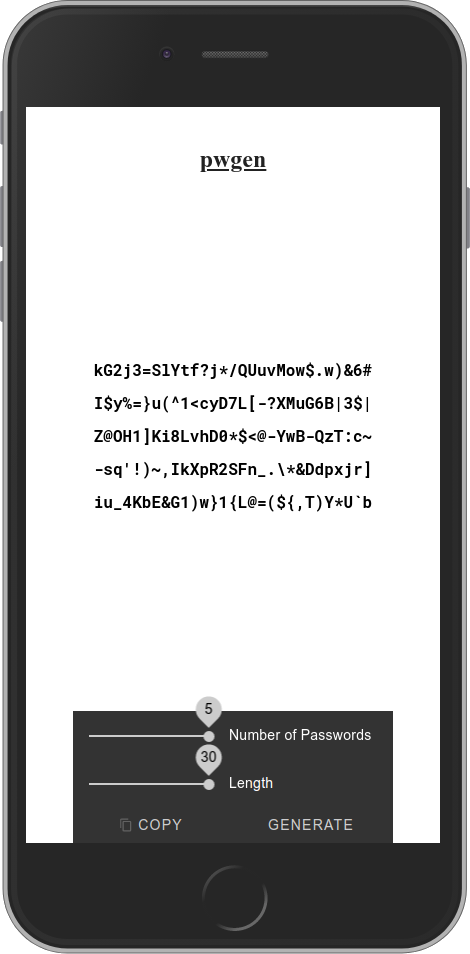
A [password generator](https://kherrick.github.io/pwgen/) compiled as Wasm for use on the CLI, in a custom element, or as a module.
 ## Use with the CLI on Mac, Windows, and Linux
[](https://www.npmjs.com/package/pwgen)
[](https://wapm.io/package/kherrick/pwgen)
### With npx
```bash
npx pwgen -sy 20 1
```
### With npm, as a global package
```bash
npm i -g pwgen
```
```bash
pwgen -sy 20 1
```
### With wapm
```bash
wapm install kherrick/pwgen
```
```bash
wapm run pwgen -sy 20 1
```
## Use in HTML ([demo](https://jsbin.com/yuvazejipu/edit?html,console,output))
```html
```
## Use in React
```bash
npm i pwgen
```
```javascript
import React from 'react';
import 'pwgen';
const App: React.FC = () => {
return (
)
}
```
## Use in Angular
```bash
npm i pwgen
```
Within the component:
```typescript
import { Component, OnInit } from '@angular/core';
import { pwgen } from 'pwgen';
@Component({
selector: 'app-root',
templateUrl: './app.component.html',
styleUrls: ['./app.component.css'],
})
export class AppComponent implements OnInit {
password: string = '';
ngOnInit() {
pwgen({
arguments: ['-sy', '20', '1'],
print: (password: string) => (
this.password = password
),
});
}
}
```
Within the template:
```html
{{ password }}
```
## Use in Node.js
```bash
npm i pwgen
```
```js
const pwgen = require('pwgen')
const flags = '-1sy'
const length = '20'
const number = '10'
pwgen({
arguments: [ flags, length, number ],
print: stdout => {
console.log(`Password: ${stdout}`)
}
})
```
## Test the experimental web bundle
### Download [pwgen.wbn](https://kherrick.github.io/pwgen/wbn/dist/pwgen.wbn)
### Read more about web packaging
* [https://web.dev/web-bundles/](https://web.dev/web-bundles/)
* [https://github.com/WICG/webpackage](https://github.com/WICG/webpackage)
## Develop
### Requirements
* [Node.js](https://nodejs.org/en/download/)
* [bash](https://www.gnu.org/software/bash/)
* [Docker](https://hub.docker.com/search/?offering=community&type=edition)
### Clone the project and submodules
```bash
git clone https://github.com/kherrick/pwgen \
&& cd pwgen \
&& git submodule update --init --recursive
```
### Start
```bash
npm start
```
### Build
```bash
npm run build
```
## Get Help
Show command line usage and available options (flags):
```bash
npx pwgen --help
```
```text
Usage: pwgen [ OPTIONS ] [ pw_length ] [ num_pw ]
Options supported by pwgen:
-c or --capitalize
Include at least one capital letter in the password
-A or --no-capitalize
Don't include capital letters in the password
-n or --numerals
Include at least one number in the password
-0 or --no-numerals
Don't include numbers in the password
-y or --symbols
Include at least one special symbol in the password
-r or --remove-chars=
Remove characters from the set of characters to generate passwords
-s or --secure
Generate completely random passwords
-B or --ambiguous
Don't include ambiguous characters in the password
-h or --help
Print a help message
-H or --sha1=path/to/file[#seed]
Use sha1 hash of given file as a (not so) random generator
-C
Print the generated passwords in columns
-1
Don't print the generated passwords in columns
-v or --no-vowels
Do not use any vowels so as to avoid accidental nasty words
```
## Use with the CLI on Mac, Windows, and Linux
[](https://www.npmjs.com/package/pwgen)
[](https://wapm.io/package/kherrick/pwgen)
### With npx
```bash
npx pwgen -sy 20 1
```
### With npm, as a global package
```bash
npm i -g pwgen
```
```bash
pwgen -sy 20 1
```
### With wapm
```bash
wapm install kherrick/pwgen
```
```bash
wapm run pwgen -sy 20 1
```
## Use in HTML ([demo](https://jsbin.com/yuvazejipu/edit?html,console,output))
```html
```
## Use in React
```bash
npm i pwgen
```
```javascript
import React from 'react';
import 'pwgen';
const App: React.FC = () => {
return (
)
}
```
## Use in Angular
```bash
npm i pwgen
```
Within the component:
```typescript
import { Component, OnInit } from '@angular/core';
import { pwgen } from 'pwgen';
@Component({
selector: 'app-root',
templateUrl: './app.component.html',
styleUrls: ['./app.component.css'],
})
export class AppComponent implements OnInit {
password: string = '';
ngOnInit() {
pwgen({
arguments: ['-sy', '20', '1'],
print: (password: string) => (
this.password = password
),
});
}
}
```
Within the template:
```html
{{ password }}
```
## Use in Node.js
```bash
npm i pwgen
```
```js
const pwgen = require('pwgen')
const flags = '-1sy'
const length = '20'
const number = '10'
pwgen({
arguments: [ flags, length, number ],
print: stdout => {
console.log(`Password: ${stdout}`)
}
})
```
## Test the experimental web bundle
### Download [pwgen.wbn](https://kherrick.github.io/pwgen/wbn/dist/pwgen.wbn)
### Read more about web packaging
* [https://web.dev/web-bundles/](https://web.dev/web-bundles/)
* [https://github.com/WICG/webpackage](https://github.com/WICG/webpackage)
## Develop
### Requirements
* [Node.js](https://nodejs.org/en/download/)
* [bash](https://www.gnu.org/software/bash/)
* [Docker](https://hub.docker.com/search/?offering=community&type=edition)
### Clone the project and submodules
```bash
git clone https://github.com/kherrick/pwgen \
&& cd pwgen \
&& git submodule update --init --recursive
```
### Start
```bash
npm start
```
### Build
```bash
npm run build
```
## Get Help
Show command line usage and available options (flags):
```bash
npx pwgen --help
```
```text
Usage: pwgen [ OPTIONS ] [ pw_length ] [ num_pw ]
Options supported by pwgen:
-c or --capitalize
Include at least one capital letter in the password
-A or --no-capitalize
Don't include capital letters in the password
-n or --numerals
Include at least one number in the password
-0 or --no-numerals
Don't include numbers in the password
-y or --symbols
Include at least one special symbol in the password
-r or --remove-chars=
Remove characters from the set of characters to generate passwords
-s or --secure
Generate completely random passwords
-B or --ambiguous
Don't include ambiguous characters in the password
-h or --help
Print a help message
-H or --sha1=path/to/file[#seed]
Use sha1 hash of given file as a (not so) random generator
-C
Print the generated passwords in columns
-1
Don't print the generated passwords in columns
-v or --no-vowels
Do not use any vowels so as to avoid accidental nasty words
```