# Public Google Sheets Parser
[](https://github.com/fureweb-com)
[](https://www.npmjs.com/package/public-google-sheets-parser)
[](https://codecov.io/gh/fureweb-com/public-google-sheets-parser)
[](https://github.com/fureweb-com/public-google-sheets-parser/blob/main/LICENSE)
[](https://standardjs.com)
[](https://github.com/fureweb-com/public-google-sheets-parser/stargazers)
[](https://www.npmjs.com/package/public-google-sheets-parser)
[](https://www.jsdelivr.com/package/npm/public-google-sheets-parser)
### [Demo Page (click here)](https://fureweb-com.github.io/public-google-sheets-parser/)
### Introduction
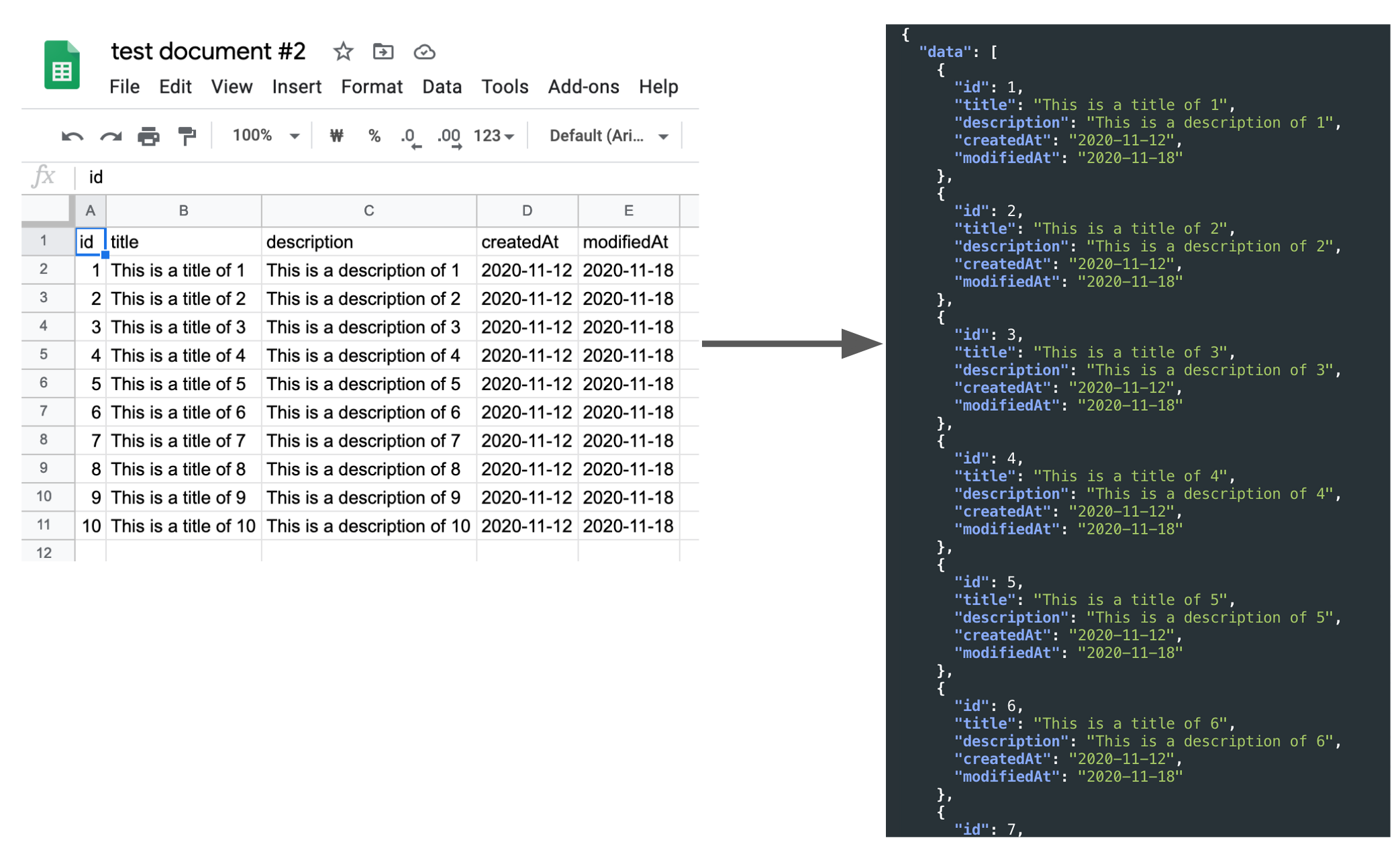
The Public Google Sheets Parser is a zero-dependency library that enables the use of publicly shared Google Sheets as a data source, akin to a database. Ensure your Google Sheet is public and formatted correctly with headers in the first row for seamless integration.
### Features:
- **Sheet Name or GID Selection:** Fetch data from specific sheets by name or GID (since v1.1.0 and v1.3.0 respectively).
- **Formatted Dates:** While you can opt to retrieve dates in their displayed format within the spreadsheet with `useFormattedDate` (since v1.4.0), it is recommended to use the `useFormat` option available since v1.5.0 for more precise control and accuracy. The `useFormat` option ensures that both numeric and date values are returned in their formatted string representations as they appear in your Google Sheets, providing a more accurate and consistent result.
- **Custom Formatting:** Leverage `useFormat` to get numeric and date values as formatted in Google Sheets (since v1.5.0).
- **Custom Fetch:** Supply your own request function for tests, retries, or request logging (since v1.6.0).
- **Browser and Node.js Support:** Utilize in various environments though note it requires Fetch API compatibility.
- **API Access:** No API key required for the SDK; access data through the provided free API for public sheets.
### Installation
```bash
yarn add public-google-sheets-parser
# OR
npm i public-google-sheets-parser
```
### Testing
Install development dependencies with `yarn install --frozen-lockfile`. These commands work on Windows, macOS, and Linux; npm users can run the same scripts with `npm run
```
Vue v2:
```html
```
React:
```javascript
import React, { useState, useEffect } from 'react'
import PublicGoogleSheetsParser from 'public-google-sheets-parser'
const SpreadsheetData = () => {
const [items, setItems] = useState([])
useEffect(() => {
const parser = new PublicGoogleSheetsParser('your_spreadsheet_id_here')
parser.parse().then(data => {
setItems(data)
})
}, [])
return (
{items.map((item, index) => (
- {JSON.stringify(item)}
))}
)
}
export default SpreadsheetData
```
### Options and Configurations
- `useFormattedDate`: Although you can parse date values according to the spreadsheet's format using `useFormattedDate`, it is now recommended to use the `useFormat` option for more comprehensive and precise formatting control. The `useFormat` option not only affects dates but also applies to numeric values, ensuring consistency and accuracy across your data.
- `useFormat`: Get data as formatted in the spreadsheet (applies to numbers and dates).
- `fetch`: Optional function receiving the generated URL and returning a promise for a response with `ok` and an asynchronous `text()` method. When omitted, the parser uses its browser or Node.js transport. The function can also be replaced with `setOption({ fetch: customFetch })`; changing other options retains it.
- Specify sheet by name or GID to target specific data ranges.
For example, a test can provide a response without making a network request:
```javascript
const parser = new PublicGoogleSheetsParser('test-sheet', {
fetch: async (url) => ({
ok: true,
text: async () => 'google.visualization.Query.setResponse({"table":{"cols":[{"label":"name"}],"rows":[{"c":[{"v":"Alice"}]}]}});'
})
})
parser.parse().then(console.log) // [{ name: 'Alice' }]
```
### Example with Options:
```javascript
const options = { sheetName: 'Sheet4', useFormat: true }
const parser = new PublicGoogleSheetsParser('10WDbAPAY7Xl5DT36VuMheTPTTpqx9x0C5sDCnh4BGps', options)
parser.parse().then((data) => {
// data will be like below:
// [
// {
// date: '2024년 1월 1일 월요일 오전 12시 0분 0초',
// 'with-format': '₩2,000.00',
// 'without-format': '5678'
// },
// {
// date: '2024년 12월 1일 일요일 오전 12시 0분 0초',
// 'with-format': '₩2,000.00',
// 'without-format': '1234'
// }
// ]
})
parser.setOption({ useFormat: false })
parser.parse().then((data2) => {
// data2 will be like below:
// [
// {
// date: 'Date(2024,0,1,0,0,0)',
// 'with-format': 2000,
// 'without-format': 5678
// },
// {
// date: 'Date(2024,11,1,0,0,0)',
// 'with-format': 2000,
// 'without-format': 1234
// }
// ]
})
```
### License
This project is licensed under the MIT License - see the [LICENSE](https://github.com/fureweb-com/public-google-sheets-parser/blob/main/LICENSE) file for details.