# ppu-uniface
TypeScript, type-safe, opinionated port of Python's Uniface: A comprehensive library for face detection, recognition, ~~landmark analysis, age, and gender detection~~.
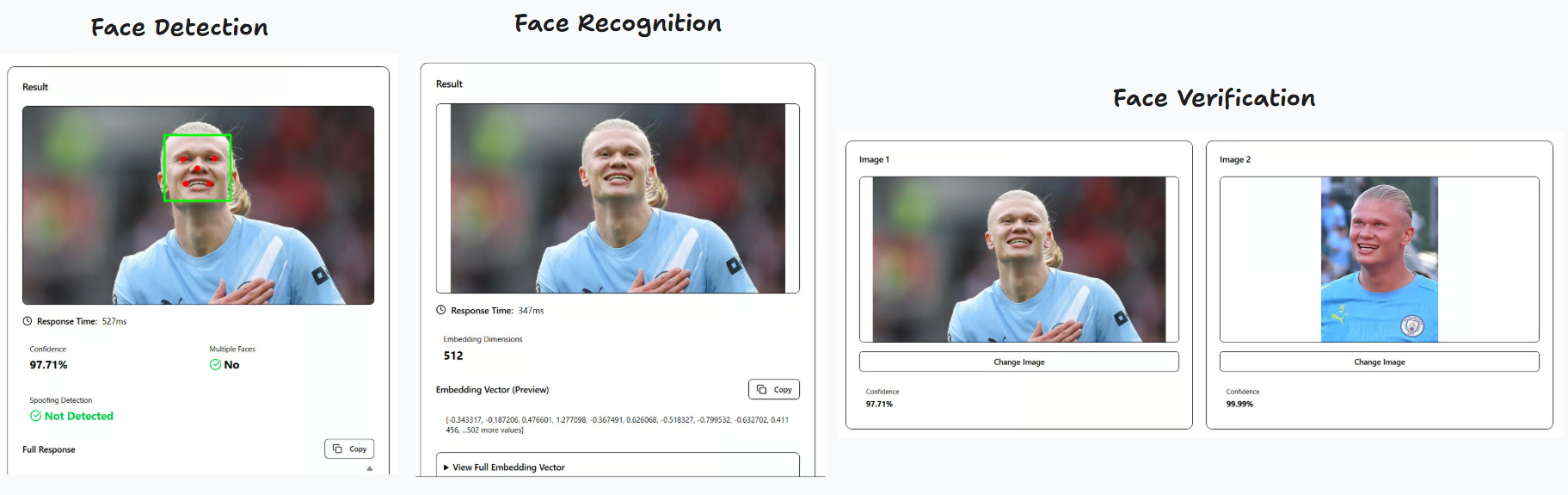
**Demos:**
- Client-side (browser): https://pt-perkasa-pilar-utama.github.io/ppu-uniface/
- Server-side (Next.js): https://github.com/PT-Perkasa-Pilar-Utama/ppu-uniface-demo
The code pattern is highly inspired by Uniface, however we do not offer model variations. We stick to predetermined opinionated models and functionality to achieve a minimum footprint.
## Features
1. **Face Detection**: Using RetinaNet (like Uniface) with basic 5 landmark points
2. **Face Recognition**: Using FaceNet512 (unlike Uniface, we opted for this, ported from Deepface)
3. **Face Verification**: Using Cosine similarity (unlike Deepface which offers euclidean, euclideanL2, and angular)
4. **Face Alignment**: Automatic face alignment based on eye landmarks
5. **Anti-Spoofing Face**: Following Deepface implementation, using Mini-FaceNet
6. **Web Support**: Can run entirely in the browser using `onnxruntime-web`
Customization will be added as we go along. Feel free to open an issue for feature requests.
## Installation
```bash
bun add ppu-uniface
```
or
```bash
npm install ppu-uniface
```
## Usage
It is recommended to do warmup initialize first to download all the models needed to run for the first time.
### Basic Face Verification
```typescript
import { Uniface } from "ppu-uniface";
const uniface = new Uniface();
await uniface.initialize();
const image1 = await Bun.file("path/to/image1.jpg").arrayBuffer();
const image2 = await Bun.file("path/to/image2.jpg").arrayBuffer();
const result = await uniface.verify(image1, image2);
console.log(result);
await uniface.destroy();
```
### Compact Result (Default)
```typescript
const result = await uniface.verify(image1, image2, { compact: true });
// Returns: { multipleFaces, spoofing, verified, similarity }
```
### Full Result
```typescript
const result = await uniface.verify(image1, image2, { compact: false });
// Returns: { detection, recognition, verification }
```
### Verification with Custom Detection Threshold
```typescript
// Override detection threshold for both faces in verification
const result = await uniface.verify(image1, image2, {
compact: true,
detection: {
threshold: { confidence: 0.5 },
},
});
```
### Verification with Custom Verification Threshold
```typescript
// Override verification threshold for this specific verification call
const result = await uniface.verify(image1, image2, {
compact: true,
threshold: 0.85, // Falls back to model-level threshold (0.7) if not provided
});
// Or with direct embedding comparison
const verification = await uniface.verifyEmbedding(
face1.embedding,
face2.embedding,
0.85 // Optional threshold override
);
```
### Face Detection Only
```typescript
const detection = await uniface.detect(imageBuffer);
console.log(detection);
// Returns: { box, confidence, landmarks, multipleFaces }
```
#### With Custom Detection Threshold
```typescript
// Override confidence threshold for this detection call
const detection = await uniface.detect(imageBuffer, {
threshold: { confidence: 0.5 },
});
// Override both thresholds
const detection = await uniface.detect(imageBuffer, {
threshold: {
confidence: 0.8,
nonMaximumSuppression: 0.3,
},
});
```
### Face Recognition Only
```typescript
const recognition = await uniface.recognize(imageBuffer);
console.log(recognition.embedding);
// Returns: { embedding: Float32Array(512) }
```
### Direct Embedding Comparison
```typescript
const face1 = await uniface.recognize(image1);
const face2 = await uniface.recognize(image2);
const verification = await uniface.verifyEmbedding(
face1.embedding,
face2.embedding
);
console.log(verification);
// Returns: { similarity, verified, threshold }
```
### Enable Verbose Logging
```typescript
import { LoggerConfig } from "ppu-uniface";
LoggerConfig.verbose = true;
```
### Advanced Usage with Individual Components
```typescript
import {
RetinaNetDetection,
FaceNet512Recognition,
CosineVerification,
alignAndCropFace,
} from "ppu-uniface";
const detector = new RetinaNetDetection();
await detector.initialize();
const recognizer = new FaceNet512Recognition();
await recognizer.initialize();
const verifier = new CosineVerification();
const detection = await detector.detect(imageBuffer);
if (detection) {
const alignedFace = await alignAndCropFace(imageBuffer, detection);
const embedding = await recognizer.recognize(alignedFace);
console.log(embedding);
}
await detector.destroy();
await recognizer.destroy();
```
## Web / Browser Support
ppu-uniface runs entirely in the browser using `onnxruntime-web`. No server required.
### Via npm (bundlers)
```bash
npm install ppu-uniface onnxruntime-web
```
```typescript
import { Uniface } from "ppu-uniface/web";
const uniface = new Uniface();
await uniface.initialize();
// Use with an image ArrayBuffer (from fetch, FileReader, canvas, etc.)
const detection = await uniface.detect(imageArrayBuffer);
const recognition = await uniface.recognize(imageArrayBuffer);
const verification = await uniface.verify(image1, image2);
const spoofing = await uniface.spoofingAnalysisWithDetection(imageArrayBuffer);
await uniface.destroy();
```
### Via CDN (no build step)
```html
```
> **Note:** First initialization downloads ONNX models (~100MB total). Subsequent loads use browser cache.
## Configuration
You can customize the models by passing options to the `Uniface` constructor or individual model constructors.
### Detection Options (`DetectionModelOptions`)
Model-level options configured during initialization:
| Option | Type | Default | Description |
| --------------------------------- | ------------------ | ------------ | ------------------------------------------- |
| `threshold.confidence` | `number` | `0.7` | Minimum confidence score for face detection |
| `threshold.nonMaximumSuppression` | `number` | `0.4` | IoU threshold for non-maximum suppression |
| `topK.preNonMaximumSuppression` | `number` | `5000` | Maximum detections before NMS |
| `topK.postNonMaxiumSuppression` | `number` | `750` | Maximum detections after NMS |
| `size.input` | `[number, number]` | `[320, 320]` | Input dimensions [height, width] |
### Method-Level Detection Options (`DetectOptions`)
Override detection thresholds on a per-call basis (available for `detect()`, `verify()`, `verifyWithDetections()`, and `spoofingAnalysisWithDetection()`):
| Option | Type | Default | Description |
| --------------------------------- | -------- | -------------------- | ------------------------------------------- |
| `threshold.confidence` | `number` | Model-level or `0.7` | Minimum confidence score for face detection |
| `threshold.nonMaximumSuppression` | `number` | Model-level or `0.4` | IoU threshold for non-maximum suppression |
### Recognition Options (`RecognitionModelOptions`)
| Option | Type | Default | Description |
| ------------- | ---------------------------------- | ------------------ | --------------------------------------------------- |
| `size.input` | `[number, number, number, number]` | `[1, 160, 160, 3]` | Input tensor shape [batch, height, width, channels] |
| `size.output` | `[number, number]` | `[1, 512]` | Output tensor shape [batch, embedding_size] |
### Verification Options (`VerificationModelOptions`)
| Option | Type | Default | Description |
| ----------- | -------- | ------- | ------------------------------------- |
| `threshold` | `number` | `0.7` | Similarity threshold for verification |
### Spoofing Options (`VerificationModelOptions`)
| Option | Type | Default | Description |
| ----------- | --------- | ------- | ------------------------------------- |
| `threshold` | `number` | `0.5` | Similarity threshold for verification |
| `enable` | `boolean` | `true` | Enable the anti-spoofing analysis |
### Example with Custom Options
```typescript
const uniface = new Uniface({
detection: {
threshold: {
confidence: 0.9,
},
size: {
input: [640, 640],
},
},
verification: {
threshold: 0.8,
},
});
```
## API Reference
### `Uniface`
Main service class for face detection, recognition, and verification.
#### Methods
- `initialize(): Promise` - Initializes all models
- `detect(image: ArrayBuffer | Canvas, options?: DetectOptions): Promise` - Detects face in image with optional threshold overrides
- `recognize(image: ArrayBuffer | Canvas): Promise` - Generates face embedding
- `verify(image1, image2, options?: UnifaceVerifyOptions): Promise` - Verifies if two images contain the same person (supports detection and verification threshold overrides via `options.detection` and `options.threshold`)
- `verifyWithDetections(input1, input2, options?: UnifaceVerifyOptions): Promise` - Verifies with pre-computed detections (supports detection and verification threshold overrides via `options.detection` and `options.threshold`)
- `verifyEmbedding(embedding1, embedding2, threshold?: number): Promise` - Compares two embeddings directly with optional threshold override
- `spoofingAnalysisWithDetection(image: ArrayBuffer | Canvas, options?: DetectOptions): Promise` - Analyzes spoofing with automatic detection and optional threshold overrides
- `destroy(): Promise` - Releases all model resources
### Types
#### `DetectOptions`
```typescript
{
threshold?: {
confidence?: number; // Default: 0.7
nonMaximumSuppression?: number; // Default: 0.4
};
}
```
#### `DetectionResult`
```typescript
{
box: { x: number; y: number; width: number; height: number };
confidence: number;
landmarks: number[][]; // 5 points: left eye, right eye, nose, left mouth, right mouth
multipleFaces: boolean;
}
```
#### `RecognitionResult`
```typescript
{
embedding: Float32Array; // 512-dimensional vector
}
```
#### `VerificationResult`
```typescript
{
similarity: number; // 0-1
verified: boolean;
threshold: number; // Default: 0.7
}
```
#### `UnifaceVerifyOptions`
```typescript
{
compact: boolean; // Default: true
detection?: DetectOptions; // Optional detection threshold overrides
threshold?: number; // Optional verification threshold override (falls back to model-level threshold, default: 0.7)
}
```
#### `UnifaceCompactResult`
```typescript
{
multipleFaces: {
face1: boolean | null;
face2: boolean | null;
}
spoofing: {
face1: boolean | null;
face2: boolean | null;
}
verified: boolean;
similarity: number;
}
```
#### `UnifaceFullResult`
```typescript
{
detection: {
face1: DetectionResult | null;
face2: DetectionResult | null;
}
recognition: {
face1: RecognitionResult;
face2: RecognitionResult;
}
spoofing: {
face1: SpoofingResult | null;
face2: SpoofingResult | null;
}
verification: VerificationResult;
}
```
## Models
The library automatically downloads and caches the following models on first use:
- **RetinaFace MobileNet V2** (~12.5MB) - Face detection
- **FaceNet512** (~89.63MB) - Face recognition
Models are cached in `~/.cache/ppu-uniface/` for faster subsequent loads.
## Benchmark
```sh
bun run benchmark
```
Feel free to compare it to Deepface.
## Testing
```sh
bun test
```
The library includes comprehensive unit tests covering:
- Face detection with RetinaNet
- Face recognition with FaceNet512
- Cosine similarity verification
- Full integration tests
## Performance
Typical performance on modern hardware:
- **Detection**: ~50-150ms per image
- **Recognition**: ~30-80ms per aligned face
- **Full Verification**: ~100-300ms for two images
## Requirements
### Server (Node.js / Bun)
- **Runtime**: Bun or Node.js 18+
- **Dependencies**:
- `onnxruntime-node` - ONNX model inference
- `ppu-ocv` - Computer vision utilities
### Browser (Web)
- **Runtime**: Modern browser with WebAssembly support
- **Dependencies** (loaded via CDN or npm):
- `onnxruntime-web` - ONNX model inference (WASM)
- `ppu-ocv/web` - Computer vision utilities (browser build)
## Contribution
Contributions are welcome! Please feel free to submit a Pull Request.
1. Fork the repository
2. Create your feature branch (`git checkout -b feature/amazing-feature`)
3. Commit your changes (`git commit -m 'Add some amazing feature'`)
4. Push to the branch (`git push origin feature/amazing-feature`)
5. Open a Pull Request
## License
MIT
## Credits
- [Uniface](https://github.com/yakhyo/uniface) - Original Python implementation
- [Deepface](https://github.com/serengil/deepface) - Face recognition framework
- [InsightFace](https://github.com/deepinsight/insightface) - Face analysis toolkit
- [minivision-ai](https://github.com/minivision-ai/Silent-Face-Anti-Spoofing) - Minivision-ai Silent Anti-Spoofing
## Roadmap
- [x] Anti-spoofing detection
- [x] Face detection customization options
- [x] Browser support (ONNX Web)