# pptx-wasm
[](https://www.npmjs.com/package/pptx-wasm)
[](https://github.com/prahack/pptx-wasm/blob/main/LICENSE)
Render PowerPoint `.pptx` files in the browser. No server, no conversion step, no upload —
the file is parsed and drawn on the client.
The parser, layout engine and renderer are Rust compiled to WebAssembly. This package is
the TypeScript API around it, plus an optional React component.
```tsx
import { PresentationViewer } from 'pptx-wasm/react';
```
## Install
```sh
npm install pptx-wasm
```
React is an optional peer dependency; you only need it for `pptx-wasm/react`.
*Preset geometry built from the ECMA-376 formulas, including the lit and shaded faces of
`can` and `cube`.*
## How it compares
Against the other browser-side pptx renderers on npm, over the same 14 fixtures. Payload
is gzipped; `cold` is a first render in a fresh page including WASM instantiation; `warm`
is opening another deck in the same page. The two fidelity columns are the share of inked
pixels differing from a LibreOffice render — lower is closer.
| engine | payload | cold | warm | structure | text |
|---|---:|---:|---:|---:|---:|
| **pptx-wasm** | 328 KB | **36.2 ms** | **3.0 ms** | **1.23%** | 27.43% |
| @aiden0z/pptx-renderer | 349 KB | 102.1 ms | 6.2 ms | 1.54% | 26.93% |
| pptxviewjs | 252 KB | 99.6 ms | 33.0 ms | 14.57% | 26.72% |
| pptx-glimpse | 167 KB | 40.5 ms | 9.9 ms | 14.84% | 27.08% |
| pptx-preview | 426 KB | 99.4 ms | 5.8 ms | 33.19% | 24.44% |
| @jvmr/pptx-to-html | 45 KB | 21.2 ms | 2.9 ms | 47.76% | 69.15% |
| pptx-vanilla-viewer | 1695 KB | 228.5 ms | 28.4 ms | 57.38% | 64.72% |
**structure** — shapes, tables, effects, fills — is the column that discriminates. **text**
is a floor rather than a score: every competent engine lands within three points of the
others, because there the diff is dominated by font rasterisation, which a browser and
LibreOffice will never agree on.
Read honestly: the fastest of the engines that render accurately and the most accurate on
structure, but **fourth of seven on payload**, a narrow lead over @aiden0z/pptx-renderer,
and the *weakest* of the accurate engines on text. One of the fixtures was written for
this project after a capability diff found 22 flowchart presets missing here; it moves
other engines' figures and the
[repository README](https://github.com/prahack/pptx-wasm#one-of-these-fixtures-is-ours-and-it-matters)
gives the table both with and without it.
## What it renders
| | |
|---|---|
| **Text** | paragraphs, runs, alignment, word wrap, line and paragraph spacing, bold/italic/underline/strikethrough, bullets and auto-numbering, vertical anchoring, autofit, embedded fonts |
| **Shapes** | ~110 preset geometries including the full flowchart and action-button families, custom geometry (including the DrawingML formula language), connectors, nested groups with rotation and flips |
| **Fills** | solid, linear and radial gradients (including on text), picture fills stretched or tiled, preset hatch patterns, transparency |
| **Images** | PNG, JPEG, GIF, BMP, WebP, SVG, with `srcRect` cropping and shape-clipping |
| **Links** | hyperlinks on text runs, reported with their rectangles |
| **Inheritance** | the full chain: shape → placeholder → layout → master → theme, with colour maps and theme fonts |
| **Tables** | grids, merged cells, borders, and PowerPoint's built-in table styles |
| **Charts** | bar, column, line, area, pie, doughnut and scatter, with axes, gridlines and legends |
| **Effects** | drop shadows, glow and soft edges |
Known gaps: 3-D bevels, SmartArt and OLE embeddings (these render as their
fallback image where the file provides one), animations and transitions, and EMF/WMF
images — which no browser can decode.
## Framework-agnostic API
```ts
import { Presentation } from 'pptx-wasm';
const deck = await Presentation.open('/deck.pptx');
const canvas = document.querySelector('canvas');
await deck.render(0, canvas, { fit: 'contain' });
console.log(deck.slideCount, deck.slideSize);
deck.destroy();
```
### `Presentation.open(src, options?)`
`src` is a URL, `File`, `Blob`, `ArrayBuffer` or `Uint8Array`.
| option | default | |
|---|---|---|
| `wasm` | bundled | URL, `Response` or `ArrayBuffer` for the `.wasm` module |
| `useEmbeddedFonts` | `true` | install fonts embedded in the deck as `FontFace`s |
| `signal` | — | `AbortSignal`, honoured while fetching a URL |
### `deck.render(index, canvas, options?)`
Draws a slide. Sizes the canvas backing store from `options` and the device pixel ratio.
| option | default | |
|---|---|---|
| `width`, `height` | the canvas's client size | in CSS pixels |
| `dpr` | `devicePixelRatio` | |
| `fit` | `'contain'` | `'contain'`, `'cover'`, `'fill'`, `'actual'` |
| `zoom` | `1` | applied on top of the fit |
| `panX`, `panY` | `0` | in CSS pixels |
Resolves to `{ complete }`. `complete: false` means images were still decoding — subscribe
to `onAssetsReady` and draw again.
### Other members
| | |
|---|---|
| `deck.info` | `{ slideCount, width, height, slides, embeddedFonts }`; size in points |
| `deck.slideCount`, `deck.slideSize` | |
| `deck.prepare(index)` | lay a slide out without drawing it — worth doing for neighbours |
| `deck.text(index)` | the slide's text, in draw order |
| `deck.notes(index)` | speaker notes |
| `deck.onAssetsReady(fn)` | called when late-decoding images arrive; returns an unsubscribe |
| `deck.pendingAssetCount()` | images still decoding |
| `deck.evict()` | drop cached layouts under memory pressure |
| `deck.destroy()` | free the WASM-side deck and uninstall embedded fonts |
`deck.debugTrace(index)` and `deck.gpuRequirements(index)` are diagnostics. Their output
format is not stable; do not build on them.
## React
```tsx
import { useRef } from 'react';
import { PresentationViewer, type PresentationViewerHandle } from 'pptx-wasm/react';
function Deck() {
const viewer = useRef(null);
return (
<>
console.log(`${info.slideCount} slides`)}
/>
);
}
```
### Props
| prop | default | |
|---|---|---|
| `src` | — | URL, `File`, `Blob`, `ArrayBuffer` or `Uint8Array` |
| `width`, `height` | `100%` | CSS length or number of pixels |
| `initialSlide` | `0` | |
| `slide` | — | pass to control the index yourself |
| `fit` | `'contain'` | |
| `zoom` | `1` | |
| `keyboard` | `true` | arrows, Page Up/Down, Home/End, space |
| `selectableText` | `false` | overlay a transparent, selectable copy of the slide's text |
| `wasm` | bundled | where to load the WASM module from |
| `loading` | a spinner | node shown while the deck loads |
| `renderError` | a message | `(error) => ReactNode` |
| `className`, `style` | — | |
| `onLoad` | — | `(info: PresentationInfo) => void` |
| `onError` | — | `(error: PptxError) => void` |
| `onSlideChange` | — | `(index: number) => void` |
The component redraws on resize and on device-pixel-ratio changes, prefetches the
neighbouring slides, and exposes the current slide's text to assistive technology and
find-in-page.
### Selecting text
A canvas draws pixels, so text on it cannot be selected or copied with the mouse.
`selectableText` lays a transparent `` per run over the canvas, positioned from the
same layout that painted the glyphs — the technique pdf.js uses for its text layer.
```tsx
```
It is off by default because it costs a DOM node per run, and a dense slide has hundreds.
**Screen readers and find-in-page do not need it** — the component always renders an
off-screen copy of the slide text for those. What this adds is selection, which is a
pointer interaction an off-screen block cannot serve.
Each span is scaled to the width the layout engine measured, so the highlight tracks the
glyphs instead of drifting across a long line. On the test fixtures that correction is
within 0.02%.
For the underlying data — say, to build your own overlay, or to hit-test text — use
`deck.textLayer(index, options)`. Pass the same options you passed to `render`, or the
boxes will not line up:
```ts
for (const run of deck.textLayer(0, { width: 960, height: 540, dpr: 1 })) {
// run.text, run.x, run.y (baseline), run.width, run.size, run.family, run.rotation
}
```
Positions come from the same walk the renderer uses, so a run culled from the canvas is
absent here too: the layer can never offer selectable text where nothing was painted.
### Handle
`next()`, `previous()`, `goTo(index)`, `redraw()`, and the read-only `slide`,
`slideCount` and `presentation`.
## Finding text
`findSlides` says which slides contain a string; `searchSlide` says where on one of them,
with the rectangles to draw a highlight.
```ts
for (const { index, count } of deck.findSlides('revenue')) {
console.log(`slide ${index + 1}: ${count} match(es)`);
}
// Pass the same options you passed to render(), or the boxes will not line up.
for (const m of deck.searchSlide(1, 'revenue', { width: 960, height: 540, dpr: 1 })) {
for (const r of m.rects) ctx.fillRect(r.x, r.y, r.width, r.height);
}
```
Case-insensitive by default, and `text` comes back with the slide's casing rather than the
query's. Matches are positioned by the same walk that painted the glyphs, so a highlight
cannot land where the text is not.
Two behaviours worth knowing. A match spanning several runs — `the **bold** word` is three
of them — returns **one rectangle per run**, because a single box across them would cover
the gaps. And a phrase is never matched across a line break: those words are not adjacent
on screen, and boxing them as one would cover the unrelated text between them.
`findSlides` is the cheaper call, but it still lays out every slide it has not seen, so on
a large deck the first call is the expensive one. Drive a result list with it, then ask
`searchSlide` for boxes only on the slide actually on screen.
## Hyperlinks
Every run on the text layer carries the URL it links to, or `null`:
```ts
for (const r of deck.textLayer(0, { width: 960, height: 540, dpr: 1 })) {
if (r.link) {
// r.x, r.y (baseline), r.width and r.size bound the clickable area
console.log(r.text, '->', r.link);
}
}
```
Only `http`, `https` and `mailto` survive parsing. A deck is untrusted input and the URL
is about to go in an `href`, so schemes are allow-listed rather than sanitised —
`javascript:` and `file:` come back as `null`.
The renderer does not draw links or make them clickable; it tells you where they are.
Turning them into anchors is the host's job, and `selectableText` already puts a
positioned element over each run if you want somewhere to hang one.
## Loading the WASM module
The package ships `pptx_bg.wasm` as a real file next to the JS rather than inlining it, so
it is cached separately and compiled while it streams. Most bundlers resolve it with no
configuration.
To serve it from elsewhere — a CDN, or a path your framework controls:
```ts
import { initWasm } from 'pptx-wasm';
await initWasm('https://cdn.example.com/pptx_bg.wasm');
```
Call it once before the first `Presentation.open`, or pass the same value as the `wasm`
prop. The module is instantiated once per page and shared.
## Browser support
Chrome, Edge, Firefox and Safari — verified per release by rendering the whole fixture
suite in Chromium, Firefox and WebKit and checking the output matches.
Requires WebAssembly, `OffscreenCanvas` and `Path2D`, all available since 2020.
## A note on fidelity
Text is measured with the browser's own `measureText`, so line breaks and drawn glyphs
come from one engine and cannot disagree. The cost is that the three browser engines do
not return byte-identical advances, so a paragraph could in principle break differently
between them. Advances are measured in points at the authored size, never at the zoomed
size, so a deck breaks identically at every zoom level and DPR — and the font fallback
chain prefers metric-compatible substitutes (Carlito for Calibri, Liberation Sans for
Arial) so a missing face keeps its wrap points instead of reflowing the slide.
## Licence
MIT
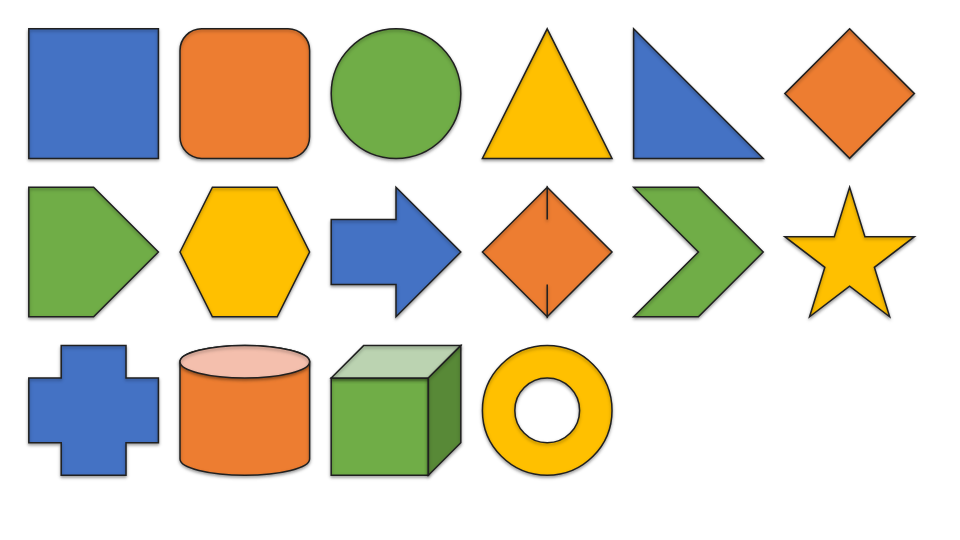 *Preset geometry built from the ECMA-376 formulas, including the lit and shaded faces of
`can` and `cube`.*
## How it compares
Against the other browser-side pptx renderers on npm, over the same 14 fixtures. Payload
is gzipped; `cold` is a first render in a fresh page including WASM instantiation; `warm`
is opening another deck in the same page. The two fidelity columns are the share of inked
pixels differing from a LibreOffice render — lower is closer.
| engine | payload | cold | warm | structure | text |
|---|---:|---:|---:|---:|---:|
| **pptx-wasm** | 328 KB | **36.2 ms** | **3.0 ms** | **1.23%** | 27.43% |
| @aiden0z/pptx-renderer | 349 KB | 102.1 ms | 6.2 ms | 1.54% | 26.93% |
| pptxviewjs | 252 KB | 99.6 ms | 33.0 ms | 14.57% | 26.72% |
| pptx-glimpse | 167 KB | 40.5 ms | 9.9 ms | 14.84% | 27.08% |
| pptx-preview | 426 KB | 99.4 ms | 5.8 ms | 33.19% | 24.44% |
| @jvmr/pptx-to-html | 45 KB | 21.2 ms | 2.9 ms | 47.76% | 69.15% |
| pptx-vanilla-viewer | 1695 KB | 228.5 ms | 28.4 ms | 57.38% | 64.72% |
**structure** — shapes, tables, effects, fills — is the column that discriminates. **text**
is a floor rather than a score: every competent engine lands within three points of the
others, because there the diff is dominated by font rasterisation, which a browser and
LibreOffice will never agree on.
Read honestly: the fastest of the engines that render accurately and the most accurate on
structure, but **fourth of seven on payload**, a narrow lead over @aiden0z/pptx-renderer,
and the *weakest* of the accurate engines on text. One of the fixtures was written for
this project after a capability diff found 22 flowchart presets missing here; it moves
other engines' figures and the
[repository README](https://github.com/prahack/pptx-wasm#one-of-these-fixtures-is-ours-and-it-matters)
gives the table both with and without it.
## What it renders
| | |
|---|---|
| **Text** | paragraphs, runs, alignment, word wrap, line and paragraph spacing, bold/italic/underline/strikethrough, bullets and auto-numbering, vertical anchoring, autofit, embedded fonts |
| **Shapes** | ~110 preset geometries including the full flowchart and action-button families, custom geometry (including the DrawingML formula language), connectors, nested groups with rotation and flips |
| **Fills** | solid, linear and radial gradients (including on text), picture fills stretched or tiled, preset hatch patterns, transparency |
| **Images** | PNG, JPEG, GIF, BMP, WebP, SVG, with `srcRect` cropping and shape-clipping |
| **Links** | hyperlinks on text runs, reported with their rectangles |
| **Inheritance** | the full chain: shape → placeholder → layout → master → theme, with colour maps and theme fonts |
| **Tables** | grids, merged cells, borders, and PowerPoint's built-in table styles |
| **Charts** | bar, column, line, area, pie, doughnut and scatter, with axes, gridlines and legends |
| **Effects** | drop shadows, glow and soft edges |
Known gaps: 3-D bevels, SmartArt and OLE embeddings (these render as their
fallback image where the file provides one), animations and transitions, and EMF/WMF
images — which no browser can decode.
## Framework-agnostic API
```ts
import { Presentation } from 'pptx-wasm';
const deck = await Presentation.open('/deck.pptx');
const canvas = document.querySelector('canvas');
await deck.render(0, canvas, { fit: 'contain' });
console.log(deck.slideCount, deck.slideSize);
deck.destroy();
```
### `Presentation.open(src, options?)`
`src` is a URL, `File`, `Blob`, `ArrayBuffer` or `Uint8Array`.
| option | default | |
|---|---|---|
| `wasm` | bundled | URL, `Response` or `ArrayBuffer` for the `.wasm` module |
| `useEmbeddedFonts` | `true` | install fonts embedded in the deck as `FontFace`s |
| `signal` | — | `AbortSignal`, honoured while fetching a URL |
### `deck.render(index, canvas, options?)`
Draws a slide. Sizes the canvas backing store from `options` and the device pixel ratio.
| option | default | |
|---|---|---|
| `width`, `height` | the canvas's client size | in CSS pixels |
| `dpr` | `devicePixelRatio` | |
| `fit` | `'contain'` | `'contain'`, `'cover'`, `'fill'`, `'actual'` |
| `zoom` | `1` | applied on top of the fit |
| `panX`, `panY` | `0` | in CSS pixels |
Resolves to `{ complete }`. `complete: false` means images were still decoding — subscribe
to `onAssetsReady` and draw again.
### Other members
| | |
|---|---|
| `deck.info` | `{ slideCount, width, height, slides, embeddedFonts }`; size in points |
| `deck.slideCount`, `deck.slideSize` | |
| `deck.prepare(index)` | lay a slide out without drawing it — worth doing for neighbours |
| `deck.text(index)` | the slide's text, in draw order |
| `deck.notes(index)` | speaker notes |
| `deck.onAssetsReady(fn)` | called when late-decoding images arrive; returns an unsubscribe |
| `deck.pendingAssetCount()` | images still decoding |
| `deck.evict()` | drop cached layouts under memory pressure |
| `deck.destroy()` | free the WASM-side deck and uninstall embedded fonts |
`deck.debugTrace(index)` and `deck.gpuRequirements(index)` are diagnostics. Their output
format is not stable; do not build on them.
## React
```tsx
import { useRef } from 'react';
import { PresentationViewer, type PresentationViewerHandle } from 'pptx-wasm/react';
function Deck() {
const viewer = useRef
*Preset geometry built from the ECMA-376 formulas, including the lit and shaded faces of
`can` and `cube`.*
## How it compares
Against the other browser-side pptx renderers on npm, over the same 14 fixtures. Payload
is gzipped; `cold` is a first render in a fresh page including WASM instantiation; `warm`
is opening another deck in the same page. The two fidelity columns are the share of inked
pixels differing from a LibreOffice render — lower is closer.
| engine | payload | cold | warm | structure | text |
|---|---:|---:|---:|---:|---:|
| **pptx-wasm** | 328 KB | **36.2 ms** | **3.0 ms** | **1.23%** | 27.43% |
| @aiden0z/pptx-renderer | 349 KB | 102.1 ms | 6.2 ms | 1.54% | 26.93% |
| pptxviewjs | 252 KB | 99.6 ms | 33.0 ms | 14.57% | 26.72% |
| pptx-glimpse | 167 KB | 40.5 ms | 9.9 ms | 14.84% | 27.08% |
| pptx-preview | 426 KB | 99.4 ms | 5.8 ms | 33.19% | 24.44% |
| @jvmr/pptx-to-html | 45 KB | 21.2 ms | 2.9 ms | 47.76% | 69.15% |
| pptx-vanilla-viewer | 1695 KB | 228.5 ms | 28.4 ms | 57.38% | 64.72% |
**structure** — shapes, tables, effects, fills — is the column that discriminates. **text**
is a floor rather than a score: every competent engine lands within three points of the
others, because there the diff is dominated by font rasterisation, which a browser and
LibreOffice will never agree on.
Read honestly: the fastest of the engines that render accurately and the most accurate on
structure, but **fourth of seven on payload**, a narrow lead over @aiden0z/pptx-renderer,
and the *weakest* of the accurate engines on text. One of the fixtures was written for
this project after a capability diff found 22 flowchart presets missing here; it moves
other engines' figures and the
[repository README](https://github.com/prahack/pptx-wasm#one-of-these-fixtures-is-ours-and-it-matters)
gives the table both with and without it.
## What it renders
| | |
|---|---|
| **Text** | paragraphs, runs, alignment, word wrap, line and paragraph spacing, bold/italic/underline/strikethrough, bullets and auto-numbering, vertical anchoring, autofit, embedded fonts |
| **Shapes** | ~110 preset geometries including the full flowchart and action-button families, custom geometry (including the DrawingML formula language), connectors, nested groups with rotation and flips |
| **Fills** | solid, linear and radial gradients (including on text), picture fills stretched or tiled, preset hatch patterns, transparency |
| **Images** | PNG, JPEG, GIF, BMP, WebP, SVG, with `srcRect` cropping and shape-clipping |
| **Links** | hyperlinks on text runs, reported with their rectangles |
| **Inheritance** | the full chain: shape → placeholder → layout → master → theme, with colour maps and theme fonts |
| **Tables** | grids, merged cells, borders, and PowerPoint's built-in table styles |
| **Charts** | bar, column, line, area, pie, doughnut and scatter, with axes, gridlines and legends |
| **Effects** | drop shadows, glow and soft edges |
Known gaps: 3-D bevels, SmartArt and OLE embeddings (these render as their
fallback image where the file provides one), animations and transitions, and EMF/WMF
images — which no browser can decode.
## Framework-agnostic API
```ts
import { Presentation } from 'pptx-wasm';
const deck = await Presentation.open('/deck.pptx');
const canvas = document.querySelector('canvas');
await deck.render(0, canvas, { fit: 'contain' });
console.log(deck.slideCount, deck.slideSize);
deck.destroy();
```
### `Presentation.open(src, options?)`
`src` is a URL, `File`, `Blob`, `ArrayBuffer` or `Uint8Array`.
| option | default | |
|---|---|---|
| `wasm` | bundled | URL, `Response` or `ArrayBuffer` for the `.wasm` module |
| `useEmbeddedFonts` | `true` | install fonts embedded in the deck as `FontFace`s |
| `signal` | — | `AbortSignal`, honoured while fetching a URL |
### `deck.render(index, canvas, options?)`
Draws a slide. Sizes the canvas backing store from `options` and the device pixel ratio.
| option | default | |
|---|---|---|
| `width`, `height` | the canvas's client size | in CSS pixels |
| `dpr` | `devicePixelRatio` | |
| `fit` | `'contain'` | `'contain'`, `'cover'`, `'fill'`, `'actual'` |
| `zoom` | `1` | applied on top of the fit |
| `panX`, `panY` | `0` | in CSS pixels |
Resolves to `{ complete }`. `complete: false` means images were still decoding — subscribe
to `onAssetsReady` and draw again.
### Other members
| | |
|---|---|
| `deck.info` | `{ slideCount, width, height, slides, embeddedFonts }`; size in points |
| `deck.slideCount`, `deck.slideSize` | |
| `deck.prepare(index)` | lay a slide out without drawing it — worth doing for neighbours |
| `deck.text(index)` | the slide's text, in draw order |
| `deck.notes(index)` | speaker notes |
| `deck.onAssetsReady(fn)` | called when late-decoding images arrive; returns an unsubscribe |
| `deck.pendingAssetCount()` | images still decoding |
| `deck.evict()` | drop cached layouts under memory pressure |
| `deck.destroy()` | free the WASM-side deck and uninstall embedded fonts |
`deck.debugTrace(index)` and `deck.gpuRequirements(index)` are diagnostics. Their output
format is not stable; do not build on them.
## React
```tsx
import { useRef } from 'react';
import { PresentationViewer, type PresentationViewerHandle } from 'pptx-wasm/react';
function Deck() {
const viewer = useRef