# pptx-vanilla-viewer

[![npm version](https://img.shields.io/npm/v/pptx-vanilla-viewer.svg)](https://www.npmjs.com/package/pptx-vanilla-viewer)
[![license](https://img.shields.io/npm/l/pptx-vanilla-viewer.svg)](https://github.com/ChristopherVR/pptx-viewer/blob/main/LICENSE)

Show, edit, and present Microsoft PowerPoint (`.pptx`) files directly in the
browser with **zero framework**: no React, Vue, Angular, or Svelte required, no
server, no conversion step, no PowerPoint install. Call one factory function,
`createPptxViewer(container, options)`, and slides render as real HTML and
CSS.
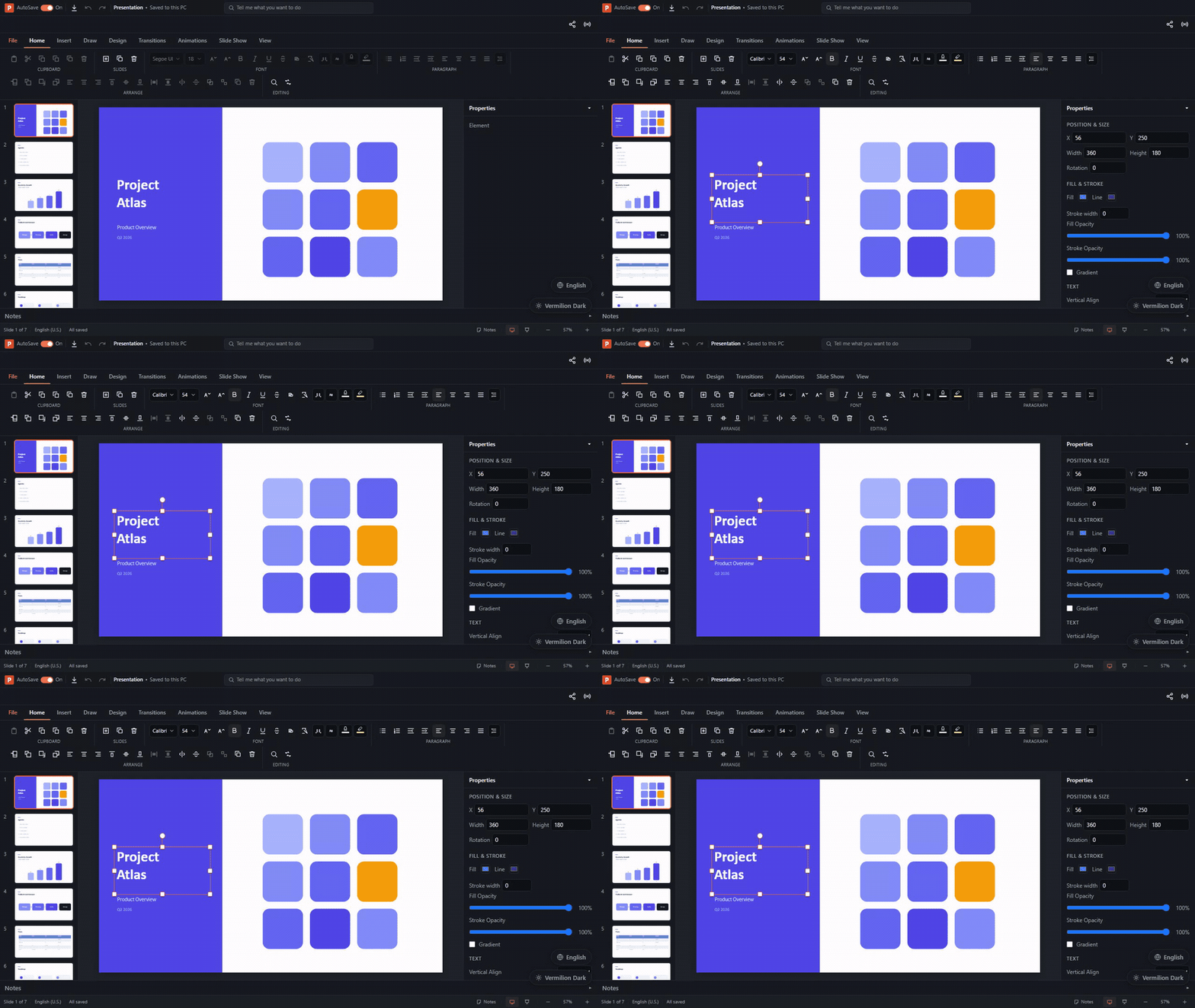
![Editing, undoing, and rendering a deck with the zero-framework Vanilla JavaScript demo](https://raw.githubusercontent.com/ChristopherVR/pptx-viewer/main/.github/assets/packages/vanilla-demo.gif)

The rendering is done by the framework-agnostic [`pptx-viewer-core`](https://www.npmjs.com/package/pptx-viewer-core) engine, which turns a `.pptx` file into a structured slide model. This package is the plain-DOM layer that draws that model on screen, and the engine is **bundled in**, so you install just one package.

<samp>**[▶️ Try the live demo](https://christophervr.github.io/pptx-viewer/demo-vanilla/)** · **[📦 npm](https://www.npmjs.com/package/pptx-vanilla-viewer)** · **[📖 Full docs](https://christophervr.github.io/pptx-viewer/vanilla/)** · **[🧩 Core SDK](https://www.npmjs.com/package/pptx-viewer-core)**</samp>

## Install

```bash
npm install pptx-vanilla-viewer
```

## Usage

```ts
import { createPptxViewer } from 'pptx-vanilla-viewer';

const viewer = createPptxViewer(document.getElementById('host')!, {
	source: '/decks/quarterly.pptx', // URL, ArrayBuffer, Uint8Array, Blob, or File
	theme: { colors: { primary: '#e34f26' } },
	locale: 'en',
	initialSlide: 0,
	editable: true, // select, drag, resize, rotate, inline text, undo/redo, save
	showToolbar: true,
	showThumbnails: true,
	onLoad: ({ slideCount }) => console.log(`${slideCount} slides`),
	onSlideChange: (index) => console.log('slide', index + 1),
	onError: (message) => console.error(message),
	onDirtyChange: (dirty) => console.log('unsaved edits:', dirty),
});

// Navigation / zoom
viewer.next();
viewer.prev();
viewer.goToSlide(3);
viewer.setZoom(1.5); // or 'fit'
viewer.zoomToFit();

// Presentation mode (real Fullscreen API; Esc exits)
await viewer.enterPresentation();

// Editing (click/drag/resize/rotate/double-click-to-edit-text happen via the
// DOM; these are the programmatic entry points)
viewer.undo();
viewer.redo();
viewer.deleteSelected();
const bytes = await viewer.save(); // serialise the edited deck to .pptx bytes
await viewer.downloadPptx('quarterly-edited.pptx'); // save() + trigger a download

// Load a different file later
await viewer.loadFile(fileInput.files![0]);
await viewer.loadUrl('/other-deck.pptx');

// Escape hatch: the live pptx-viewer-core handler (save, markdown, archive access)
const handler = viewer.getHandler();

// Tear down DOM, listeners, Blob URLs, and the core handler
viewer.destroy();
```

The container should have a size (the viewer fills it: `width/height: 100%`).

## Options

All options are optional except the container element itself. Beyond the ones
shown above:

| Option                                 | Type                                                  | Default               | Description                                                                                 |
| -------------------------------------- | ----------------------------------------------------- | --------------------- | ------------------------------------------------------------------------------------------- |
| `source`                               | `string \| ArrayBuffer \| Uint8Array \| Blob \| File` | -                     | The presentation to open (URL or bytes). Omit to start empty and call `loadFile`/`loadUrl`. |
| `fonts`                                | `ViewerFontSource[]`                                  | -                     | Licensed font sources supplied by the host application.                                     |
| `theme`                                | `ViewerTheme`                                         | -                     | Chrome theme (colors, radius, CSS vars).                                                    |
| `fileName`                             | `string`                                              | -                     | Display name shown in the title bar.                                                        |
| `locale` / `messages`                  | `string` / `TranslationMessages`                      | `'en'`                | UI locale and per-locale `pptx.*` dictionaries (see [i18n](#i18n)).                         |
| `initialSlide`                         | `number`                                              | `0`                   | Zero-based slide shown after load.                                                          |
| `editable`                             | `boolean`                                             | `false`               | Enable editing (see [Editing](#editing)).                                                   |
| `showToolbar`                          | `boolean`                                             | `true`                | Whole ribbon/title-bar/status-bar chrome.                                                   |
| `showThumbnails`                       | `boolean`                                             | `true`                | Thumbnail sidebar.                                                                          |
| `showFormatToolbar`                    | `boolean`                                             | `true`                | Editing format toolbar row (visible only while editing).                                    |
| `showInspector`                        | `boolean`                                             | `true`                | Property inspector panel (visible only while editing).                                      |
| `hiddenActions`                        | `ToolbarActionId[]`                                   | -                     | Hide individual buttons/tabs (see [Toolbar customization](#toolbar-customization)).         |
| `registry`                             | `ElementRendererRegistry`                             | -                     | Custom element-renderer registry (see [Element coverage](#element-coverage)).               |
| `smartArt3D`                           | `boolean`                                             | `false`               | Opt-in Three.js 3D SmartArt renderer (optional `three` peer, lazily imported).              |
| `autosave`                             | `boolean`                                             | `false`               | Debounced crash-recovery autosave to IndexedDB.                                             |
| `autosaveIntervalMs`                   | `number`                                              | `2000`                | Autosave debounce window.                                                                   |
| `autosaveFilePath`                     | `string`                                              | `'presentation.pptx'` | IndexedDB recovery key for autosave snapshots.                                              |
| `collaboration`                        | `CollaborationConfig`                                 | -                     | Start a Yjs collaboration session immediately (y-websocket or serverless y-webrtc).         |
| `shareDefaults`                        | `{ roomId?, userName?, serverUrl? }`                  | -                     | Prefilled values for the Share/Broadcast dialogs.                                           |
| `availableThemes` / `availableLocales` | catalog entries                                       | -                     | Choices offered by File > Options.                                                          |
| `onThemeChange` / `onLocaleChange`     | `(key: string) => void`                               | -                     | Host hooks for the File > Options pickers (host owns persistence when supplied).            |
| `accountAuth`                          | `AccountAuthConfig`                                   | -                     | Optional sign-in hook point for File > Account.                                             |

Callbacks: `onLoad`, `onError`, `onSlideChange`, `onZoomChange`,
`onPresentationChange`, `onChange` (any document mutation), `onDirtyChange`,
`onSelectionChange`, `onAutosaveStatus`, `onAutosaveRecovery` (offers a prior
session's recovery snapshot), `onToggleAutosave`, and `onCollaborationStatus`.

## Instance API

The handle returned by `createPptxViewer` implements the shared
`PowerPointViewerAPI` (the same imperative contract as the React/Vue/Angular/
Svelte bindings: `getContent`, `goTo`, `undo`/`redo`, zoom and mode getters/
setters, `getSlides`/`getSlide`/`getActiveSlide`, `addSlide`/`deleteSlides`/
`duplicateSlides`/`moveSlide`/`toggleHideSlides`, `getElements`/
`getElementById`/`updateElement`/`deleteElements`/`duplicateElement`, and the
selection methods) plus vanilla-specific methods:

- **Loading**: `loadFile(bytesOrBlob)`, `loadUrl(url)`.
- **Navigation / zoom**: `next()`, `prev()`, `goToSlide(index)`,
  `getSlideCount()`, `getCurrentSlide()`, `getZoom()`, `setZoom(scale)`,
  `zoomIn()`, `zoomOut()`, `zoomToFit()`.
- **Presentation**: `enterPresentation()`, `exitPresentation()`.
- **Editing**: `setEditable(flag)`, `setEditTemplateMode(flag)`, `undo()`,
  `redo()`, `canUndo()`, `canRedo()`, `deleteSelected()`,
  `getSelectedElementId()`.
- **Saving**: `save(format?)`, `downloadPptx(fileName?)`,
  `downloadAs(format, fileName?)`, `packageForSharing(fileName?)`.
- **Export / print**: `exportSlidePng(index?)`, `copySlideAsImage(index?)`,
  `exportPdf(options?)`, `exportGif(options?)`, `exportVideo(options?)`,
  `print(options?)` (returns `false` when the popup was blocked; call from a
  click handler).
- **Collaboration**: `startCollaboration(config)`, `stopCollaboration()`,
  `getCollaborationStatus()`.
- **Autosave**: `autosaveNow()`, `setAutosaveEnabled(flag)`,
  `isAutosaveEnabled()`.
- **Chrome / extension**: `setTheme(theme?)`, `setLocale(locale)`,
  `getRegistry()`, `getHandler()` (the live `pptx-viewer-core` handler),
  `destroy()`.

## Keyboard

Navigation: arrow keys / PageUp / PageDown / Space, Home/End jump to the
first or last slide, Esc exits presentation mode. The viewer root is
focusable (`tabindex="0"`).

When `editable` is on and an element is selected: Ctrl/Cmd+Z undoes,
Ctrl/Cmd+Shift+Z (or Ctrl+Y) redoes, Delete/Backspace deletes the selection,
Ctrl/Cmd+D duplicates it, arrow keys nudge it by 1px (Shift+arrow for 10px),
and Escape deselects. Double-click a text-capable element to edit its text
inline.

## Styling and theming

Styles are injected once per document as a `<style id="pptx-vanilla-viewer-styles">`
tag, scoped under the `.pptxv` root class. CSP-strict hosts can import the
packaged static stylesheet with `import 'pptx-vanilla-viewer/styles.css'`.
`getViewerCss()` remains available when the host needs the stylesheet text.

All chrome colors come from the shared `--pptx-*` CSS custom properties. Pass
a `ViewerTheme` (`theme` option or `setTheme`) to override them; the
`vermilionLightTheme` / `vermilionDarkTheme` presets are re-exported.

## Toolbar customization

`showToolbar` hides the whole ribbon/title-bar/status-bar chrome; to hide
individual buttons or ribbon tabs instead, pass `hiddenActions`:

```ts
const viewer = createPptxViewer(document.getElementById('host')!, {
	source: '/decks/quarterly.pptx',
	editable: true,
	// Hide Share, the Broadcast action, and the whole Insert ribbon tab, while
	// keeping every other button and tab visible.
	hiddenActions: ['share', 'broadcast', 'insert'],
});
```

Each id in `hiddenActions` hides a single quick-access button (`'share'`,
`'broadcast'`, `'export'`, `'undo'`, `'redo'`, `'notes'`, `'fullscreen'`), a
whole control cluster as a unit (`'zoom'` covers zoom in/out/fit, `'navigation'`
covers the presentation slide-show's prev/next controls), or a ribbon tab
(`'file'`, `'home'`, `'insert'`, `'draw'`, `'design'`, `'transitions'`,
`'animations'`, `'slideShow'`, `'record'`, `'review'`, `'view'`, `'help'`).
`'record'` hides both the quick-access Record control and the Record ribbon
tab, since they surface the same feature. Hidden actions are never built (not
just visually hidden), on desktop and mobile chrome alike. Omit the option (or
leave it `undefined`) to keep today's fully-visible default.

## Editing

Pass `editable: true` (or call `setEditable(true)` at runtime) to turn on:

- Click to select an element, click empty space to deselect.
- Drag to move, with snap-to-sibling-edge guides.
- Resize via 8 handles (Shift locks aspect ratio on the corner handles) and
  rotate via a rotate handle (Shift snaps to angle increments).
- Double-click a text-capable element for inline text editing.
- Undo/redo (100-entry history), delete, and duplicate (`Ctrl/Cmd+D`).
- Insert, format, z-order, group, and ungroup elements from the ribbon.
- Edit inherited master/layout elements by enabling template editing in the
  View ribbon or calling `setEditTemplateMode(true)`.
- Rich speaker notes, accessibility checks, autosave, and collaboration.
- The toolbar's Save button (shown only when `editable`), which calls
  `downloadPptx()` to serialise and download the edited `.pptx`.

Use `viewer.getSelectedElementId()` and the `onSelectionChange` /
`onDirtyChange` callbacks to build your own chrome around the selection
state.

## i18n

All UI strings go through the shared `pptx.*` dictionary (English built in).
Provide `messages: { de: { 'pptx.presenter.nextSlide': 'Nächste Folie', ... } }`
plus `locale: 'de'` (or call `setLocale`) for other languages; missing keys
fall back to English, then to a humanised label.

## Element coverage

Dedicated renderers ship for every element type: text, shape, image/picture,
group, connector, table, chart, SmartArt (2D and opt-in 3D), media
(video/audio), ink, OLE, content parts, zoom links, and 3D models. Renderers
are dispatched through an open registry, so any of them can be overridden
without forking:

```ts
import { createPptxViewer, type ElementRenderer } from 'pptx-vanilla-viewer';

const renderTable: ElementRenderer = (element, zIndex, context) => {
	/* build and return a DOM node */
};

const viewer = createPptxViewer(host, { source });
viewer.getRegistry().register('table', renderTable);
```

See `src/viewer/render/elements/README.md` for the full renderer contract.

## Building your own chrome

`createPptxViewer` mounts the whole viewer (ribbon, canvas, inspector,
controllers) as one unit. If you want to build custom chrome around the same
primitives instead, the ribbon builder and the canvas renderer are both
importable independently:

```ts
import {
	createRibbon,
	createStore,
	createInitialViewerState,
	renderSlideStage,
	createDefaultRegistry,
	type RibbonHandlers,
	type Store,
	type ViewerState,
} from 'pptx-vanilla-viewer';

// Your own reactive container, seeded with the same shape `createPptxViewer`
// uses internally.
const store: Store<ViewerState> = createStore(createInitialViewerState());

// `createRibbon` is callback-driven: it never reaches into a `PptxViewer`
// instance or a store directly, so it renders against whatever `RibbonHandlers`
// you hand it.
const handlers: RibbonHandlers = {
	/* nav, primary, file, slideShow, insert, edit, findReplace, design, draw */
};
const ribbon = createRibbon(document, t, handlers);
host.appendChild(ribbon.el);

// Draw the current slide with the same DOM renderer the bundled viewer uses.
const registry = createDefaultRegistry();
const stageEl = renderSlideStage({
	doc: document,
	slide: store.get().slides[store.get().currentSlide],
	registry,
	// ...canvasSize, scale, editable, selection, etc. (see `SlideStageOptions`)
});
canvasHost.appendChild(stageEl);

// Re-render on every store change.
store.subscribe((state) => {
	ribbon.update({ current: state.currentSlide, total: state.slides.length, zoomPercent: 100 });
	/* re-render the stage, drive ribbon.setEditState/updateSelection/etc. */
});
```

Be aware of what this buys you and what it doesn't:

- `renderSlideStage`, `createElementRendererRegistry` / `createDefaultRegistry`,
  and `createRibbon` are pure, callback-driven building blocks with no hidden
  coupling to `PptxViewer`; they are safe to use standalone.
- `createStore` / `createInitialViewerState` give you the same reactive
  container and `ViewerState` shape `createPptxViewer` uses, so you can seed
  state and pass slices of it into `renderSlideStage`.
- `RibbonHandlers` (the `edit` and `findReplace` groups especially, typed by
  the exported `EditActions` / `FindReplaceActions` interfaces) is a large
  surface: insert/format/arrange/clipboard/history/animation/transition
  actions, comments, sections, and more. The built-in implementations of
  these (`createEditorController`, `createEditActions`, `RenderController`,
  `LoadingController`, ...) are **not** exported: they're wired directly
  into `PptxViewer`'s own mount lifecycle (`getChrome`, `getHandler`, history,
  autosave) and aren't decomposable into standalone pieces without a larger
  refactor. Building a fully-featured custom editor chrome today means
  implementing `RibbonHandlers` yourself against your own store and history,
  not reusing the bundled editor logic; `createPptxViewer` remains the
  supported path for a complete, batteries-included editor.

## License

Apache-2.0. See `LICENSE` and `NOTICE`.
