# pm-image-editor
[](https://www.npmjs.com/package/pm-image-editor)
[](https://travis-ci.org/partnermarketing/pm-image-editor)
[](http://bower.io/search/?q=pm-image-editor)
[](https://www.npmjs.com/package/pm-image-editor)
Image Editor directive for AngularJS. Enables to crop a rectangle out of an image.
Demo is available on [http://partnermarketing.github.io/pm-image-editor/index.html](http://partnermarketing.github.io/pm-image-editor/index.html)
## Screenshots
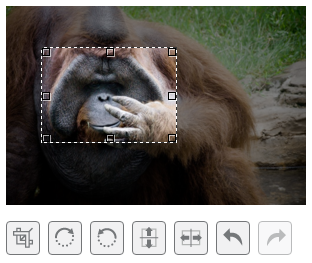
## Live demo
[Live demo](http://partnermarketing.github.io/pm-image-editor/index.html)
## Requirements
- AngularJS
- Modern Browser supporting css transformation
## Installing
### Download
You can [Download pm-image-editor](https://github.com/partnermarketing/pm-image-editor/archive/master.zip) files from GitHub.
- Use [Bower](http://bower.io) to download the files.
```sh
bower install pm-image-editor
```
- Use [Npm](https://www.npmjs.com/package/pm-image-editor) to download the files.
```sh
npm install pm-image-editor
```
### Add files
Add the scripts to your application. Make sure the `pm-image-editor.js` file is inserted **after** the `angular.js` library:
```html
```
### Add a dependancy
Add the image crop module as a dependancy to your application module:
```js
var myAppModule = angular.module('MyApp', ['pmImageEditor']);
```
## Usage
1. Add the image editor directive `` to the HTML file where you want to use an image crop control. *Note:* a container, you place the directive to, should have some pre-defined size (absolute or relative to its parent). That's required, because the image crop control fits the size of its container.
2. Bind the directive to a source image property (using **image=""** option). The directive will read the image data from that property and watch for updates. The property should be a url to an image.
3. Bind the directive to a result image property (using **result-image=""** option). On each update, the directive will put the content of the crop area to that property in the data uri format.
4. Set up the options that make sense to your application.
5. Done!
## Result image
The result image will be genarated based on transformations.
## Example code
The following code enables to select an image using a file input and crop it. The cropped image data is inserted into img each time the crop area updates.
```html
Cropped Image:
```
## Options
```html
```
### image
Assignable angular expression to data-bind to. PmImageEditor gets an image url for cropping from it.
### width
Assignable angular expression to set editor width.
### selection-width
Assignable angular expression to set selection area width.
### selection-height
Assignable angular expression to set selection area height.
## Copyrights
This project is inspired by [ngImgCrop](https://github.com/alexk111/ngImgCrop) by Alex Kaul.
The project was not being maintained and we wanted to implement new features so we decided to take Alex's work and
continue to share our vision along with the community.