# picgo-plugin-immich
[PicGo](https://github.com/PicGo/PicGo-Core) plugin for uploading to [immich]().

## Install
- for GUI: search `immich` and install
- for Core: run `picgo add immich`
- for Typora: See [here](#for-typora)
## Configuration
For Core user, you can run `picgo set uploader immich` to enter interactive configuration.
For GUI user, you can configure in `Picbeds Settings`.
### `url`
- `Required`
- Example: `https://myimmich.com`
immich web URL, including the protocol.
### `token`
- `Required`
- Example: `xxxxxxxxxxxxx`
immich API token.
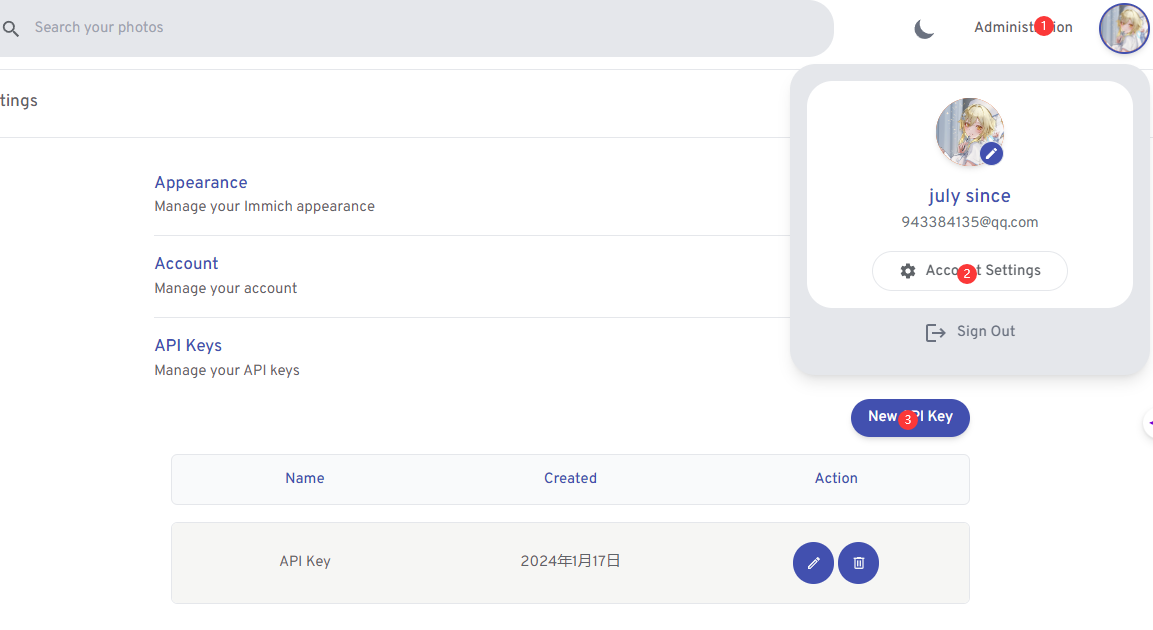
You can generate an API Token from the settings.
### `albumId`
- Default: `unsorted`
- Example: `mTmo_j9SVEie3ETcCMY3YruI`
### `shareLinkId`
- Default: `unsorted`
- Example: `mTmo_j9SVEie3ETcCMY3YruI`
You need to obtain the ***shared link id*** and ***album id***, both of which are indispensable.
After entering the album, you can find the album ID in the URL.


## For Typora
The internally packaged PicGo-Core in Typora uses Node.js `v12.13.0` and PicGo-Core `v1.4.7`. This version is outdated and cannot be compatible with the new APIs required by this tool.
**Please download the latest version of [PicGo-Core](https://github.com/PicGo/PicGo-Core) on your own and use a `custom command` in Typora to specify the use of the latest version of PicGo-Core.**
## LICENSE
MIT