[English](README.md) | [简体中文](i18n/README.zh-CN.md)
# pi-voicekit
> **Community continuation of [`codexstar69/pi-listen`](https://github.com/codexstar69/pi-listen)** (upstream, MIT — dormant since v7.2.2 in May 2026).
> Not affiliated with the original author. Old name: `pi-listen`.
**Voice in and voice out for [Pi](https://github.com/earendil-works/pi-coding-agent).**
Hold-to-talk STT — Deepgram streaming (cloud) or 21 offline models — plus TTS that
speaks the agent's replies (Kitten, Kokoro, Piper, or Deepgram Aura).
> **Language scope: Chinese and English.** Recognition and punctuation are validated for Chinese,
> English and mixed Chinese–English dictation only. Every other language a model happens to cover
> is out of scope and unvalidated — see [Language scope](#language-scope).
[](https://www.npmjs.com/package/pi-voicekit)
[](https://github.com/CyFeng16/pi-voicekit/blob/main/LICENSE)
[](https://x.com/baanditeagle)
> **v0.1.3 — current release** — audio capture prefers `ffmpeg` when
> `PULSE_SERVER` is set (SSH audio tunnel / remote PulseAudio), so remote
> microphones record reliably. Voice in **and** voice out: 21 offline STT models,
> 20 local TTS voices plus Deepgram Aura, driven by one `/voice-settings` panel
> with 5 tabs. The 0.1.x line is documented in the [changelog](CHANGELOG.md).
---
## See How It Works
Click to watch the demo video
---
## Setup (2 minutes)
### 1. Install the extension
```bash
# In a regular terminal (not inside Pi)
pi install npm:pi-voicekit
```
### 2. Choose your backend
pi-voicekit supports two transcription backends:
| | Deepgram (cloud) | Local models (offline recognition) |
| ---------------- | -------------------------------------------------------- | --------------------------------------------------- |
| **How it works** | Live streaming — text appears as you speak | Batch mode — transcribes after you finish recording |
| **Setup** | API key required | No API key, models auto-download on first use |
| **Internet** | Required | Not required after model download — recognition and punctuation run in process |
| **Latency** | Real-time interim results | 2–10 seconds after recording stops |
| **Languages** | Chinese and English locales | Chinese, English, mixed Chinese–English |
| **Cost** | $200 free credit (lasts 6–12 months for most developers) | Free — recognition and punctuation are local |
Run `/voice-settings` inside Pi to choose your backend and configure everything from one panel.
#### Option A: Deepgram (recommended for live streaming)
Sign up at [dpgr.am/pi-voice](https://dpgr.am/pi-voice) — $200 free credit, no card needed.
```bash
export DEEPGRAM_API_KEY="your-key-here" # add to ~/.zshrc or ~/.bashrc
```
#### Option B: Local models (offline recognition)
No setup needed — run `/voice-settings`, switch backend to Local, and select a model. It downloads automatically.
> **Note:** Local models use batch mode — they transcribe after you finish recording, not while you speak. For live streaming as you speak, use Deepgram.
### 3. Open Pi
On first launch, pi-voicekit checks your setup and tells you what's ready:
- Backend configured (Deepgram key or local model)
- Audio capture tool detected (sox, ffmpeg, or arecord)
- If everything checks out, voice activates immediately
### Audio capture
pi-voicekit auto-detects your audio tool. No manual install needed if you already have sox or ffmpeg.
| Priority | Tool | Platforms | Install |
| -------- | --------------- | --------------------- | ------------------------------------------------------------ |
| 1 | **SoX** (`rec`) | macOS, Linux, Windows | `brew install sox` / `apt install sox` / `choco install sox` |
| 2 | **ffmpeg** | macOS, Linux, Windows | `brew install ffmpeg` / `apt install ffmpeg` |
| 3 | **arecord** | Linux only | Pre-installed (ALSA) |
> When `PULSE_SERVER` is set (SSH audio tunnel or remote PulseAudio) the order
> becomes **ffmpeg → sox → arecord** — network Pulse sources need ffmpeg.
---
## Settings Panel
All configuration lives in one place: `/voice-settings`. Five tabs cover everything you need.
### General — backend, language, scope
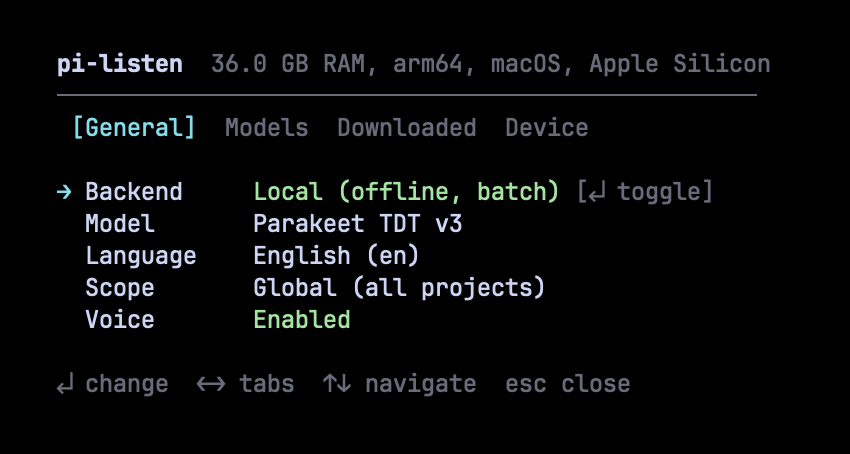 Toggle between Deepgram (cloud, live streaming) and Local (offline, batch mode). Change language, scope, and enable/disable voice — all with keyboard shortcuts.
### Models — browse, search, install
Toggle between Deepgram (cloud, live streaming) and Local (offline, batch mode). Change language, scope, and enable/disable voice — all with keyboard shortcuts.
### Models — browse, search, install
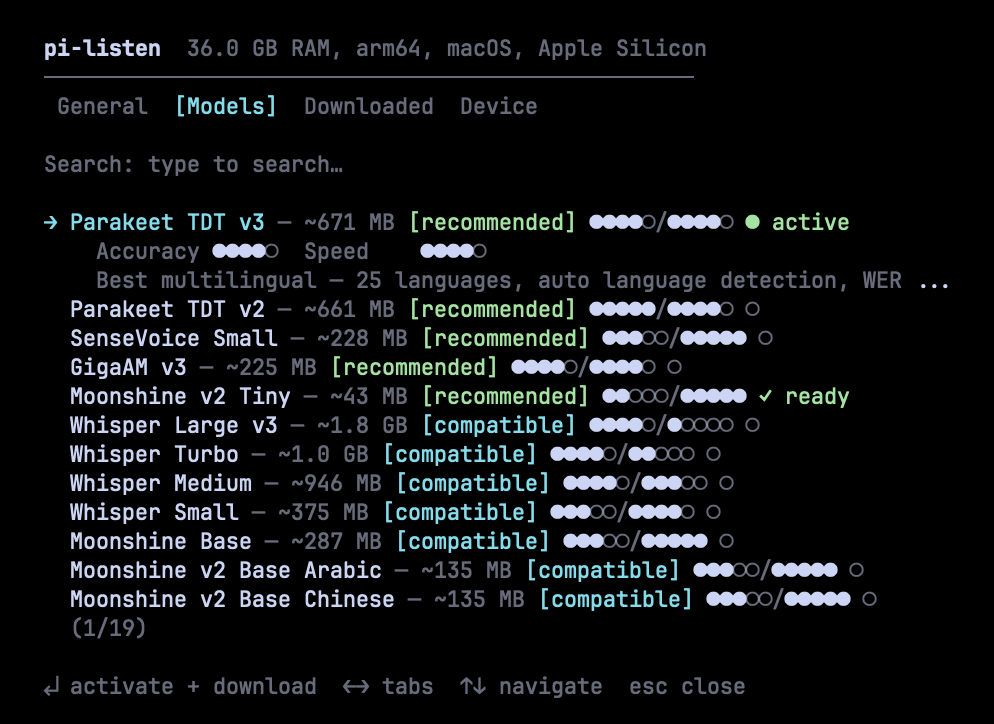 Browse 21 models from Parakeet, Whisper, Moonshine, SenseVoice, GigaAM, Paraformer, and Qwen3. Each model shows accuracy and speed ratings (●●●●○/●●●●○), fitness badges, and download status. Fuzzy search to find models fast. Press Enter to activate and download.
### Downloaded — manage installed models
Browse 21 models from Parakeet, Whisper, Moonshine, SenseVoice, GigaAM, Paraformer, and Qwen3. Each model shows accuracy and speed ratings (●●●●○/●●●●○), fitness badges, and download status. Fuzzy search to find models fast. Press Enter to activate and download.
### Downloaded — manage installed models
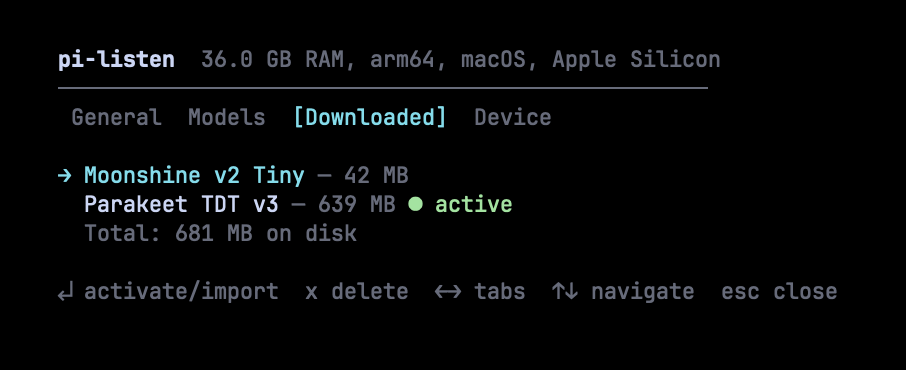 See what's installed, total disk usage, and which model is active. Press Enter to activate, `x` to delete. Models from [Handy](https://github.com/cjpais/handy) are auto-detected and can be imported without re-downloading.
### Speak — TTS models and voices
Pick a TTS backend (local sherpa-onnx or Deepgram Aura), browse 20 local voices
from ~13 MB, download on selection, and choose a voice per backend. Auto-speak of
agent replies is toggled here.
### Device — hardware profile and dependencies
See what's installed, total disk usage, and which model is active. Press Enter to activate, `x` to delete. Models from [Handy](https://github.com/cjpais/handy) are auto-detected and can be imported without re-downloading.
### Speak — TTS models and voices
Pick a TTS backend (local sherpa-onnx or Deepgram Aura), browse 20 local voices
from ~13 MB, download on selection, and choose a voice per backend. Auto-speak of
agent replies is toggled here.
### Device — hardware profile and dependencies
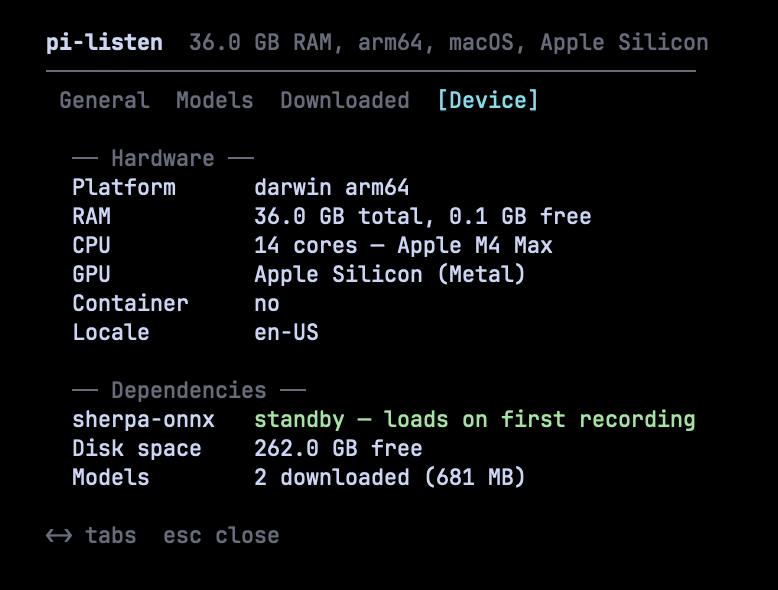 See your hardware profile (RAM, CPU, GPU), dependency status (sherpa-onnx runtime), available disk space, and total downloaded models. Model recommendations are based on this profile.
### Punctuation — offline, marks-only
Not a tab: punctuation is an automatic step between the recogniser and the editor,
on by default. When a transcript contains Chinese and is essentially unpunctuated
(fewer than one mark per 20 characters), an in-process model inserts full stops,
commas and question marks. It can only **insert** marks — every other byte of the
transcript is preserved — and any problem leaves the text exactly as the recogniser
produced it. English is not supported (the model measured F1 0.175 on English), and
a transcript whose punctuation is already dense enough — one mark per 20 characters or
more — is left alone; a sparser one is punctuated even if it carries a mark or two.
The model is a one-time ~285 MB download, fetched in the background the first time a
dictation needs it: that first dictation comes back unchanged while the download starts.
Once the download has completed, verified against its digest and the engine has been
constructed — any of which can fail — later qualifying dictations are punctuated; until
then they come back unchanged, and `/voice-punctuation status` reports the state. The
switch is the `punctuationEnabled` setting (a `settings.json` field, on by default — the
panel has no row for it), and `/voice-punctuation status` shows whether the step ran, why
it did not, and the state of the model.
---
## Usage
### Keybindings
| Action | Key | Notes |
| -------------------- | -------------------- | ----------------------------------------------------------------------- |
| **Record to editor** | Hold `SPACE` (≥0.7s) | Release to finalize. Pre-records during warmup so you don't miss words. |
| **Toggle recording** | `Ctrl+Shift+V` | Works in all terminals — press to start, press again to stop. |
| **Clear editor** | `Escape` × 2 | Double-tap within 500ms to clear all text. |
### How recording works
1. **Hold SPACE** — warmup countdown appears, audio capture starts immediately (pre-recording)
2. **Keep holding** — live transcription streams into the editor (Deepgram) or audio buffers (local)
3. **Release SPACE** — recording continues for 1.5s (tail recording) to catch your last word, then finalizes
4. Text appears in the editor, ready to send
### Commands
| Command | Description |
| ------------------------ | --------------------------------------------------------- |
| `/voice-settings` | Settings panel — backend, models, language, scope, device |
| `/voice-models` | Settings panel (Models tab) |
| `/voice-setup` | Run the first-run setup wizard |
| `/voice-language` | Open the settings panel to change language |
| `/voice-speak ` | Speak text out loud (TTS) |
| `/voice-speak-test` | Speak a sample sentence |
| `/voice-speak-toggle` | Enable / disable TTS |
| `/voice-stream` | Toggle Deepgram streaming TTS (cloud) |
| `/voice-speak-stop` | Stop in-flight TTS playback |
| `/voice-autosubmit` | Toggle: STT text auto-sent to the agent (`on`/`off`) |
| `/voice-punctuation` | Offline punctuation: status, model state, last decision |
| `/voice-hold-delay` | Set hold-to-talk delay (200-3000 ms, default 700) |
| `/voice-speak-models` | Browse / install TTS voice models |
| `/voice-speak-info` | Diagnose TTS state |
| `/voice-help` | Keyboard + command reference (or press `F1`) |
| `/voice test` | Full diagnostics — audio tool, mic, API key |
| `/voice on` / `off` | Enable or disable voice |
| `/voice dictate` | Continuous dictation (no key hold) |
| `/voice stop` | Stop active recording or dictation |
| `/voice history` | Recent transcriptions |
| `/voice` | Toggle on/off |
### v7.1 keyboard
While in the settings panel:
| Key | Action |
| ------ | ----------------------------------- |
| `← →` | switch tab |
| `↑ ↓` | navigate row (skips group headings) |
| `↵` | select / activate |
| `esc` | back to main / close panel |
| `type` | filter (search) |
| `bksp` | clear last search char |
While an install widget or playback indicator is mounted (no overlay
in front):
| Key | Action |
| ----- | ------------------------------------------------------------- |
| `esc` | cancel active install (most-recent first), then stop playback |
| `F1` | open help overlay (always available) |
## Language scope
**Supported and validated: Chinese, English, and mixed Chinese–English dictation.** Every
recognition, punctuation and quality decision in this repository is made against those two
languages.
Other languages are **not supported**: the models that cover them stay in the catalogue because
they are general-purpose models, but nothing about them is validated here — no accuracy figures,
no punctuation behaviour, no device recommendation. They are on the roadmap, not in the support
matrix.
| Area | In scope | Out of scope — unvalidated |
| ----------- | ------------------------------------------- | -------------------------------------------------------------------------------------------------------------------------------- |
| Recognition | Chinese, English, mixed Chinese–English | every other language in the catalogue (Japanese, Korean, Russian, Arabic, Ukrainian, Vietnamese, Spanish, …) |
| Punctuation | Chinese today; English under evaluation | other languages |
| Cloud | Deepgram Chinese and English locales | Deepgram's other 50+ locales |
---
## Local Models
21 models across 7 families. Sorted by quality — best models first. Only Chinese and English are
validated; every other language listed below is out of scope — see [Language scope](#language-scope).
### Top picks
| Model | Accuracy | Speed | Size | Languages | Notes |
| ------------------- | -------- | ----- | ------ | ---------------- | ------------------------------- |
| **Parakeet TDT v3** | ●●●●○ | ●●●●○ | 671 MB | 25 (auto-detect) | Best overall. WER 6.3%. |
| **Parakeet TDT v2** | ●●●●● | ●●●●○ | 661 MB | English | Best English. WER 6.0%. |
| **Whisper Turbo** | ●●●●○ | ●●○○○ | 1.0 GB | 57 | Broadest coverage, unvalidated. |
### Fast and lightweight
| Model | Accuracy | Speed | Size | Languages | Notes |
| --------------------- | -------- | ----- | ------ | --------------- | ------------------------------------ |
| **Moonshine v2 Tiny** | ●●○○○ | ●●●●● | 43 MB | English | 34ms latency. Raspberry Pi friendly. |
| **Moonshine Base** | ●●●○○ | ●●●●● | 287 MB | English | Handles accents well. |
| **SenseVoice Small** | ●●●○○ | ●●●●● | 228 MB | zh/en/ja/ko/yue | Best small Chinese model. |
### Specialist
| Model | Accuracy | Speed | Size | Languages | Notes |
| -------------------- | -------- | ----- | ------ | --------- | -------------------------------------- |
| **GigaAM v3** | ●●●●○ | ●●●●○ | 225 MB | Russian | 50% lower WER than Whisper on Russian. |
| **Whisper Medium** | ●●●●○ | ●●●○○ | 946 MB | 57 | Good accuracy, medium speed. |
| **Whisper Large v3** | ●●●●○ | ●○○○○ | 1.8 GB | 57 | Highest Whisper accuracy. Slow on CPU. |
Plus 8 language-specialized Moonshine v2 variants for Japanese, Korean, Arabic, Chinese, Ukrainian,
Vietnamese, and Spanish — only the Chinese one is inside the supported scope.
### How local models work
```
Hold SPACE → audio captured to memory buffer
↓
Release SPACE → buffer sent to sherpa-onnx (in-process)
↓
ONNX inference on CPU (2–10 seconds)
↓
Final transcript inserted into editor
```
Models download automatically on first use. Downloads are resumable, verified after completion, and deduplicated (no double-downloads). The settings panel shows real-time download progress with speed and ETA.
Models from [Handy](https://github.com/cjpais/handy) (`~/Library/Application Support/com.pais.handy/models/`) are auto-detected and can be imported via symlink (zero disk duplication).
---
## Performance
Measured on the maintainer's machine, local CPU, no network, over 70 published utterances
(28 Chinese, 28 English, 14 mixed Chinese–English). RTF is processing time divided by audio
duration — lower is better, and below 1.0 is faster than real time.
| Recogniser | Chinese RTF | English RTF | Mixed RTF | Characters per second |
| -------------------- | ----------- | ----------- | --------- | --------------------- |
| **paraformer-zh** | 0.014 | 0.013 | 0.016 | 247–983 |
| **sensevoice-small** | 0.028 | 0.029 | 0.040 | 134–451 |
| **whisper-turbo** | 0.372 | 0.369 | 0.395 | 7–27 |
End to end, the punctuation step adds almost nothing when it runs: on 27–32 character
inputs the model call measures p50 2.9 ms / p95 3.1 ms after a one-time 544 ms load,
all on CPU (see docs/BENCHMARKS.md). `whisper-turbo` is the slowest of the three by an
order of magnitude and the least accurate on this corpus — measured for comparison, not
recommended for CPU-only use.
Protocol, all result tables and the honest limits live in
[docs/BENCHMARKS.md](docs/BENCHMARKS.md) — GitHub only, because npm ships the extension and
this README.
---
## Features
| Feature | Description |
| -------------------------------- | ---------------------------------------------------------------------------------------- |
| **Dual backend** | Deepgram (cloud, live streaming) or local models (offline, batch) — switch in settings |
| **21 local models** | Parakeet, Whisper, Moonshine, SenseVoice, GigaAM, Paraformer, Qwen3 — with accuracy/speed ratings |
| **Unified settings panel** | One overlay panel for all configuration — `/voice-settings` |
| **Device-aware recommendations** | Scores models against your hardware. Only best-in-class models get [recommended]. |
| **Enterprise download pipeline** | Pre-checks (disk, network, permissions), live progress with speed/ETA, post-verification |
| **Handy integration** | Auto-detects models from Handy app, imports via symlink |
| **Audio fallback chain** | Tries sox → ffmpeg → arecord in order — ffmpeg first when `PULSE_SERVER` is set |
| **Pre-recording** | Audio capture starts during warmup — you never miss the first word |
| **Tail recording** | Keeps recording 1.5s after release so your last word isn't clipped |
| **Live streaming** | Deepgram Nova 3 WebSocket (Nova 2 for Chinese locales) — live interim transcripts |
| **Offline punctuation** | Chinese dictations that come back unpunctuated get full stops, commas and question marks from an in-process model — marks only, no wording changes, fail-open, English not supported |
| **Chinese + English** | The supported and validated scope, mixed Chinese–English included. Every other language in the catalogue is unvalidated — see [Language scope](#language-scope). |
| **Continuous dictation** | `/voice dictate` for long-form input without holding keys |
| **Typing cooldown** | Space holds within 400ms of typing are ignored |
| **Sound feedback** | macOS system sounds for start, stop, and error events |
| **Cross-platform** | macOS, Windows, Linux — Kitty protocol + non-Kitty fallback |
---
## Architecture
```
# core
extensions/voice.ts Main extension — state machine, recording, UI, command surface
extensions/voice/config.ts Config loading, saving, migration
extensions/voice/onboarding.ts First-run wizard, language picker
extensions/voice/audio-tool.ts Capture tool detection (sox / ffmpeg / arecord)
extensions/voice/hold-to-talk.ts Hold detection, Kitty and non-Kitty terminals
extensions/voice/release-controller.ts Recording lifecycle, release handling
# speech-to-text
extensions/voice/deepgram.ts Deepgram URL builder, API key resolver
extensions/voice/local.ts Model catalog (21 models), in-process transcription
extensions/voice/sherpa-engine.ts sherpa-onnx bindings — recognizer lifecycle, inference
extensions/voice/sherpa-loader.ts Lazy native module loading
extensions/voice/model-download.ts Download manager — resume, progress, verification, Handy import
extensions/voice/device.ts Device profiling — RAM, GPU, CPU, container detection
# offline punctuation
extensions/voice/punctuation.ts Offline punctuation — marks-only splice, fail-open step
extensions/voice/punctuation-model.ts Punctuation model — catalogue, digest verification, download
# text-to-speech
extensions/voice/speak.ts Speak entry point, auto-speak wiring
extensions/voice/tts-engine.ts sherpa-onnx TTS synthesis
extensions/voice/tts-deepgram.ts Deepgram Aura voices (cloud)
extensions/voice/tts-local-models.ts Local TTS catalog — 20 voices (Kitten, Kokoro, Piper)
extensions/voice/tts-playback.ts Playback, buffering, player detection
extensions/voice/tts-text-filter.ts Code-block stripping, sentence prep
extensions/voice/tts-onboarding.ts TTS onboarding flow
extensions/voice/tts-onboarding-overlay.ts TTS onboarding overlay
extensions/voice/tts-install-progress.ts Model install progress widget
extensions/voice/tts-playback-indicator.ts Speaking indicator widget
# settings and UI
extensions/voice/settings-panel.ts Settings panel — overlay, 5 tabs
extensions/voice/ui-picker.ts Generic list picker
extensions/voice/ui-help-overlay.ts Keyboard and command reference
extensions/voice/ui-aura.ts Visual primitives (Liquid Braille, Aurora)
extensions/voice/ui-widget-base.ts Widget registry and base class
extensions/voice/ui-render-ticker.ts Shared render ticker
extensions/voice/ui-icons.ts Glyph and icon set
extensions/voice/ui-width.ts CJK-aware visual width helpers
extensions/voice/ui-locale-labels.ts Native language and voice labels
# benchmarks (repository only — never published)
bench/manifest.jsonl Benchmark slices: dataset, split, license, selection rule
bench/fetch.py Deterministic fetcher — writes bench/data/ (gitignored)
# types
extensions/voice/sherpa-onnx-node.d.ts Type declarations for the optional native module
```
---
## Configuration
Settings stored in Pi's settings files under the `voice` key:
| Scope | Path |
| ------- | ----------------------------- |
| Global | `~/.pi/agent/settings.json` |
| Project | `/.pi/settings.json` |
```json
{
"voice": {
"version": 4,
"enabled": true,
"language": "en",
"backend": "local",
"localModel": "parakeet-v3",
"scope": "global",
"onboarding": { "completed": true, "schemaVersion": 4 }
}
}
```
`DEEPGRAM_API_KEY` from your shell is used at runtime and is not copied back
into `~/.pi/agent/settings.json`. If you paste a key during onboarding, that is
an explicit save and it still goes to `~/.env.secrets` or `~/.zshrc`.
Hold-to-talk delay defaults to **700 ms** (`/voice-hold-delay` accepts 200–3000 ms).
### Punctuation
Punctuation is automatic and on by default. When a dictation finishes, the transcript
is punctuated locally if the text contains Chinese and its punctuation density is below
one mark per 20 characters; the recogniser's output is otherwise untouched. Nothing
leaves your machine: the model runs in process, and the only network traffic is the
one-time download of the model itself. English is not supported in this version, and
English text is skipped by the same rule. A transcript the rule declines is returned
exactly as the recogniser produced it, and so is any transcript whose punctuation fails
at any point.
| Setting | Scope | Default | Notes |
| ------------------------ | ------------------ | ------- | ------------------------------------------------------------ |
| `punctuationEnabled` | global and project | `true` | Runs the offline punctuation step on qualifying transcripts. |
| `punctuationNoticeShown` | global only | `false` | Machine-local bookkeeping for the one-time upgrade notice. |
`punctuationEnabled` is an ordinary, scope-agnostic field: a project file may set it
and the usual project-over-global precedence applies. Omitted from a project block, it
inherits the global value rather than falling back to the default, so a global OFF cannot
be silently ignored. The first project-scope save writes the value it resolved to —
including an inherited one — into the repository's `.pi/settings.json`, and from then on
that repository is pinned: a later global change no longer applies to it.
`/voice-punctuation status` prints the switch state, whether the model is downloaded and
digest-verified, and what the step decided on the last dictation of the session. The model
lives in `~/.pi/models/punct-ct-transformer-zh-en/`, appears in the Downloaded tab like any
other download, and selecting that row does not make it a recogniser. The step writes
no session entry; under `PI_VOICE_DEBUG` it logs one line per dictation with the
character count, marks before and after, the reason when it did not run, and the
elapsed time. The removed `postProcess*` keys from older releases are ignored when
loading — never migrated, and left in place when the settings file is saved.
---
## Troubleshooting
Run `/voice test` inside Pi for full diagnostics.
| Problem | Solution |
| ------------------------------------------------ | --------------------------------------------------------------------------------------------------------------- |
| "DEEPGRAM_API_KEY not set" | [Get a key](https://dpgr.am/pi-voice) → `export DEEPGRAM_API_KEY="..."` in `~/.zshrc` |
| "No audio capture tool found" | `brew install sox` or `brew install ffmpeg` |
| Remote microphone records silence | Audio over PulseAudio/SSH — install ffmpeg on the Pi side (capture then prefers ffmpeg) |
| Space doesn't activate voice | Run `/voice-settings` — voice may be disabled |
| Local model not transcribing | Check `/voice-settings` → Device tab for sherpa-onnx status |
| Download failed | Partial downloads auto-resume on retry. Check disk space in Device tab. |
| `dyld: Library not loaded: libsimdjson` on macOS | Homebrew Node ABI mismatch — run `brew reinstall node` or switch to version-managed Node (`mise`, `fnm`, `nvm`) |
---
## Security
- **Cloud STT** — audio is sent to Deepgram for transcription (Deepgram backend only)
- **Local STT** — audio never leaves your machine (local backend)
- **No telemetry** — pi-voicekit does not collect or transmit usage data
- **API key** — stored in env var or Pi settings, never logged
See [SECURITY.md](SECURITY.md) for vulnerability reporting.
---
## License
[MIT](LICENSE) — original by [@baanditeagle](https://x.com/baanditeagle), maintained by [CyFeng16](https://github.com/CyFeng16)
---
See your hardware profile (RAM, CPU, GPU), dependency status (sherpa-onnx runtime), available disk space, and total downloaded models. Model recommendations are based on this profile.
### Punctuation — offline, marks-only
Not a tab: punctuation is an automatic step between the recogniser and the editor,
on by default. When a transcript contains Chinese and is essentially unpunctuated
(fewer than one mark per 20 characters), an in-process model inserts full stops,
commas and question marks. It can only **insert** marks — every other byte of the
transcript is preserved — and any problem leaves the text exactly as the recogniser
produced it. English is not supported (the model measured F1 0.175 on English), and
a transcript whose punctuation is already dense enough — one mark per 20 characters or
more — is left alone; a sparser one is punctuated even if it carries a mark or two.
The model is a one-time ~285 MB download, fetched in the background the first time a
dictation needs it: that first dictation comes back unchanged while the download starts.
Once the download has completed, verified against its digest and the engine has been
constructed — any of which can fail — later qualifying dictations are punctuated; until
then they come back unchanged, and `/voice-punctuation status` reports the state. The
switch is the `punctuationEnabled` setting (a `settings.json` field, on by default — the
panel has no row for it), and `/voice-punctuation status` shows whether the step ran, why
it did not, and the state of the model.
---
## Usage
### Keybindings
| Action | Key | Notes |
| -------------------- | -------------------- | ----------------------------------------------------------------------- |
| **Record to editor** | Hold `SPACE` (≥0.7s) | Release to finalize. Pre-records during warmup so you don't miss words. |
| **Toggle recording** | `Ctrl+Shift+V` | Works in all terminals — press to start, press again to stop. |
| **Clear editor** | `Escape` × 2 | Double-tap within 500ms to clear all text. |
### How recording works
1. **Hold SPACE** — warmup countdown appears, audio capture starts immediately (pre-recording)
2. **Keep holding** — live transcription streams into the editor (Deepgram) or audio buffers (local)
3. **Release SPACE** — recording continues for 1.5s (tail recording) to catch your last word, then finalizes
4. Text appears in the editor, ready to send
### Commands
| Command | Description |
| ------------------------ | --------------------------------------------------------- |
| `/voice-settings` | Settings panel — backend, models, language, scope, device |
| `/voice-models` | Settings panel (Models tab) |
| `/voice-setup` | Run the first-run setup wizard |
| `/voice-language` | Open the settings panel to change language |
| `/voice-speak ` | Speak text out loud (TTS) |
| `/voice-speak-test` | Speak a sample sentence |
| `/voice-speak-toggle` | Enable / disable TTS |
| `/voice-stream` | Toggle Deepgram streaming TTS (cloud) |
| `/voice-speak-stop` | Stop in-flight TTS playback |
| `/voice-autosubmit` | Toggle: STT text auto-sent to the agent (`on`/`off`) |
| `/voice-punctuation` | Offline punctuation: status, model state, last decision |
| `/voice-hold-delay` | Set hold-to-talk delay (200-3000 ms, default 700) |
| `/voice-speak-models` | Browse / install TTS voice models |
| `/voice-speak-info` | Diagnose TTS state |
| `/voice-help` | Keyboard + command reference (or press `F1`) |
| `/voice test` | Full diagnostics — audio tool, mic, API key |
| `/voice on` / `off` | Enable or disable voice |
| `/voice dictate` | Continuous dictation (no key hold) |
| `/voice stop` | Stop active recording or dictation |
| `/voice history` | Recent transcriptions |
| `/voice` | Toggle on/off |
### v7.1 keyboard
While in the settings panel:
| Key | Action |
| ------ | ----------------------------------- |
| `← →` | switch tab |
| `↑ ↓` | navigate row (skips group headings) |
| `↵` | select / activate |
| `esc` | back to main / close panel |
| `type` | filter (search) |
| `bksp` | clear last search char |
While an install widget or playback indicator is mounted (no overlay
in front):
| Key | Action |
| ----- | ------------------------------------------------------------- |
| `esc` | cancel active install (most-recent first), then stop playback |
| `F1` | open help overlay (always available) |
## Language scope
**Supported and validated: Chinese, English, and mixed Chinese–English dictation.** Every
recognition, punctuation and quality decision in this repository is made against those two
languages.
Other languages are **not supported**: the models that cover them stay in the catalogue because
they are general-purpose models, but nothing about them is validated here — no accuracy figures,
no punctuation behaviour, no device recommendation. They are on the roadmap, not in the support
matrix.
| Area | In scope | Out of scope — unvalidated |
| ----------- | ------------------------------------------- | -------------------------------------------------------------------------------------------------------------------------------- |
| Recognition | Chinese, English, mixed Chinese–English | every other language in the catalogue (Japanese, Korean, Russian, Arabic, Ukrainian, Vietnamese, Spanish, …) |
| Punctuation | Chinese today; English under evaluation | other languages |
| Cloud | Deepgram Chinese and English locales | Deepgram's other 50+ locales |
---
## Local Models
21 models across 7 families. Sorted by quality — best models first. Only Chinese and English are
validated; every other language listed below is out of scope — see [Language scope](#language-scope).
### Top picks
| Model | Accuracy | Speed | Size | Languages | Notes |
| ------------------- | -------- | ----- | ------ | ---------------- | ------------------------------- |
| **Parakeet TDT v3** | ●●●●○ | ●●●●○ | 671 MB | 25 (auto-detect) | Best overall. WER 6.3%. |
| **Parakeet TDT v2** | ●●●●● | ●●●●○ | 661 MB | English | Best English. WER 6.0%. |
| **Whisper Turbo** | ●●●●○ | ●●○○○ | 1.0 GB | 57 | Broadest coverage, unvalidated. |
### Fast and lightweight
| Model | Accuracy | Speed | Size | Languages | Notes |
| --------------------- | -------- | ----- | ------ | --------------- | ------------------------------------ |
| **Moonshine v2 Tiny** | ●●○○○ | ●●●●● | 43 MB | English | 34ms latency. Raspberry Pi friendly. |
| **Moonshine Base** | ●●●○○ | ●●●●● | 287 MB | English | Handles accents well. |
| **SenseVoice Small** | ●●●○○ | ●●●●● | 228 MB | zh/en/ja/ko/yue | Best small Chinese model. |
### Specialist
| Model | Accuracy | Speed | Size | Languages | Notes |
| -------------------- | -------- | ----- | ------ | --------- | -------------------------------------- |
| **GigaAM v3** | ●●●●○ | ●●●●○ | 225 MB | Russian | 50% lower WER than Whisper on Russian. |
| **Whisper Medium** | ●●●●○ | ●●●○○ | 946 MB | 57 | Good accuracy, medium speed. |
| **Whisper Large v3** | ●●●●○ | ●○○○○ | 1.8 GB | 57 | Highest Whisper accuracy. Slow on CPU. |
Plus 8 language-specialized Moonshine v2 variants for Japanese, Korean, Arabic, Chinese, Ukrainian,
Vietnamese, and Spanish — only the Chinese one is inside the supported scope.
### How local models work
```
Hold SPACE → audio captured to memory buffer
↓
Release SPACE → buffer sent to sherpa-onnx (in-process)
↓
ONNX inference on CPU (2–10 seconds)
↓
Final transcript inserted into editor
```
Models download automatically on first use. Downloads are resumable, verified after completion, and deduplicated (no double-downloads). The settings panel shows real-time download progress with speed and ETA.
Models from [Handy](https://github.com/cjpais/handy) (`~/Library/Application Support/com.pais.handy/models/`) are auto-detected and can be imported via symlink (zero disk duplication).
---
## Performance
Measured on the maintainer's machine, local CPU, no network, over 70 published utterances
(28 Chinese, 28 English, 14 mixed Chinese–English). RTF is processing time divided by audio
duration — lower is better, and below 1.0 is faster than real time.
| Recogniser | Chinese RTF | English RTF | Mixed RTF | Characters per second |
| -------------------- | ----------- | ----------- | --------- | --------------------- |
| **paraformer-zh** | 0.014 | 0.013 | 0.016 | 247–983 |
| **sensevoice-small** | 0.028 | 0.029 | 0.040 | 134–451 |
| **whisper-turbo** | 0.372 | 0.369 | 0.395 | 7–27 |
End to end, the punctuation step adds almost nothing when it runs: on 27–32 character
inputs the model call measures p50 2.9 ms / p95 3.1 ms after a one-time 544 ms load,
all on CPU (see docs/BENCHMARKS.md). `whisper-turbo` is the slowest of the three by an
order of magnitude and the least accurate on this corpus — measured for comparison, not
recommended for CPU-only use.
Protocol, all result tables and the honest limits live in
[docs/BENCHMARKS.md](docs/BENCHMARKS.md) — GitHub only, because npm ships the extension and
this README.
---
## Features
| Feature | Description |
| -------------------------------- | ---------------------------------------------------------------------------------------- |
| **Dual backend** | Deepgram (cloud, live streaming) or local models (offline, batch) — switch in settings |
| **21 local models** | Parakeet, Whisper, Moonshine, SenseVoice, GigaAM, Paraformer, Qwen3 — with accuracy/speed ratings |
| **Unified settings panel** | One overlay panel for all configuration — `/voice-settings` |
| **Device-aware recommendations** | Scores models against your hardware. Only best-in-class models get [recommended]. |
| **Enterprise download pipeline** | Pre-checks (disk, network, permissions), live progress with speed/ETA, post-verification |
| **Handy integration** | Auto-detects models from Handy app, imports via symlink |
| **Audio fallback chain** | Tries sox → ffmpeg → arecord in order — ffmpeg first when `PULSE_SERVER` is set |
| **Pre-recording** | Audio capture starts during warmup — you never miss the first word |
| **Tail recording** | Keeps recording 1.5s after release so your last word isn't clipped |
| **Live streaming** | Deepgram Nova 3 WebSocket (Nova 2 for Chinese locales) — live interim transcripts |
| **Offline punctuation** | Chinese dictations that come back unpunctuated get full stops, commas and question marks from an in-process model — marks only, no wording changes, fail-open, English not supported |
| **Chinese + English** | The supported and validated scope, mixed Chinese–English included. Every other language in the catalogue is unvalidated — see [Language scope](#language-scope). |
| **Continuous dictation** | `/voice dictate` for long-form input without holding keys |
| **Typing cooldown** | Space holds within 400ms of typing are ignored |
| **Sound feedback** | macOS system sounds for start, stop, and error events |
| **Cross-platform** | macOS, Windows, Linux — Kitty protocol + non-Kitty fallback |
---
## Architecture
```
# core
extensions/voice.ts Main extension — state machine, recording, UI, command surface
extensions/voice/config.ts Config loading, saving, migration
extensions/voice/onboarding.ts First-run wizard, language picker
extensions/voice/audio-tool.ts Capture tool detection (sox / ffmpeg / arecord)
extensions/voice/hold-to-talk.ts Hold detection, Kitty and non-Kitty terminals
extensions/voice/release-controller.ts Recording lifecycle, release handling
# speech-to-text
extensions/voice/deepgram.ts Deepgram URL builder, API key resolver
extensions/voice/local.ts Model catalog (21 models), in-process transcription
extensions/voice/sherpa-engine.ts sherpa-onnx bindings — recognizer lifecycle, inference
extensions/voice/sherpa-loader.ts Lazy native module loading
extensions/voice/model-download.ts Download manager — resume, progress, verification, Handy import
extensions/voice/device.ts Device profiling — RAM, GPU, CPU, container detection
# offline punctuation
extensions/voice/punctuation.ts Offline punctuation — marks-only splice, fail-open step
extensions/voice/punctuation-model.ts Punctuation model — catalogue, digest verification, download
# text-to-speech
extensions/voice/speak.ts Speak entry point, auto-speak wiring
extensions/voice/tts-engine.ts sherpa-onnx TTS synthesis
extensions/voice/tts-deepgram.ts Deepgram Aura voices (cloud)
extensions/voice/tts-local-models.ts Local TTS catalog — 20 voices (Kitten, Kokoro, Piper)
extensions/voice/tts-playback.ts Playback, buffering, player detection
extensions/voice/tts-text-filter.ts Code-block stripping, sentence prep
extensions/voice/tts-onboarding.ts TTS onboarding flow
extensions/voice/tts-onboarding-overlay.ts TTS onboarding overlay
extensions/voice/tts-install-progress.ts Model install progress widget
extensions/voice/tts-playback-indicator.ts Speaking indicator widget
# settings and UI
extensions/voice/settings-panel.ts Settings panel — overlay, 5 tabs
extensions/voice/ui-picker.ts Generic list picker
extensions/voice/ui-help-overlay.ts Keyboard and command reference
extensions/voice/ui-aura.ts Visual primitives (Liquid Braille, Aurora)
extensions/voice/ui-widget-base.ts Widget registry and base class
extensions/voice/ui-render-ticker.ts Shared render ticker
extensions/voice/ui-icons.ts Glyph and icon set
extensions/voice/ui-width.ts CJK-aware visual width helpers
extensions/voice/ui-locale-labels.ts Native language and voice labels
# benchmarks (repository only — never published)
bench/manifest.jsonl Benchmark slices: dataset, split, license, selection rule
bench/fetch.py Deterministic fetcher — writes bench/data/ (gitignored)
# types
extensions/voice/sherpa-onnx-node.d.ts Type declarations for the optional native module
```
---
## Configuration
Settings stored in Pi's settings files under the `voice` key:
| Scope | Path |
| ------- | ----------------------------- |
| Global | `~/.pi/agent/settings.json` |
| Project | `/.pi/settings.json` |
```json
{
"voice": {
"version": 4,
"enabled": true,
"language": "en",
"backend": "local",
"localModel": "parakeet-v3",
"scope": "global",
"onboarding": { "completed": true, "schemaVersion": 4 }
}
}
```
`DEEPGRAM_API_KEY` from your shell is used at runtime and is not copied back
into `~/.pi/agent/settings.json`. If you paste a key during onboarding, that is
an explicit save and it still goes to `~/.env.secrets` or `~/.zshrc`.
Hold-to-talk delay defaults to **700 ms** (`/voice-hold-delay` accepts 200–3000 ms).
### Punctuation
Punctuation is automatic and on by default. When a dictation finishes, the transcript
is punctuated locally if the text contains Chinese and its punctuation density is below
one mark per 20 characters; the recogniser's output is otherwise untouched. Nothing
leaves your machine: the model runs in process, and the only network traffic is the
one-time download of the model itself. English is not supported in this version, and
English text is skipped by the same rule. A transcript the rule declines is returned
exactly as the recogniser produced it, and so is any transcript whose punctuation fails
at any point.
| Setting | Scope | Default | Notes |
| ------------------------ | ------------------ | ------- | ------------------------------------------------------------ |
| `punctuationEnabled` | global and project | `true` | Runs the offline punctuation step on qualifying transcripts. |
| `punctuationNoticeShown` | global only | `false` | Machine-local bookkeeping for the one-time upgrade notice. |
`punctuationEnabled` is an ordinary, scope-agnostic field: a project file may set it
and the usual project-over-global precedence applies. Omitted from a project block, it
inherits the global value rather than falling back to the default, so a global OFF cannot
be silently ignored. The first project-scope save writes the value it resolved to —
including an inherited one — into the repository's `.pi/settings.json`, and from then on
that repository is pinned: a later global change no longer applies to it.
`/voice-punctuation status` prints the switch state, whether the model is downloaded and
digest-verified, and what the step decided on the last dictation of the session. The model
lives in `~/.pi/models/punct-ct-transformer-zh-en/`, appears in the Downloaded tab like any
other download, and selecting that row does not make it a recogniser. The step writes
no session entry; under `PI_VOICE_DEBUG` it logs one line per dictation with the
character count, marks before and after, the reason when it did not run, and the
elapsed time. The removed `postProcess*` keys from older releases are ignored when
loading — never migrated, and left in place when the settings file is saved.
---
## Troubleshooting
Run `/voice test` inside Pi for full diagnostics.
| Problem | Solution |
| ------------------------------------------------ | --------------------------------------------------------------------------------------------------------------- |
| "DEEPGRAM_API_KEY not set" | [Get a key](https://dpgr.am/pi-voice) → `export DEEPGRAM_API_KEY="..."` in `~/.zshrc` |
| "No audio capture tool found" | `brew install sox` or `brew install ffmpeg` |
| Remote microphone records silence | Audio over PulseAudio/SSH — install ffmpeg on the Pi side (capture then prefers ffmpeg) |
| Space doesn't activate voice | Run `/voice-settings` — voice may be disabled |
| Local model not transcribing | Check `/voice-settings` → Device tab for sherpa-onnx status |
| Download failed | Partial downloads auto-resume on retry. Check disk space in Device tab. |
| `dyld: Library not loaded: libsimdjson` on macOS | Homebrew Node ABI mismatch — run `brew reinstall node` or switch to version-managed Node (`mise`, `fnm`, `nvm`) |
---
## Security
- **Cloud STT** — audio is sent to Deepgram for transcription (Deepgram backend only)
- **Local STT** — audio never leaves your machine (local backend)
- **No telemetry** — pi-voicekit does not collect or transmit usage data
- **API key** — stored in env var or Pi settings, never logged
See [SECURITY.md](SECURITY.md) for vulnerability reporting.
---
## License
[MIT](LICENSE) — original by [@baanditeagle](https://x.com/baanditeagle), maintained by [CyFeng16](https://github.com/CyFeng16)
---
Continuation of pi-listen by @baanditeagle, maintained by CyFeng16
Website · 𝕏 Twitter · GitHub · npm · Report a Bug · Pi CLI