# Pix
**A workspace-first terminal UI for [Pi](https://github.com/badlogic/pi-mono) — built for real coding sessions, not terminal log archaeology.**
Tabs, readable tool activity, session navigation, local voice input, an interactive shell, and a bundled toolkit for repository-scale agent work.
[](https://www.npmjs.com/package/pi-ui-extend)
[](https://www.npmjs.com/package/pi-ui-extend)
[](https://github.com/dnaroid/pix/actions/workflows/check.yml)
[](#requirements)
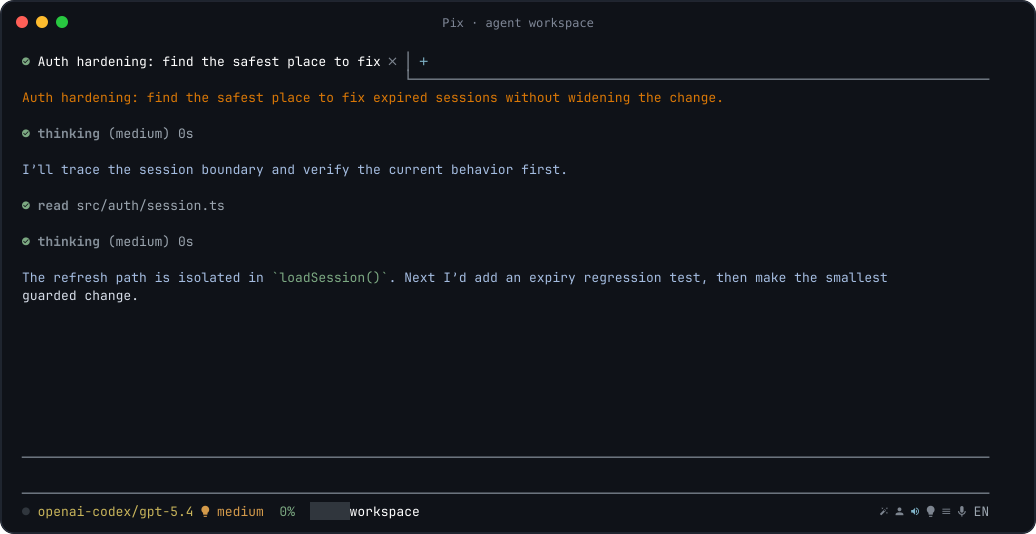
## Start in two commands
```bash
npx pi-ui-extend install
npx pi-ui-extend --cwd .
```
The setup command checks runtime helpers, creates non-secret Pix and tools configuration templates when missing, and prints a credential-aware checklist. It never imports credentials. The second command opens the current project in Pix without requiring a global Pix install.
> Already installed globally? Run `pix --cwd .`.
## Why Pix?
Pi provides the agent runtime, models, tools, skills, extensions, and persistent sessions. Pix keeps that SDK-native foundation and replaces the stock interface with a renderer designed around long, tool-heavy coding work.
- **See the work, not the noise.** Thinking and tool calls are compact rows that expand on demand. Mutating tools, searches, failures, todos, and sub-agents are visually distinct.
- **Keep projects organized.** Tabs are scoped to the working directory and survive restarts. Search, resume, fork, clone, jump through, import, export, share, or delete sessions without leaving the terminal.
- **Stay in flow.** Run quick commands with `!`, open a raw interactive terminal with `!!`, paste images, follow file links, dictate in English or Russian, and improve a prompt before sending it.
- **Know what the agent is doing.** The status area exposes model, thinking level, context, usage, workspace, todos, sub-agents, voice state, and prompt actions — with mouse targets where useful.
- **Bring a serious toolkit.** Pix ships with `pi-tools-suite`: 21 integrated modules for indexed repository discovery, AST edits, LSP diagnostics, parallel agents, durable todos, context compression, web access, provider accounts, and more.
- **Use the models you want.** Pix runs on Pi's provider ecosystem and supports model switching, scoped model lists, per-model thinking levels, usage views, autocomplete, and fallback-aware helper workflows.
Pix is not a separate agent protocol or an RPC wrapper around Pi. It runs on the Pi SDK, so the runtime, session format, extensions, skills, prompts, and tools remain part of the same ecosystem.
## The interface
### A workspace, not a transcript
- **Persistent tabs** for independent tasks in the same project.
- **Lazy session loading** so restoring a workspace does not eagerly start every runtime.
- **Compact activity rows** with configurable previews, colors, expansion, and output filtering.
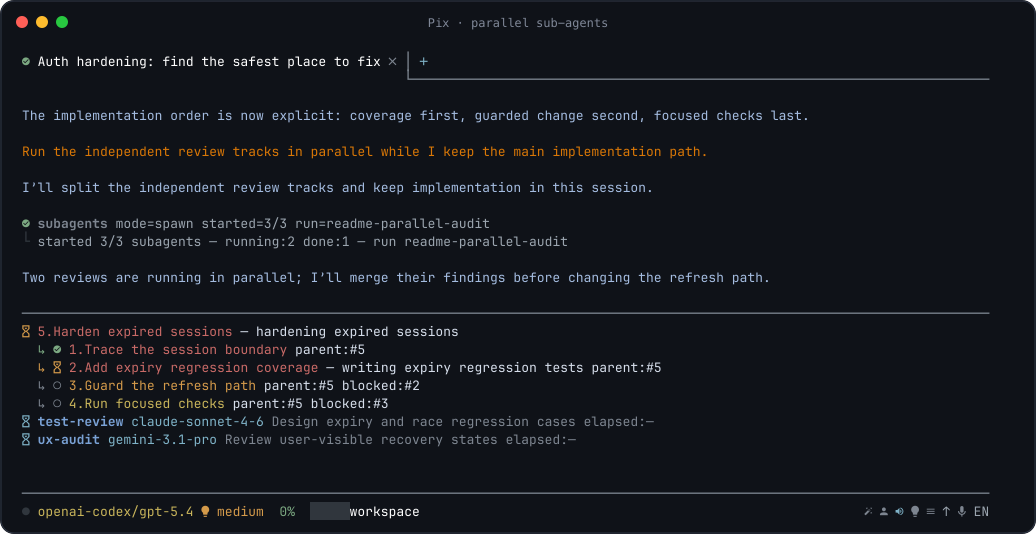
- **Dedicated todo and sub-agent panels** instead of dumping orchestration state into chat.
- **Mouse-aware navigation** for tabs, status actions, scrolling, expandable blocks, menus, links, and the scrollbar.
- **Rich terminal content** including Markdown, code blocks, diffs, file links, images, toasts, widgets, dialogs, and custom extension UI.
- **Dark and light themes**, configurable model colors, and Nerd Font icons with graceful fallbacks.
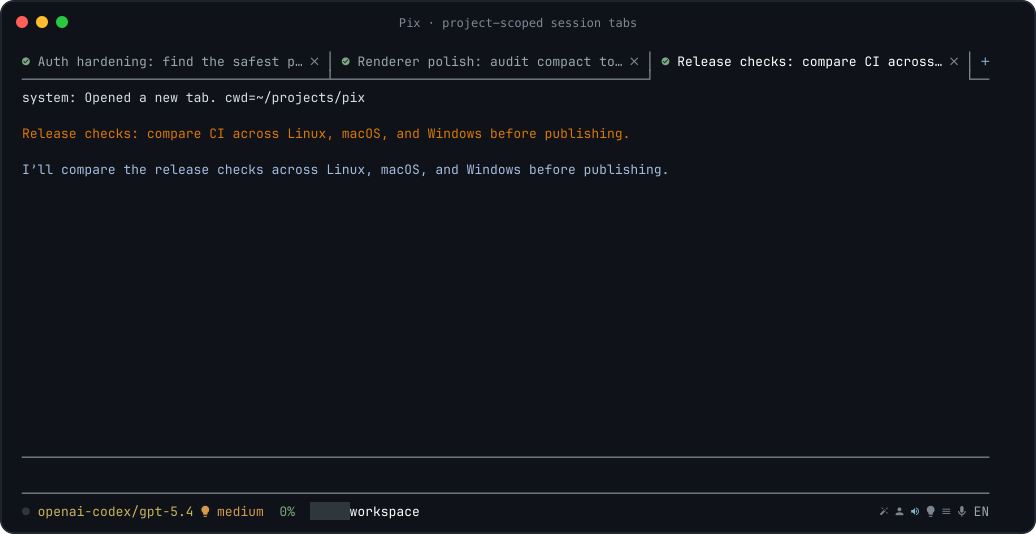
### Commands are searchable
Type `/` to open the command picker. Continue typing to filter built-in commands and commands contributed by extensions.
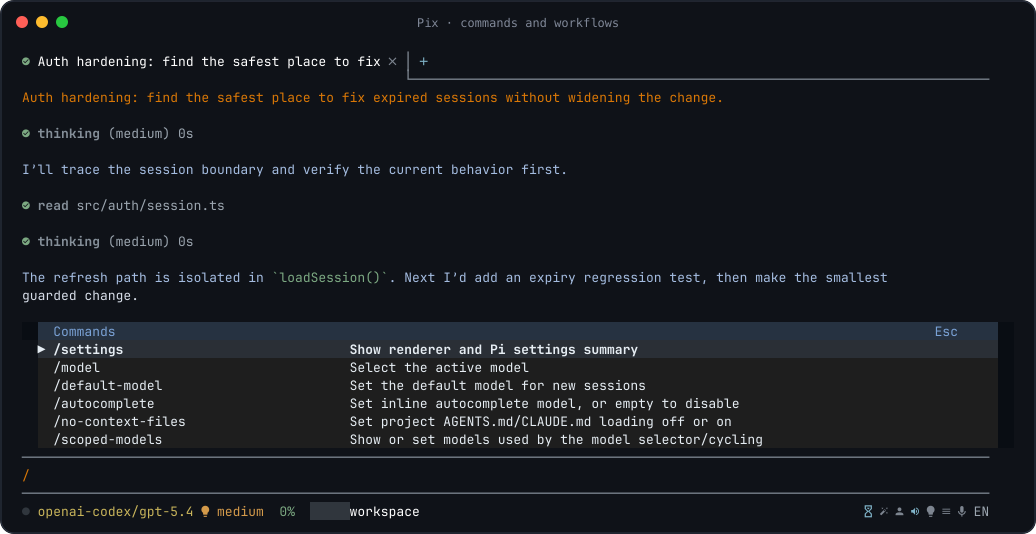
### Agent activity stays readable
Pix gives different kinds of work different visual weight:
- thinking can remain collapsed until you need it;
- reads and searches show concise previews;
- edits and patches are expanded by default;
- long shell output can show its tail while the command runs;
- failures remain visible;
- tool rows can be expanded or collapsed with the mouse;
- todo and sub-agent state is rendered as structured UI.
All of this is configurable per exact tool name or wildcard such as `repo_*` and `ast_*`.
**Adaptive plans keep dependencies, blockers, ownership, and the active step visible:**

**Parallel sub-agents report live status without taking over the main session:**
## Bundled: pi-tools-suite
On startup, Pix tries to link the bundled suite into the active Pi agent directory (normally `~/.pi/agent/extensions/pi-tools-suite`). An existing non-symlink installation is preserved. Suite modules are designed to work without Pix-specific UI where they are loaded; suite-spawned sub-agents intentionally use an isolated, minimal extension set.
| Capability | Included modules | What it adds |
| --- | --- | --- |
| Parallel work | `async-subagents` | Isolated asynchronous agents, presets, model fallback routing, result artifacts, `/ultrawork`, and `/hyperplan`. |
| Repository intelligence | `repo-discovery` | Indexed architecture, structure, AST, semantic search, symbol explanation, and dependency/caller tools when the repository has an `.indexer-cli` index. |
| Structural code changes | `ast-grep` | Language-aware AST search, rewrite previews, and explicit AST mutation tools. |
| Fast feedback | `lsp`, `comment-checker` | Project-trusted language-server diagnostics and a guard against low-quality AI-style code comments. |
| Durable planning | `todo` | Hierarchical todos with blockers, owners, persistence, scoped resumes, and per-task thinking levels. |
| Context control | `dcp` | Explicit compression and context pruning for long sessions, including sidecar state. |
| Local web access | `web-search` | Web search and page extraction through a local Ollama instance. |
| Providers and quotas | `antigravity-auth`, `opencode-import`, `usage` | Antigravity OAuth/account failover, OpenCode credential import, and multi-provider usage views. |
| Reusable workflows | `prompt-commands`, `resource-registry`, `session-name` | Prompt-command CRUD, private Git-backed skill/agent install/update/push/remote-remove/local-uninstall with reload-on-change, project-scoped `.pi/tasks.jsonc` + `.pi/plans/` + `.pi/TODO.md` sync, a Desktop Registry sidebar for status/actions/configuration, and session naming. |
| Model compatibility | `coding-discipline`, `model-tools`, `codex-reasoning-fix` | Model-specific discipline and vision lookup, compatibility aliases, and a Codex reasoning payload workaround. |
| Agent session context | `session-recovery` | Bounded session overview/search/section tools so agents can recover prior context. |
| Payload hygiene | `context-gateway`, `truncation-metadata-normalizer`, `credential-firewall` | Observe-only result-chain gateway, opt-in truncation-metadata cleanup, and an opt-in secret firewall. |
Every module can be disabled. Optional integrations only activate when their requirements are available — for example, repository tools require an index, web tools require local Ollama web search, and LSP servers must be configured and trusted.
Suite configuration is loaded from:
1. `~/.config/pi/pi-tools-suite.jsonc`
2. `$PI_CONFIG_DIR/pi-tools-suite.jsonc`, when set
3. the nearest project `.pi/pi-tools-suite.jsonc`
Later files override earlier ones. Disable modules with `disabledModules`, `PI_TOOLS_SUITE_DISABLED_MODULES`, or disable the entire suite with `PI_TOOLS_SUITE_DISABLED=1`. DCP settings are intentionally user-scoped and belong in the shared user configuration.
## What you can build with it
| Workflow | Pix advantage |
| --- | --- |
| Explore an unfamiliar repository | Start with an indexed architecture map, search behavior semantically, inspect symbols, and trace dependencies without flooding context with entire files. |
| Run a large refactor | Combine repository discovery, AST-aware changes, LSP feedback, workspace undo, and a structured todo plan. |
| Investigate several hypotheses | Launch focused sub-agents in parallel, keep working, and inspect compact result artifacts when they finish. |
| Carry a task across many sessions | Persist tabs and todos, search session history, fork from an earlier message, and compress old context without losing the active objective. |
| Work across providers | Switch models and thinking levels, scope the model picker, import supported accounts, inspect quotas, and use fallback-aware sub-agent presets. |
| Keep your hands in the terminal | Run quick shell commands inline, use a full interactive TTY when needed, paste images, dictate prompts, and open file links directly. |
## Install
### Download a ready-to-run release
[GitHub Releases](https://github.com/dnaroid/pix/releases) contains published
portable TUI archives and Pix Desktop installers when a release has completed
the native build/verification pipeline. Choose **TUI** or **Desktop** and your
OS/CPU: Windows x64, macOS Apple Silicon, macOS Intel, or Linux x64.
These packages contain Node.js and the Pix/ACP runtime; no separate Node/npm
installation is required to launch them. For TUI, extract the whole archive and
run `pix` (macOS/Linux) or `pix.cmd` (Windows) from your terminal. For Desktop,
use the `.dmg`, Windows installer, `.AppImage`, or `.deb` for your system.
Portable TUI installs can later update themselves with `pix update`: the command
downloads the matching GitHub Release archive, verifies `SHA256SUMS`, smoke-tests
the staged runtime, and replaces the installation after the updater exits.
Packaged Desktop checks the signed Tauri update feed on startup and offers an
Update/Restart flow in the app; development builds do not run that updater.
Git, tools needed by your projects, provider credentials and optional voice/
clipboard helpers are separate. Unsigned/ad-hoc builds may show OS warnings;
check the release notes before installing. See the [release guide](docs/release.md)
for building, signing, checksums and updates. npm installation remains available below.
### Requirements
The Node/npm requirements below apply to the npm/source installation channel.
- **Node.js `>=22.19.0 <25`**
- macOS, Linux, or Windows terminal with 256-color support
- npm or another way to run the published npm package
- provider credentials supported by Pi, unless you only use locally configured models
Recommended:
- **JetBrainsMono Nerd Font** for the intended icons; `pix install` can install it for the current user
- a terminal with mouse reporting and Kitty keyboard protocol support for the richest interaction
- Linux clipboard helper: `wl-clipboard` on Wayland or `xclip`/`xsel` on X11
Optional:
- a Deepgram API key in `dictation.apiKey` inside `~/.config/pi/pix.jsonc` for voice input; `DEEPGRAM_API_KEY` remains supported as a fallback
- an audio recorder for terminal dictation: SoX (`rec`/`sox`), `ffmpeg`, or `arecord` on Linux
- `tmux` and `rsvg-convert` only if you want to regenerate README screenshots
- Ollama with web search enabled for the bundled `web_search` and `web_fetch` tools
- language servers for the LSP module (see [LSP setup](external/pi-tools-suite/README.md#lsp-setup) for install commands and ready-to-paste configs for popular servers, including Svelte, Vue, Go, clangd, Lua, and bash)
### One-shot use
```bash
# Check/install runtime helpers for this user
npx pi-ui-extend install
# Start Pix in a project
npx pi-ui-extend --cwd /path/to/project
```
### First-run checklist
1. Run `npx pi-ui-extend install`. It preserves existing files and creates these non-secret templates when missing:
- `~/.config/pi/pix.jsonc`
- `~/.config/pi/pi-tools-suite.jsonc`
2. Configure at least one model provider:
- With an existing OpenCode setup, start Pix and run `/opencode-import`; review [OpenCode migration](#opencode-migration) before using `--force`.
- Otherwise run `npx @earendil-works/pi-coding-agent`, use `/login` in the stock Pi TUI, then exit. Environment-based provider API keys also work.
3. Start Pix, use `/model` to select an available model, and follow any startup authentication diagnostic.
4. Configure only the optional integrations you need; none are required for normal model conversations.
The installer installs JetBrainsMono Nerd Font when it is missing. Pix also checks it on startup and starts a background installation when needed so the icon UI remains readable even when setup was skipped. Installation failures are reported while Pix keeps its fallback icons. Use `--check` to inspect the machine without creating files, installing helpers, or changing credentials.
### Global install
```bash
npm install -g pi-ui-extend --ignore-scripts
pix install
pix --cwd /path/to/project
```
The package exposes both `pix` and `pi-ui-extend`; they launch the same application.
### Check without changing anything
```bash
npx pi-ui-extend install --check
# or, after a global install
pix install --check
```
### Start options
```text
pix [--cwd ] [--no-session] [--session ]
[--theme dark|light] [--model ]
```
Examples:
```bash
pix --cwd .
pix --cwd ../pi-mono --theme light
pix --cwd . --model anthropic/claude-sonnet-4-20250514:medium
pix --cwd . --no-session
```
## Models and accounts
Pix uses Pi's model and authentication stores. Environment-based API keys and credentials already configured for Pi are available to Pix.
| Credential or integration | Required? | Setup | Notes |
| --- | --- | --- | --- |
| Model provider | **Yes**, unless the selected model needs no credentials | Run the stock Pi TUI with `npx @earendil-works/pi-coding-agent`, use `/login`, then `/reload` in Pix; or set a provider-supported environment key | Pix does not yet implement Pi's interactive `/login` and `/logout` dialogs. |
| Existing OpenCode accounts | No; migration shortcut | Run `/opencode-import` in Pix | Imports only the credential types listed below and preserves existing Pi entries by default. |
| Model-backed helpers | No | Review `promptEnhancer`, `autocomplete`, and `sessionTitle` in `pix.jsonc` | Each configured helper model needs credentials for its own provider; it need not use the main session provider. |
| Ollama/Tavily web access | No | Use local Ollama without a cloud key, set `OLLAMA_API_KEY`/`TAVILY_API_KEY`, or run `/web-credentials` | Stored keys live in `~/.config/pi/pi-tools-suite-credentials.json` with mode `0600`. |
| Context7 documentation skill | No | Export `CONTEXT7_API_KEY` | The skill fails before making a network request when the variable is absent. |
| Telegram task connector | No | Configure `telegramConnector.botToken` + `telegramConnector.chatId`, or `PIX_TELEGRAM_BOT_TOKEN` + `PIX_TELEGRAM_CHAT_ID` | Completion/question notifications; reply to continue the exact live session, or use `/new ` for a fresh session. |
`pix install` reports whether these sources appear configured, but never displays, copies, or overwrites token values.
### OpenCode migration
Run this inside Pix after the bundled tools suite loads:
```text
/opencode-import
```
Supported mappings are deliberately narrow:
- OpenAI OAuth → Pi's `openai-codex` provider
- OpenAI API key → Pi's `openai` provider
- GitHub Copilot OAuth → `github-copilot`
- Z.ai/Zhipu-compatible credentials → `zai`
- an OpenCode Antigravity account → Pi's Antigravity provider
By default the command reads `$OPENCODE_AUTH_CONTENT`, `$OPENCODE_DATA_DIR/auth.json`, or the XDG/default OpenCode data path, plus the corresponding OpenCode Antigravity account file. It writes to Pi's active agent directory (`$PI_CODING_AGENT_DIR` when set), preserves existing provider entries, and reloads Pix only after a successful write. Use `/opencode-import --force` only when you intentionally want supported existing entries replaced. Explicit source and destination paths are available through `/opencode-import --path `, `--auth-path `, and `--antigravity-path `.
OpenCode model/provider definitions, default-model choices, MCP servers, plugins, instructions, and tool settings are **not** migrated because their formats and security assumptions do not map safely. Recreate those settings in Pix/Pi and `pi-tools-suite.jsonc` as needed. No secret is imported during `pix install` itself.
- Run `/antigravity-add-account` to add an Antigravity OAuth account, then use `/antigravity-account` and `/antigravity-status` to manage it.
- Use `/model`, `/scoped-models`, and `/thinking` to control the active runtime.
- Use `/default-model`, `/default-thinking`, and `/autocomplete` to change defaults for new sessions.
- Use `/usage` or the clickable usage status to inspect locally available quota data.
Provider availability and thinking levels depend on the selected model. Pix does not upload private repository data merely to populate the model or usage UI; normal model requests still follow the provider you choose.
## Everyday interaction
### Prompts
- **Enter** sends the current prompt.
- **Shift+Enter** inserts a newline.
- **Tab** accepts autocomplete or the selected popup item.
- `/enhance` — or the status-bar magic wand — improves the current draft with the configured helper model.
- `/queue ` stores a delayed message you can send later from the queue menu.
- Prompt history is searchable with `/history` and navigable with Up/Down when no popup owns those keys.
Pix can provide inline, model-backed autocomplete with configurable debounce, timeout, token budget, and recent-message context.
### Local shell
```text
!git status
!npm test
!!npm run dev
!!python
```
- `!command` runs a shell command and renders the result in chat. It is local UI activity and is not saved to the Pi session.
- While it runs, submit editor text to its stdin; use `Ctrl-C` to interrupt.
- `!!command` opens a raw interactive terminal for REPLs, TUIs, debuggers, and development servers. Exit it to return to Pix.
### Git helpers
- `/code-review` reviews staged, unstaged, and untracked Git changes with the configured review model and prints the findings locally in the TUI.
- `/commit-message` generates a message from staged changes, shows the full message, and asks for confirmation before running `git commit`. If the staged diff changes before confirmation completes, Pix refuses the commit and asks you to regenerate the message.
- These helpers use the existing `desktop.git.reviewModelRef` / `reviewFallbackModels` and `desktop.git.commitMessageModelRef` / `commitMessageFallbackModels` settings for compatibility. `/commit-message` never stages changes or bypasses Git hooks.
### Images, clipboard, and files
- Paste an image from the clipboard with `Ctrl+V`/`Cmd+V` in supported terminals.
- Add image/file references to prompts and open detected file links from rendered output.
- `/copy` copies the last assistant message.
- Pix integrates with the native clipboard on macOS and Windows and common Wayland/X11 helpers on Linux.
### Voice input
Put the Deepgram key in the user Pix config:
```jsonc
{
"dictation": {
"apiKey": "your-deepgram-api-key"
}
}
```
The file is `~/.config/pi/pix.jsonc`. Keep the key in this user config rather than a project `.pi/pix.jsonc`; project config is intentionally not allowed to override the secret. `DEEPGRAM_API_KEY` remains supported as a compatibility fallback when `dictation.apiKey` is not set.
Then press `Ctrl+G` or click the microphone in the terminal status area to start/stop dictation. Pix streams microphone audio to Deepgram Nova-3 and inserts finalized text into the editor so you can review it before sending. The default dictation languages are English and Russian and can be changed with the existing language control.
Pix Desktop exposes the same voice-input action directly in the message composer. The desktop client uses Nova-3 and respects `dictation.language` plus the selected language's `deepgramLanguage` value from the user Pix config. It requests a short-lived Deepgram token from the local Tauri backend; the permanent API key is read from the user Pix config (or the environment fallback) by Rust and is never exposed to the WebView. The Settings UI also exposes `Dictation · Api Key` as a sensitive field because it is generated from the Pix schema.
Voice audio is sent to Deepgram while recording. Pix no longer downloads or installs local speech-recognition models.
### Workspace undo
Pix records supported agent file mutations against the user message that started them. Open that message's action menu and choose **Undo changes** to rewind the session branch and restore the recorded workspace changes. It is a safety net, not a replacement for version control.
## Sessions and tabs
Pix stores a tab workspace per working directory. Reopening the same `--cwd` restores its tabs, active tab, drafts, queued messages, and session references.
- `/new_tab` opens a fresh session without replacing the current tab.
- `/resume` opens a session picker or accepts a session path.
- `/search` searches session contents and opens a match in a new tab.
- `/fork`, `/clone`, `/tree`, and `/jump` support branching and navigation inside session history.
- `/export` writes HTML by default or JSONL when given a `.jsonl` path.
- `/import` resumes a JSONL session; `/share` publishes a secret GitHub gist.
- `/compact` manually summarizes older context; the DCP suite module provides finer-grained context compression.
- `/delete` permanently removes a session and its DCP sidecar after confirmation.
Set `maxProjectSessions` in Pix configuration to prune old session files automatically for each project; `0` keeps them indefinitely.
## Command reference
Type `/` for the live, searchable list. Extensions can add more commands than the core set below.
| Area | Commands |
| --- | --- |
| Renderer and resources | `/settings`, `/hotkeys`, `/reload`, `/changelog`, `/update` |
| Models | `/model`, `/default-model`, `/scoped-models`, `/thinking`, `/default-thinking`, `/autocomplete` |
| Project context | `/no-context-files`, `/compact` |
| Prompt workflow | `/enhance`, `/queue`, `/copy` |
| Git | `/code-review`, `/commit-message` |
| Sessions | `/new`, `/new_tab`, `/resume`, `/name`, `/session`, `/search`, `/history`, `/jump`, `/tree` |
| Branching and files | `/fork`, `/clone`, `/delete`, `/export`, `/import`, `/share` |
| Status | `/usage` |
| Process | `/quit`, `/exit` |
Useful suite commands include `/todos`, `/todos-persist`, `/todos-scope`, `/sub-status`, `/sub-stop`, `/ultrawork`, `/hyperplan`, `/subagent-preset`, `/usage`, `/dcp`, `/idx-init`, `/idx-update`, `/opencode-import`, `/antigravity-add-account`, and `/registry`.
### Keyboard and mouse
| Input | Action |
| --- | --- |
| `Enter` | Send a message or run the selected command |
| `Shift+Enter` | Insert a newline |
| `Tab` | Accept autocomplete / selected popup item |
| `Esc` | Close a popup or abort running work |
| `Up` / `Down` | Navigate history or the active popup |
| `PageUp` / `PageDown` | Scroll the conversation by page |
| `Cmd+Up` / `Cmd+Down` | Alternative page scrolling in supported terminals |
| `Ctrl+C` | Interrupt running work; press again while an abort is in progress to stop Pix |
| `Ctrl+D` | Quit when the editor is empty |
| `Ctrl+L` | Redraw the screen |
| `Ctrl+G` | Toggle voice recording |
| `Ctrl+V` / `Cmd+V` | Paste a clipboard image when supported |
| Mouse wheel / scrollbar | Scroll the conversation or active popup |
| Click | Switch tabs; expand activity; follow links; activate visible status actions |
Use `/hotkeys` for the authoritative in-app summary for your installed version.
## Configuration
Pix creates a commented JSONC file on first launch:
```text
~/.config/pi/pix.jsonc
```
A project can override it with:
```text
/.pi/pix.jsonc
```
Both support the published schema:
```jsonc
{
"$schema": "https://unpkg.com/pi-ui-extend/schemas/pix.json",
"defaultModel": {
"modelRef": "openai-codex/gpt-5.6-sol",
"fallbackModels": [],
"thinking": "medium"
},
"toolRenderer": {
"default": { "previewLines": 0 },
"tools": {
"shell": { "previewLines": 6, "direction": "tail" },
"repo_*": { "previewLines": 6, "direction": "head" },
"apply_patch": { "defaultExpanded": true }
}
},
"promptEnhancer": { "modelRef": "openai-codex/gpt-5.6-luna", "fallbackModels": [] },
"autocomplete": {
"modelRef": "zai/glm-5-turbo",
"fallbackModels": [],
"debounceMs": 350,
"timeoutMs": 3000
},
"sessionTitle": {
"modelRef": "openai-codex/gpt-5.6-luna",
"fallbackModels": ["zai/glm-5-turbo"]
},
"dictation": { "language": "en" },
"ignoreContextFiles": false,
"maxProjectSessions": 0
}
```
Singular model selectors resolve with an explicit ordered fallback array, even
when it is empty. Existing configs that omit the array remain compatible and
normalize to `[]`. Pix uses `fallbackModels` for object selectors; Desktop Git
uses `reviewFallbackModels` and `commitMessageFallbackModels` beside the
corresponding primary model refs.
Configurable areas include:
- default model and thinking level;
- scoped model selection and per-model colors;
- tool visibility, expansion, preview length/direction, and semantic colors;
- assistant output filters using globs or regex literals;
- autocomplete, prompt enhancement, and automatic session-title models;
- dictation languages and model download URLs;
- icon theme;
- loading of project `AGENTS.md`/`CLAUDE.md` files;
- per-project session retention.
Use `/settings` to inspect the effective settings summary and `/reload` after changing resources. Some command-driven settings update the relevant config file directly.
### Ignoring legacy context files
If a legacy project already contains an `AGENTS.md` or `CLAUDE.md` that should not be loaded, the simplest project-local workaround for both Pi and Pix is an empty override file in the same directory:
```bash
touch AGENTS.override.md
```
Pi and Pix load `AGENTS.override.md` instead of `AGENTS.md`/`CLAUDE.md` from that directory. To keep this local without changing the repository:
```bash
echo AGENTS.override.md >> .git/info/exclude
```
To disable discovery of all context files, including files in parent directories:
- start Pi with `pi --no-context-files` (or `pi -nc`);
- in Pix, run `/no-context-files on`. Pix saves `"ignoreContextFiles": true` to `/.pi/pix.jsonc`.
Start a new session or restart Pix after changing this setting. Use `/no-context-files off` to enable context-file loading again.
## Updates
```bash
# Check only
pix update --check
# Install the latest published Pix and align the global Pi CLI
pix update
# Reinstall even when the version appears current
pix update --force
```
Inside Pix, `/update` performs a check and explains the shell command needed for installation. Restart Pix after an update.
## Troubleshooting
### Icons look wrong
Run `pix install`, configure your terminal to use **JetBrainsMono Nerd Font**, and restart the terminal. Pix falls back to plain glyphs, but the intended UI uses Nerd Font icons.
### Clipboard images do not paste on Linux
Install `wl-clipboard` on Wayland or `xclip`/`xsel` on X11, then run `pix install --check`.
### Voice input is unavailable
Ensure `dictation.apiKey` is set in `~/.config/pi/pix.jsonc`, or set the compatibility fallback `DEEPGRAM_API_KEY` in the environment that launches Pix. Terminal voice input also needs an audio recorder: SoX (`rec`/`sox`), `ffmpeg`, or `arecord` on Linux. Pix Desktop additionally needs microphone permission from the operating system. Voice support can be omitted without affecting the rest of Pix.
### A provider login dialog is missing
Pix does not yet implement Pi's interactive `/login` and `/logout` dialogs. Authenticate in the stock `pi` TUI or configure the provider's supported environment/API-key storage, then run `/reload`.
### Repository discovery tools are absent
Those tools register only when Pix is launched from a repository with an `.indexer-cli` index. Run `/idx-init` to initialize the current repository, then `/reload`. If Pix was started elsewhere with `--cwd`, restart it from the project directory first:
```bash
cd /path/to/project
pix
```
When `indexer-cli` is installed and available on `PATH`, Pix checks it at startup and runs its official updater when needed. Pix silently skips this check when `idx` is absent. `/idx-update` remains available for a manual retry; neither flow refreshes a project's index.
### An extension behaves differently
Pix supports Pi SDK extensions, including toasts, widgets, menus, dialogs, custom UI, and terminal input hooks. Extensions that assume private internals or a specific stock renderer may still need adaptation. Use `ctx.hasUI` guards for code that also runs headlessly.
## For extension authors
The package exports the renderer-facing SDK from both entry points:
```ts
import type { PixExtensionUIContext } from "pi-ui-extend";
// or
import type { PixExtensionUIContext } from "pi-ui-extend/sdk";
```
Pix implements the Pi extension UI surface for notifications, keyed toasts, widgets, above-input content, menus, dialogs, custom full-screen UI, editor text, terminal input hooks, theme helpers, and status updates. The published declarations are available in [`dist/sdk.d.ts`](dist/sdk.d.ts).
## Development
Use the exact Node.js version in `.node-version` for development and builds;
`.nvmrc` mirrors it for nvm users. No particular version manager is required:
all npm scripts use the `node` and `npm` already on your `PATH`.
The supported runtime range is `>=22.19.0 <25`, shared by Pix, ACP, and Desktop.
CI checks the pinned version on Linux, macOS, and Windows, plus the minimum
supported version on Linux.
```bash
git clone https://github.com/dnaroid/pix.git
cd pix
# Select the version from .node-version using your preferred installation method.
# With nvm (optional): nvm install && nvm use
node --version
npm ci
# Run from source
npm run dev -- --cwd /path/to/project
# Typecheck and test
npm run check
# Validate the bundled suite
npm run test:tools-suite
# Build the publishable renderer
npm run build:pix
# Watch Pix, ACP, the bundled suite, and Desktop
npm run watch:all
```
`watch:all` rebuilds only the affected project parts. It keeps the last working
Desktop process alive while changes compile, then replaces it only after the
entire queued build succeeds. A failed build is reported without replacing the
running Desktop. Desktop web changes rebuild the Vite bundle first and then
invalidate the native Tauri asset embedding before the replacement app starts.
Regenerate the README screenshots without accounts or live model traffic:
```bash
node --import tsx scripts/capture-readme-screenshots.ts
```
The capture script runs the real renderer against the local test `MockModel` in an isolated tmux server and temporary home directory.
## Project layout
```text
src/ Pix renderer and SDK bridge
external/pi-tools-suite/ bundled headless tools and extensions
schemas/ published JSON schemas
skills/ packaged agent skills
docs/ release documentation
tests/ unit, integration, and PTY tests
scripts/ build, release, sync, and capture tooling
acp/ pix-acp: ACP adapter embedding pi into editors like Zed (own install; `npm run check:acp`)
```
---
**If your coding agent lives in the terminal, give it a workspace.**
```bash
npx pi-ui-extend --cwd .
```