# pi-todo-observer
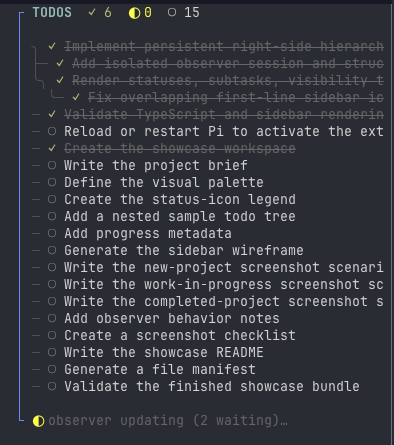
A persistent, Neotest-inspired todo sidebar for [Pi](https://pi.dev). An isolated observer model reviews every main-agent turn and maintains a hierarchical view of planned, active, blocked, and completed work.
## Features
- Persistent, non-capturing right-hand overlay
- Hierarchical todos and sub-todos
- Pending, in-progress, blocked, and completed states
- Separate in-memory Pi session for the observer
- Configurable provider, model, and thinking level
- Asynchronous per-turn observation without blocking the main agent
- Branch-aware persistence inside the main Pi session
- Full-session recalculation in chronological, bounded chunks
- Responsive visibility for narrow terminals
- No filesystem or shell tools in the observer session
- Hidden model reasoning is never forwarded
## Install
From npm:
```bash
pi install npm:pi-todo-observer
```
Directly from GitHub:
```bash
pi install git:github.com/jkieley/pi-todo-observer
```
Then start Pi or run `/reload` in an existing interactive session.
## Commands
| Command | Description |
|---|---|
| `/todo-clear` | Clear all todos and reset the observer; future turns continue to be tracked |
| `/todo-recalc` | Recalculate from the complete active branch while retaining historical completed todos |
| `/todo-hide` | Hide the sidebar while observation continues |
| `/todo-show` | Show the sidebar |
| `/todo-sidebar` | Toggle sidebar visibility |
| `/todo-observer-refresh` | Backward-compatible alias for `/todo-recalc` |
| `/todo-config` | Show the effective model, thinking level, sidebar sizing, and config paths |
`Ctrl+Alt+T` also toggles sidebar visibility.
## Todo states
| Icon | State |
|---|---|
| `○` | Pending |
| `◐` | In progress |
| `!` | Blocked |
| `✓` | Completed |
## Configuration
The extension works without a configuration file using built-in defaults. To customize it, create:
```text
~/.pi/agent/todo-observer.json
```
A trusted project can override global values with:
```text
/.pi/todo-observer.json
```
Project values are deeply merged over global values. See [`config.example.json`](config.example.json) for a complete example.
```json
{
"provider": "openai-codex",
"model": "gpt-5.6-luna",
"thinkingLevel": "medium",
"observer": {
"maxTodos": 100,
"bootstrapOnStart": true,
"publishRetries": 1,
"apiRetries": 2,
"compactionEnabled": true,
"additionalInstructions": ""
},
"sidebar": {
"width": 46,
"minTerminalWidth": 90,
"maxHeight": "100%",
"showOnStart": true
},
"context": {
"maxTurnChars": 60000,
"maxBootstrapChars": 100000,
"maxContentChars": 16000,
"maxToolArgsChars": 4000,
"includeToolResults": true,
"includeExtensionMessages": false
}
}
```
Set `thinkingLevel` to `"off"` to disable observer reasoning. Run `/reload` after changing configuration.
### Full-session recalculation
`/todo-recalc` is designed for sessions that may predate the extension. It walks every message on the active branch in chronological order and sends bounded chunks to a fresh observer session. The accumulated todo state is passed between chunks, allowing later evidence to complete tasks discovered earlier.
`context.maxBootstrapChars` controls the size of each observer request; it does not cap the total history processed. Very large sessions therefore require multiple model calls and may take longer or cost more.
Individual oversized messages and tool results are still clipped according to the other context limits. The final list is capped by `observer.maxTodos`.
## How it works
1. The extension records user, assistant, and configured tool-result context after each turn.
2. Observations are queued to an isolated in-memory Pi session.
3. The observer has one structured tool, `publish_todo_state`, and no coding tools.
4. Published todo snapshots are appended to the main session as branch-aware custom entries.
5. The overlay rerenders when a new snapshot arrives.
The custom resource loader used by the observer contains no extensions, preventing this package from recursively starting another observer.
## Privacy and model usage
The observer receives selected content from the main session and sends it to the configured model provider. Tool results are included by default because they provide useful completion evidence. Review the context settings before using the extension with sensitive sessions.
Each observed turn creates an additional model request. Recalculation can create several requests for a large session.
## Development
```bash
git clone https://github.com/jkieley/pi-todo-observer.git
cd pi-todo-observer
npm install
npm run typecheck
pi -e .
```
## License
[MIT](LICENSE)