# Skill Gate
*Interactive skill visibility manager for pi coding agent*
[Features](#features) • [Installation](#installation) • [Usage](#usage) • [Configuration](#configuration) • [How It Works](#how-it-works)
Control which skills are injected into the initial system prompt with `/skill-gate`. Browse full skill content, toggle visibility on or off, and invoke skills — all from a keyboard-driven overlay. Skills that are not injected can still be executed manually in chat. State is persisted across sessions and injected into the system prompt before every agent run.
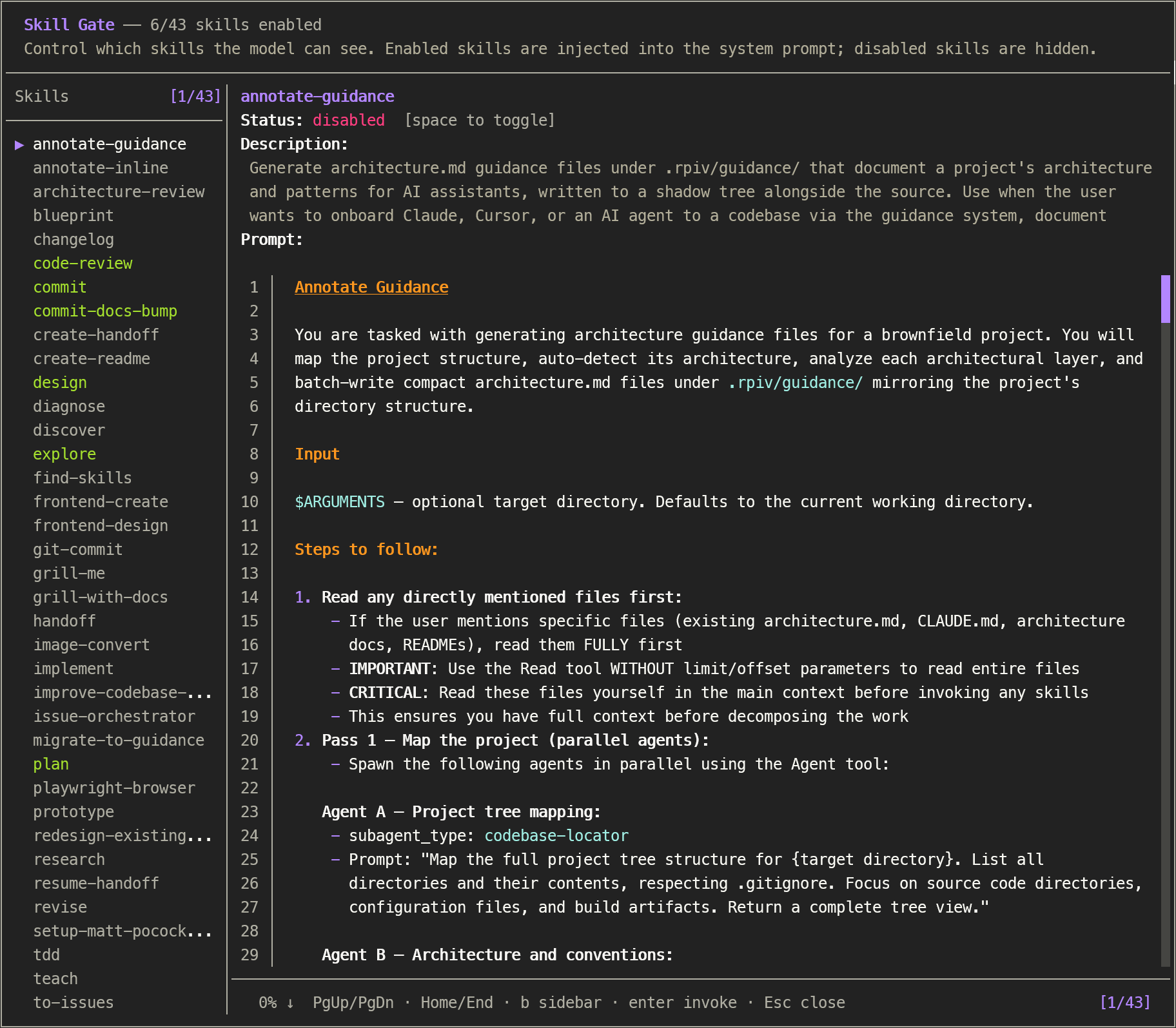
## Features
- **Complete skill coverage** — uses pi's `ResourceLoader` API with dynamic directory discovery to match `/skill:` autocomplete (including extension-contributed, project-memory, and migrated package skills)
- **Skill browser** — view the complete `SKILL.md` content (description, when-to-use, procedure, prompt body) for every skill with syntax-highlighted markdown rendering
- **Yank body to clipboard** — press `y` to copy the current skill's full `SKILL.md` body to the clipboard for pasting elsewhere
- **Open in $EDITOR** — press `o` to open the current skill's `SKILL.md` in `$VISUAL` / `$EDITOR`. The overlay pauses, the editor takes over the terminal, and the body cache is invalidated on return so your edits show up immediately
- **Toggle visibility** — enable or disable skills individually; disabled skills are excluded from the system prompt
- **Search with highlighting** — `/` searches by skill name; `f` performs full-text search across names, descriptions, and SKILL.md bodies. Matching text is highlighted in the sidebar, description, and rendered prompt body
- **Bulk actions with confirm modals** — enable/disable all visible skills at once (`a`/`A`, warning-bordered modal) or reset the current scope to defaults (`r`, error-bordered modal). Bulk respects the active search filter
- **Persistent state** — toggle state saved to `~/.pi/agent/config/skill-gate.json`
- **Usage analytics** — every `/skill:name` invocation is counted and persisted; show a "Uses" column in the sidebar (toggle with `u`) and per-skill usage in the detail view
- **System prompt injection** — enabled skills are automatically inserted as `` before each agent start via the `before_agent_start` hook
- **Respects native-disabled** — skills with `disableModelInvocation: true` are marked with a disabled indicator and cannot be toggled
- **Per-project configs** — project-level overrides stored under a `projects` key in the same config file, keyed by absolute path. Toggle scope between global and project with `g`
- **Fast hook** — `before_agent_start` filters from in-memory caches (skills + config) — zero filesystem access per agent turn
## Installation
### Via npm (recommended)
Install the package, then let pi discover it:
```bash
pi install npm:pi-skill-gate
```
### Manual (local development)
Clone / copy the extension into your pi extensions directory:
```bash
git clone https://github.com/cullendotdev/pi-skill-gate.git
cp -r pi-skill-gate ~/.pi/agent/extensions/pi-skill-gate
```
## Usage
```
/skill-gate
```
Opens an overlay showing all discovered skills.
| Key | Action |
|---|---|
| `↑` `↓` | Navigate skills |
| `Space` | Toggle selected skill enabled/disabled |
| `/` | Enter name-only search mode — type to filter skills by name (Enter commits query, filter persists) |
| `f` | Enter full-text search mode — type to filter skills by name, description, and body (Enter commits query, filter persists) |
| `b` | Toggle skill-list sidebar |
| `u` | Toggle "Uses" column in sidebar (shows per-skill invocation count) |
| `k` `j` | Scroll prompt content |
| `Home` `End` | Jump to top/bottom |
| `Enter` | Invoke skill into chat (confirm selection in search mode and confirm modals) |
| `y` | Yank (copy) the current skill's `SKILL.md` body to the clipboard |
| `o` | Open the current skill's `SKILL.md` in `$VISUAL` / `$EDITOR` (e.g. `vim`, `code --wait`). The body cache is invalidated on return so edits show up immediately. Respects editor arguments split on whitespace (e.g. `code --wait`). |
| `g` | Toggle editing scope (global ↔ project) — only in a project directory |
| `a` | Open "Enable all" confirm modal (warning border) — respects active filter |
| `A` | Open "Disable all" confirm modal (warning border) — respects active filter |
| `r` | Open "Reset scope" confirm modal (error border) |
| `?` | Open the keybindings help modal (scroll with `↑` `↓` / `k` `j`; close with `?`, `Esc`, or `q`) |
| `Esc` | Close (cancel search when searching; clear active filter on first press; cancel confirm modal when open) |
### Confirm modals
`a`, `A`, and `r` open a centered confirmation modal before applying the change:
- **`a` / `A` — Warning border (yellow):** show the count of skills that will be affected plus the active scope. Use `Enter` or `y` to confirm, `Esc` or `n` to cancel.
- **`r` — Error border (red):** shows the scope that will be cleared and how many toggles will be removed. Use `Enter` or `y` to confirm, `Esc` or `n` to cancel.
When the modal is open, all other keys (including `r`, arrows, `j`/`k`) are ignored so you can't accidentally double-confirm.
### Help modal
Press `?` anywhere in the overlay (except over a confirm modal) to open a centered, bordered keybindings reference. It auto-sizes to the widest key/description pair. Scroll with `↑` `↓` or `k` `j`; close with `?`, `Esc`, or `q`.
## Configuration
`skill-gate.json` at `~/.pi/agent/config/skill-gate.json` is created automatically. Only `"enabled"` keys are persisted; `"disabled"` is the default.
### Global skills
```json
{
"skills": {
"code-review": "enabled",
"blueprint": "disabled"
}
}
```
### Per-project overrides
Add a `projects` key keyed by the absolute project path. Project entries override global settings for that project only. The overlay defaults to editing the **global** scope — press `g` to switch to project-level editing.
```json
{
"skills": {
"code-review": "enabled",
"debugger": "enabled"
},
"projects": {
"/home/user/work/my-react-app": {
"skills": {
"debugger": "disabled",
"test-runner": "enabled"
}
}
}
}
```
In this example, `my-react-app` inherits `code-review` from global, overrides `debugger` to disabled (shown in red in the sidebar), and adds `test-runner` (not in global).
Redundant project entries (where the project toggle matches the global effective state) are automatically removed to keep the config clean.
> [!WARNING]
> Corrupted JSON resets all toggles to disabled.
### Usage analytics
Invocation counts are stored separately at `~/.pi/agent/config/skill-gate-analytics.json`. The `input` event hook increments the count for every `/skill:name` (or `/skill:foo bar` etc.) that fires before skill expansion. Duplicate names in a single input are counted once.
```json
{
"counts": {
"code-review": 47,
"debugger": 12,
"blueprint": 3
}
}
```
In the overlay, the detail view always shows a `Usage: Used Nx` line (or `Usage: —` for never-used skills). Press `u` to add a dedicated `Uses` column to the sidebar with a vertical `│` divider aligned to the `┬` in the separator and the right edge of the `Uses` header. Numbers are centered in the column and the column width auto-sizes for 1-, 2-, and 3-digit counts.
To reset analytics, delete the file or set counts to `{}`.
## How It Works
```
session_start
↓
DefaultResourceLoader + dynamic skill path discovery
(walks agentDir for skills/ dirs not covered by includeDefaults,
e.g. pi-hermes-memory/skills/, projects-memory/*/skills/)
↓ ↓
cachedSkills[] skill-gate.json
(Skill: name, desc, (global skills + per-project
filePath, disableModelInvocation) overrides keyed by abs path)
↓ ↓
SkillDetailOverlay ←── loadEffectiveState() / persistToggle(scope)
↓
before_agent_start hook (in-memory filter, project-aware)
↓
buildVisibleBlock() → injected into system prompt
input hook (pi.on("input", ...))
↓
match /skill:name patterns → incrementSkillUsage()
↓
skill-gate-analytics.json (persisted, in-memory cache)
```
### State resolution
Effective state is resolved per-skill: **project override** → **global** → **disabled** (default). The `before_agent_start` hook passes `ctx.cwd` as the project path, so per-project toggles take effect automatically when running an agent from that directory.
### Editing scope
When opened from a project directory, the overlay defaults to **global** editing scope. Press `g` to switch to project-level editing. The sidebar shows `·G` indicators for skills inherited from global (project scope) and `·P` for skills overridden at the project level (global scope). Skills that are enabled globally but explicitly disabled by a project override render in red.
### Skill discovery
The extension creates a `DefaultResourceLoader` at `session_start` with `includeDefaults: true` (covers `~/.pi/agent/skills/`, npm package skills, and `.agents/skills/`) plus dynamically discovered `additionalSkillPaths`:
- Agent-level directories with `skills/` subdirectories (e.g. `pi-hermes-memory/skills/`)
- Project memory skills (`projects-memory//skills/`)
This ensures the skill count always matches `/skill:` autocomplete, regardless of where skills are stored.