# pi-package-manager
Installed packages manager for [pi](https://pi.dev) — a blueprint-style web dashboard for browsing, installing, and removing pi packages from your agent.



## Preview
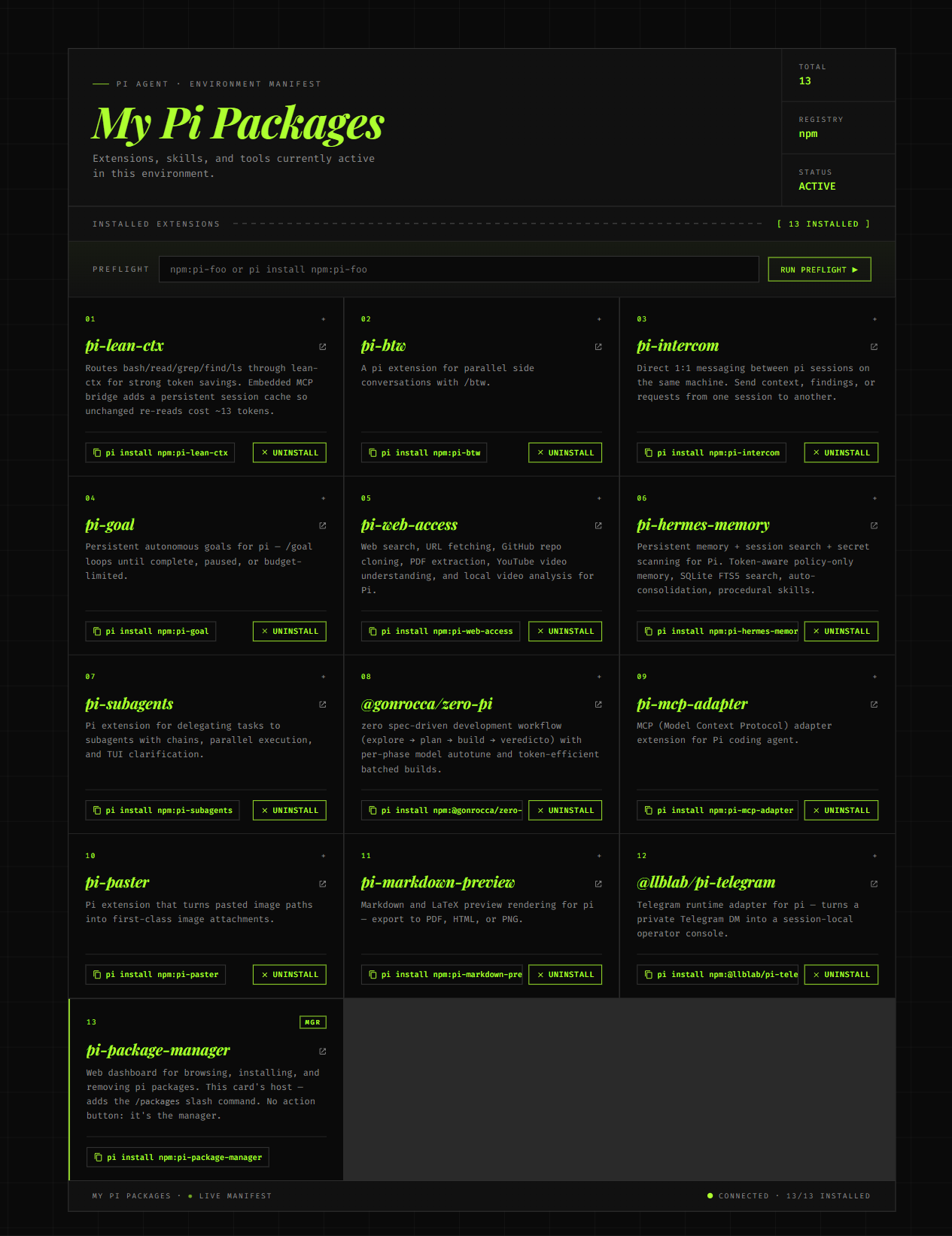
The dashboard lists every installed package and lets you install, uninstall, or copy the install command with one click. When a package isn't on the machine yet, the action button flips to a neutral **Install** state; when it is, it switches to a brand-green **Uninstall** state — and you can mix the two in the same view.
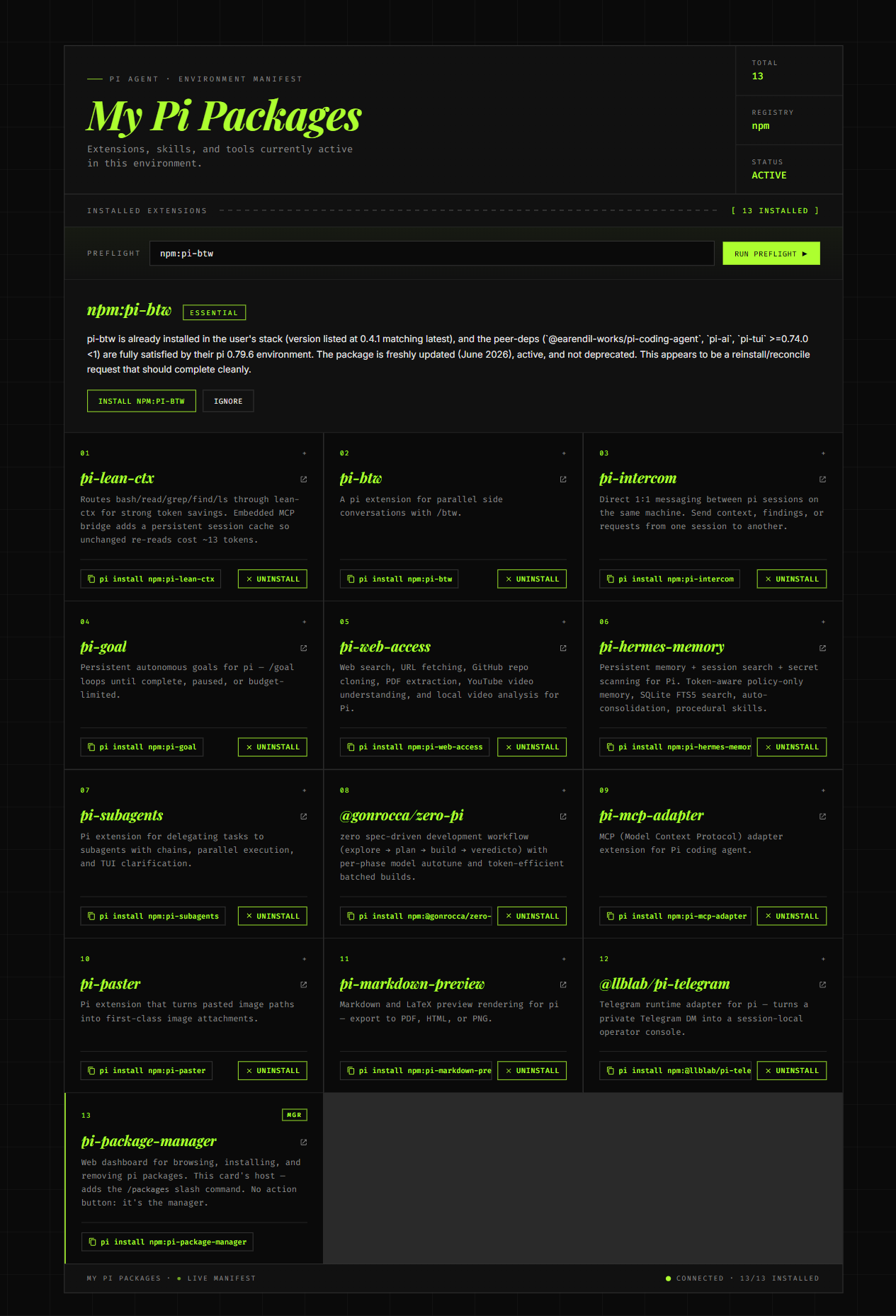
The preflight paste box above the grid calls your configured pi LLM to assess any package before you install it. Fit label, reasoning, concerns, and up to 3 better alternatives — all without leaving the dashboard.
| Dashboard (13 installed + manager card) | LLM preflight result |
|---|---|
|  |  |
## What it does
Adds two slash commands to your pi agent:
- **`/packages`** — opens the local dashboard at showing your installed packages with one-click install/uninstall
- **`/packages-stop`** — stops the dashboard server (the agent also stops it on session end)
The dashboard is a self-contained HTML page that lists your installed extensions and lets you install or remove any npm-published pi package directly from the browser. No terminal round-trips, no copy-paste.
### Paste-a-command preflight
Above the package grid, the dashboard has a single paste box. Drop in `npm:some-package` (or `pi install npm:some-package`, or just the bare name) and click **Run preflight** — the server assembles a fact sheet about the package (npm metadata, your installed stack, your environment) and sends it to your configured pi LLM. The LLM returns a fit label and reasoning.
Fit labels: **Essential** · **Recommended** · **Good** · **Caution** · **Low**
The result panel shows the label, the reasoning, any concerns the LLM flagged, and up to 3 better alternatives from pi.dev/packages. From there you can install with one click, ignore the recommendation, or (if the LLM was unavailable) open a typed-confirm dialog to force-install anyway. Every force-install is audit-logged to `~/.pi/agent/pi-packages-audit.log`.
### Prebuilt package setup
The dashboard ships with **12 proven pi packages** already listed, plus a 13th card for `pi-package-manager` itself (marked `MGR` — the card host, no action button). Fresh pi agent users don't need to search for good extensions — they're all one click away:
| Package | What it does |
|---------|-------------|
| `pi-lean-ctx` | Token-saves bash/read/grep/find/ls via lean-ctx compression |
| `pi-btw` | Parallel side conversations with `/btw` |
| `pi-intercom` | 1:1 messaging between pi sessions on the same machine |
| `pi-goal` | Persistent autonomous goals via `/goal` |
| `pi-web-access` | Web search, URL fetch, GitHub clone, YouTube understanding |
| `pi-hermes-memory` | Persistent memory + session search + procedural skills |
| `pi-subagents` | Delegate tasks to subagents with chains and parallel execution |
| `@gonrocca/zero-pi` | Spec-driven development workflow (explore → plan → build) |
| `pi-mcp-adapter` | MCP (Model Context Protocol) adapter |
| `pi-paster` | Paste image paths as first-class attachments |
| `pi-markdown-preview` | Markdown/LaTeX preview → PDF, HTML, or PNG |
| `@llblab/pi-telegram` | Telegram DM as a session-local operator console |
If you already have a package installed, the button shows **Uninstall** instead of **Install** — so you can see at a glance which of the recommended extensions you're still missing.
## Install
```bash
pi install npm:pi-package-manager
```
That's it — restart the agent and `/packages` is registered.
### Requirements
- Node.js ≥ 18
- `pi` CLI on your `PATH` (you have this if pi is installed)
- A modern browser to view the dashboard
## Usage
### Inside the pi agent
```
/packages
```
Spawns the bridge server in the background and opens the dashboard. Subsequent invocations are instant (the server is reused).
### From a terminal (no agent)
```bash
# Server + open browser
npx pi-package-manager
# Server only
npx pi-package-manager --no-open
# Custom port
npx pi-package-manager --port 9000
```
## How it works
1. The `/packages` slash command resolves the bundled `src/server.mjs` path and spawns `node` against it
2. The server binds `127.0.0.1:7878` (or whatever `PI_PACKAGES_PORT` is set to) and serves the dashboard HTML
3. The dashboard probes `/api/state` to read the recipient's installed packages from `~/.pi/agent/settings.json`
4. Clicking **Install** or **Uninstall** POSTs to `/api/install` or `/api/uninstall`, which shells out to the real `pi install` / `pi remove` commands
5. On `session_shutdown`, the extension kills the server process
### HTML resolution
The server picks the dashboard HTML in this order:
1. `$PI_PACKAGES_HTML` env var (explicit override)
2. `~/.pi/agent/pi-packages.html` — your personal copy (if it exists)
3. `src/pi-packages.html` — the bundled copy that ships with the package
This means the personal regen flow (`update_pi_packages.py`) still works: the dashboard always shows your latest local catalog, even if you installed the package long ago.
### API Endpoints
| Endpoint | Method | Description |
|----------|--------|-------------|
| `/` | GET | Serves the dashboard HTML |
| `/api/state` | GET | Returns installed packages from `settings.json` |
| `/api/health` | GET | Server health check |
| `/api/install` | POST | Install a package (`{ "source": "npm:" }`) |
| `/api/uninstall` | POST | Uninstall a package (`{ "source": "npm:" }`) |
| `/api/preflight` | POST | LLM preflight (`{ "source": "npm:" }` → `{ ok, label, reasoning, alternatives, concerns, ... }`) |
| `/api/force-install` | POST | Force-install after typed-confirm (`{ "source": "npm:", "phrase": "I understand the risks" }`); audit-logged |
### Security
- Bound to `127.0.0.1` only — never reachable from the network
- Source strings validated against a strict regex before reaching the shell: `/^npm:@?[a-z0-9][\w.-]*(\/[a-z0-9][\w.-]*)?$/i`
- 180-second timeout on install/uninstall operations
- CORS headers allow the page to be opened as `file://` for offline use
## Structure
```
pi-package-manager/
├── extensions/
│ └── index.ts # Pi extension entry point — /packages command
├── src/
│ ├── server.mjs # Bridge server (zero external deps; uses @earendil-works/pi-ai for preflight)
│ └── pi-packages.html # Dashboard UI
├── bin/
│ ├── pi-package-manager.mjs # CLI entry point (npx / global)
│ └── pi-preflight.mjs # LLM preflight shim (throwaway; moves upstream when pi gains a preflight subcommand)
├── package.json
├── LICENSE
├── tsconfig.json
└── README.md
```
## License
MIT