# pi-codex-limit
Codex subscription usage footer widget for Pi. Shows 5-hour and weekly usage limits for openai-codex models, and provides a `/codex-limit` command with an interactive usage dashboard.
## Install
### Global
```bash
pi install npm:pi-codex-limit
```
### Project-local
Writes to `.pi/settings.json` — portable across teams:
```bash
pi install -l npm:pi-codex-limit
```
## Visual Demo
### Default Footer
 ### Custom Footer (with pi-footer-mode)
The [custom footer](https://github.com/santychuy/pi-setup/tree/main/extensions/footer-mode) adds a minimal usage percentage showing your 5-hour window consumption, giving you instant visibility into remaining quota:
### Custom Footer (with pi-footer-mode)
The [custom footer](https://github.com/santychuy/pi-setup/tree/main/extensions/footer-mode) adds a minimal usage percentage showing your 5-hour window consumption, giving you instant visibility into remaining quota:
 ### `/codex-limit` Command
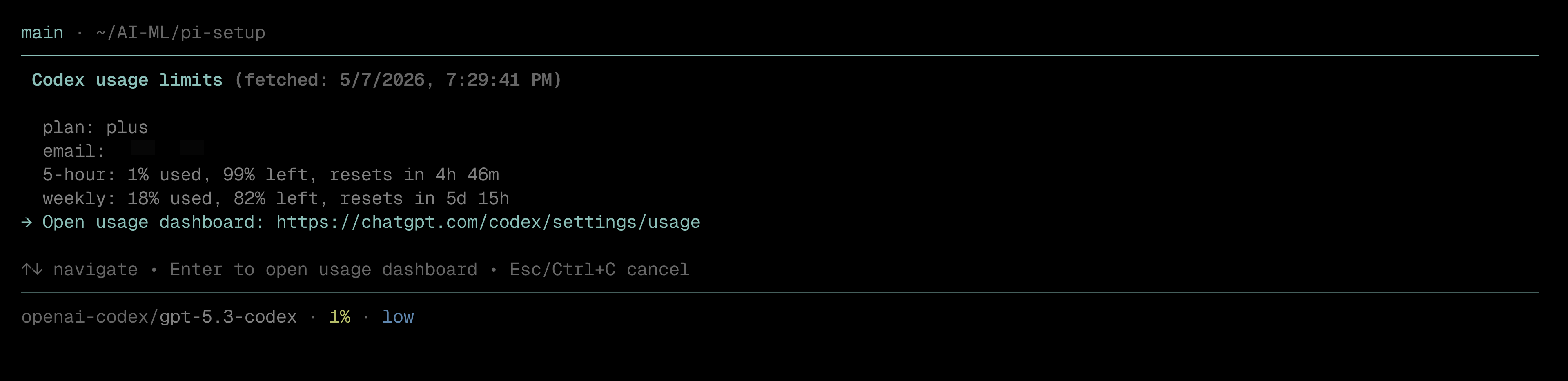
Running `/codex-limit` opens an interactive dashboard with usage statistics and a shortcut.
### `/codex-limit` Command
Running `/codex-limit` opens an interactive dashboard with usage statistics and a shortcut.
 ## Features
- Footer widget showing 5-hour usage percentage when using openai-codex models
- `/codex-limit` command — interactive view with plan type, masked email, per-window usage, and a shortcut to open the Codex dashboard
## Links
- [Source](https://github.com/santychuy/pi-setup/tree/main/extensions/codex-limit)
- [Issues](https://github.com/santychuy/pi-setup/issues)
## Features
- Footer widget showing 5-hour usage percentage when using openai-codex models
- `/codex-limit` command — interactive view with plan type, masked email, per-window usage, and a shortcut to open the Codex dashboard
## Links
- [Source](https://github.com/santychuy/pi-setup/tree/main/extensions/codex-limit)
- [Issues](https://github.com/santychuy/pi-setup/issues)