# pi-clinepass
**ClinePass for [pi](https://pi.dev) coding agent**
Dollar-based limits, live cost tracking, and plan cap reporting.
## Highlights
- **22 Models**: 16 ClinePass models on a dollar-based limit system plus 6 free tier models
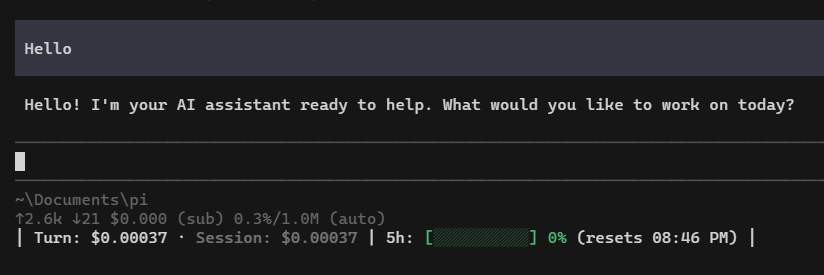
- **Live Status Meter**: Per-turn and session cost directly in the pi footer
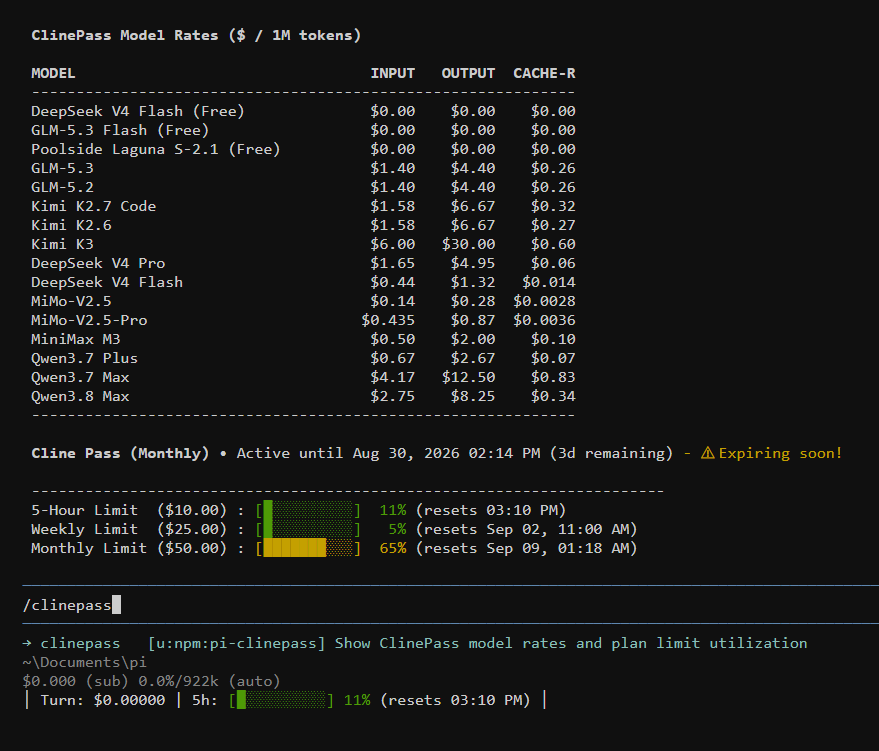
- **Plan Utilization**: 5-hour, weekly, and monthly caps tracked via `/clinepass`
- **Price Calibration**: measure real gateway billing from `/clinepass` to keep displayed prices honest
- **Simple Auth**: One-time login via Cline CLI, browser, or API key
---
## Installation
Requires **Node.js 22.19+** and [pi](https://pi.dev).
```sh
pi install npm:pi-clinepass
```
---
## Quickstart
### 1. Authenticate
Run the login command inside pi:
```
/login
```
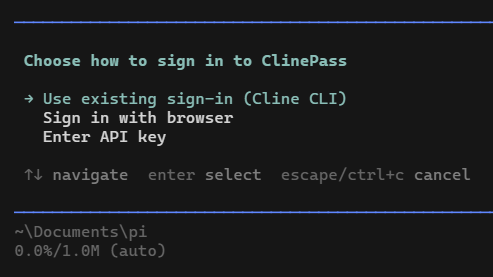
Select **ClinePass** to choose your sign-in method:
- **Use existing sign-in (Cline CLI)**: keep using your Cline CLI account
- **Sign in with browser**: log in once in your browser
- **Enter API key**: paste your ClinePass key
### 2. Select a Model
Pick any model using the interactive selector — prices are shown right in the picker:
```
/model
```
---
## Report
View the live rate sheet and plan limit utilization anytime:
```
/clinepass
```
The command opens a menu: the dashboard shows model rates and plan utilization
in a centered modal, or run **price calibration** to measure real gateway
billing and update the whole panel (uses ~5-10% of the 5-hour quota).
---
## Development
```sh
git clone https://github.com/fifidayone/pi-clinepass.git
cd pi-clinepass
npm install
npm test
npm run typecheck
```
---
## Support
pi-clinepass is free and will stay free. If you'd like to help, consider buying me a coffee: