# Pi Arcade Games 🎮
Retro terminal arcade for [Pi coding agent](https://github.com/earendil-works/pi). Play classic games while you wait for builds, tests, and long-running tasks.
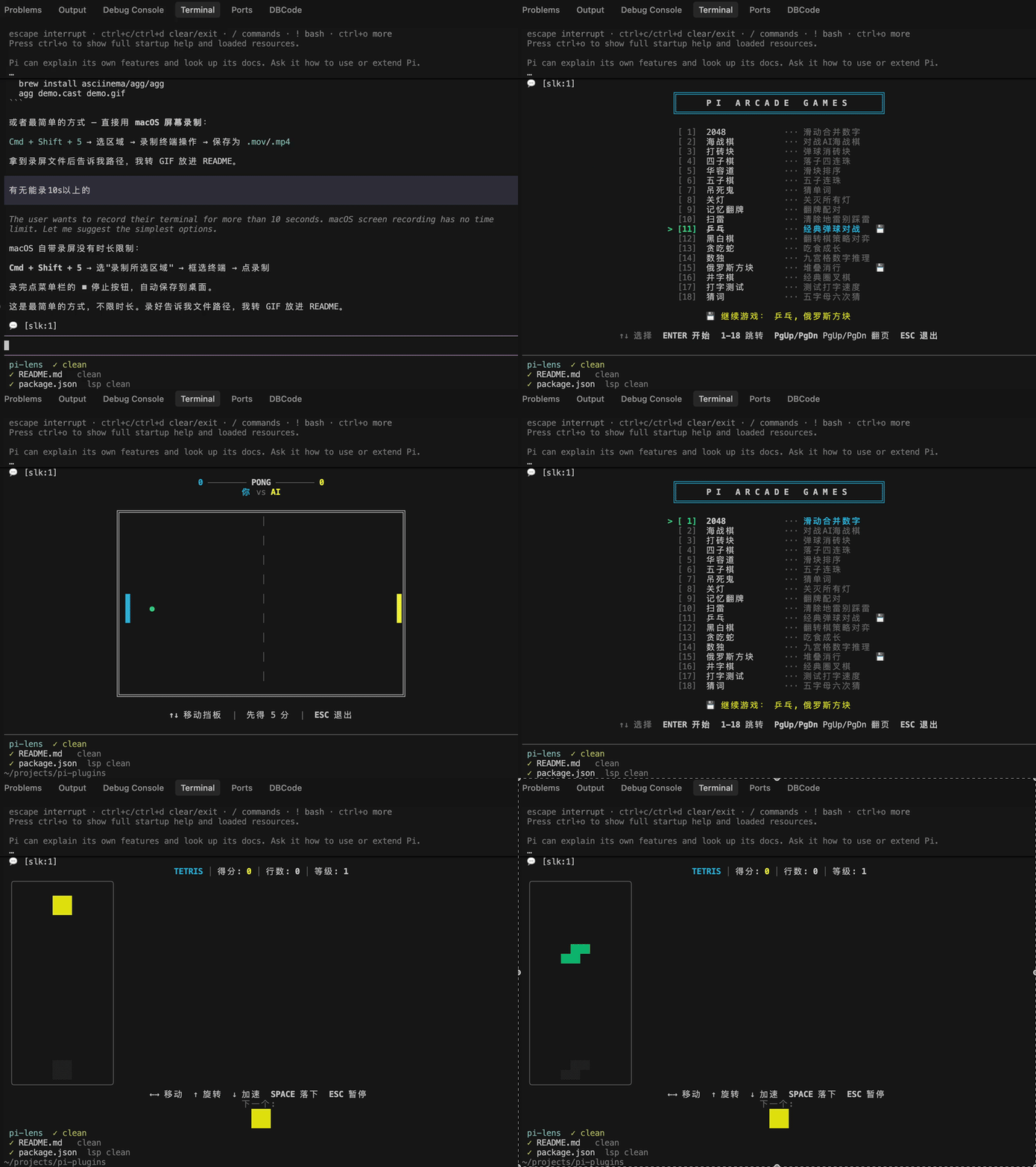
**17 games** built in — with bilingual (English / 中文) menu support and **auto-save**.
## 💾 Auto-Save
Every game automatically saves your progress when you exit. Come back anytime and pick up right where you left off.
```
╔════════════════════════════════════════╗
║ P I A R C A D E G A M E S ║
╚════════════════════════════════════════╝
▸ [1] 2048 ··· Slide & merge tiles
[2] Battleship ··· Naval combat vs AI
[3] Snake ··· Eat food, grow, don't crash 💾
💾 Continue: Snake
```
- **💾 badge** — appears next to games with saved progress
- **Continue prompt** — shows at the bottom so you can jump right back in
- **Per-game state** — each game stores its own save independently (score, board, position…)
Just select the game with 💾 and you're back in action. No manual saving needed.
## Games
| Game | Description |
| ------------------ | ------------------------------------------- |
| **2048** | Slide & merge tiles to reach 2048 |
| **Battleship** | Naval combat vs AI |
| **Breakout** | Break bricks with ball and paddle |
| **Connect Four** | Drop discs, get 4 in a row vs AI |
| **Hangman** | Guess the hidden word one letter at a time |
| **Lights Out** | Toggle all lights off |
| **Memory** | Flip & match card pairs |
| **Minesweeper** | Reveal cells, flag mines, clear the board |
| **Pong** | Classic paddle game, first to 5 wins |
| **Reversi** | Othello strategy game vs AI |
| **Snake** | Eat food, grow, don't crash |
| **Sliding Puzzle** | Arrange numbered tiles in order (3×3–5×5) |
| **Sudoku** | 9×9 number puzzle |
| **Tetris** | Stack & clear lines |
| **Tic-Tac-Toe** | Classic 3×3 grid, X vs O against the agent |
| **Typing Test** | Test your typing speed and accuracy |
| **Wordle** | 5-letter word, 6 guesses, position feedback |
## Install
### Pi Agent
```bash
pi install npm:pi-arcade-games
```
Or add to your Pi settings:
```json
{
"packages": ["pi-arcade-games"]
}
```
### Standalone CLI (npx)
Play directly in your terminal — no Pi agent needed:
```bash
npx pi-arcade-games # Show game menu
npx pi-arcade-games snake # Jump straight to a game
npx pi-arcade-games tetris # Play Tetris immediately
```
Saves are stored in `~/.pi-arcade/`.
Local install (for development)
```bash
pi install /path/to/pi-arcade-games
# or test without installing:
pi -e /path/to/pi-arcade-games
```
## Quick Start
1. Type `/game` in Pi to open the game menu
2. First launch picks your language (English / 中文) — remembered for next time
3. Pick a game with arrow keys + `ENTER` and start playing
4. Press `ESC` to quit — **your progress is auto-saved**
5. Open `/game` again to continue from where you left off
### Commands
| Command | Description |
| --------------------- | ----------------------------------- |
| `/game` | Open game selection menu |
| `/game-list` | List all games (shows 💾 for saves) |
| `/game-install ` | Install a game from a URL |
### Environment Variables
| Variable | Description |
| ----------------------- | ----------------------------------------------- |
| `PI_ARCADE_REGISTRY` | URL to a game registry JSON manifest |
| `PI_ARCADE_LOCAL_GAMES` | Colon-separated list of local game module paths |
## Controls
| Game | Controls |
| ------------------ | ----------------------------------------------- |
| **All** | `ESC` quit, `R` restart (after game over) |
| **2048** | Arrow keys to slide & merge |
| **Battleship** | Arrow keys + `ENTER` to place ships and fire |
| **Breakout** | ←→ to move paddle |
| **Connect Four** | ←→ to select column, `ENTER` to drop disc |
| **Hangman** | Type any letter to guess |
| **Lights Out** | Arrow keys + `ENTER` to toggle lights |
| **Memory** | Arrow keys + `SPACE` to flip cards |
| **Minesweeper** | Arrow keys to move, `ENTER` reveal, `F` flag |
| **Pong** | ↑↓ to move paddle |
| **Reversi** | Arrow keys to move, `ENTER` to place piece |
| **Snake** | Arrow keys or WASD |
| **Sliding Puzzle** | Arrow keys to slide tiles |
| **Sudoku** | Arrow keys, `1-9` to fill, `DEL` to clear |
| **Tetris** | Arrow keys, `SPACE` for hard drop |
| **Tic-Tac-Toe** | Arrow keys to move, `ENTER` to play |
| **Typing Test** | Just start typing! |
| **Wordle** | Type 5 letters + `ENTER` to submit |
## Tips
- Background long-running tasks with **Ctrl+B** before starting a game
- All games auto-save on exit — just re-open `/game` to continue
- After quitting a game, you return to the menu to pick another
## Writing Your Own Game 🛠️
Pi Arcade Games is designed to be extensible. Anyone can write a game and submit a PR!
**Quick overview:**
1. Create a `.ts` file in `extensions/games/builtin/`
2. Export a `GameModule` object with `meta` + `register()`
3. Implement a TUI `Component` with `render()`, `handleInput()`, `invalidate()`
4. Register a menu entry via `registerMenuEntry()`
👉 **See [CONTRIBUTING.md](./CONTRIBUTING.md)** for the full guide with a working template game.
## Build from Source
```bash
npm install
npm run build
```
## Architecture
```
pi-arcade-games/
├── extensions/
│ ├── arcade.ts # Main extension: menu, commands, /game
│ └── games/
│ ├── types.ts # GameModule interface
│ ├── ansi.ts # Shared ANSI styling helpers
│ ├── i18n.ts # Internationalization (en/zh)
│ ├── loader.ts # Game loader (builtin/remote/local)
│ └── builtin/ # 17 bundled games
│ ├── 2048.ts
│ ├── battleship.ts
│ ├── breakout.ts
│ ├── connect4.ts
│ ├── fifteen.ts # Sliding Puzzle
│ ├── hangman.ts
│ ├── lightsout.ts
│ ├── memory.ts
│ ├── minesweeper.ts
│ ├── pong.ts
│ ├── reversi.ts
│ ├── snake.ts
│ ├── sudoku.ts
│ ├── tetris.ts
│ ├── tictactoe.ts
│ ├── typing.ts
│ └── wordle.ts
├── skills/
│ └── games/SKILL.md # Pi skill documentation
├── tests/ # Test suite for each game
└── package.json
```
## License
MIT