# ✨ petdex-cc ✨
### Claude Code 桌面宠物伴侣
**住在屏幕上的动画宠物,实时响应你的每一次编码操作**
[](https://www.npmjs.com/package/petdex-cc)
[]()
[]()
[](./LICENSE)
[](https://petdex.crafter.run/zh)
[](https://github.com/devnomad-byte/petdex-cc/stargazers)
[🌐 English](./README.md) · [🇨🇳 中文文档](./README_CN.md)
---
---
🐾 **一条命令,唤醒你的专属宠物** 🐾
```bash
npm install -g petdex-cc
petdex-cc install boba
```
全局安装后,宠物立刻出现在桌面上,开始响应你的 Claude Code 操作 🎉
---
## 🌟 为什么选择 petdex-cc?
> **和 `npx petdex install` 有什么区别?**
>
> 原始的 `petdex` 命令提供基础宠物展示。`petdex-cc` 额外增加了**深度 Claude Code 集成** —— 通过 hooks 接入你的编码流程,包含等级成长系统、AI 生成语音、时段问候、互动特效。你的宠物不只是一个装饰,它*参与*你的编码过程。
|
🎯 **实时反应**
读文件、编辑代码、运行命令、完成任务、遇到错误时,宠物同步改变动画
|
🏆 **8 级成长体系**
Byte → Process → Thread → Module → Kernel → Neural → Quantum → Singularity
|
|
🤖 **AI 语音气泡**
基于 Claude 生成的上下文感知中文对话,无 API Key 时使用内置台词
|
🕐 **时段问候**
早上好、午安、下午茶、下班、晚安、凌晨问候
|
|
🎮 **互动体验**
拖拽宠物到任意位置、右键菜单、快速点击彩蛋
|
💾 **状态持久化**
等级和事件数重启不丢失(HMAC 签名防篡改)
|
---
## 🚀 快速开始
### 环境要求
- [Node.js](https://nodejs.org/) >= 18
- 已安装 [Claude Code](https://docs.anthropic.com/en/docs/claude-code)
### 安装
```bash
# 1. 浏览宠物 → https://petdex.crafter.run/zh
# 2. 看中哪只,记下它的 slug(比如 "boba")
# 3. 全局安装并配置宠物:
npm install -g petdex-cc
petdex-cc install boba
```
> **为什么要全局安装?** 全局安装后 `petdex-cc` 命令才能在任何终端使用(`petdex-cc start`、`petdex-cc stop` 等)。使用 `npx` 只能一次性安装,新终端窗口中无法直接调用 `petdex-cc` 命令。
>
> **开机自启:** `petdex-cc install` 会自动启用开机自启。如需关闭,运行 `petdex-cc autostart --disable`。
### 🐾 热门宠物
| Slug |
名称 |
描述 |
boba |
🦦 Boba |
喝着珍珠奶茶的小水獭 |
doraemon |
🐱 哆啦A梦 |
来自未来的蓝色机器猫 |
noir-webling |
🕷️ Noir Webling |
戴礼帽的单色蜘蛛侦探 |
ikun-hoops |
🏀 IKUN Hoops |
穿卫衣拿篮球的小鸡 |
ddo-zvzo |
😎 ddo-zvzo |
会戴墨镜的紫色吉祥物 |
mochi |
🐱 Mochi |
橘白色可爱小猫 |
> 浏览全部 1,569+ 款宠物 → [**petdex.crafter.run/zh**](https://petdex.crafter.run/zh) 🎨
🌏 国内用户加速(必看)
首次安装需要下载 Electron 二进制文件(~100MB),默认从 GitHub 下载,国内可能很慢或无法访问。安装前配置国内镜像:
```bash
# 全局安装(使用官方 registry 确保获取最新版本)
npm install -g petdex-cc --registry https://registry.npmjs.org
petdex-cc install boba
```
🔧 常见问题
**`ERR_MODULE_NOT_FOUND: Cannot find package '@electron/remote'`**
这是 0.1.6 之前版本的 bug。更新到最新版即可:
```bash
npm uninstall -g petdex-cc
npm install -g petdex-cc
petdex-cc install boba
```
**`EPERM` / `EBUSY` 文件被锁**
宠物进程仍在运行,锁住了文件。先停止宠物:
```bash
# Windows PowerShell
Stop-Process -Name electron -Force -ErrorAction SilentlyContinue
# macOS / Linux
pkill -f electron
# 然后重新安装
npm install -g petdex-cc
petdex-cc install boba
```
**安装时 `ECONNRESET` / `ETIMEDOUT`**
Electron 无法从 GitHub 下载。请配置国内镜像(见上方「国内用户加速」)。
**`Cannot find module 'auto-launch'`**
npm 镜像源缓存了旧版本,缺少依赖。从官方 registry 安装即可:
```bash
npm uninstall -g petdex-cc
npm install -g petdex-cc --registry https://registry.npmjs.org
```
---
## 🎬 你的宠物会做什么
Claude Code 的每一次操作都会触发宠物反应:
| Claude Code 事件 | 宠物动画 | 语音气泡 |
|---|---|---|
| 🟢 会话开始 | 挥手 👋 | "Let's get to work!" |
| 📖 读取文件 | 审视 🔍 | "Reading 文件名..." |
| ✏️ 编辑文件 | 待机 | "Edited 文件名" |
| ▶️ 运行命令 | 奔跑 🏃 | "Running command..." |
| 🔍 搜索文件 | 等待 ⏳ | "Searching..." |
| ❌ 工具失败 | 垂头 😢 | "Oops, something went wrong" + AI 鼓励 |
| ✅ 任务完成 | 跳跃 🎉 | "Task complete!" + AI 庆祝 |
| 🛑 Claude 停止 | 跳跃 | "Task complete!"(60% 概率触发 AI) |
| ⚠️ Claude 报错 | 垂头 | 错误信息 + AI 安慰 |
| 💤 空闲 10+ 分钟 | 挥手 | 时段问候(中文) |
| ⬆️ 等级提升 | 当前状态 | "Level up! Kernel!" + 特效激活 |
### 🎮 互动操作
| 操作 | 效果 |
|---|---|
| **拖拽** | 点击拖动宠物到屏幕任意位置 |
| **右键** | 上下文菜单:显示/隐藏、关于、退出 |
| **系统托盘** | 右下角任务栏图标 |
| **彩蛋** | 快速连续点击,触发递进式反应(2→4→6→9→12→15 次) |
---
## 🏆 等级系统
你的宠物随你的编码而成长,每次 Claude Code 操作算一次事件,累积升级:
| 等级 | 名称 | 所需事件数 | | 视觉效果 |
|:---:|---|---:|---|---|
| 1 | **Byte** | 0 | ⚪ 基础宠物 |
| 2 | **Process** | 50 | 🟢 呼吸式发光 |
| 3 | **Thread** | 200 | 🔵 旋转光环 |
| 4 | **Module** | 500 | 🟣 增强光环 |
| 5 | **Kernel** | 1,000 | 🟡 漂浮光点粒子 |
| 6 | **Neural** | 2,000 | 🩷 粒子风暴 |
| 7 | **Quantum** | 5,000 | 🩵 能量场 |
| 8 | **Singularity** | 10,000 | 🌟 金色光环 + 全部特效 |
---
## 🤖 AI 语音
当 Anthropic API Key 可用时(自动从 Claude Code 设置读取),宠物会生成**上下文感知的中文语音**:
| 场景 | 触发时机 | AI 生成示例 |
|---|---|---|
| `task_complete` | 任务完成 | "做得好!继续加油!" |
| `error` | 工具失败 | "别担心,bugs难免的~" |
| `idle` | 空闲超过 10 分钟 | "还在吗?" |
| `level_up` | 等级跨越阈值 | "升级啦!太厉害了!" |
- **2 分钟冷却** —— 连续 AI 调用间隔(升级时自动跳过冷却)
- **5 秒超时** —— API 响应超过 5 秒自动回退到预设台词
- **没有 API Key?** 内置预设台词完全够用 —— 7 条任务、5 条错误、5 条空闲、4 条升级
---
## 📋 命令参考
```bash
petdex-cc install # 下载宠物、配置 hooks、启动
petdex-cc start # 启动桌面宠物
petdex-cc stop # 优雅停止宠物
petdex-cc list # 浏览 Petdex 宠物库
petdex-cc switch # 运行时切换宠物(自动下载)
petdex-cc status # 查看宠物名称、等级、事件数、运行状态
petdex-cc update # 更新到最新版本
petdex-cc uninstall # 移除 hooks、停止宠物、删除所有数据
petdex-cc autostart # 查看开机自启状态
petdex-cc autostart --enable # 启用开机自启(安装时默认启用)
petdex-cc autostart --disable # 关闭开机自启
petdex-cc config [选项] # 配置设置
```
⚙️ 配置选项
```bash
petdex-cc config --api-key # Anthropic API Key(用于 AI 语音)
petdex-cc config --api-base-url # API 基础 URL
petdex-cc config --cooldown <分钟> # AI 调用冷却时间(默认 2 分钟)
```
> API 凭据会自动从 `~/.claude/settings.json` 读取,大多数用户无需手动配置。
---
## 🏗️ 架构设计
```
┌─────────────────────────────────────────────────┐
│ Claude Code │
│ (工具调用、任务完成、错误、空闲等事件) │
└──────────┬─────────────────────────┬────────────┘
│ hooks │ statusline
▼ ▼
┌──────────────────┐ ┌───────────────────────┐
│ bridge.ps1/.sh │ │ statusline-bridge.ps1 │
└────────┬─────────┘ └──────────┬────────────┘
│ HTTP POST /event │ HTTP POST /statusline
▼ ▼
┌─────────────────────────────────────────────────┐
│ petdex-cc(Electron 主进程) │
│ │
│ ┌──────────────┐ ┌──────────┐ ┌────────────┐ │
│ │ event-mapper │ │ storage │ │ ai-speech │ │
│ │ 事件 → 动作 │ │ 等级、XP │ │ Claude Haiku│ │
│ └──────┬───────┘ └─────┬────┘ └─────┬──────┘ │
│ │ │ │ │
│ └─────────┬───────┘ │ │
│ ▼ │ │
│ ┌─────────────────┐ │ │
│ │ IPC → 渲染窗口 │◀─────────────┘ │
│ └────────┬────────┘ │
└──────────────────┼──────────────────────────────────┘
▼
┌──────────────────┐
│ 宠物窗口(HTML) │ 透明、始终置顶
│ │
│ ┌─── sprite ───┐ │ 9 种动画状态
│ │ 气泡 │ │ 3s / 8s 自动消失
│ │ token 计数 │ │ 实时 token 用量
│ │ 等级徽章 │ │ 等级标签 + 颜色
│ │ 特效 │ │ 光晕/光环/粒子/光环
│ └──────────────┘ │
└──────────────────┘
```
📁 项目结构
```
petdex-cc/
├── bin/cli.ts CLI 入口(8 个命令)
├── src/
│ ├── main/ Electron 主进程
│ │ ├── index.ts 窗口创建、事件循环、IPC
│ │ ├── server.ts HTTP 服务器(hooks → 宠物,端口 17321)
│ │ ├── ai-speech.ts AI 语音(Anthropic Messages API)
│ │ ├── storage.ts HMAC 签名状态持久化
│ │ ├── tray.ts 系统托盘(像素猫脸图标)
│ │ └── event-mapper.ts 8 种 hook 事件 → 宠物动作
│ ├── renderer/ Electron 渲染进程(宠物 UI)
│ │ ├── index.html 透明窗口 + CSS 特效
│ │ ├── renderer.ts IPC 协调 + 等级特效
│ │ ├── pet-sprite.ts 9 状态精灵图引擎
│ │ ├── bubble.ts 语音气泡系统
│ │ ├── click-through.ts 透明点击穿透
│ │ ├── drag.ts 拖拽 + 点击彩蛋
│ │ └── context-menu.ts 右键菜单
│ ├── cli/ CLI 命令实现
│ ├── hooks/ Claude Code hooks 注册
│ ├── petdex-api/ Petdex 注册中心客户端
│ └── shared/ 共享类型和常量
```
---
## 🔧 开发者安装
```bash
git clone https://github.com/devnomad-byte/petdex-cc.git
cd petdex-cc
npm install
npm run build
# 开发模式启动
npx electron .
# 全局安装使用 CLI
npm link
petdex-cc install boba
```
---
## ⚙️ 配置参考
自动检测配置
petdex-cc 自动从 `~/.claude/settings.json` 读取以下配置:
| 配置项 | 用途 |
|---|---|
| `ANTHROPIC_AUTH_TOKEN` | AI 语音的 API Key |
| `ANTHROPIC_BASE_URL` | AI 语音的 API 端点 |
数据目录
| 路径 | 内容 |
|---|---|
| `~/.petdex-cc/pets//` | 下载的精灵图 + pet.json |
| `~/.petdex-cc/data/state.json` | 等级、事件数、宠物 slug(HMAC 签名) |
| `~/.petdex-cc/data/state.sig` | HMAC-SHA256 签名 |
| `~/.petdex-cc/hooks/` | Bridge 脚本 |
| `~/.petdex-cc/config.json` | 用户配置(API Key、冷却时间) |
---
## 🪝 Hooks 参考
| Hook | 匹配器 | 触发时机 |
|---|---|---|
| `PostToolUse` | `Read\|Edit\|Write\|Bash\|Glob\|Grep` | 工具调用之后 |
| `PostToolUseFailure` | — | 工具调用失败时 |
| `Stop` | — | Claude 完成响应时 |
| `StopFailure` | — | Claude 停止并报错时 |
| `Notification` | `idle_prompt` | 空闲通知 |
| `SessionStart` | `startup\|resume` | Claude Code 启动或恢复时 |
| `SessionEnd` | — | Claude Code 会话结束时 |
| `TaskCompleted` | — | 任务标记完成时 |
---
## 🗺️ 后续计划
- [ ] 支持 Cursor
- [ ] 支持 Windsurf
- [ ] 支持 GitHub Copilot
- [ ] 更多宠物互动动作
- [ ] 宠物换装系统
---
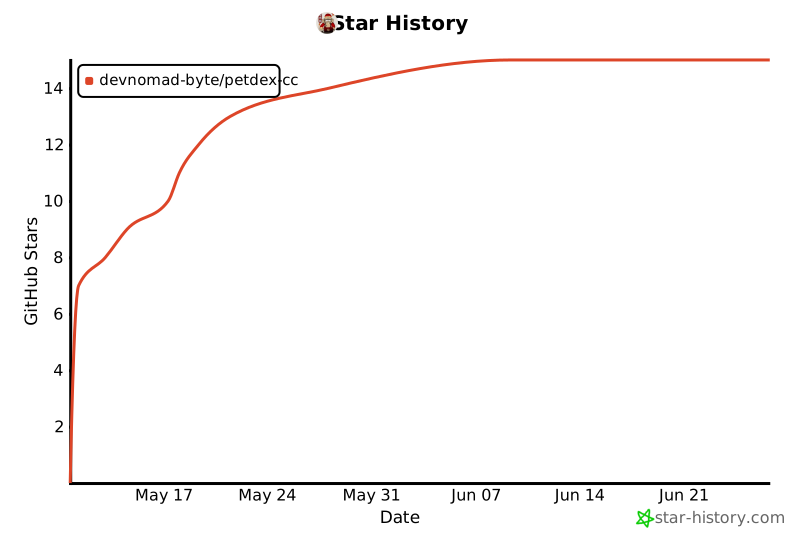
## ⭐ Star 趋势
## 📄 许可证
[MIT](./LICENSE)
为 [Claude Code](https://docs.anthropic.com/en/docs/claude-code) 社区用心打造 💜
宠物来自 [**Petdex**](https://petdex.crafter.run/zh) · 1,569+ 款社区宠物,持续更新中
