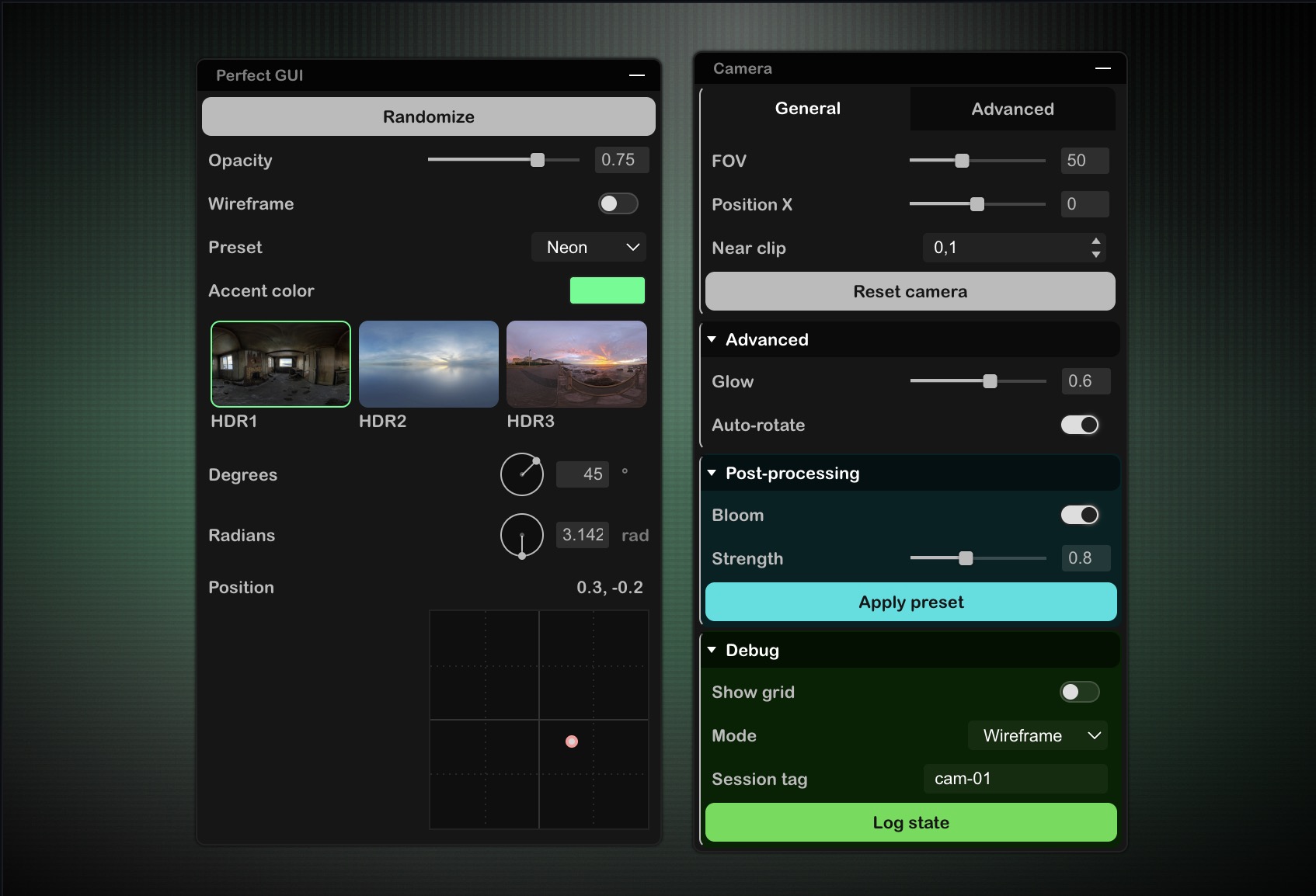
## Features
- **Simplicity first**: Extremely easy to setup and use, inspired by timeless classics like `dat.gui` and `lil.gui`.
- **Modern UI**: Clean, customizable, and polished design right out of the box.
- **Rich Inputs**: Support for sliders, buttons, color pickers, vectors, images, lists, and toggles.
- **Folders**: Easily group and organize your controls in collapsible sections.
- **Tabs**: Create tabbed interfaces to organize content in separate panels.
- **Draggable & Auto-positioned**: Snap it to screen edges or let the user drag it anywhere.
- **Data Binding**: Automatically sync your controls with object properties.
- **Zero Dependencies**: Lightweight and built with vanilla JavaScript.
## Installation
**With NPM:**
```bash
npm i perfect-gui
```
**From a CDN (ES Modules):**
For a quick setup without build tools, use an import map:
```html
```
## Quick Start
Creating a control panel is as simple as instantiating the GUI and adding some components:
```javascript
import GUI from 'perfect-gui';
// 1. Create a new GUI instance
const gui = new GUI();
// 2. Add a simple button
gui.button({
label: 'Click me'
}).onClick(() => {
console.log('Button clicked!');
});
// 3. Add a slider connected to an object value natively
const settings = { opacity: 0.5 };
gui.slider(settings, 'opacity').onChange(val => {
document.body.style.opacity = val;
});
```
## Configuration Options
You can customize the GUI by passing an options object to the constructor:
```javascript
const gui = new GUI({
label: 'My GUI', // Name of the panel (default: null)
container: '#container', // Element containing the GUI (default: document.body)
width: 250, // Width of the panel in pixels (default: 290)
maxHeight: 500, // Max height beyond which scrolling is necessary
closed: false, // Start closed? (default: false)
position: 'bottom right', // Position ('top', 'bottom', 'left', 'right')
draggable: false, // Can it be manually moved? (default: false)
autoRepositioning: true, // Reset position on window resize? (default: true)
color: '#bada55', // Accent color
onUpdate: () => {
// Callback function triggered each time any GUI instance is updated
},
});
```
## API / Available Components
See the [Documentation](https://thibka.github.io/perfect-gui/dist/) for a comprehensive list of properties and usage.
| Method | Description |
| --- | --- |
| [`button(options)`](https://thibka.github.io/perfect-gui/dist/#method-button) | Adds a clickable button. |
| [`slider(obj, prop, options)`](https://thibka.github.io/perfect-gui/dist/#method-slider) | Numeric slider bound to `obj[prop]`. |
| [`number(obj, prop, options)`](https://thibka.github.io/perfect-gui/dist/#method-number) | Plain numeric input (no slider) bound to `obj[prop]`. |
| [`text(obj, prop, options)`](https://thibka.github.io/perfect-gui/dist/#method-text) | Free text input bound to `obj[prop]`. |
| [`toggle(obj, prop, options)`](https://thibka.github.io/perfect-gui/dist/#method-toggle) | Boolean checkbox bound to `obj[prop]`. |
| [`list(obj, prop, values, options)`](https://thibka.github.io/perfect-gui/dist/#method-list) | Dropdown to select a value from a list, bound to `obj[prop]`. |
| [`image(path, options)`](https://thibka.github.io/perfect-gui/dist/#method-image) | Displays an image inside the panel. |
| [`color(obj, prop, options)`](https://thibka.github.io/perfect-gui/dist/#method-color) | Color picker bound to `obj[prop]`. |
| [`vector2(obj, propX, propY, options)`](https://thibka.github.io/perfect-gui/dist/#method-vector2) | 2D pad bound to `obj[propX]` and `obj[propY]`. |
| [`angle(obj, prop, options)`](https://thibka.github.io/perfect-gui/dist/#method-angle) | Rotary angle control bound to `obj[prop]`. |
| [`folder(options)`](https://thibka.github.io/perfect-gui/dist/#method-folder) | Collapsible group of controls. |
| [`tabs(options)`](https://thibka.github.io/perfect-gui/dist/#method-tabs) | Tabbed panels to organize controls. |
| [`toggleClose()`](https://thibka.github.io/perfect-gui/dist/#method-toggleclose) | Programmatically expands or collapses the panel. |
| [`kill()`](https://thibka.github.io/perfect-gui/dist/#method-kill) | Destroys the GUI instance and removes its listeners. |