<div align="center">

<img src="https://cdn.jsdelivr.net/npm/pan-wizard@latest/assets/pan-readme-hero.png" alt="PanWizard — context engineering that makes AI coding reliable" width="820" />

# PanWizard

**Command a bot army for your codebase** — an Opus *Mission Control* delegates whole-project goals to specialist squads and ships behind a human merge gate. Five AI CLIs, zero context rot.

**Solves context rot** — the quality degradation that happens as the model fills its context window.

[![npm version](https://img.shields.io/npm/v/pan-wizard?style=for-the-badge&color=FF5A3C&labelColor=211E18)](https://www.npmjs.com/package/pan-wizard)

[![npm downloads](https://img.shields.io/npm/dm/pan-wizard?style=for-the-badge&color=5B4BE6&labelColor=211E18)](https://www.npmjs.com/package/pan-wizard)

[![License](https://img.shields.io/badge/license-MIT-1E8E5A?style=for-the-badge&labelColor=211E18)](LICENSE)

<br>

```bash
npx pan-wizard@latest
```

**Works on Mac, Windows, and Linux.**
<br>

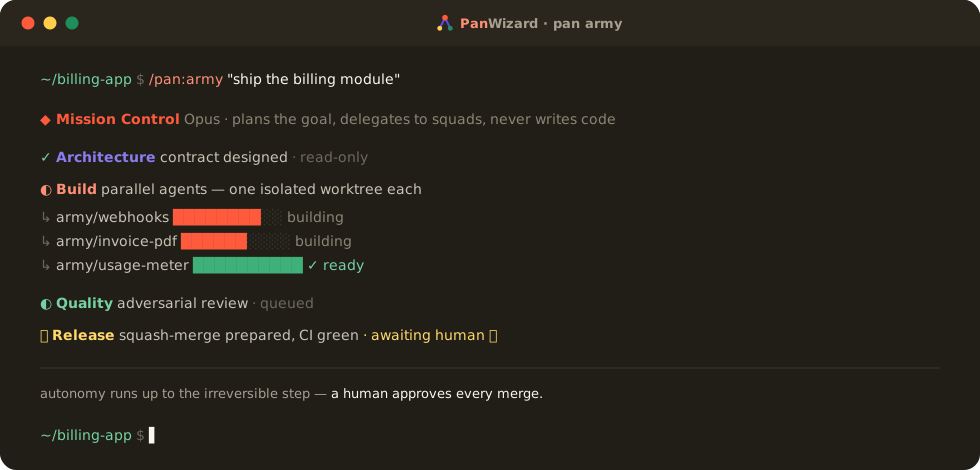
![PanWizard bot army — Mission Control delegating to squads, builders in isolated worktrees, human-gated merge](https://cdn.jsdelivr.net/npm/pan-wizard@latest/assets/terminal.svg)

<br>

[How It Works](#how-it-works) · [Commands](#commands) · [Why It Works](#why-it-works) · [User Guide](docs/USER-GUIDE.md) · [FAQ](docs/FAQ.md)

</div>

---

## What is PAN Wizard?

PAN (Project Automation Navigator) is a structured workflow system that helps you build software projects with AI coding assistants. The complexity is in the system, not in your workflow. Behind the scenes: context engineering, XML prompt formatting, subagent orchestration, state management. What you see: a few commands that just work.

The system gives Claude everything it needs to do the work *and* verify it. Describe your idea, let the system extract everything it needs to know, and let Claude Code get to work.

PAN is the context engineering layer that makes Claude Code reliable. It breaks work into phases that fit within context limits, provides specialized agents with exactly the context they need, and maintains state across sessions.

### Architecture

```
┌─────────────────────────────────────────────────────────────┐
│  YOU                                                        │
│  /pan:new-project → /pan:plan-phase → /pan:exec-phase    │
└─────────────────────┬───────────────────────────────────────┘
                      │ invokes
┌─────────────────────▼───────────────────────────────────────┐
│  COMMANDS (.md files + CLI operations)                      │
│  Thin orchestrators that spawn agents and route results     │
└─────────────────────┬───────────────────────────────────────┘
                      │ spawns
┌─────────────────────▼───────────────────────────────────────┐
│  AGENTS (specialized)                                       │
│  planner · executor · verifier · researcher · debugger ...  │
│  Each runs in fresh 200K context window                     │
└─────────────────────┬───────────────────────────────────────┘
                      │ uses
┌─────────────────────▼───────────────────────────────────────┐
│  CORE LIBRARY (pan-wizard-core/)                            │
│  config · state · init · verify · commit · phase-utils      │
│  Cross-platform CLI tools, zero runtime dependencies        │
└─────────────────────┬───────────────────────────────────────┘
                      │ reads/writes
┌─────────────────────▼───────────────────────────────────────┐
│  .planning/                                                 │
│  project.md · roadmap.md · state.md · PLAN files            │
│  Persistent state that survives context resets              │
└─────────────────────────────────────────────────────────────┘
```

---

## Bot Army

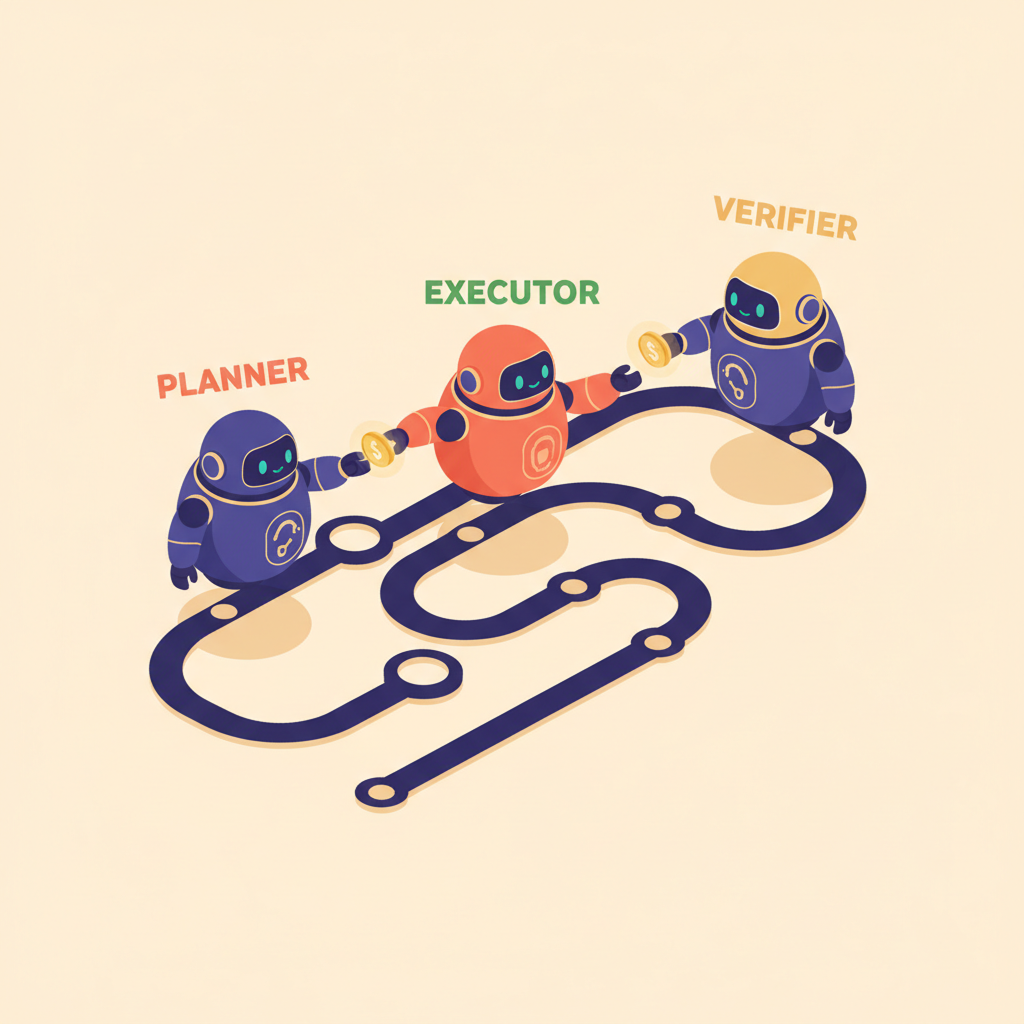
> **Don't run one phase — run the whole project.** `/pan:army` turns PAN's agents into a coordinated army that delivers a goal end-to-end: an Opus **Mission Control** plans the mission and delegates to specialist **squads**, parallel builders each work an isolated git worktree, and **nothing reaches your main branch without green checks and your explicit approval.**

<div align="center">
<img src="https://cdn.jsdelivr.net/npm/pan-wizard@latest/assets/pan-orchestration.png" alt="PanWizard specialist agents orchestrated along a pipeline" width="340" />
</div>

| Tier | Squad | Does | Access |
|------|-------|------|--------|
| **0 · Mission Control** | `pan-conductor` (Opus) | Plans + delegates. Never writes code. | delegation-only |
| **1 · Architecture** | roadmapper · planner · researchers | Designs the contract before code | read-only |
| **1 · Build** | `pan-executor` | Turns the contract into committed code | read / write · one `army/<task>` worktree per agent |
| **1 · Quality** | reviewer · hardener · verifier · … | Adversarially tries to break it | read-only |
| **1 · Release** | `pan-release` | Ships behind a human gate | always-ask |
| **2 · Workers** | document_code · distiller | Narrow, high-volume jobs | scoped |

**The loop:** `Muster → Plan → Delegate → Execute → Review → Integrate → Learn` ↺ — repeating until the goal ships or a stop condition fires.

**Bounded by a hard safety harness:**

- **A human merges. Always.** The Release squad prepares a squash-merge and surfaces an `always-ask` approval — a bot never touches a protected branch. Recovery is `git revert` or the previous tag, never a force-push.
- **Isolated builders.** Each Build agent forks its own `army/<task>` branch + git worktree, so parallel agents never share a file.
- **Caps that don't relax.** Delegation-depth cap, per-cycle spawn + budget ceilings, and a `.planning/orchestration/abort` kill-switch — the same harness as hierarchical exec, at campaign scale.

**Run it over days.** `--schedule` arms a self-resuming campaign with a per-day budget that burns the backlog down across sessions — and *still* waits for you at every merge. **Autonomy runs up to the irreversible step; a human is at the step.**

**Watch it live.** `/pan:hud` renders a single self-contained HTML dashboard — Mission Control over the squads, in-flight worktrees, campaign budget, telemetry, and the safety harness — in one page.

```bash
/pan:army "ship the v1 reporting module"     # plan → delegate → build → review → human-gated ship
/pan:army "harden auth across the app" --schedule daily --daily-budget 200
/pan:army --status        # where the campaign stands
/pan:hud --open           # watch the army work, live
```

Resolve the live squad roster any time with `pan-tools squad list`.

---

## Who This Is For

People who want to describe what they want and have it built correctly — without managing complex project management overhead.

---

## Getting Started

```bash
npx pan-wizard@latest
```

The installer prompts you to choose:
1. **Runtime** — Claude Code, OpenCode, Gemini, Codex, Copilot CLI, or all
2. **Location** — Global (all projects) or local (current project only)

Verify with:
- Claude Code / Gemini: `/pan:help`
- OpenCode / Copilot CLI: `/pan-help`
- Codex: `$pan-help`

> [!NOTE]
> Codex and Copilot CLI installations use skills (`skills/pan-*/SKILL.md`) rather than custom prompts.

### Staying Updated

PAN evolves fast. Update periodically:

```bash
npx pan-wizard@latest
```

<details>
<summary><strong>Non-interactive Install (Docker, CI, Scripts)</strong></summary>

```bash
# Claude Code
npx pan-wizard --claude --global   # Install to ~/.claude/
npx pan-wizard --claude --local    # Install to ./.claude/

# OpenCode (open source, free models)
npx pan-wizard --opencode --global # Install to ~/.config/opencode/

# Gemini CLI (enterprise — see note below)
npx pan-wizard --gemini --global   # Install to ~/.gemini/

# Codex (skills-first)
npx pan-wizard --codex --global    # Install to ~/.codex/
npx pan-wizard --codex --local     # Install to ./.codex/

# GitHub Copilot CLI (skills-first)
npx pan-wizard --copilot --global  # Install to ~/.copilot/
npx pan-wizard --copilot --local   # Install to ./.github/

# All runtimes
npx pan-wizard --all --global      # Install to all directories
```

Use `--global` (`-g`) or `--local` (`-l`) to skip the location prompt.
Use `--claude`, `--opencode`, `--gemini`, `--codex`, `--copilot`, or `--all` to skip the runtime prompt.
Add `--unified-skills` to install commands as one shared `.agents/skills/` tree read natively by every runtime (and Antigravity CLI) instead of per-runtime formats — see the User Guide for details.

> **Gemini CLI note:** from June 18, 2026, Google's Gemini CLI serves Gemini Code Assist (Standard/Enterprise) customers; individual free / AI Pro / Ultra accounts are directed to Antigravity CLI instead. PAN's `--gemini` target installs for Gemini CLI. Antigravity CLI is not yet a PAN install target, but it reads the shared `.agents/skills/` tree natively — install with `--unified-skills` and PAN's commands are usable from Antigravity in the same project.

</details>

<details>
<summary><strong>Development Installation</strong></summary>

Clone the repository and run the installer locally:

```bash
git clone https://github.com/oharms/PanWizard.git
cd PanWizard
node bin/install.js --claude --local
```

Installs to `./.claude/` for testing modifications before contributing.

```bash
npm test                # Unit tests
npm run test:scenarios  # Scenario tests
npm run test:all        # All tests (unit + scenario)
```

</details>

<details>
<summary><strong>Experimental: ZCode support (preview) — ZCode is beta</strong></summary>

**PAN-Z** is an experimental, separate subsystem that brings the PAN workflow to
[ZCode](https://zcode.z.ai), z.ai's GLM coding-agent harness. ZCode has no
slash-commands or hooks to host PAN directly, so PAN-Z instead exposes PAN's engine to
ZCode over **MCP**: PAN's agents become ZCode subagents, and the deterministic engine —
including a model-proof human merge gate — is reached as MCP tools.

> **ZCode is beta**, and its on-disk formats change frequently. PAN-Z is a **preview**:
> two facts (whether a subagent can call MCP tools, and whether local MCP calls are
> metered) can only be confirmed on a live ZCode install. See
> [`pan-zcode/README.md`](pan-zcode/README.md) and
> [`pan-zcode/KNOWN-BETA-RISKS.md`](pan-zcode/KNOWN-BETA-RISKS.md).

```bash
# From an installed pan-wizard package, build the ZCode bundle into a target dir
node "$(npm root -g)/pan-wizard/pan-zcode/bin/install-zcode.js" --target ./zcode-bundle
# then finish setup inside ZCode per the generated INSTALL-ZCODE.md
```

</details>

### Recommended: Skip Permissions Mode

PAN is designed for frictionless automation. Run Claude Code with:

```bash
claude --dangerously-skip-permissions
```

> [!TIP]
> This is how PAN is intended to be used — stopping to approve `date` and `git commit` 50 times defeats the purpose.

<details>
<summary><strong>Alternative: Granular Permissions</strong></summary>

If you prefer not to use that flag, add this to your project's `.claude/settings.json`:

```json
{
  "permissions": {
    "allow": [
      "Bash(date:*)",
      "Bash(echo:*)",
      "Bash(cat:*)",
      "Bash(ls:*)",
      "Bash(mkdir:*)",
      "Bash(wc:*)",
      "Bash(head:*)",
      "Bash(tail:*)",
      "Bash(sort:*)",
      "Bash(grep:*)",
      "Bash(tr:*)",
      "Bash(git add:*)",
      "Bash(git commit:*)",
      "Bash(git status:*)",
      "Bash(git log:*)",
      "Bash(git diff:*)",
      "Bash(git tag:*)"
    ]
  }
}
```

</details>

---

## How It Works

> **Already have code?** Run `/pan:map-codebase` first. It spawns parallel agents to analyze your stack, architecture, conventions, and concerns. Then `/pan:new-project` knows your codebase — questions focus on what you're adding, and planning automatically loads your patterns.

### 1. Initialize Project

```
/pan:new-project
```

One command, one flow. The system:

1. **Questions** — Asks until it understands your idea completely (goals, constraints, tech preferences, edge cases)
2. **Research** — Spawns parallel agents to investigate the domain (optional but recommended)
3. **Requirements** — Extracts what's v1, v2, and out of scope
4. **Roadmap** — Creates phases mapped to requirements

You approve the roadmap. Now you're ready to build.

**Creates:** `project.md`, `requirements.md`, `roadmap.md`, `state.md`, `.planning/research/`

---

### 2. Discuss Phase

```
/pan:discuss-phase 1
```

**This is where you shape the implementation.**

Your roadmap has a sentence or two per phase. That's not enough context to build something the way *you* imagine it. This step captures your preferences before anything gets researched or planned.

The system analyzes the phase and identifies gray areas based on what's being built:

- **Visual features** → Layout, density, interactions, empty states
- **APIs/CLIs** → Response format, flags, error handling, verbosity
- **Content systems** → Structure, tone, depth, flow
- **Organization tasks** → Grouping criteria, naming, duplicates, exceptions

For each area you select, it asks until you're satisfied. The output — `context.md` — feeds directly into the next two steps:

1. **Researcher reads it** — Knows what patterns to investigate ("user wants card layout" → research card component libraries)
2. **Planner reads it** — Knows what decisions are locked ("infinite scroll decided" → plan includes scroll handling)

The deeper you go here, the more the system builds what you actually want. Skip it and you get reasonable defaults. Use it and you get *your* vision.

**Creates:** `{phase_num}-context.md`

---

### 3. Plan Phase

```
/pan:plan-phase 1
```

The system:

1. **Researches** — Investigates how to implement this phase, guided by your context.md decisions
2. **Plans** — Creates 2-3 atomic task plans with XML structure
3. **Verifies** — Checks plans against requirements, loops until they pass

Each plan is small enough to execute in a fresh context window. No degradation, no "I'll be more concise now."

**Creates:** `{phase_num}-research.md`, `{phase_num}-{N}-plan.md`

---

### 4. Execute Phase

```
/pan:exec-phase 1
```

The system:

1. **Runs plans in waves** — Parallel where possible, sequential when dependent
2. **Fresh context per plan** — 200k tokens purely for implementation, zero accumulated garbage
3. **Commits per task** — Every task gets its own atomic commit
4. **Verifies against goals** — Checks the codebase delivers what the phase promised

Walk away, come back to completed work with clean git history.

**How Wave Execution Works:**

Plans are grouped into "waves" based on dependencies. Within each wave, plans run in parallel. Waves run sequentially.

```
┌─────────────────────────────────────────────────────────────────────┐
│  PHASE EXECUTION                                                     │
├─────────────────────────────────────────────────────────────────────┤
│                                                                      │
│  WAVE 1 (parallel)          WAVE 2 (parallel)          WAVE 3       │
│  ┌─────────┐ ┌─────────┐    ┌─────────┐ ┌─────────┐    ┌─────────┐ │
│  │ Plan 01 │ │ Plan 02 │ →  │ Plan 03 │ │ Plan 04 │ →  │ Plan 05 │ │
│  │         │ │         │    │         │ │         │    │         │ │
│  │ User    │ │ Product │    │ Orders  │ │ Cart    │    │ Checkout│ │
│  │ Model   │ │ Model   │    │ API     │ │ API     │    │ UI      │ │
│  └─────────┘ └─────────┘    └─────────┘ └─────────┘    └─────────┘ │
│       │           │              ↑           ↑              ↑       │
│       └───────────┴──────────────┴───────────┘              │       │
│              Dependencies: Plan 03 needs Plan 01            │       │
│                          Plan 04 needs Plan 02              │       │
│                          Plan 05 needs Plans 03 + 04        │       │
│                                                                      │
└─────────────────────────────────────────────────────────────────────┘
```

**Why waves matter:**
- Independent plans → Same wave → Run in parallel
- Dependent plans → Later wave → Wait for dependencies
- File conflicts → Sequential plans or same plan

This is why "vertical slices" (Plan 01: User feature end-to-end) parallelize better than "horizontal layers" (Plan 01: All models, Plan 02: All APIs).

**Creates:** `{phase_num}-{N}-summary.md`, `{phase_num}-verification.md`

---

### 5. Verify Work

```
/pan:verify-phase 1
```

**This is where you confirm it actually works.**

Automated verification checks that code exists and tests pass. But does the feature *work* the way you expected? This is your chance to use it.

The system:

1. **Extracts testable deliverables** — What you should be able to do now
2. **Walks you through one at a time** — "Can you log in with email?" Yes/no, or describe what's wrong
3. **Diagnoses failures automatically** — Spawns debug agents to find root causes
4. **Creates verified fix plans** — Ready for immediate re-execution

If everything passes, you move on. If something's broken, you don't manually debug — you just run `/pan:exec-phase` again with the fix plans it created.

**Creates:** `{phase_num}-uat.md`, fix plans if issues found

---

### 6. Repeat → Complete → Next Milestone

```
/pan:discuss-phase 2
/pan:plan-phase 2
/pan:exec-phase 2
/pan:verify-phase 2
...
/pan:milestone-done
/pan:milestone-new
```

Loop **discuss → plan → execute → verify** until milestone complete.

Each phase gets your input (discuss), proper research (plan), clean execution (execute), and human verification (verify). Context stays fresh. Quality stays high.

When all phases are done, `/pan:milestone-done` archives the milestone and tags the release.

Then `/pan:milestone-new` starts the next version — same flow as `new-project` but for your existing codebase. You describe what you want to build next, the system researches the domain, you scope requirements, and it creates a fresh roadmap. Each milestone is a clean cycle: define → build → ship.

---

### Quick Mode

```
/pan:quick
```

**For ad-hoc tasks that don't need full planning.**

Quick mode gives you PAN guarantees (atomic commits, state tracking) with a faster path:

- **Same agents** — Planner + executor, same quality
- **Skips optional steps** — No research, no plan checker, no verifier
- **Separate tracking** — Lives in `.planning/quick/`, not phases

Use for: bug fixes, small features, config changes, one-off tasks.

```
/pan:quick
> What do you want to do? "Add dark mode toggle to settings"
```

**Creates:** `.planning/quick/001-add-dark-mode-toggle/plan.md`, `summary.md`

---

## Why It Works

### Context Engineering

Claude Code is incredibly powerful *if* you give it the context it needs. Most people don't.

PAN handles it for you:

| File | What it does |
|------|--------------|
| `project.md` | Project vision, always loaded |
| `research/` | Ecosystem knowledge (stack, features, architecture, pitfalls) |
| `requirements.md` | Scoped v1/v2 requirements with phase traceability |
| `roadmap.md` | Where you're going, what's done |
| `state.md` | Decisions, blockers, position — memory across sessions |
| `plan.md` | Atomic task with XML structure, verification steps |
| `summary.md` | What happened, what changed, committed to history |
| `standards.md` | Selected industry standards (OWASP, WCAG, NIST, etc.) — advisory checklists for agents |
| `todos/` | Captured ideas and tasks for later work |

Size limits based on where Claude's quality degrades. Stay under, get consistent excellence.

### XML Prompt Formatting

Every plan is structured XML optimized for Claude:

```xml
<task type="auto">
  <name>Create login endpoint</name>
  <files>src/app/api/auth/login/route.ts</files>
  <action>
    Use jose for JWT (not jsonwebtoken - CommonJS issues).
    Validate credentials against users table.
    Return httpOnly cookie on success.
  </action>
  <verify>curl -X POST localhost:3000/api/auth/login returns 200 + Set-Cookie</verify>
  <done>Valid credentials return cookie, invalid return 401</done>
</task>
```

Precise instructions. No guessing. Verification built in.

### Multi-Agent Orchestration

Every stage uses the same pattern: a thin orchestrator spawns specialized agents, collects results, and routes to the next step.

| Stage | Orchestrator does | Agents do |
|-------|------------------|-----------|
| Research | Coordinates, presents findings | 4 parallel researchers investigate stack, features, architecture, pitfalls |
| Planning | Validates, manages iteration | Planner creates plans, checker verifies, loop until pass |
| Execution | Groups into waves, tracks progress | Executors implement in parallel, each with fresh 200k context |
| Verification | Presents results, routes next | Verifier checks codebase against goals, debuggers diagnose failures |

The orchestrator never does heavy lifting. It spawns agents, waits, integrates results.

**The result:** You can run an entire phase — deep research, multiple plans created and verified, thousands of lines of code written across parallel executors, automated verification against goals — and your main context window stays at 30-40%. The work happens in fresh subagent contexts. Your session stays fast and responsive.

### Reasoning-Trace Handoff

When agents hand work off via files, only OUTPUTS get passed by default — not the reasoning that produced them. Per Cognition's "Don't build multi-agents" research (June 2025), silent decisions force downstream agents to reconcile contradictions blindly. PAN passes the reasoning explicitly:

- Plans carry a `## Plan Decisions` section (Locked / Open / Considered+rejected buckets) — the executor reads it before coding so it doesn't re-argue settled choices.
- Summaries carry an `## Implementation Decisions` section — the verifier reads it to understand WHY the executor deviated from the plan, not just THAT it did.

The plan-checker enforces this with two dedicated dimensions (Spec Sufficiency for Handoff, Decision Trace Completeness). Schema lives in `pan-wizard-core/references/handoff-decisions.md`.

### Self-Improving Learnings

PAN runs autonomous experiments in isolated folders, harvests the resulting telemetry, and promotes generalizable findings into a shipped patterns store at `pan-wizard-core/learnings/`:

- `learnings/universal/<topic>.md` — patterns that ship to every install (atomic-state, concurrency, idempotency, secret-handling, test-patterns, …). Loaded by planner / executor / verifier agents during their work.
- `learnings/internal/<topic>.md` — PAN-development patterns; source-only (stripped at install).
- `learnings/index.json` — topic→agent-relevance map. Workflows call `pan-tools learn topics-for --agent <role> --token-budget N` to load only relevant patterns instead of skim-everything (avoids the distractor-density anti-pattern).
- `pan-tools learn lint` — integrity check (duplicate IDs, dangling refs, scope leaks). Wired into `/check`.

### Atomic Git Commits

Each task gets its own commit immediately after completion:

```bash
abc123f docs(08-02): complete user registration plan
def456g feat(08-02): add email confirmation flow
hij789k feat(08-02): implement password hashing
lmn012o feat(08-02): create registration endpoint
```

> [!NOTE]
> **Benefits:** Git bisect finds exact failing task. Each task independently revertable. Clear history for Claude in future sessions. Better observability in AI-automated workflow.

Every commit is surgical, traceable, and meaningful.

### Modular by Design

- Add phases to current milestone
- Insert urgent work between phases
- Complete milestones and start fresh
- Adjust plans without rebuilding everything

You're never locked in. The system adapts.

---

## How PAN Compares

| | PAN Wizard | Cursor / Windsurf | Aider / Cline | GitHub Copilot |
|---|---|---|---|---|
| **Context rot prevention** | Phase-scoped fresh 200K windows | No — context degrades over time | No (Cline: condensing) | No |
| **Multi-agent** | Specialized agents, parallel waves | Up to 8 parallel (Cursor 2.0) | Single agent | Specialized sub-agents |
| **Plan → Verify loop** | Research → plan → verify with iteration | Agent generates plan | Plan mode (Cline) | Plan step |
| **Post-execution verification** | Auto verifier + human UAT | Iterative error-fix | Manual test runs | Auto-fix loop |
| **Session persistence** | state.md + pause/resume + handoff | Notepad / Memories | None / Task history | None |
| **Runtime support** | Claude Code, OpenCode, Gemini CLI, Codex, Copilot CLI | IDE-locked | Terminal / VS Code | VS Code + CLI |
| **Zero dependencies** | Yes (Node builtins only) | No (Electron) | No (Python / Node) | No |

PAN is not a replacement for your IDE or AI agent — it's the orchestration layer that handles everything *around* them: breaking work into context-safe chunks, researching before planning, verifying after execution, and maintaining state across sessions.

> For the full comparison across the major AI coding tools and many dimensions, see [COMPARISON.md](docs/COMPARISON.md).

---

## Commands

### Core Workflow

| Command | What it does |
|---------|--------------|
| `/pan:new-project [--auto]` | Full initialization: questions → research → requirements → roadmap |
| `/pan:discuss-phase [N] [--auto]` | Capture implementation decisions before planning |
| `/pan:plan-phase [N] [--auto]` | Research + plan + verify for a phase |
| `/pan:exec-phase <N>` | Execute all plans in parallel waves, verify when complete |
| `/pan:verify-phase [N]` | Manual user acceptance testing ¹ |
| `/pan:milestone-audit` | Verify milestone achieved its definition of done |
| `/pan:milestone-done` | Archive milestone, tag release |
| `/pan:milestone-new [name]` | Start next version: questions → research → requirements → roadmap |

### Navigation

| Command | What it does |
|---------|--------------|
| `/pan:progress` | Where am I? What's next? |
| `/pan:hud` (alias `/pan:dashboard`) | Render a self-contained HTML dashboard of project + bot-army state to `.planning/hud.html` (`--open`, `--out`, `--stdout`) |
| `/pan:help` | Show all commands and usage guide |
| `/pan:update` | Update PAN with changelog preview |
| `/pan:discord` | Join the PAN Discord community |

### Brownfield

| Command | What it does |
|---------|--------------|
| `/pan:map-codebase` | Analyze existing codebase before new-project |

### Bot Army

| Command | What it does |
|---------|--------------|
| `/pan:army "<goal>"` | Campaign-scale delivery: Mission Control (Opus) delegates a whole-project goal to architecture/build/quality/release squads with branch-per-agent worktrees, behind CI + a human merge gate; `--schedule`/`--continue` run it over time |

### Phase Management

| Command | What it does |
|---------|--------------|
| `/pan:add-phase` | Append phase to roadmap |
| `/pan:insert-phase [N]` | Insert urgent work between phases |
| `/pan:remove-phase [N]` | Remove future phase, renumber |
| `/pan:assumptions [N]` | See Claude's intended approach before planning |
| `/pan:milestone-gaps` | Create phases to close gaps from audit |

### Session

| Command | What it does |
|---------|--------------|
| `/pan:pause` | Create handoff when stopping mid-phase |
| `/pan:resume` | Restore from last session |

### Utilities

| Command | What it does |
|---------|--------------|
| `/pan:settings` | Configure model profile and workflow agents |
| `/pan:profile <profile>` | Switch model profile (quality/balanced/budget) |
| `/pan:todo-add [desc]` | Capture idea for later |
| `/pan:todo-check` | List pending todos |
| `/pan:debug [desc]` | Systematic debugging with persistent state |
| `/pan:quick [--full]` | Execute ad-hoc task with PAN guarantees (`--full` adds plan-checking and verification) |
| `/pan:health [--repair]` | Validate `.planning/` directory integrity; `--repair` auto-fixes detected issues |
| `/pan:hygiene [--apply] [--trace-age-days N]` | Scan for PAN version drift and stale project artifacts (legacy filenames, .tmp orphans, memory bloat, poisoned cost ledgers, trace debris, fragment planning dirs); `--apply` executes the safe fixes — ledgers are quarantined by rename, never deleted |
| `/pan:links [--strict]` | Validate the doc-code link graph: inline `[[<id>]]` refs, `// @pan:` source anchors, `require-code-mention` contracts (ADR-0027, v3.8.0+) |
| `/pan:phase-tests [N]` | Generate tests for a completed phase based on UAT criteria |
| `/pan:milestone-cleanup` | Archive accumulated phase directories from completed milestones |
| `/pan:retro` | Milestone retrospective — estimation accuracy, verification patterns, gap analysis |
| `/pan:patches` | Restore local modifications after a PAN update |
| `/pan:research-phase [N]` | Standalone deep research for a phase (usually part of plan-phase) |
| `/pan:phase-budget` | Estimate context window utilization for current phase |

### Operations

| Command | What it does |
|---------|--------------|
| `pan-tools preflight [target]` | Pre-flight validation: state, blockers, git clean, config, error patterns |
| `pan-tools dashboard` | Aggregated project overview as JSON: phase, progress, blockers, next action (for the visual HTML dashboard, see `/pan:hud`) |
| `pan-tools learnings extract` | Auto-extract learnings from sessions, error patterns, and summaries |
| `pan-tools learnings list` | List all extracted learnings with type breakdown |
| `pan-tools learnings prune` | Remove old learnings by age (`--days N`) or ID (`--id LEARN-NNN`) |
| `pan-tools deps validate` | Cross-reference roadmap vs disk phases, detect orphaned requirements |

### Focus (Strategic Project Management)

| Command | What it does |
|---------|--------------|
| `/pan:focus-scan` | Collect, classify, and prioritize all work items with Reality Score |
| `/pan:focus-plan` | Create capacity-budgeted execution batch (4 modes: bugfix/balanced/features/full) |
| `/pan:focus-exec` | Execute items from batch with tier-based test cadence |
| `/pan:focus-auto` | Continuous scan→plan→exec loop with purpose-driven categories and 5-layer safety harness |
| `/pan:focus-sync` | Detect and report stale documentation counts |
| `/pan:focus-design` | 10-phase strategic feature investigation pipeline |
| `/pan:focus-drift-walking` | Walk project tree, detect doc-code drift, score severity, auto-repair |
| `/pan:focus-doc-audit` | Multi-dimensional document audit with 8-dimension quality scoring |

### Spec B v2 (v3.0–v3.4)

| Command | What it does |
|---------|--------------|
| `/pan:cost` | Token usage + estimated cost across PAN invocations (json/table/chart) |
| `/pan:preview <phase\|phases\|milestone>` | Read-only foresight: blast radius, dependency graph, milestone ETA |
| `/pan:review-deep <phase>` | Security audit (OWASP + STRIDE) + cross-check by meta-reviewer |
| `/pan:knowledge {ask\|discuss\|playbook}` | Grounded Q&A, multi-turn discussion, or aggregate memory into playbook |
| `/pan:what-if <phase> "scenario"` | Counterfactual phase replay in isolated git worktree |
| `/pan:mcp-bridge {list\|recommend\|cache}` | Discover MCP tools and recommend per-phase relevance |

### Optimization & Git (v3.5)

| Command | What it does |
|---------|--------------|
| `/pan:learn` | Analyze trace events, generate optimization report with auto-apply block |
| `/pan:optimize {apply\|list\|stats\|trace}` | Apply optimizer recommendations, list reports, view stats, manage trace sessions |
| `/pan:git <subcommand>` | Phase-aware git workflow: commit/branch/push/status/log/stash/diff/rollback/tag/sync |
| `/pan:audit-deployment` | Audit a PAN installation for integrity (manifest verification, drift detection) |

<sup>¹ Contributed by reddit user OracleGreyBeard</sup>

---

## Configuration

PAN stores project settings in `.planning/config.json`. Configure during `/pan:new-project` or update later with `/pan:settings`. For the full config schema, workflow toggles, git branching options, and per-agent model breakdown, see the [User Guide](docs/USER-GUIDE.md#configuration-reference).

### Core Settings

| Setting | Options | Default | What it controls |
|---------|---------|---------|------------------|
| `mode` | `yolo`, `interactive` | `interactive` | Auto-approve vs confirm at each step |
| `depth` | `quick`, `standard`, `comprehensive` | `standard` | Planning thoroughness (phases × plans) |

### Model Profiles

Control which Claude model each agent uses. Balance quality vs token spend.

| Profile | Planning | Execution | Verification |
|---------|----------|-----------|--------------|
| `quality` | Opus | Opus | Opus |
| `balanced` (default) | Opus | Sonnet | Sonnet |
| `budget` | Sonnet | Sonnet | Haiku |

> Simplified view — actual model assignment varies by agent role. See [User Guide](docs/USER-GUIDE.md#model-profiles-per-agent-breakdown) for the full per-agent breakdown.

Switch profiles:
```
/pan:profile budget
```

Or configure via `/pan:settings`.

### Workflow Agents

These spawn additional agents during planning/execution. They improve quality but add tokens and time.

| Setting | Default | What it does |
|---------|---------|--------------|
| `workflow.research` | `true` | Researches domain before planning each phase |
| `workflow.plan_check` | `true` | Verifies plans achieve phase goals before execution |
| `workflow.verifier` | `true` | Confirms must-haves were delivered after execution |
| `workflow.auto_advance` | `false` | Auto-chain discuss → plan → execute without stopping |
| `workflow.nyquist_validation` | `false` | Map test coverage during planning (Nyquist layer) |

Use `/pan:settings` to toggle these, or override per-invocation:
- `/pan:plan-phase --skip-research`
- `/pan:plan-phase --skip-verify`

### Execution

| Setting | Default | What it controls |
|---------|---------|------------------|
| `parallelization.enabled` | `true` | Run independent plans simultaneously |
| `planning.commit_docs` | `true` | Track `.planning/` in git |

### Git Branching

Control how PAN handles branches during execution.

| Setting | Options | Default | What it does |
|---------|---------|---------|--------------|
| `git.branching_strategy` | `none`, `phase`, `milestone` | `none` | Branch creation strategy |
| `git.phase_branch_template` | string | `pan/phase-{phase}-{slug}` | Template for phase branches |
| `git.milestone_branch_template` | string | `pan/{milestone}-{slug}` | Template for milestone branches |

**Strategies:**
- **`none`** — Commits to current branch (default PAN behavior)
- **`phase`** — Creates a branch per phase, merges at phase completion
- **`milestone`** — Creates one branch for entire milestone, merges at completion

At milestone completion, PAN Wizard offers squash merge (recommended) or merge with history.

---

## Security

### Protecting Sensitive Files

PAN's codebase mapping and analysis commands read files to understand your project. **Protect files containing secrets** by adding them to Claude Code's deny list:

1. Open Claude Code settings (`.claude/settings.json` or global)
2. Add sensitive file patterns to the deny list:

```json
{
  "permissions": {
    "deny": [
      "Read(.env)",
      "Read(.env.*)",
      "Read(**/secrets/*)",
      "Read(**/*credential*)",
      "Read(**/*.pem)",
      "Read(**/*.key)"
    ]
  }
}
```

This prevents Claude from reading these files entirely, regardless of what commands you run.

> [!IMPORTANT]
> PAN includes built-in protections against committing secrets, but defense-in-depth is best practice. Deny read access to sensitive files as a first line of defense.

---

## Troubleshooting

**Commands not found after install?**
- Restart your runtime to reload commands/skills
- Verify files exist in `~/.claude/commands/pan/` (global) or `./.claude/commands/pan/` (local)
- For Codex, verify skills exist in `~/.codex/skills/pan-*/SKILL.md` (global) or `./.codex/skills/pan-*/SKILL.md` (local)
- For Copilot CLI, verify skills exist in `~/.copilot/skills/pan-*/SKILL.md` (global) or `./.github/skills/pan-*/SKILL.md` (local)

**Commands not working as expected?**
- Run `/pan:help` to verify installation
- Re-run `npx pan-wizard` to reinstall

**Updating to the latest version?**
```bash
npx pan-wizard@latest
```

**Using Docker or containerized environments?**

If file reads fail with tilde paths (`~/.claude/...`), set `CLAUDE_CONFIG_DIR` before installing:
```bash
CLAUDE_CONFIG_DIR=/home/youruser/.claude npx pan-wizard --global
```
This ensures absolute paths are used instead of `~` which may not expand correctly in containers.

### Uninstalling

To remove PAN completely:

```bash
# Global installs
npx pan-wizard --claude --global --uninstall
npx pan-wizard --opencode --global --uninstall
npx pan-wizard --gemini --global --uninstall
npx pan-wizard --codex --global --uninstall
npx pan-wizard --copilot --global --uninstall

# Local installs (current project)
npx pan-wizard --claude --local --uninstall
npx pan-wizard --opencode --local --uninstall
npx pan-wizard --gemini --local --uninstall
npx pan-wizard --codex --local --uninstall
npx pan-wizard --copilot --local --uninstall
```

This removes all PAN commands, agents, hooks, and settings while preserving your other configurations.

---

## Documentation

<div align="center">
<img src="https://cdn.jsdelivr.net/npm/pan-wizard@latest/assets/pan-developer.png" alt="A developer reading the PAN Wizard documentation" width="600" />
</div>

| Document | Audience | What it covers |
|----------|----------|---------------|
| [User Guide](docs/USER-GUIDE.md) | Users | Workflow diagrams, command reference, config schema, troubleshooting |
| [FAQ](docs/FAQ.md) | Users | Common questions about cost, runtimes, customization |
| [Examples](docs/EXAMPLES.md) | Users | Worked examples from new project to cost-conscious development |
| [Architecture](docs/ARCHITECTURE.md) | Contributors | 5-layer system design, data flow, module graph |
| [Development Guide](docs/DEVELOPMENT.md) | Contributors | Setup, how to add commands/agents/tests, cross-platform pitfalls |
| [CLI Reference](docs/CLI-REFERENCE.md) | Contributors | Every pan-tools.cjs subcommand with args, flags, and JSON output |
| [Agent System](docs/AGENTS.md) | Contributors | Agent inventory, lifecycle, model profiles, collaboration patterns |
| [Hook System](docs/HOOKS.md) | Contributors | 5 built-in hooks, bridge file architecture, custom hook development |
| [Internals](docs/INTERNALS.md) | Power Users | Checkpoint system, TDD, verification patterns, model profiles |
| [Troubleshooting](docs/TROUBLESHOOTING.md) | Users | Deep-dive diagnostics for execution, state, git, and verification issues |
| [Contributing](CONTRIBUTING.md) | Contributors | Project structure, code style, PR process |
| [Contributors](CONTRIBUTORS.md) | Everyone | Who built this project |
| [Attribution](ATTRIBUTION.md) | Everyone | Where every design idea came from |
| [Changelog](CHANGELOG.md) | Everyone | Release history |

---

## License

MIT License. See [LICENSE](LICENSE) for details.

---

## Brand

| Token | Hex | Use |
| --- | --- | --- |
| Ember | `#FF5A3C` | Primary / CTAs |
| Conduit | `#5B4BE6` | Links, agent connectors |
| Verify | `#1E8E5A` | Success / verified |
| Butter | `#FFCE4A` | Highlights |
| Ink | `#211E18` | Dark surfaces, terminals |
| Paper | `#F3ECDD` | Light surfaces |

Type: **Gabarito** (display) + **JetBrains Mono** (code & labels). Logo: a node-graph mark (coral parent → indigo links → butter + green children) beside the `PanWizard` wordmark.

> Banner, avatar, and illustration art are generated from the prompts in [`docs/branding/image-prompts.md`](docs/branding/image-prompts.md).

---

<div align="center">

**Claude Code is powerful. PAN makes it reliable.**

</div>
