# p5.beholder
This is a library for the [p5](http://p5js.org) creative coding tool. It facilitates using the [Beholder](https://github.com/project-beholder/beholder-detection) system (not created by me) with p5.
## Introduction
### What is Beholder?
[Beholder](https://github.com/project-beholder/beholder-detection) is a great tool that lets users create JavaScript apps that can detect Aruco markers using a webcam. This becomes the basis to creating tangible systems like alternative game controllers without having to use a lot of electronics. You can print the markers and stick them to objects, and these can be tracked with the camera. Beholder is the basis for a variety of cool applications, and you can read more about them and the system in the papers below:
> Gyory, P. (2022). Creating Platforms to Support Craft and Creativity in Game Controller Design. Creativity and Cognition, 708–710. https://doi.org/10.1145/3527927.3533733
> Gyory, P., Owens, P., Bethancourt, M., Banic, A., Zheng, C., & Do, E. Y.-L. (2022). Build Your Own Arcade Machine with Tinycade. Creativity and Cognition, 312–322. https://doi.org/10.1145/3527927.3533023
> Zheng, C., Gyory, P., & Do, E. Y.-L. (2020). Tangible Interfaces with Printed Paper Markers. Proceedings of the 2020 ACM on Designing Interactive Systems Conference, 909–923. https://doi.org/10.1145/3357236.3395578
You can also find more info about [Aruco markers here](https://docs.opencv.org/3.2.0/d5/dae/tutorial_aruco_detection.html).
### A quick example
An example of the **Beholder** system in use is the game [DE VOLTA](https://enric.llagostera.com.br/2022/07/04/de-volta/), created for the [Tinycade](https://tinycade.github.io/tinycade-homepage/) system.
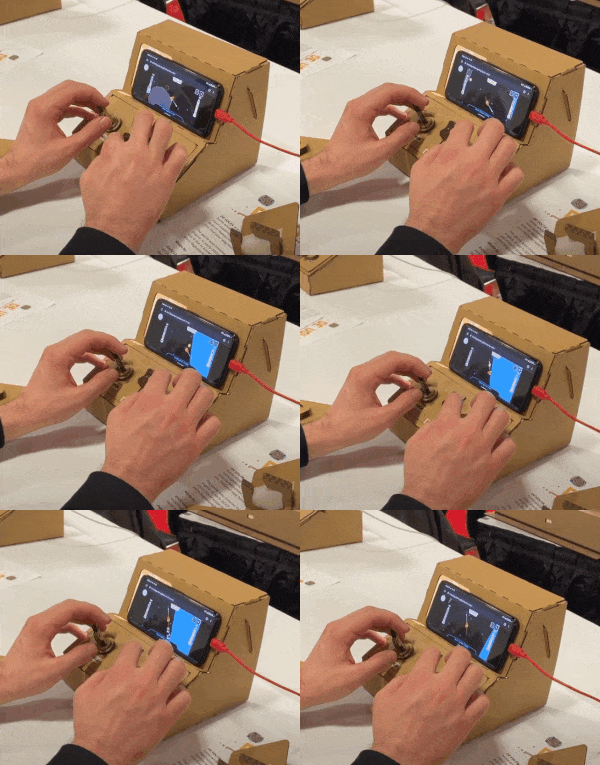
_DE VOLTA being played on a Tinycade at alt.ctrl.GDC 2022._
### Why p5.beholder?
My goal in making **p5.beholder** is to make experimentation with Beholder easier for p5 users. I like using p5 to try out ideas without having to worry much about setting up a lot of tools. I created p5.beholder to streamline the setup for my own prototyping needs, and it's basically a thin shell hooking into the amazing work of the Beholder creators!
## Installation
### Template project
There is a template ZIP file with an example project in the root folder of this repository, called [`p5-beholder-template.zip`](https://github.com/enricllagostera/p5.beholder/blob/main/p5-beholder-template.zip). You can download it, extract and use it as a starting point for your project.
### Setup
To use p5.beholder, include the `p5.beholder.js` (or the minified version `p5.beholder.min.js`) script in your HTML. You can include it directly from UNPKG:
```html
```
OR You can also download the file from [here](https://raw.githubusercontent.com/enricllagostera/p5.beholder/main/dist/p5.beholder.js). The compressed and non-compressed versions are in the `dist` folder of this package as well. Then, include the script in your HTML from your local project folder.
After either of the options above, the `p5beholder` object should be now ready to use from within your sketch.
#### p5 web editor
You can use p5.beholder directly in the p5 online editor. Go to the `index.html` file of your sketch and include the script from UNPKG: ``. After that, you can use the `p5beholder` object in your `sketch.js` file.
## Use
1. **Make sure you are running your sketch from a [secure context](https://developer.mozilla.org/en-US/docs/Web/Security/Secure_Contexts).** Browsers only allow access to cameras from sites in secure contexts, for security reasons. Sites served via `https://` or in a `localhost` are considered safe. The p5 online editor is on a secure context, so it should work out-of-the-box too.
2. **Add the `p5beholder.prepare()` call in the `setup` function of your sketch.** This initializes Beholder with a default configuration. You can pass in a configuration object ([more info here](https://github.com/project-beholder/beholder-detection#custom-config)) and a query selector to an HTML element to be Beholder's root (if the element does not exist, it will be appended as a child of the HTML ``).
3. **Use the methods in the `p5beholder` from within your sketch.**
You can use [this website](https://chev.me/arucogen/) to generate and print Aruco markers (select the "Original Aruco" option on the dropdown).
### Quick sample
```html
```
```js
/* Your sketch.js file */
function setup() {
createCanvas(640, 480);
p5beholder.prepare();
}
function draw() {
// Shows a black background if marker 0 is present
if (p5beholder.getMarker(0).present) {
background(0);
} else {
// Shows a white background if marker 0 is NOT present
background(255);
}
// Shows information about marker with ID 0
p5beholder.drawDebugMarker(0);
}
```
## Features
With this library, you can use the functions of the Beholder library through the `p5beholder` object. It takes care of updating automatically, and initialization happens at in the `setup()` of your sketch.
Some features are:
1. **Marker presence to keyboard events.** See [demo](https://enricllagostera.github.io/p5.beholder/02_marker_presence_to_keyboard)
2. **Marker presence to mouse click.** See [demo](https://enricllagostera.github.io/p5.beholder/demos/03_marker_presence_to_mouse_click/).
3. **Marker rotation within range.** See [demo with raw values](docs/demos/04_rotation_detection_simple/) and [with interpolation](docs/demos/05_rotation_range_detection_with_lerp/).
4. **Camera to canvas utility functions.** These useful functions that map coordinates from the camera range to the sketch's canvas range. Example: `p5beholder.cameraHeight` : returns camera height in pixels; `p5beholder.cameraToCanvasXY(x, y)` returns an object with `x` and `y` values.
5. **Debug drawing of markers on the canvas.** Using `p5beholder.debugDrawMarker(ID)` creates a canvas-adjusted visualization of a marker. See [demo](https://enricllagostera.github.io/p5.beholder/demos/01_basic_marker_detection/).
### API
You can see detailed information about the library functions on the [P5Beholder API documentation](https://enricllagostera.github.io/p5.beholder/P5Beholder.html).
## License
**p5.beholder** is licensed under the MIT License. You can check its contents [here](https://github.com/enricllagostera/p5.beholder/blob/main/LICENSE).