` element into the Opentable constructor and fill the instance with sample data:
```javascript
var data = [
["", "Tesla", "Volvo", "Toyota", "Honda"],
["2017", 10, 11, 12, 13],
["2018", 20, 11, 14, 13],
["2019", 30, 15, 12, 13]
];
var container = document.getElementById('example');
var hot = new Handsontable(container, {
data: data,
rowHeaders: true,
colHeaders: true
});
```
### Examples - [See a live demo](//handsontable.com/examples.html)
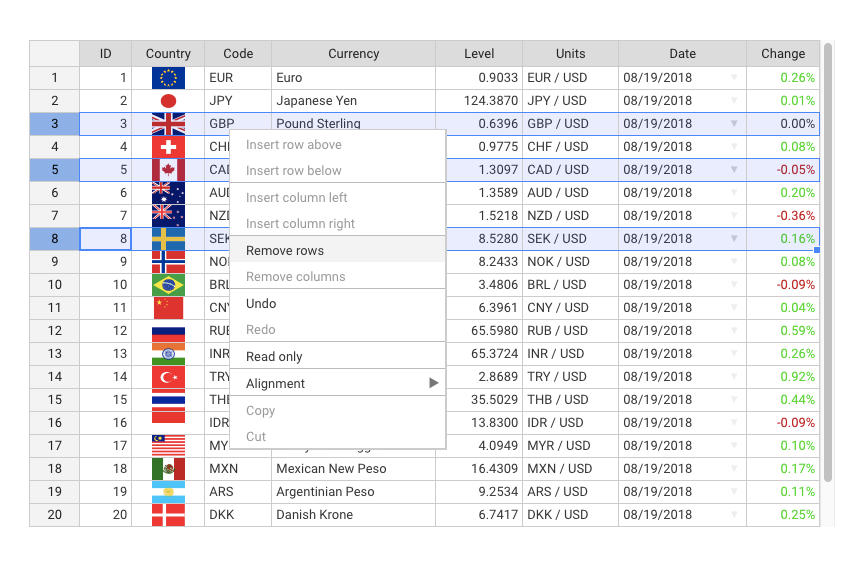
### Features **Some of the most popular features include:** - Sorting data - Data validation - Conditional formatting - Freezing rows/columns - Merging cells - Defining custom cell types - Moving rows/columns - Resizing rows/columns - Context menu - Adding comments to cells - Dragging fill handle to populate data - Internationalization - Non-contiguous selection [See a comparison table](//handsontable.com/docs/tutorial-features.html)
### Screenshot
### Resources - [API Reference](//handsontable.com/docs/Core.html) - [Compatibility](//handsontable.com/docs/tutorial-compatibility.html) - [Change log](//github.com/handsontable/handsontable/releases) - [Roadmap](//trello.com/b/PztR4hpj) - [Newsroom](//twitter.com/handsontable)
### Wrappers Handsontable CE comes with wrappers and directives for most popular frameworks: - [Angular](//github.com/handsontable/angular-handsontable) - [Angular 1](//github.com/handsontable/ngHandsontable) - [React](//github.com/handsontable/react-handsontable) - [Vue](//github.com/handsontable/vue-handsontable-official) - [Polymer](//github.com/handsontable/hot-table) - [Typescript file](//github.com/handsontable/handsontable/blob/master/handsontable.d.ts)
### Support Report all the suggestions and problems on [GitHub Issues](//github.com/handsontable/handsontable/issues). An open source version doesn't include a commercial support. You need to purchase [Handsontable Pro](//github.com/handsontable/handsontable-pro) license or [contact us](//handsontable.com/contact.html) directly in order to obtain a technical support from the Handsoncode team.
### Contributing If you would like to help us to develop Handsontable, please take a look at this [guide for contributing](//github.com/handsontable/handsontable/blob/master/CONTRIBUTING.md).
### Community - [GitHub issues](//github.com/handsontable/handsontable/issues) - [Stackoverflow](//stackoverflow.com/tags/handsontable) - [Forum](//forum.handsontable.com) - [Twitter](//twitter.com/handsontable)
### License Handsontable Community Edition is released under the MIT license. [Read license](//github.com/handsontable/handsontable/blob/master/LICENSE). Copyrights belong to Handsoncode sp. z o.o.
### Examples - [See a live demo](//handsontable.com/examples.html)
### Features **Some of the most popular features include:** - Sorting data - Data validation - Conditional formatting - Freezing rows/columns - Merging cells - Defining custom cell types - Moving rows/columns - Resizing rows/columns - Context menu - Adding comments to cells - Dragging fill handle to populate data - Internationalization - Non-contiguous selection [See a comparison table](//handsontable.com/docs/tutorial-features.html)
### Screenshot
### Resources - [API Reference](//handsontable.com/docs/Core.html) - [Compatibility](//handsontable.com/docs/tutorial-compatibility.html) - [Change log](//github.com/handsontable/handsontable/releases) - [Roadmap](//trello.com/b/PztR4hpj) - [Newsroom](//twitter.com/handsontable)
### Wrappers Handsontable CE comes with wrappers and directives for most popular frameworks: - [Angular](//github.com/handsontable/angular-handsontable) - [Angular 1](//github.com/handsontable/ngHandsontable) - [React](//github.com/handsontable/react-handsontable) - [Vue](//github.com/handsontable/vue-handsontable-official) - [Polymer](//github.com/handsontable/hot-table) - [Typescript file](//github.com/handsontable/handsontable/blob/master/handsontable.d.ts)
### Support Report all the suggestions and problems on [GitHub Issues](//github.com/handsontable/handsontable/issues). An open source version doesn't include a commercial support. You need to purchase [Handsontable Pro](//github.com/handsontable/handsontable-pro) license or [contact us](//handsontable.com/contact.html) directly in order to obtain a technical support from the Handsoncode team.
### Contributing If you would like to help us to develop Handsontable, please take a look at this [guide for contributing](//github.com/handsontable/handsontable/blob/master/CONTRIBUTING.md).
### Community - [GitHub issues](//github.com/handsontable/handsontable/issues) - [Stackoverflow](//stackoverflow.com/tags/handsontable) - [Forum](//forum.handsontable.com) - [Twitter](//twitter.com/handsontable)
### License Handsontable Community Edition is released under the MIT license. [Read license](//github.com/handsontable/handsontable/blob/master/LICENSE). Copyrights belong to Handsoncode sp. z o.o.