OpenCode Visual Cache
Real-time Token Cache Hit Rate · TUI Sidebar Visualization
Adaptive Theme Colors · Auto-desaturated · Chinese / English
If you find this plugin useful, a ⭐ would mean a lot — thank you!
[](https://github.com/Hotakus/opencode-visual-cache)
[](https://github.com/Hotakus/opencode-visual-cache/stargazers)
[](LICENSE)
[](https://github.com/Hotakus/opencode-visual-cache/blob/master/README.md)

---
Interested in sub-agent monitoring? Check out [opencode-subagent-magazine](https://github.com/Hotakus/opencode-subagent-magazine)!
---
## 1. Screenshots
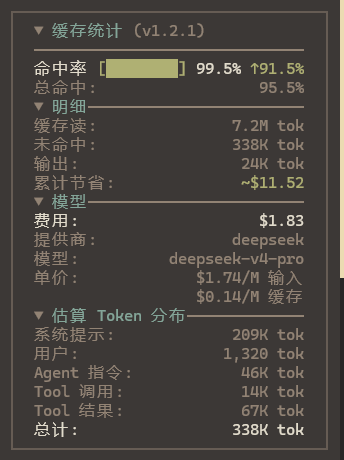
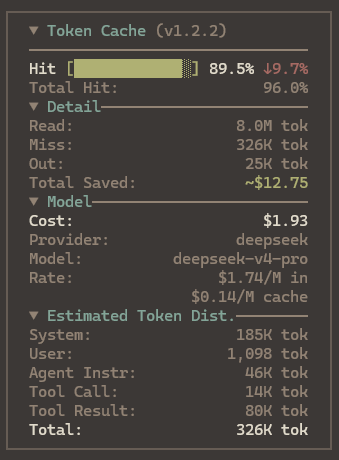
Collapsed 👇


Expanded 👇
---
## 2. Features
- **Cache Hit Rate**: Real-time hit rate with adaptive-width progress bar and trend indicator
- **Token Detail**: Cache read / write / miss / output, left-aligned labels, right-aligned values
- **Cost & Savings**: Session cumulative cost plus cache-hit savings
- **Model Pricing**: Input / cache-read / cache-write per-million rates (read from provider config dynamically)
- **Collapsible**: Main title collapsed by default; click to expand. Detail, model, and distribution sections fold independently
- **Adaptive Colors**: ≥85% green · ≥70% orange · <70% red, auto-desaturated from current theme
- **Token Distribution**: Per-role (system / user / sub-agent instr / tool call / tool result) estimated token breakdown
- **Persistent State**: Fold preferences and config remembered across restarts via api.kv
- **Language**: Chinese / English / 日本語 / 한국어, auto-detects system locale, with `/cache-lang` for runtime switching — user preference takes priority over auto-detection
- **Multi-currency**: Switch via `/cache-currency` — costs, savings, and per-million rates convert in real time
- **Balance Query**: Query account balance across multiple AI providers, with auto-switch following the current session's provider
- **Slash Commands**: `/cache-session` `/cache-session-back` `/cache-rate` `/cache-section` `/cache-config` `/cache-lang` for live panel configuration
- **Sub-Agent Cache View**: `/cache-session` auto-scans and lists sub-agents; select one to switch the panel stats. Use `/cache-session-back` to return to the main session
- **Loaded Skills**: Detects `skill` tool calls in the session and displays loaded skill names with estimated token footprint
- **Bottom Status Bar**: single-line hit rate (with trend) · Tokens · Balance in the prompt hint row — visible even with the sidebar closed. **Off by default on opencode 1.x** (turning it on requires a TUI restart, see [4.3](#43-section-visibility)); shown by default on opencode 2.x
---
## 3. Installation
This plugin supports both opencode 1.x and 2.x.
### 3.1 opencode 2.x
opencode 2.x manages TUI plugins through the `plugins` array in `cli.json`; after adding an entry, it is installed and loaded automatically on the next start.
Create or edit `~/.config/opencode/cli.json` and append the following entry to the `plugins` array:
```json
{
"plugins": [
{
"package": "opencode-visual-cache@latest",
"options": {
"enabled": true
}
}
]
}
```
If the file already contains other plugins or settings, just append this object entry to the existing `plugins` array.
> **Note**: Do not install this plugin with `opencode plugin add`. That command writes the entry to `opencode.jsonc` (used for server plugins), which makes the server fail to load it:
>
> ```
> Plugin must export a default definition with an id and an effect or setup function.
> ```
>
> If you already installed it that way:
> 1. Open `~/.config/opencode/opencode.jsonc` and remove this plugin from the `plugins` array
> 2. Declare it in the `plugins` array of `cli.json` as described above
> 3. Restart opencode
> **Troubleshooting**: If the plugin does not take effect, clear the plugin cache and restart. The V2 cache lives in `~/.cache/opencode/npm`, and the V1 cache in `~/.cache/opencode/packages`.
### 3.2 opencode 1.x
**Option 1: Command (recommended)**
Press **`Ctrl + P`** in OpenCode to open the command palette, search **`install plugin`**, then type:
```
opencode-visual-cache@latest
```
Press Enter to install and configure automatically.
**Option 2: Manual**
1. Install the plugin
```bash
npm install -g opencode-visual-cache@latest
```
2. Configure the TUI plugin — create or edit `~/.config/opencode/tui.jsonc`:
```jsonc
{
"$schema": "https://opencode.ai/tui.json",
"plugin": ["opencode-visual-cache@latest"]
}
```
### 3.3 Restart OpenCode
Open any session — the cache stats panel appears in the sidebar.
---
## 4. Usage Guide
### 4.1 Slash Commands
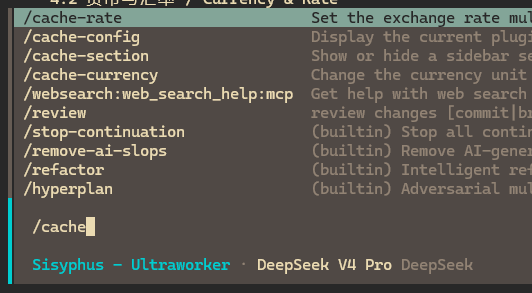
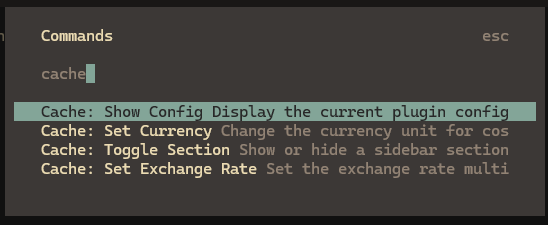
The plugin supports slash commands and command palette (`Ctrl + P`) for runtime configuration. Changes take effect immediately and are persisted (the **Bottom Bar** toggle is the exception on opencode 1.x — see [4.3 Section Visibility](#43-section-visibility)):
| Command | Function | How to use |
|---------|----------|------------|
| `/cache-session` | View sub-agent cache stats | Lists sub-agents automatically, or paste a Session ID to switch the panel data source |
| `/cache-session-back` | Return to main session | Switch back to main session from sub-agent cache view |
| `/cache-currency` | Switch currency | Pick from a list (USD / CNY / EUR / JPY / GBP / KRW); default exchange rate auto-filled |
| `/cache-rate` | Adjust exchange rate | Enter a custom rate (e.g. `7.2` for CNY) |
| `/cache-section` | Toggle sections & border | Independently show/hide Detail, Model & Pricing, Token Distribution, Loaded Skills, Balance, Bottom Bar, or the panel border (Bottom Bar is off by default on opencode 1.x; turning it on requires a TUI restart) |
| `/cache-config` | View current config | Displays currency, rate, and section visibility |
| `/cache-lang` | Switch display language | Pick Chinese or English from the dialog — takes effect immediately, no restart needed |
| `/cache-balance` | Balance query settings | Pick a balance provider (menu shows key source: user key / OpenCode / not set) / toggle auto-switch |
| `/cache-balance-key` | Set balance API key | Two-step flow: pick a provider → enter the API key |
Switching currency automatically applies a built-in approximate exchange rate (USD-based). Override it anytime with `/cache-rate`.
### 4.2 Currency & Exchange Rate
Cost display supports multiple currencies:
| Code | Symbol | Default rate (1 USD = ?) |
|------|--------|-------------------------|
| USD | `$` | 1 |
| CNY | `¥` | 7.2 |
| EUR | `€` | 0.92 |
| JPY | `JP¥` | 150 |
| GBP | `£` | 0.79 |
| KRW | `₩` | 1350 |
> The rate applies to session cost, cache savings, and per-million pricing — consistently across the panel.
>
> **Base currency**: The plugin assumes all provider pricing is in USD. Major AI APIs (OpenAI / Anthropic / Google / DeepSeek / xAI etc.) use USD for their international endpoints. If your provider bills in CNY or another currency, set the exchange rate to `1`.
### 4.3 Section Visibility
Three sub-sections can be toggled independently to save sidebar space:
- **Token Detail**: cache read / write / miss / output
- **Model & Pricing**: cost / provider / model name / per-million rates
- **Estimated Token Dist.**: per-role token breakdown
- **Loaded Skills**: skill names the LLM actually loaded via the `skill` tool, with estimated token counts
- **Balance**: the selected provider's account balance (multi-provider with auto-switch)
- **Bottom Status Bar**: the single-line hit rate · Tokens · Balance stats in the prompt hint row (**off by default on opencode 1.x**)
Toggled via `/cache-section` — takes effect instantly with no restart (the **Bottom Status Bar** is the exception, see below). The same command also toggles the panel **border**; turning it off removes the outline and padding so content fills the full width.
> **The Bottom Bar is off by default on opencode 1.x; turning it on requires a TUI restart**: on opencode 1.x the hint row can only carry the bar by rebuilding the host's `session_prompt` slot, and that slot uses replace mode — **every rebuilder's output is rendered side by side**. If another plugin rebuilds `session_prompt` as well (e.g. [`oh-my-openagent`](https://github.com/code-yeongyu/oh-my-openagent)), you get **duplicate input boxes**. This plugin therefore does not claim that slot by default, and the hint row shows the host's default path.
>
> Run `/cache-section` to turn the **Bottom Bar** on and **restart the TUI** to show the stats (this claims the slot and is mutually exclusive with such plugins). opencode 2.x uses a dedicated `prompt.footer.status` slot, so there is no such conflict and the bar is **shown by default**.
> **About Token Dist. values**: "Reasoning" is an exact value from the API; the other rows (system / user / sub-agent instr / tool call / tool result) are **estimates** — the API only reports total token counts, not how they split across content types, so the plugin collects text per content type and approximates via character counting. Values are indicative only. OpenCode runtime-injected system prompt content (environment info, skill catalog, tool schema definitions — see [`system.ts`](https://github.com/anomalyco/opencode/blob/dev/packages/opencode/src/session/system.ts), [`tools.ts`](https://github.com/anomalyco/opencode/blob/dev/packages/opencode/src/session/tools.ts)) is not covered by these estimates.
### 4.4 Balance Query
The panel can display account balance from multiple AI providers. With **auto-switch** enabled, the balance query follows the model provider of the current session automatically.
Supported balance providers:
| Provider | Balance endpoint | Currency | Key prefix | Status |
|----------|-----------------|----------|------------|--------|
| DeepSeek | `https://api.deepseek.com/user/balance` | CNY / USD | `sk-` | ✅ Supported |
| SiliconFlow | `https://api.siliconflow.cn/v1/user/info` | CNY | `sk-` | ✅ Supported |
| OpenRouter | `https://openrouter.ai/api/v1/credits` | USD | `sk-or-` | ✅ Supported |
| Moonshot | `https://api.moonshot.cn/v1/users/me/balance` | CNY | `sk-` | ✅ Supported |
| Zhipu GLM | Pending (community-reversed endpoint, unofficial) | CNY | — | ⏳ Planned |
| xAI | Pending (requires Management Key + Team ID) | USD | — | ⏳ Planned |
> **Key source**: a key set manually via `/cache-balance-key` takes priority; otherwise the plugin reuses the credential OpenCode already authenticated (`/connect`-configured providers). Providers with neither cannot show a balance.
>
> **Key storage**: manually configured API keys are stored in plaintext in the plugin's persistent KV — avoid using on shared devices.
>
> **Auto-switch**: enabled by default; picking a provider manually disables it — re-enable anytime via `/cache-balance`. Auto-switch matches the current session's model provider; a provider without a key shows a "not set" hint when selected.
>
> **Planned**: candidates confirmed feasible by research, not yet implemented. Zhipu GLM only has a community-reversed unofficial endpoint (no stability guarantee).
>
> **Metric semantics**: hit rate = cache read / (fresh input + cache read + cache write), consistent with the industry (OpenAI / Anthropic / Bedrock). "Miss" in the detail view = fresh input + cache write. The bottom-bar Tokens is the input-side total (output excluded). Providers that do not report cache writes separately (e.g. DeepSeek) automatically fall back to the hit/miss formula.
>
> **Balance display**: the sidebar and bottom bar share the same balance data, so both show identical values. When the current provider has no balance adapter, the sidebar shows a hint and the bottom bar hides the balance segment.
---
## 5. Update
Due to a [known OpenCode issue #6774](https://github.com/anomalyco/opencode/issues/6774), the plugin cache locks to the version installed at first setup and does **not** auto-detect newer releases on npm.
To update:
**1. Clear the OpenCode plugin cache**
```powershell
# Windows
Remove-Item -Recurse -Force "$env:USERPROFILE\.cache\opencode\packages\opencode-visual-cache@latest"
```
```bash
# macOS / Linux
rm -rf ~/.cache/opencode/packages/opencode-visual-cache@latest
```
**2. Re-install the plugin**
Press **`Ctrl + P`** in OpenCode → `install plugin` → `opencode-visual-cache@latest` → Enter
**3. Restart OpenCode**
---
## 6. Language Settings
The plugin provides three ways to control the display language, listed by priority (highest first):
### 6.1 Runtime Switching (recommended)
Type `/cache-lang` in the TUI and select Chinese / English / 日本語 / 한국어 from the dialog. The panel switches immediately without restarting. Your preference is persisted and takes priority over auto-detection on the next launch.
### 6.2 Environment Variable Override
Set the `CACHE_TUI_LANG` environment variable before launching to force a specific language (`zh` / `en` / `ja` / `ko`):
```powershell
# Windows PowerShell
$env:CACHE_TUI_LANG="en"; opencode
```
```bash
# macOS / Linux
CACHE_TUI_LANG=en opencode
```
### 6.3 Auto Detection
Defaults to the system locale automatically. If it doesn't match, switch once with `/cache-lang` and the preference will be remembered.
---
## 7. Compatibility
Model-agnostic — works with all OpenCode-compatible AI models (DeepSeek / Claude / GPT etc.).
Token data and pricing are read via OpenCode SDK standard interfaces.
---
## 8. License
MIT