# OpenClaw Plugin For Codex App Server
[](https://github.com/pwrdrvr/openclaw-codex-app-server/actions/workflows/ci.yml)
[](https://www.npmjs.com/package/openclaw-codex-app-server)
[](https://www.npmjs.com/package/openclaw-codex-app-server)
[](./LICENSE)
This project has no product name. It is just an OpenClaw plugin that connects OpenClaw to the Codex App Server protocol so you can interact with your existing threads from Codex Desktop and Codex TUI through Telegram and Discord conversations.
`Codex` is mentioned here only to describe the protocol and toolchain this plugin connects to. This repository is independent and is not official, provided, sponsored, endorsed, or affiliated with OpenAI or Codex.
If `codex` already works on the machine running OpenClaw, this plugin should work too. It uses the same local Codex CLI and shared login state. There is no separate plugin login requirement for normal use.
## Quick Start
1. Install the plugin into OpenClaw.
2. Start in the Telegram or Discord conversation where you want the bridge bound.
3. Run `/cas_resume`.
4. Pick a recent thread, click `New` to start a fresh one, or search directly.
5. Once bound, plain text in that conversation routes to the selected Codex thread.
Buttons are presented for project and thread selection, model switching, and skill shortcuts. If your filter is ambiguous, the plugin sends a picker instead of guessing.
## Install In OpenClaw
These are the intended install commands for OpenClaw `2026.3.22` and newer.
Compatibility:
| Plugin release | OpenClaw compatibility |
| --- | --- |
| `0.6.0+` | `2026.3.22` and newer, with automatic fallback between the legacy Telegram runtime shim and the `2026.3.31+` outbound adapter facade |
| `0.5.x` | `2026.3.22` through `2026.3.30`; Telegram breaks on `2026.3.31+` |
Install:
```bash
openclaw plugins install --dangerously-force-unsafe-install openclaw-codex-app-server
```
Uninstall:
```bash
openclaw plugins uninstall openclaw-codex-app-server
```
OpenClaw `2026.3.22` and newer include the binding and plugin interface changes this package originally targeted. Plugin `0.6.0+` prefers the newer OpenClaw `2026.3.31+` outbound adapter and Telegram account facade when they are present, but it also falls back to the older `runtime.channel.telegram` interface used by OpenClaw `2026.3.22` through `2026.3.30`. Older plugin `0.5.x` releases only match that legacy path and are not compatible with Telegram on OpenClaw `2026.3.31+`.
> ⚠️ OpenClaw flags this plugin as unsafe because it must launch `codex app-server`. That process spawn is the whole bridge, not an optional extra.
### Updating on OpenClaw `2026.3.31` through at least `2026.4.3`
> ⚠️ On released OpenClaw builds through `2026.4.3`, `plugins update` still cannot accept the unsafe-install flag for this plugin. The fix is merged upstream but not deployed yet, so for now the reliable update path is:
```bash
openclaw plugins uninstall openclaw-codex-app-server
openclaw plugins install --dangerously-force-unsafe-install openclaw-codex-app-server
```
### If install is still blocked on OpenClaw `2026.3.31`
Some OpenClaw `2026.3.31` installs still block this package even with `--dangerously-force-unsafe-install`. That behavior is tracked upstream in [openclaw/openclaw#59241](https://github.com/openclaw/openclaw/issues/59241).
When that happens, use this manual path:
1. Download and unpack the published package into OpenClaw's extension directory.
```bash
cd /tmp
npm --userconfig /tmp/empty-npmrc pack openclaw-codex-app-server@latest
rm -rf /tmp/openclaw-cas
mkdir -p /tmp/openclaw-cas
tar -xzf openclaw-codex-app-server-*.tgz -C /tmp/openclaw-cas
mkdir -p ~/.openclaw/extensions/openclaw-codex-app-server
cp -R /tmp/openclaw-cas/package/. ~/.openclaw/extensions/openclaw-codex-app-server/
```
2. Add this plugin id to OpenClaw's allowlist, preserving any existing entries you already have in `plugins.allow`.
```bash
openclaw config set plugins.allow '["openclaw-codex-app-server"]'
```
3. Restart the gateway and confirm the plugin loads.
```bash
openclaw gateway restart
openclaw plugins inspect openclaw-codex-app-server
```
If you already allow other plugins, merge `openclaw-codex-app-server` into that existing JSON array instead of replacing it.
Pre-release packages are published on matching npm dist-tags instead of `latest`. For example, a tag such as `v0.3.0-beta.1` publishes to `openclaw-codex-app-server@beta`, so `npm install openclaw-codex-app-server@latest` stays on the newest stable release.
## Why Try It
- Uses your existing local Codex CLI setup instead of a separate hosted bridge.
- Feels natural in chat: bind once with `/cas_resume`, then just talk.
- Keeps useful controls close at hand with `/cas_status`, `/cas_plan`, `/cas_review`, and more.
- Works well for Telegram and Discord conversations that you want tied to a real Codex thread.
## Typical Workflow
1. Run `/cas_resume` in the conversation you want to bind.
2. Use the picker buttons, click `New`, or pass a filter like `/cas_resume release-fix`, `/cas_resume --projects`, or `/cas_resume --new openclaw`.
3. Optionally set model, fast mode, or permissions while binding with flags like `/cas_resume --model gpt-5.4 --fast --yolo`.
4. Send normal chat messages once the thread is bound.
5. Use `/cas_status` to inspect or adjust the binding in place, including model, reasoning, fast mode, permissions, compact, and stop controls.
6. If you leave plan mode through the normal `Implement this plan` button, you do not need `/cas_plan off`; use `/cas_plan off` only when you want to exit planning manually instead.
## Command Reference
| Command | What it does | Notes / examples |
| --- | --- | --- |
| `/cas_resume` | Bind this conversation to a Codex thread. | With no args, opens a picker for recent threads in the current workspace and includes a `New` button. |
| `/cas_resume --projects` | Browse projects first. | Opens a project picker, then a thread picker. |
| `/cas_resume --new` | Start a fresh Codex thread in a project. | Opens a project picker instead of a thread picker. |
| `/cas_resume --new openclaw` | Start a fresh Codex thread directly in a matching project. | If more than one workspace matches, you get buttons to choose. |
| `/cas_resume --all` | Search recent threads across projects. | Useful when the thread is not in the current workspace. |
| `/cas_resume --cwd ~/github/openclaw` | Restrict browsing/search to one workspace. | `--cwd` accepts an absolute path or `~/...`. |
| `/cas_resume --sync` | Resume and try to sync the chat/topic name to the Codex thread. | You can combine this with other flags. |
| `/cas_resume --model gpt-5.4` | Resume or create a thread with a preferred model. | The preference is saved on the binding and reused on later turns. |
| `/cas_resume --fast`, `/cas_resume --no-fast` | Set fast mode while binding or creating a thread. | Fast mode is only available on supported models such as GPT-5.4+. |
| `/cas_resume --yolo`, `/cas_resume --no-yolo` | Set permissions mode while binding or creating a thread. | `--yolo` selects Full Access. |
| `/cas_resume release-fix` | Resume a matching thread by title or id. | If more than one thread matches, you get buttons to choose. |
| `/cas_status` | Show the current binding, thread state, and interactive controls. | Includes model, reasoning, fast mode, permissions, compact, and stop buttons. |
| `/cas_status --model gpt-5.4` | Change the preferred model and refresh the status card. | Works on the current binding. |
| `/cas_status --fast`, `/cas_status --no-fast` | Change fast mode and refresh the status card. | Fast mode is only available on supported models such as GPT-5.4+. |
| `/cas_status --yolo`, `/cas_status --no-yolo` | Change permissions mode and refresh the status card. | `--yolo` selects Full Access. |
| `/cas_detach` | Unbind this conversation from Codex. | Stops routing plain text from this conversation into the bound thread. |
| `/cas_stop` | Interrupt the active Codex run. | Only applies when a turn is currently in progress. |
| `/cas_steer ` | Send follow-up steer text to an active run. | Example: `/cas_steer focus on the failing tests first` |
| `/cas_plan ` | Ask Codex to plan instead of execute. | The plugin relays plan questions and the final plan back into chat. |
| `/cas_plan off` | Exit plan mode for this conversation. | Use this when you want to leave planning manually instead of through the normal `Implement this plan` button. |
| `/cas_review` | Review the current uncommitted changes in the bound workspace. | Requires an existing binding. |
| `/cas_review ` | Review with custom instructions. | Example: `/cas_review focus on thread selection regressions` |
| `/cas_compact` | Compact the bound Codex thread. | The plugin posts progress and final context usage. |
| `/cas_skills` | List available Codex skills for the workspace. | Adds buttons for up to eight skill shortcuts. |
| `/cas_skills review` | Filter the skills list. | Matches skill name, description, or cwd. |
| `/cas_experimental` | List experimental features reported by Codex. | Read-only. |
| `/cas_mcp` | List configured MCP servers. | Shows auth state and counts for tools/resources/templates. |
| `/cas_mcp github` | Filter MCP servers. | Matches name and auth status. |
| `/cas_fast` | Toggle fast mode for the bound thread. | Convenience command for the same fast-mode control exposed on `/cas_status`. |
| `/cas_fast on`, `/cas_fast off`, `/cas_fast status` | Set or inspect fast mode explicitly. | Example: `/cas_fast status` |
| `/cas_model` | List models and show model-selection buttons when the conversation is bound. | Without a binding, it lists models only. |
| `/cas_model gpt-5.4` | Set the model for the bound thread. | Also updates the saved preferred model for later turns. |
| `/cas_permissions` | Show account, rate-limit, and current permission status. | To change permissions, use `/cas_status --yolo` or the status card. |
| `/cas_init ...` | Forward `/init` to Codex. | Sends the alias straight through to the App Server. |
| `/cas_diff ...` | Forward `/diff` to Codex. | Sends the alias straight through to the App Server. |
| `/cas_rename ` | Rename the bound Codex thread. | Example: `/cas_rename approval flow cleanup` |
| `/cas_rename --sync ` | Rename the thread and try to sync the conversation/topic name too. | Requires an existing binding. |
| `/cas_rename --sync` | Show suggested naming styles and sync the chosen one to the conversation too. | Useful when you want the derived thread/project naming without typing it out. |
## Screenshot Placeholders
### `/cas_resume` thread picker with buttons
 ### `/cas_resume` binding approval
 ### `/cas_resume` restored context / pinned message
 ### `/cas_status`
 The status card is the main control surface once a conversation is bound. It shows the current binding state and provides buttons for:
- model selection
- reasoning selection
- fast mode toggle when the current model supports it
- permissions toggle between Default and Full Access
- compaction
- stopping the active run
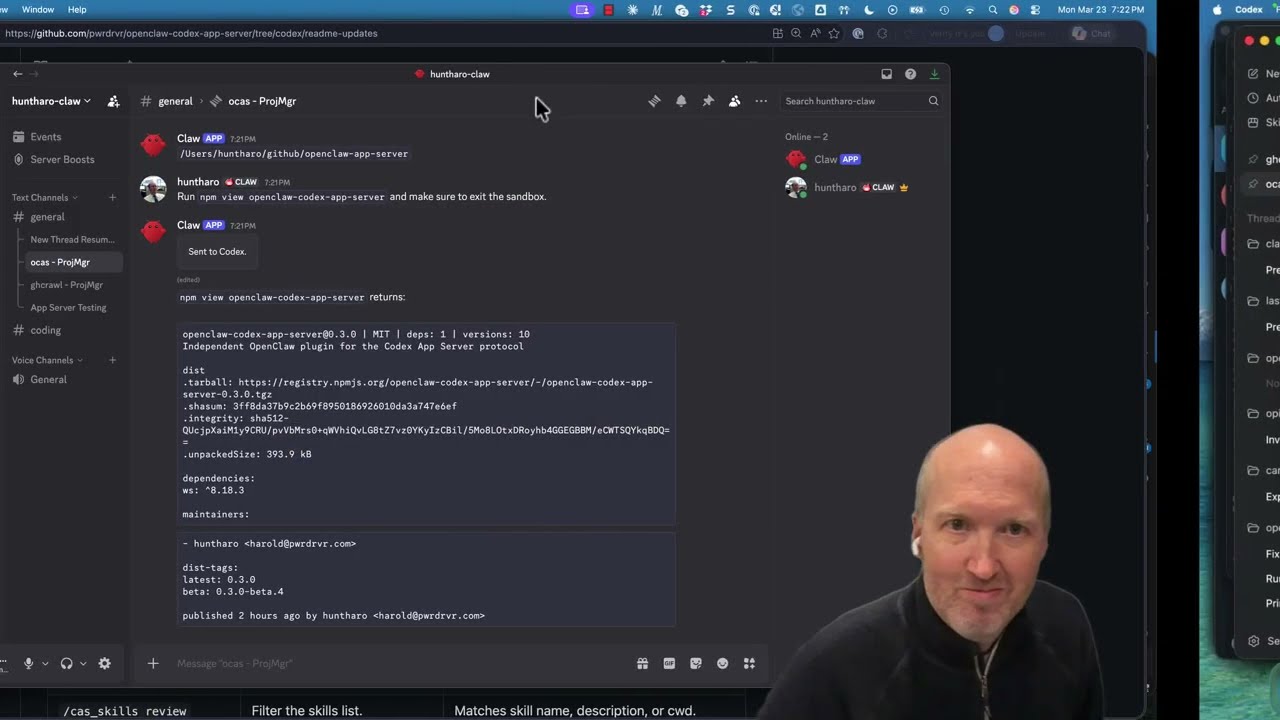
### Run `npm view openclaw-codex-app-server` and prompt to exit sandbox
The status card is the main control surface once a conversation is bound. It shows the current binding state and provides buttons for:
- model selection
- reasoning selection
- fast mode toggle when the current model supports it
- permissions toggle between Default and Full Access
- compaction
- stopping the active run
### Run `npm view openclaw-codex-app-server` and prompt to exit sandbox
 ### Tool output
 ### `/cas_plan` 1st Question
 ### `/cas_plan` 2nd Question
 ## Plugin Config Notes
The plugin schema in [`openclaw.plugin.json`](./openclaw.plugin.json) supports:
- `transport`: `stdio` or `websocket`
- `command` and `args`: the Codex executable and CLI args for `stdio`
- `url`, `authToken`, `headers`: connection settings for `websocket`
- `defaultWorkspaceDir`: fallback workspace for unbound actions
- `defaultModel`: model used when a new thread starts without an explicit selection
- `defaultServiceTier`: default service tier for new turns
## Developer Workflow With A Local OpenClaw Checkout
Use this path when you are testing a local checkout of this repository against a local OpenClaw build before the required plugin interface is available in a released OpenClaw version.
### 1. Check out OpenClaw with the required plugin interface
This plugin originally targeted [openclaw/openclaw#45318](https://github.com/openclaw/openclaw/pull/45318). Use that branch if it is still unmerged, or use `main` once the change has landed there.
```bash
git clone https://github.com/openclaw/openclaw.git
cd openclaw
gh pr checkout 45318
pnpm install
```
If you are not using `gh`, fetch the PR directly:
```bash
git fetch origin pull/45318/head:pr-45318
git checkout pr-45318
pnpm install
```
### 2. Install this plugin from a local checkout
From the OpenClaw repository:
```bash
pnpm openclaw plugins install --link "/absolute/path/to/openclaw-codex-app-server"
```
Remove the linked local checkout:
```bash
pnpm openclaw plugins uninstall openclaw-codex-app-server
```
### 3. Start the local gateway
From the OpenClaw checkout:
```bash
pnpm gateway:watch
```
### 4. Optional local dependency override inside this repo
This repository no longer commits a machine-local `openclaw` dev dependency, so CI stays portable. If you want this plugin checkout to resolve `openclaw` from your own local OpenClaw source tree, add a local-only override in your working copy:
```bash
pnpm add -D openclaw@file:/absolute/path/to/openclaw
pnpm install
```
That override is for local development only. Do not commit the resulting `package.json` or `pnpm-lock.yaml` changes.
## Development Checks
```bash
pnpm test
pnpm typecheck
```
## Plugin Config Notes
The plugin schema in [`openclaw.plugin.json`](./openclaw.plugin.json) supports:
- `transport`: `stdio` or `websocket`
- `command` and `args`: the Codex executable and CLI args for `stdio`
- `url`, `authToken`, `headers`: connection settings for `websocket`
- `defaultWorkspaceDir`: fallback workspace for unbound actions
- `defaultModel`: model used when a new thread starts without an explicit selection
- `defaultServiceTier`: default service tier for new turns
## Developer Workflow With A Local OpenClaw Checkout
Use this path when you are testing a local checkout of this repository against a local OpenClaw build before the required plugin interface is available in a released OpenClaw version.
### 1. Check out OpenClaw with the required plugin interface
This plugin originally targeted [openclaw/openclaw#45318](https://github.com/openclaw/openclaw/pull/45318). Use that branch if it is still unmerged, or use `main` once the change has landed there.
```bash
git clone https://github.com/openclaw/openclaw.git
cd openclaw
gh pr checkout 45318
pnpm install
```
If you are not using `gh`, fetch the PR directly:
```bash
git fetch origin pull/45318/head:pr-45318
git checkout pr-45318
pnpm install
```
### 2. Install this plugin from a local checkout
From the OpenClaw repository:
```bash
pnpm openclaw plugins install --link "/absolute/path/to/openclaw-codex-app-server"
```
Remove the linked local checkout:
```bash
pnpm openclaw plugins uninstall openclaw-codex-app-server
```
### 3. Start the local gateway
From the OpenClaw checkout:
```bash
pnpm gateway:watch
```
### 4. Optional local dependency override inside this repo
This repository no longer commits a machine-local `openclaw` dev dependency, so CI stays portable. If you want this plugin checkout to resolve `openclaw` from your own local OpenClaw source tree, add a local-only override in your working copy:
```bash
pnpm add -D openclaw@file:/absolute/path/to/openclaw
pnpm install
```
That override is for local development only. Do not commit the resulting `package.json` or `pnpm-lock.yaml` changes.
## Development Checks
```bash
pnpm test
pnpm typecheck
```