# _o2-auth-fs_ Angular4 tool to authenticate users by Firebase through email, Google, Facebook, GitHub and Twitter login
[](LICENSE)
_o2-auth-fs_ is a tool library for authenticating users by Firebase service by Angular4.
_Video Explanation_
## Overview
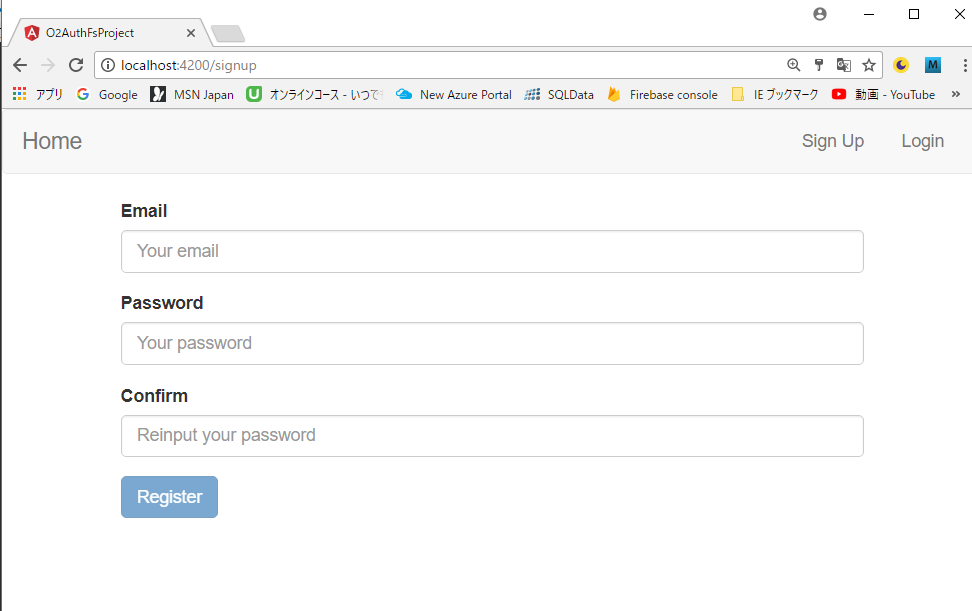
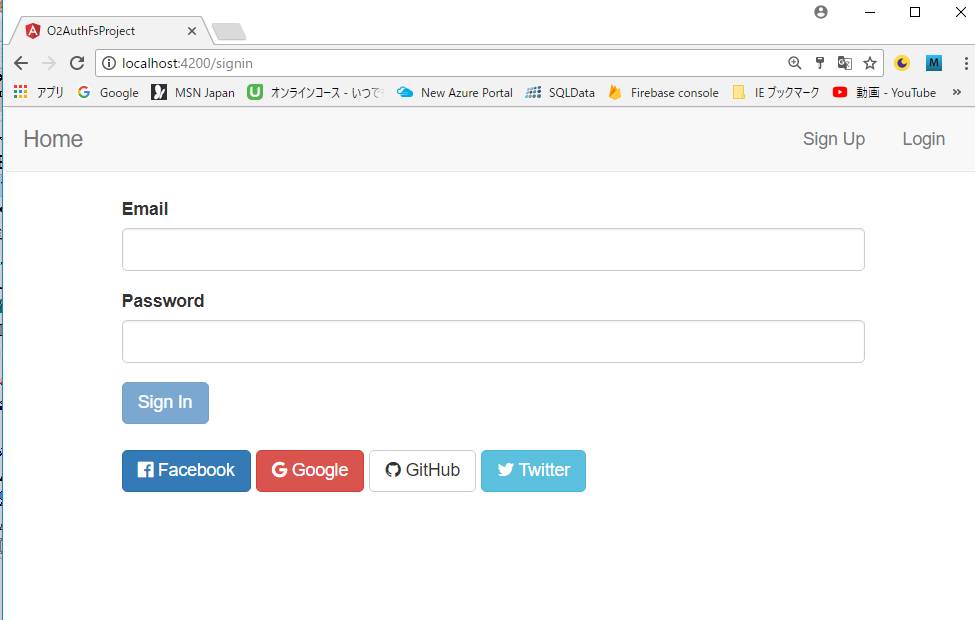
- _o2-auth-fs_ is a tool for using Firebase authentication service by using Angular4
- Main functions
- Signup (using Firebase authentication service)
- Login
- Email
- Google
- Facebook
- Twitter
- GitHub
- Logout
 ## Prerequisite
- Node.js
- TypeScript2
- Angular4
- Firebase
- bootstrap
- font-awesome
## Installation
To install this library, run:
```bash
$ npm install o2-auth-fs --save
```
### Step by Step Installation for Angular-CLI
#### Install Angular-CLI
```bash
$ npm install -g @angular/cli
```
#### Create New Project
```bash
$ ng new demo-project (Your project name)
$ cd demo-project
```
#### Check Your Program
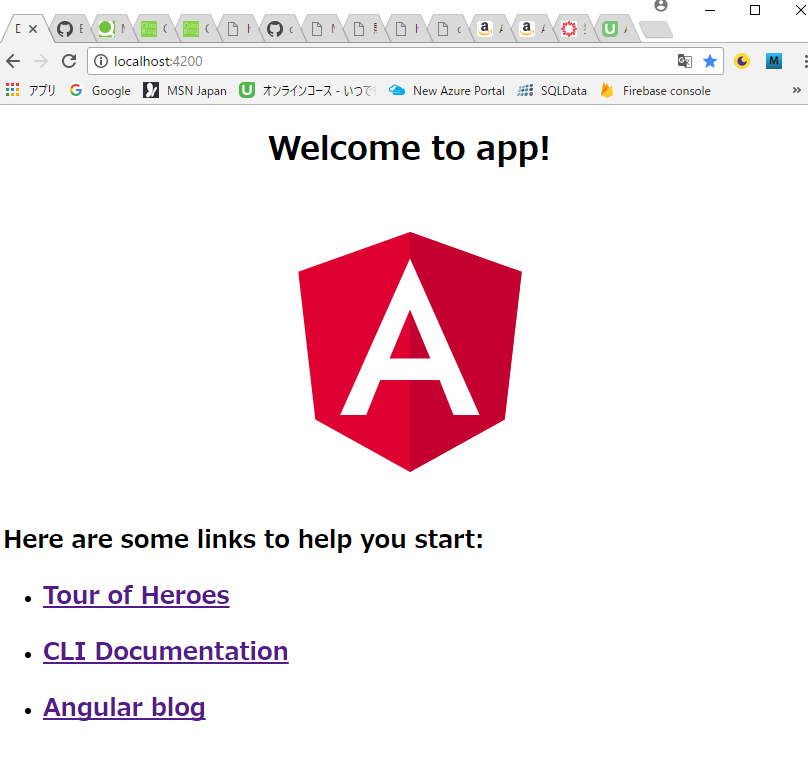
If you start local server as follows, you can get the first page in your browser by accessing **http://localhost:4200**.
```bash
$ ng serve
```
- ***First Page***
## Prerequisite
- Node.js
- TypeScript2
- Angular4
- Firebase
- bootstrap
- font-awesome
## Installation
To install this library, run:
```bash
$ npm install o2-auth-fs --save
```
### Step by Step Installation for Angular-CLI
#### Install Angular-CLI
```bash
$ npm install -g @angular/cli
```
#### Create New Project
```bash
$ ng new demo-project (Your project name)
$ cd demo-project
```
#### Check Your Program
If you start local server as follows, you can get the first page in your browser by accessing **http://localhost:4200**.
```bash
$ ng serve
```
- ***First Page***
 #### Stop Local Server
Input **Ctrl+C** and **y+Return** to stop the local server.
#### Install o2-auth-fs
```bash
$ npm install o2-auth-fs --save
```
#### Install firebase
```bash
$ npm install firebase --save
```
#### Install bootstrap
```bash
$ npm install bootstrap --save
```
#### Modify .angular-cli.json
You will find **.angular-cli.json** in the project root directory.
Add **bootstrap.min.css** as follows.
```bash
"apps": [
{
"styles": [
// Add Start --------------------------------------------
"../node_modules/bootstrap/dist/css/bootstrap.min.css",
// Add End --------------------------------------------
"styles.css"
],
}
],
```
#### Get Firebase config data
Of course you need to have Firebase account and your own project. If you don't have the account, visit the following page in advance and make your own project.
You need to get Firebase config data from your own project page. This url is as follows.
_https://console.firebase.google.com/project/your-project-name/overview_
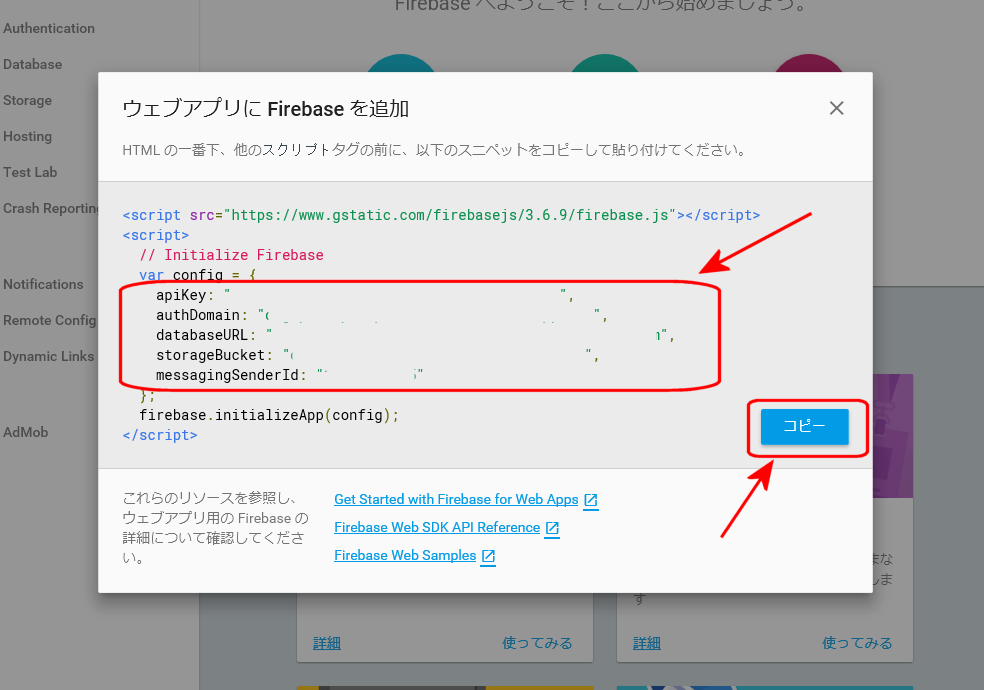
You need the following parameters
- apiKey
- authDomain
- databaseURL
- projectId
- storageBucket
- messagingSenderId
In "Overview" page, click Web Application icon.
#### Stop Local Server
Input **Ctrl+C** and **y+Return** to stop the local server.
#### Install o2-auth-fs
```bash
$ npm install o2-auth-fs --save
```
#### Install firebase
```bash
$ npm install firebase --save
```
#### Install bootstrap
```bash
$ npm install bootstrap --save
```
#### Modify .angular-cli.json
You will find **.angular-cli.json** in the project root directory.
Add **bootstrap.min.css** as follows.
```bash
"apps": [
{
"styles": [
// Add Start --------------------------------------------
"../node_modules/bootstrap/dist/css/bootstrap.min.css",
// Add End --------------------------------------------
"styles.css"
],
}
],
```
#### Get Firebase config data
Of course you need to have Firebase account and your own project. If you don't have the account, visit the following page in advance and make your own project.
You need to get Firebase config data from your own project page. This url is as follows.
_https://console.firebase.google.com/project/your-project-name/overview_
You need the following parameters
- apiKey
- authDomain
- databaseURL
- projectId
- storageBucket
- messagingSenderId
In "Overview" page, click Web Application icon.
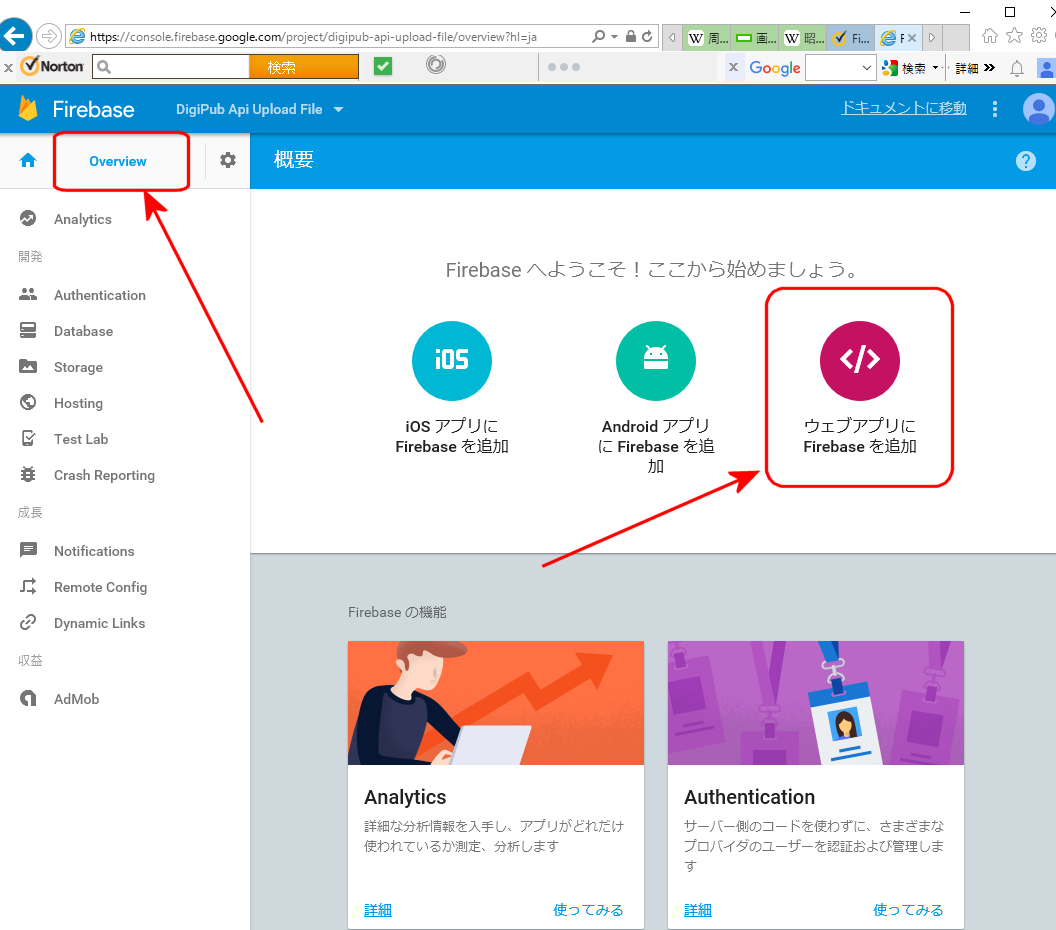 Then those parameters above will be shown. Copy them.
 #### Modify environment.ts
Change directory to "src/app/environments".
```bash
$ cd src/app/environments
```
You will find **environment.ts** and **environment.prod.ts**.
Modify these files as follows. In firebaseConfig, paste the data above.
```typescript
export const environment = {
production: true,
// Add Start --------------------------------------------
firebase: {
apiKey: '"xxxxxxxxxxxxxxxxxxxxxxxxxxxxxxxxxxxxxxxxxxxxx',
authDomain: 'xxxxxxxxxxxxxxxxxx.firebaseapp.com',
databaseURL: 'https://xxxxxxxxxxxxxxxxxx.firebaseio.com',
projectId: 'xxxxxxxxxxxxx',
storageBucket: 'xxxxxxxxxxxxx.appspot.com',
messagingSenderId: 'xxxxxxxxxxxxxxxxxxxxx'
}
// Add End --------------------------------------------
};
```
#### Modify app.module.ts
Change directory to "src/app".
```bash
$ cd src/app
```
You will find **app.module.ts**.
Modify this file as follows. **AppRoutingModule** and **CoreModule** will be made later.
```typescript
import { BrowserModule } from '@angular/platform-browser';
import { NgModule } from '@angular/core';
import { AppComponent } from './app.component';
// Add Start --------------------------------------------
import { O2AuthFsModule } from 'o2-auth-fs';
import { AppRoutingModule } from './app-routing.module';
import { CoreModule } from './core/core.module';
// Add End --------------------------------------------
@NgModule({
declarations: [
AppComponent
],
imports: [
BrowserModule,
// Add Start --------------------------------------------
AppRoutingModule,
CoreModule,
O2AuthFsModule.forRoot()
// Add End --------------------------------------------
],
providers: [],
bootstrap: [AppComponent]
})
export class AppModule { }
```
#### Modify app.component.ts
In the same directory, you will find **app.component.ts** . In this file, modify as follows.
```typescript
import { Component, OnInit } from '@angular/core';
// Add Start --------------------------------------------
import { environment } from './../environments/environment';
import * as firebase from 'firebase';
// Add End --------------------------------------------
@Component({
selector: 'app-root',
templateUrl: './app.component.html',
styleUrls: ['./app.component.css']
})
export class AppComponent implements OnInit {
title = 'app-root';
// Add Start --------------------------------------------
loadedFeature = 'home';
ngOnInit() {
firebase.initializeApp(environment.firebase);
}
onNavigate(feature: string) {
this.loadedFeature = feature;
}
// Add End --------------------------------------------
}
```
#### Add app-routing.module.ts
You had better independent modules for future. So add **app.routing.module.ts** in the project root directory. You need add **flat** option as follows.
```bash
$ ng generate module app-routing --flat
```
#### Add Core Module
You maybe need home page and header. They had better be included in **core module** which is almost always resided. At first you need add **core module** as foloows.
```bash
$ ng generate module core
```
#### Add Header Component
Next add **header component** in core module as folows.
```bash
$ ng generate component core/header
```
#### Add Home Component
Next add **home component** in core module as folows.
```bash
$ ng generate component core/home
```
## Version
- o2-auth-fs : 0.1.3
- Angular : 4.2.4
- TypeScript : 2.3.3
- @angular/cli : 1.3.2
- bootstrap : 3.3.7
- firebase : 4.4.0
- font-awesome : 4.7.0
## Reference
- "Firebase Authentication", Google,
- "Create a Full Angular Authentication System with Firebase",2017/1/16, by Gary Simon
- "Angular アプリケーションプログラミング",2017/8/17,by 山田祥寛,
- "Angular 4 (formerly Angular 2) - The Complete Guide",by Maximilian Schwarzmüller, udemy,
- "The Complete Angular Course: Beginner to Advanced",by Mosh Hamedani, udemy,
- "Build Enterprise Applications with Angular 2 (and Angular 4)",by Mosh Hamedani, udemy,
- "Learn Angular 4 from Scratch",by Gary Simon, udemy,
## Change Log
- 2017.10.2 version 0.1 uploaded
## Copyright
copyright 2017 by Shuichi Ohtsu (DigiPub Japan)
## License
MIT © [Shuichi Ohtsu](mailto:ohtsu@digipub-net.com)
#### Modify environment.ts
Change directory to "src/app/environments".
```bash
$ cd src/app/environments
```
You will find **environment.ts** and **environment.prod.ts**.
Modify these files as follows. In firebaseConfig, paste the data above.
```typescript
export const environment = {
production: true,
// Add Start --------------------------------------------
firebase: {
apiKey: '"xxxxxxxxxxxxxxxxxxxxxxxxxxxxxxxxxxxxxxxxxxxxx',
authDomain: 'xxxxxxxxxxxxxxxxxx.firebaseapp.com',
databaseURL: 'https://xxxxxxxxxxxxxxxxxx.firebaseio.com',
projectId: 'xxxxxxxxxxxxx',
storageBucket: 'xxxxxxxxxxxxx.appspot.com',
messagingSenderId: 'xxxxxxxxxxxxxxxxxxxxx'
}
// Add End --------------------------------------------
};
```
#### Modify app.module.ts
Change directory to "src/app".
```bash
$ cd src/app
```
You will find **app.module.ts**.
Modify this file as follows. **AppRoutingModule** and **CoreModule** will be made later.
```typescript
import { BrowserModule } from '@angular/platform-browser';
import { NgModule } from '@angular/core';
import { AppComponent } from './app.component';
// Add Start --------------------------------------------
import { O2AuthFsModule } from 'o2-auth-fs';
import { AppRoutingModule } from './app-routing.module';
import { CoreModule } from './core/core.module';
// Add End --------------------------------------------
@NgModule({
declarations: [
AppComponent
],
imports: [
BrowserModule,
// Add Start --------------------------------------------
AppRoutingModule,
CoreModule,
O2AuthFsModule.forRoot()
// Add End --------------------------------------------
],
providers: [],
bootstrap: [AppComponent]
})
export class AppModule { }
```
#### Modify app.component.ts
In the same directory, you will find **app.component.ts** . In this file, modify as follows.
```typescript
import { Component, OnInit } from '@angular/core';
// Add Start --------------------------------------------
import { environment } from './../environments/environment';
import * as firebase from 'firebase';
// Add End --------------------------------------------
@Component({
selector: 'app-root',
templateUrl: './app.component.html',
styleUrls: ['./app.component.css']
})
export class AppComponent implements OnInit {
title = 'app-root';
// Add Start --------------------------------------------
loadedFeature = 'home';
ngOnInit() {
firebase.initializeApp(environment.firebase);
}
onNavigate(feature: string) {
this.loadedFeature = feature;
}
// Add End --------------------------------------------
}
```
#### Add app-routing.module.ts
You had better independent modules for future. So add **app.routing.module.ts** in the project root directory. You need add **flat** option as follows.
```bash
$ ng generate module app-routing --flat
```
#### Add Core Module
You maybe need home page and header. They had better be included in **core module** which is almost always resided. At first you need add **core module** as foloows.
```bash
$ ng generate module core
```
#### Add Header Component
Next add **header component** in core module as folows.
```bash
$ ng generate component core/header
```
#### Add Home Component
Next add **home component** in core module as folows.
```bash
$ ng generate component core/home
```
## Version
- o2-auth-fs : 0.1.3
- Angular : 4.2.4
- TypeScript : 2.3.3
- @angular/cli : 1.3.2
- bootstrap : 3.3.7
- firebase : 4.4.0
- font-awesome : 4.7.0
## Reference
- "Firebase Authentication", Google,
- "Create a Full Angular Authentication System with Firebase",2017/1/16, by Gary Simon
- "Angular アプリケーションプログラミング",2017/8/17,by 山田祥寛,
- "Angular 4 (formerly Angular 2) - The Complete Guide",by Maximilian Schwarzmüller, udemy,
- "The Complete Angular Course: Beginner to Advanced",by Mosh Hamedani, udemy,
- "Build Enterprise Applications with Angular 2 (and Angular 4)",by Mosh Hamedani, udemy,
- "Learn Angular 4 from Scratch",by Gary Simon, udemy,
## Change Log
- 2017.10.2 version 0.1 uploaded
## Copyright
copyright 2017 by Shuichi Ohtsu (DigiPub Japan)
## License
MIT © [Shuichi Ohtsu](mailto:ohtsu@digipub-net.com)