# 数字键盘
[](https://travis-ci.org/viclm/numeric-keyboard)
[](https://www.npmjs.org/package/numeric-keyboard)
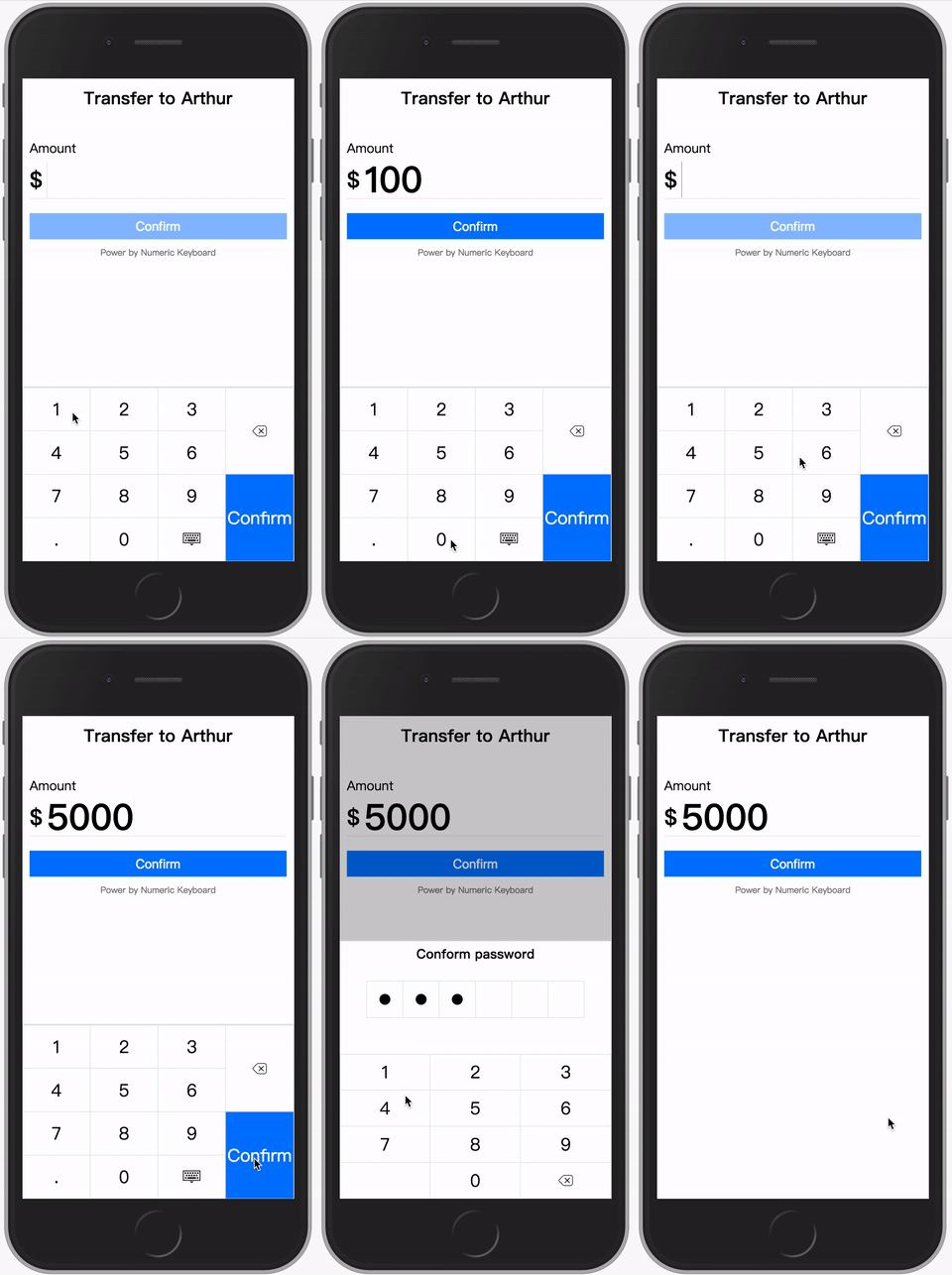
用于手机浏览器的虚拟的可自定义数字键盘,它包含一个可以调起虚拟自定义数字键盘的文本框,支持大部分的 HTML5 标准属性和光标操作。
同时,虚拟键盘本身可以单独和其他自定义输入界面一起使用,比如互联网金融场景常见的数字验证码输入方格。
数字键盘有多个版本:**原生 JavaScript**、**React**、**Angular** 和 **Vue**。
> 对于 **React**、**Angular** and **Vue**,仅支持最新版本的实现。
## 目录
- [安装](#安装)
- [使用](#使用)
- [键盘](#键盘)
- [贡献](#贡献)
- [许可证](#许可证)
## 安装
通过 **Yarn** 安装
```shell
yarn add numeric-keyboard
```
配置 **Webpack** 使用恰当的版本
```javascript
resolve: {
alias: {
// 以 **Vue** 为例
'numeric-keyboard$': 'numeric-keyboard/dist/numeric_keyboard.vue.js'
}
},
```
## 使用
#### Vanilla JavaScript
```javascript
import { NumericInput } from 'numeric-keyboard'
new NumericInput({
type: 'number',
placeholder: 'touch to input',
onInput(value) {
...
}
}).mount('.input')
```
#### React
```jsx
import { NumericInput } from 'numeric-keyboard'
class App extends React.Component {
input(val) {
...
},
render() {
return
}
}
```
#### Angular
```typescript
import { Component } from '@angular/core';
@Component({
selector: 'app-root',
template: `
`,
})
export class AppComponent {
public amount: number | string = ''
}
```
#### Vue
```vue
```
### 选项/属性
虚拟文本框用以替换原生的输入框,所以它支持大部分标准属性,详情可参看 HTML 标准文档。
```javascript
// 只支持两种输入类型:number 和 tel,默认唤起对应布局的键盘
type: {
type: String,
default: 'number'
},
autofocus: {
type: Boolean,
default: false
},
disabled: {
type: Boolean,
default: false
},
maxlength: {
type: Number
},
name: {
type: String
},
placeholder: {
type: String
},
readonly: {
type: Boolean,
default: false
},
value: {
type: [String, Number]
},
// 使用一个正则表达式或者函数限制输入内容
format: {
type: [String, Function]
},
// 自定义键盘布局
layout: {
type: [String, Array],
default: 'number'
},
// 自定义键盘确认键文案,图标可使用 Iconfont
entertext: {
type: String,
default: 'enter'
}
```
### 回调函数/事件
#### `input`
当输入发生改变时会触发 `input` 事件,和原生输入框元素触发的事件不同,响应函数的第一个参数并不是事件对象,而是输入框内文本的值。当使用原生 **JavaScript** 版本时,使用 `onInput()` 回调函数代替 `input` 事件。
#### `enterpress`
当按下键盘确认键时会触发 `enterpress` 事件。
## 键盘
虚拟数字键盘本身是一个独立的可插拔组件,可自定义布局,通常它需要和一个输入界面一起使用。
### 使用
#### Vanilla JavaScript
```javascript
import { NumericKeyboard } from 'numeric-keyboard'
new NumericKeyboard('.keyboard', {
layout: 'tel',
onPress(key) {
...
}
})
```
#### React
```jsx
import { NumericKeyboard } from 'numeric-keyboard'
class App extends React.Component {
press(key) {
...
}
render() {
return
}
}
```
#### Angular
```typescript
import { Component } from '@angular/core';
@Component({
selector: 'app-root',
template: `
`,
})
export class AppComponent {
press(key) {
...
}
}
```
#### Vue
```vue
```
### 选项/属性
```javascript
// 修改键盘的布局
layout: {
type: [String, Array],
default: 'number'
},
// 自定义确认键文案,图标可使用 Iconfont
entertext: {
type: String,
default: 'enter'
}
```
#### `layout`
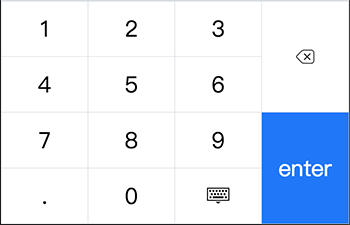
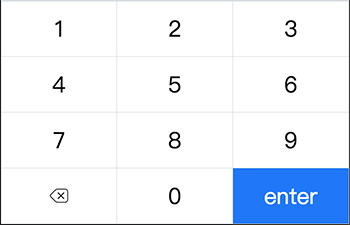
有两种内置的布局: **number** 和 **tel** 对应两种标准输入类型。
你可以自定义任何布局样式,数字键盘使用一个二维数组构建了一种表格布局,支持单元格合并。
##### number 布局
##### tel 布局
##### 自定义布局
```javascript
// 内置 number 布局代码示例
import { keys } from 'numeric-keyboard'
[
[
{
key: keys.ONE
},
{
key: keys.TWO
},
{
key: keys.THREE
},
{
key: keys.DEL,
rowspan: 2,
},
],
[
{
key: keys.FOUR
},
{
key: keys.FIVE
},
{
key: keys.SIX
},
],
[
{
key: keys.SEVEN
},
{
key: keys.EIGHT
},
{
key: keys.NINE
},
{
key: keys.ENTER,
rowspan: 2,
},
],
[
{
key: keys.DOT
},
{
key: keys.ZERO
},
{
key: keys.ESC
},
],
]
```
### 回调函数/事件
#### `press`
点击键盘按键时会触发 `press` 事件,响应函数的参数是刚刚点击过的按键。当使用原生 **JavaScript** 版本时,使用 `onPress()` 回调函数代替 `press` 事件。
#### `enterpress`
当按下键盘确认键时会触发 `enterpress` 事件。
## 贡献
欢迎一起参与开发,规范正在制定中...
## 许可证
Licensed under the MIT license.