# Dialog
- category: UI
- chinese: 自定义对话框
- type: UI组件
---
Nuke UI

## 设计思路
由于 native 没有 zIndex 的概念,所以 Dialog 的实现方式是: 在页面根节点插入一个隐藏的 View 用于实现对话框,再通过 state 去控制对话框的展示。
所以如果要实现 Dialog 遮挡全屏的效果,对 DOM 和样式书写有如下要求:
- 页面根节点不能有任何 padding、margin、border 样式 (确保边缘不漏出来)
- Dialog 必须是根节点的最后一个子元素 (确保 View 堆叠顺序)
## API
参数 | 说明 | 类型 | 默认值
-----|-----|-----|-----
contentStyle | 内容区样式 | obj| 无
maskStyle | 遮罩层样式 | obj| 无
visible | 是否默认展示 | boolean| false
onHide | 浮层关闭时触发回调 | Function |
onShow | 浮层打开后后触发回调 | Function | false
duration | 动画渲染时间,ms单位 | number |200
maskClosable| 是否可以点击遮罩层关闭|boolean|false
## demo 参考
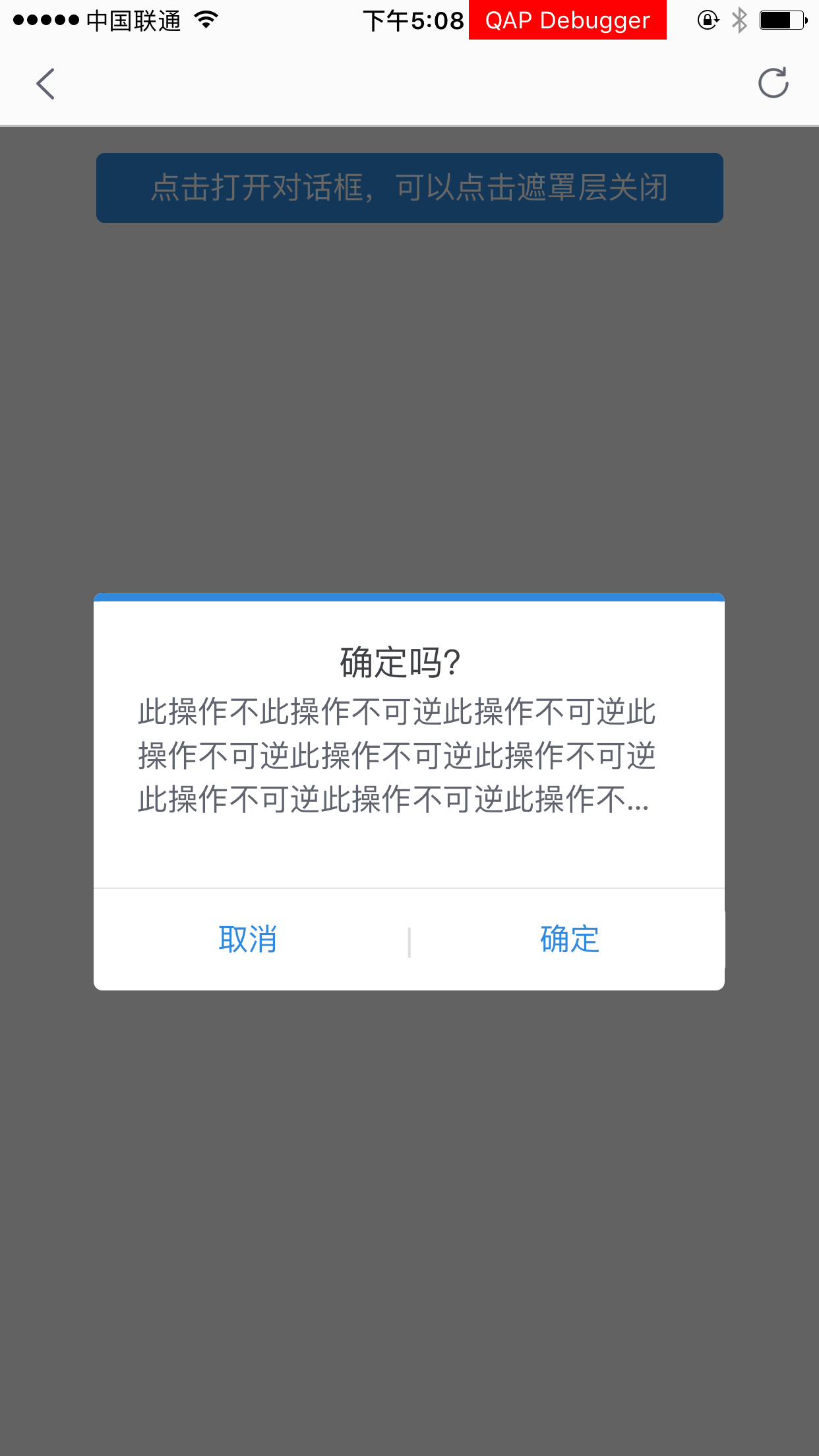 扫码预览(手淘、千牛、天猫等)
 ## 使用方法
- 安装
```bash
// 切换到你的 rax 项目中
tnpm i nuke-dialog --save
```
- 调用示例
```js
/** @jsx createElement */
import {createElement, Component,render} from 'rax';
import View from 'nuke-view';
import Text from 'nuke-text';
import ScrollView from 'nuke-scroll-view';
import Dialog from 'nuke-dialog';
import Button from 'nuke-button';
let App = class NukeDemoIndex extends Component {
constructor() {
super();
}
showModal = () => {
this.refs.modal1.show();
}
hideModal = () => {
this.refs.modal1.hide();
}
hideModalAndConfirm = () =>{
console.log('confirm')
this.refs.modal1.hide();
}
onShow = (param) => {
console.log('modal show', param);
}
onHide = (param) => {
console.log('modal hide', param);
}
onMaskPress = (param) => {
this.refs.modal1.hide();
}
render() {
return (
);
}
}
var styles = {
wrapper: {
paddingLeft: '24rem',
paddingRight: '24rem',
paddingTop: '24rem',
backgroundColor:'#f4f4f4'
},
click: {
height: '100rem',
lineHeight: '100rem',
textAlign: 'center',
borderWidth: '1rem',
borderStyle: 'solid',
borderColor: '#ccc'
},
modalStyle: {
width: '578rem',
height: '364rem',
borderTopColor:'#3089dc',
borderTopStyle:'solid',
borderTopWidth:'8rem',
// padding:'10rem',
borderRadius:'8rem',
},
body: {
flex:1,
paddingLeft:40,
paddingRight:40,
paddingTop:30,
// justifyContent: 'center',
borderRadius:'8rem',
backgroundColor: '#ffffff',
},
head:{
height: 50,
alignItems: 'center',
justifyContent: 'center',
},
textHead:{
color:'#3d4145',
fontSize:32,
},
tips:{
},
text:{
fontSize:'28rem',
lines:3,
[`-webkit-line-clamp`]: 3,
overflow: 'hidden',
height:'120rem',
lineHeight:'40rem',
color:'#60646e',
textOverflow:'ellipsis'
},
footer: {
borderTopColor:'#dddddd',
flexDirection:'row',
borderTopStyle:'solid',
borderTopWidth:1,
alignItems: 'center',
justifyContent: 'flex-end',
height: '94rem'
},
dlgBtn:{
flex:1,
borderWidth:0,
color:'#3089dc'
},
dlgBtnSeperator:{
color:'#dddddd'
},
button: {
width: '300rem',
height: '60rem',
borderWidth: '1rem',
borderStyle: 'solid',
borderColor: '#cccccc',
alignItems: 'center',
justifyContent: 'center'
}
};
render();
```
## 其他
- bug、建议联系 @翊晨
- 钉钉交流群
## 使用方法
- 安装
```bash
// 切换到你的 rax 项目中
tnpm i nuke-dialog --save
```
- 调用示例
```js
/** @jsx createElement */
import {createElement, Component,render} from 'rax';
import View from 'nuke-view';
import Text from 'nuke-text';
import ScrollView from 'nuke-scroll-view';
import Dialog from 'nuke-dialog';
import Button from 'nuke-button';
let App = class NukeDemoIndex extends Component {
constructor() {
super();
}
showModal = () => {
this.refs.modal1.show();
}
hideModal = () => {
this.refs.modal1.hide();
}
hideModalAndConfirm = () =>{
console.log('confirm')
this.refs.modal1.hide();
}
onShow = (param) => {
console.log('modal show', param);
}
onHide = (param) => {
console.log('modal hide', param);
}
onMaskPress = (param) => {
this.refs.modal1.hide();
}
render() {
return (
);
}
}
var styles = {
wrapper: {
paddingLeft: '24rem',
paddingRight: '24rem',
paddingTop: '24rem',
backgroundColor:'#f4f4f4'
},
click: {
height: '100rem',
lineHeight: '100rem',
textAlign: 'center',
borderWidth: '1rem',
borderStyle: 'solid',
borderColor: '#ccc'
},
modalStyle: {
width: '578rem',
height: '364rem',
borderTopColor:'#3089dc',
borderTopStyle:'solid',
borderTopWidth:'8rem',
// padding:'10rem',
borderRadius:'8rem',
},
body: {
flex:1,
paddingLeft:40,
paddingRight:40,
paddingTop:30,
// justifyContent: 'center',
borderRadius:'8rem',
backgroundColor: '#ffffff',
},
head:{
height: 50,
alignItems: 'center',
justifyContent: 'center',
},
textHead:{
color:'#3d4145',
fontSize:32,
},
tips:{
},
text:{
fontSize:'28rem',
lines:3,
[`-webkit-line-clamp`]: 3,
overflow: 'hidden',
height:'120rem',
lineHeight:'40rem',
color:'#60646e',
textOverflow:'ellipsis'
},
footer: {
borderTopColor:'#dddddd',
flexDirection:'row',
borderTopStyle:'solid',
borderTopWidth:1,
alignItems: 'center',
justifyContent: 'flex-end',
height: '94rem'
},
dlgBtn:{
flex:1,
borderWidth:0,
color:'#3089dc'
},
dlgBtnSeperator:{
color:'#dddddd'
},
button: {
width: '300rem',
height: '60rem',
borderWidth: '1rem',
borderStyle: 'solid',
borderColor: '#cccccc',
alignItems: 'center',
justifyContent: 'center'
}
};
render();
```
## 其他
- bug、建议联系 @翊晨
- 钉钉交流群