{
"name": "bunyan",
"version": "0.14.6",
"description": "a JSON Logger library for node.js services",
"author": {
"name": "Trent Mick",
"email": "trentm@gmail.com",
"url": "http://trentm.com"
},
"main": "./lib/bunyan.js",
"bin": {
"bunyan": "./bin/bunyan"
},
"repository": {
"type": "git",
"url": "git://github.com/trentm/node-bunyan.git"
},
"engines": [
"node >=0.6.0"
],
"keywords": [
"log",
"logging",
"log4j",
"json"
],
"devDependencies": {
"tap": "0.2.0",
"ben": "0.0.0",
"verror": "1.3.3"
},
"scripts": {
"test": "tap test/*.js"
},
"contributors": [
{
"name": "Trent Mick",
"email": "trentm@gmail.com",
"url": "http://trentm.com"
},
{
"name": "Mark Cavage",
"email": "mcavage@gmail.com",
"url": "https://github.com/mcavage"
},
{
"name": "Dave Pacheco",
"email": "dap@joyent.com",
"url": "https://github.com/davepacheco"
},
{
"name": "Michael Hart",
"url": "https://github.com/mhart"
},
{
"name": "Isaac Schlueter",
"url": "https://github.com/isaacs"
},
{
"name": "Rob Gulewich",
"url": "https://github.com/rgulewich"
}
],
"readme": "Bunyan is **a simple and fast a JSON logging library** for node.js services and\n**a `bunyan` CLI tool** for nicely viewing those logs).\n\n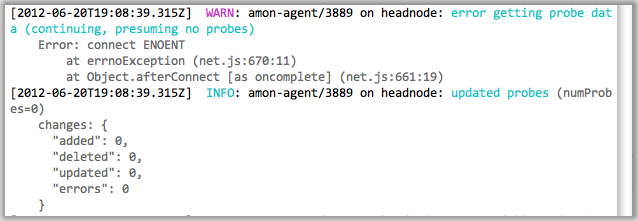\n\nServer logs should be structured. JSON's a good format. Let's do that: a log\nrecord is one line of `JSON.stringify`'d output. Let's also specify some common\nnames for the requisite and common fields for a log record (see below).\n\nAlso: log4j is way more than you need.\n\n\n# Current Status\n\nSolid core functionality is there. Joyent is using this for a number of\nproduction services. Bunyan supports node 0.6 and greater.\n\nFollow @trentmick\nfor updates to Bunyan.\n\nSee also: [Bunyan for Bash](https://github.com/trevoro/bash-bunyan).\n\n\n# Installation\n\n npm install bunyan\n\n\n# Usage\n\n**The usual.** All loggers must provide a \"name\". This is somewhat akin\nto log4j logger \"name\", but Bunyan doesn't do hierarchical logger names.\n\n $ cat hi.js\n var Logger = require('bunyan');\n var log = new Logger({name: \"myapp\"});\n log.info(\"hi\");\n\nAlternatively, bunyan 0.7.0 and up supports a more node.js-land typical\nstyle (which might become the preferred form over time):\n\n var bunyan = require('bunyan');\n var log = bunyan.createLogger({name: \"myapp\"});\n\n**Log records are JSON.** \"hostname\", \"time\" and \"v\" (the Bunyan log\nformat version) are added for you.\n\n $ node hi.js\n {\"name\":\"myapp\",\"hostname\":\"banana.local\",\"pid\":123,\"level\":2,\"msg\":\"hi\",\"time\":\"2012-01-31T00:07:44.216Z\",\"v\":0}\n\nThe full `log.{trace|debug|...|fatal}(...)` API is:\n\n log.info(); // Returns a boolean: is the \"info\" level enabled?\n\n log.info('hi'); // Log a simple string message.\n log.info('hi %s', bob, anotherVar); // Uses `util.format` for msg formatting.\n\n log.info({foo: 'bar'}, 'hi'); // Adds \"foo\" field to log record.\n\n log.info(err); // Special case to log an `Error` instance, adds \"err\"\n // key with exception details (including the stack) and\n // sets \"msg\" to the exception message.\n log.info(err, 'more on this: %s', more);\n // ... or you can specify the \"msg\".\n\nNote that this implies **you cannot pass any object as the first argument\nto log it**. IOW, `log.info(myobject)` isn't going to work the way you\nexpect. Adding support for this API would necessitate (a) JSON-ifying safely\nthat given object (sometimes hard, and probably slow) and (b) putting all its\nattribs under a top-level 'x' field name or something to avoid field name\ncollisions.\n\n\n## bunyan tool\n\nA `bunyan` tool is provided **for pretty-printing bunyan logs** and, eventually,\nfor filtering (e.g. `| bunyan -c 'level>3'`). This shows the default output\n(which is fluid right now) and indented-JSON output. More output formats will\nbe added, including support for custom formats.\n\n $ node hi.js | ./bin/bunyan # CLI tool to filter/pretty-print JSON logs.\n [2012-01-31T00:08:11.387Z] INFO: myapp on banana.local/123: hi\n\n $ node hi.js | ./bin/bunyan -o json\n {\n \"name\": \"myapp\",\n \"hostname\": \"banana.local\",\n \"pid\": 123,\n \"level\": 2,\n \"msg\": \"hi\",\n \"time\": \"2012-01-31T00:10:00.676Z\",\n \"v\": 0\n }\n\n\n## streams\n\nBy default, log output is to stdout (**stream**) and at the \"info\" level.\nExplicitly that looks like:\n\n var log = new Logger({name: \"myapp\", stream: process.stdout,\n level: \"info\"});\n\nThat is an abbreviated form for a single stream. **You can define multiple\nstreams at different levels**.\n\n var log = new Logger({\n name: \"amon\",\n streams: [\n {\n level: \"info\",\n stream: process.stdout, // log INFO and above to stdout\n },\n {\n level: \"error\",\n path: \"tmp/error.log\" // log ERROR and above to a file\n }\n ]\n });\n\nMore on streams in the \"Streams\" section below.\n\n\n## log.child\n\nA `log.child(...)` is provided to **specialize a logger for a sub-component**.\nThe following will have log records from \"Wuzzle\" instances use exactly the\nsame config as its parent, plus include the \"component\" field.\n\n var log = new Logger(...);\n\n ...\n\n function Wuzzle(options) {\n this.log = options.log;\n this.log.info(\"creating a wuzzle\")\n }\n Wuzzle.prototype.woos = function () {\n this.log.warn(\"This wuzzle is woosey.\")\n }\n\n var wuzzle = new Wuzzle({log: log.child({component: \"wuzzle\"})});\n wuzzle.woos();\n log.info(\"done with the wuzzle\")\n\nThe [node-restify](https://github.com/mcavage/node-restify)\nframework integrates bunyan. One feature of its integration, is that each\nrestify request handler includes a `req.log` logger that is:\n\n log.child({req_id: }, true)\n\nApps using restify can then use `req.log` and have all such log records\ninclude the unique request id (as \"req_id\"). Handy.\n\n\n## serializers\n\nBunyan has a concept of **\"serializers\" to produce a JSON-able object from a\nJavaScript object**, so you can easily do the following:\n\n log.info({req: }, \"something about handling this request\");\n\nAssociation is by log record field name, \"req\" in this example, so this\nrequires a registered serializer something like this:\n\n function reqSerializer(req) {\n return {\n method: req.method,\n url: req.url,\n headers: req.headers\n }\n }\n var log = new Logger({\n ...\n serializers: {\n req: reqSerializer\n }\n });\n\nOr this:\n\n var log = new Logger({\n ...\n serializers: {req: Logger.stdSerializers.req}\n });\n\nbecause Buyan includes a small set of standard serializers. To use all the\nstandard serializers you can use:\n\n var log = new Logger({\n ...\n serializers: Logger.stdSerializers\n });\n\n*Note: Your own serializers should never throw, otherwise you'll get an\nugly message on stderr from Bunyan (along with the traceback) and the field\nin your log record will be replaced with a short error message.*\n\n## src\n\nThe **source file, line and function of the log call site** can be added to\nlog records by using the `src: true` config option:\n\n var log = new Logger({src: true, ...});\n\nThis adds the call source info with the 'src' field, like this:\n\n {\n \"name\": \"src-example\",\n \"hostname\": \"banana.local\",\n \"pid\": 123,\n \"component\": \"wuzzle\",\n \"level\": 4,\n \"msg\": \"This wuzzle is woosey.\",\n \"time\": \"2012-02-06T04:19:35.605Z\",\n \"src\": {\n \"file\": \"/Users/trentm/tm/node-bunyan/examples/src.js\",\n \"line\": 20,\n \"func\": \"Wuzzle.woos\"\n },\n \"v\": 0\n }\n\n**WARNING: Determining the call source info is slow. Never use this option\nin production.**\n\n\n# Levels\n\nThe log levels in bunyan are as follows. The level descriptions are best\npractice *opinions*.\n\n- \"fatal\" (60): The service/app is going to stop or become unusable now.\n An operator should definitely look into this soon.\n- \"error\" (50): Fatal for a particular request, but the service/app continues\n servicing other requests. An operator should look at this soon(ish).\n- \"warn\" (40): A note on something that should probably be looked at by an\n operator eventually.\n- \"info\" (30): Detail on regular operation.\n- \"debug\" (20): Anything else, i.e. too verbose to be included in \"info\" level.\n- \"trace\" (10): Logging from external libraries used by your app or *very*\n detailed application logging.\n\nSuggestions: Use \"debug\" sparingly. Information that will be useful to debug\nerrors *post mortem* should usually be included in \"info\" messages if it's\ngenerally relevant or else with the corresponding \"error\" event. Don't rely\non spewing mostly irrelevant debug messages all the time and sifting through\nthem when an error occurs.\n\nIntegers are used for the actual level values (10 for \"trace\", ..., 60 for\n\"fatal\") and constants are defined for the (Logger.TRACE ... Logger.DEBUG).\nThe lowercase level names are aliases supported in the API.\n\nHere is the API for changing levels in an existing logger:\n\n log.level() -> INFO // gets current level (lowest level of all streams)\n\n log.level(INFO) // set all streams to level INFO\n log.level(\"info\") // set all streams to level INFO\n\n log.levels() -> [DEBUG, INFO] // get array of levels of all streams\n log.levels(0) -> DEBUG // get level of stream at index 0\n log.levels(\"foo\") // get level of stream with name \"foo\"\n\n log.levels(0, INFO) // set level of stream 0 to INFO\n log.levels(0, \"info\") // can use \"info\" et al aliases\n log.levels(\"foo\", WARN) // set stream named \"foo\" to WARN\n\n\n\n# Log Record Fields\n\nThis section will describe *rules* for the Bunyan log format: field names,\nfield meanings, required fields, etc. However, a Bunyan library doesn't\nstrictly enforce all these rules while records are being emitted. For example,\nBunyan will add a `time` field with the correct format to your log records,\nbut you can specify your own. It is the caller's responsibility to specify\nthe appropriate format.\n\nThe reason for the above leniency is because IMO logging a message should\nnever break your app. This leads to this rule of logging: **a thrown\nexception from `log.info(...)` or equivalent (other than for calling with the\nincorrect signature) is always a bug in Bunyan.**\n\n\nA typical Bunyan log record looks like this:\n\n {\"name\":\"myserver\",\"hostname\":\"banana.local\",\"pid\":123,\"req\":{\"method\":\"GET\",\"url\":\"/path?q=1#anchor\",\"headers\":{\"x-hi\":\"Mom\",\"connection\":\"close\"}},\"level\":3,\"msg\":\"start request\",\"time\":\"2012-02-03T19:02:46.178Z\",\"v\":0}\n\nPretty-printed:\n\n {\n \"name\": \"myserver\",\n \"hostname\": \"banana.local\",\n \"pid\": 123,\n \"req\": {\n \"method\": \"GET\",\n \"url\": \"/path?q=1#anchor\",\n \"headers\": {\n \"x-hi\": \"Mom\",\n \"connection\": \"close\"\n },\n \"remoteAddress\": \"120.0.0.1\",\n \"remotePort\": 51244\n },\n \"level\": 3,\n \"msg\": \"start request\",\n \"time\": \"2012-02-03T19:02:57.534Z\",\n \"v\": 0\n }\n\n\nCore fields:\n\n- `v`: Required. Integer. Added by Bunion. Cannot be overriden.\n This is the Bunyan log format version (`require('bunyan').LOG_VERSION`).\n The log version is a single integer. `0` is until I release a version\n \"1.0.0\" of node-bunyan. Thereafter, starting with `1`, this will be\n incremented if there is any backward incompatible change to the log record\n format. Details will be in \"CHANGES.md\" (the change log).\n- `level`: Required. Integer. Added by Bunion. Cannot be overriden.\n See the \"Levels\" section.\n- `name`: Required. String. Provided at Logger creation.\n You must specify a name for your logger when creating it. Typically this\n is the name of the service/app using Bunyan for logging.\n- `hostname`: Required. String. Provided or determined at Logger creation.\n You can specify your hostname at Logger creation or it will be retrieved\n vi `os.hostname()`.\n- `pid`: Required. Integer. Filled in automatically at Logger creation.\n- `time`: Required. String. Added by Bunion. Can be overriden.\n The date and time of the event in [ISO 8601\n Extended Format](http://en.wikipedia.org/wiki/ISO_8601) format and in UTC,\n as from\n [`Date.toISOString()`](https://developer.mozilla.org/en/JavaScript/Reference/Global_Objects/Date/toISOString).\n- `msg`: Required. String.\n Every `log.debug(...)` et al call must provide a log message.\n- `src`: Optional. Object giving log call source info. This is added\n automatically by Bunyan if the \"src: true\" config option is given to the\n Logger. Never use in production as this is really slow.\n\n\nGo ahead and add more fields, and nest ones are fine (and recommended) as\nwell. This is why we're using JSON. Some suggestions and best practices\nfollow (feedback from actual users welcome).\n\n\nRecommended/Best Practice Fields:\n\n- `err`: Object. A caught JS exception. Log that thing with `log.info(err)`\n to get:\n\n ...\n \"err\": {\n \"message\": \"boom\",\n \"name\": \"TypeError\",\n \"stack\": \"TypeError: boom\\n at Object. ...\"\n },\n \"msg\": \"boom\",\n ...\n\n Or use the `Logger.stdSerializers.err` serializer in your Logger and\n do this `log.error({err: err}, \"oops\")`. See \"examples/err.js\".\n\n- `req_id`: String. A request identifier. Including this field in all logging\n tied to handling a particular request to your server is strongly suggested.\n This allows post analysis of logs to easily collate all related logging\n for a request. This really shines when you have a SOA with multiple services\n and you carry a single request ID from the top API down through all APIs\n (as [node-restify](https://github.com/mcavage/node-restify) facilitates\n with its 'X-Request-Id' header).\n\n- `req`: An HTTP server request. Bunyan provides `Logger.stdSerializers.req`\n to serialize a request with a suggested set of keys. Example:\n\n {\n \"method\": \"GET\",\n \"url\": \"/path?q=1#anchor\",\n \"headers\": {\n \"x-hi\": \"Mom\",\n \"connection\": \"close\"\n },\n \"remoteAddress\": \"120.0.0.1\",\n \"remotePort\": 51244\n }\n\n- `res`: An HTTP server response. Bunyan provides `Logger.stdSerializers.res`\n to serialize a response with a suggested set of keys. Example:\n\n {\n \"statusCode\": 200,\n \"header\": \"HTTP/1.1 200 OK\\r\\nContent-Type: text/plain\\r\\nConnection: keep-alive\\r\\nTransfer-Encoding: chunked\\r\\n\\r\\n\"\n }\n\n\nOther fields to consider:\n\n- `req.username`: Authenticated user (or for a 401, the user attempting to\n auth).\n- Some mechanism to calculate response latency. \"restify\" users will have\n a \"X-Response-Time\" header. A `latency` custom field would be fine.\n- `req.body`: If you know that request bodies are small (common in APIs,\n for example), then logging the request body is good.\n\n\n# Streams\n\nA \"stream\" is Bunyan's name for an output for log messages (the equivalent\nto a log4j Appender). Ultimately Bunyan uses a\n[Writable Stream](http://nodejs.org/docs/latest/api/all.html#writable_Stream)\ninterface, but there are some additional attributes used to create and\nmanage the stream. A Bunyan Logger instance has one or more streams.\nIn general streams are specified with the \"streams\" option:\n\n var Logger = require('bunyan');\n var log = new Logger({\n name: \"foo\",\n streams: [\n {\n stream: process.stderr,\n level: \"debug\"\n },\n ...\n ]\n })\n\nFor convenience, if there is only one stream, it can specified with the\n\"stream\" and \"level\" options (internal converted to a `Logger.streams`):\n\n var log = new Logger({\n name: \"foo\",\n stream: process.stderr,\n level: \"debug\"\n })\n\nIf none are specified, the default is a stream on `process.stdout` at the\n\"info\" level.\n\n`Logger.streams` is an array of stream objects with the following attributes:\n\n- `type`: One of \"stream\", \"file\" or \"raw\". See below. Often this is\n implied from the other arguments.\n- `path`: A file path for a file stream. If `path` is given and `type` is\n not specified, then `type` will be set to \"file\".\n- `stream`: This is the \"Writable Stream\", e.g. a std handle or an open\n file write stream. If `stream` is given and `type` is not specified, then\n `type` will be set to \"stream\".\n- `level`: The level at which logging to this stream is enabled. If not\n specified it defaults to INFO.\n\nSupported stream types are:\n\n- `stream`: A plain ol' node.js [Writable\n Stream](http://nodejs.org/docs/latest/api/all.html#writable_Stream).\n A \"stream\" (the writeable stream) value is required.\n\n- `file`: A \"path\" argument is given. Bunyan will open this file for\n appending. E.g.:\n\n {\n \"path\": \"/var/log/foo.log\",\n \"level\": \"warn\"\n }\n\n Bunyan re-emits error events from the created `WriteStream`. So you can\n do this:\n\n var log = new Logger({name: 'mylog', streams: [{path: LOG_PATH}]});\n log.on('error', function (err, stream) {\n // Handle stream write or create error here.\n });\n\n- `raw`: Similar to a \"stream\" writeable stream, except that the write method\n is given raw log record *Object*s instead of a JSON-stringified string.\n This can be useful for hooking on further processing to all Bunyan logging:\n pushing to an external service, a RingBuffer (see below), etc.\n\n\n## RingBuffer Stream\n\nBunyan comes with a special stream called a RingBuffer which keeps the last N\nrecords in memory and does *not* write the data anywhere else. One common\nstrategy is to log 'info' and higher to a normal log file but log all records\n(including 'trace') to a ringbuffer that you can access via a debugger, or your\nown HTTP interface, or a post-mortem facility like MDB or node-panic.\n\nTo use a RingBuffer:\n\n /* Create a ring buffer that stores the last 100 records. */\n var bunyan = require('bunyan');\n var ringbuffer = new bunyan.RingBuffer({ limit: 100 });\n var log = new bunyan({\n name: 'foo',\n streams: [\n {\n level: 'info',\n stream: process.stdout\n },\n {\n level: 'trace',\n type: 'raw', // use 'raw' to get raw log record objects\n stream: ringbuffer\n }\n ]\n });\n\n log.info('hello world');\n console.log(ringbuffer.records);\n\nThis example emits:\n\n [ { name: 'foo',\n hostname: '912d2b29',\n pid: 50346,\n level: 30,\n msg: 'hello world',\n time: '2012-06-19T21:34:19.906Z',\n v: 0 } ]\n\n\n# Versioning\n\nThe scheme I follow is most succintly described by the bootstrap guys\n[here](https://github.com/twitter/bootstrap#versioning).\n\ntl;dr: All versions are `..` which will be incremented for\nbreaking backward compat and major reworks, new features without breaking\nchange, and bug fixes, respectively.\n\n\n\n# License\n\nMIT.\n\n\n\n# Future\n\nSee \"TODO.md\".\n",
"readmeFilename": "README.md",
"_id": "bunyan@0.14.6",
"_from": "bunyan@~0.14.0"
}