## Description
This library is created to make life easier for fellows who needs to implement,
NovaPoshta © address and warehouse selects. It contains two selects, which requires almost zero configuration.
## Advantages:
⭐ TypeScript Types
⭐ Zero configuration
⭐ Robust API
## Table of Contents
- [Installation](#installation)
- [NpCitySelect](#np-city-select)
- [NpWarehouseSelect](#np-warehouse-select)
- [Properties](#properties)
- [Hooks](#hooks)
- [Methods](#methods)
- [Styling](#styling)
- [Classnames](#styling-classnames)
- [Active states](#styling-active-states)
- [Variables](#styling-variables)
- [Example Usage](#usage)
- [Common Cases](#common-cases)
- [Warehouse select disabled untill city is not selected](#common-cases-1)
- [Validate select](#common-cases-2)
- [Validate multiple selects with `validateMultiple`](#common-cases-3)
- [Get select value](#common-cases-4)
---
### Installation
#### Script tag:
```html
```
- Also you can go to `/build` folder and download `np-select.umd.js`, `np-select.d.ts` if you want to have `.ts` types
Now select is availiable under NpSelect global variable:
```js
document.addEventListener('DOMContentLoaded', () => {
NpSelect.NpCitySelect({...});
NpSelect.NpWarehoseSelect({...});
});
```
#### Package managers:
```shell
npm install --save np-select
yarn add np-select
```
```javascript
import { NpCitySelect, NpWarehouseSelect, utils } from 'np-select';
NpCitySelect({...});
NpWarehouseSelect({...});
```
### NpCitySelect:
This select is searchable and it fetches Nova Poshta cities on user input.
 ```javascript
NpCitySelect({
apiKey: API_KEY,
input: {
name: 'city',
placeholder: 'Select City',
},
button: {
text: 'Select City',
},
root: document.querySelector('#city'),
});
```
### NpWarehouseSelect:
| Name | Type | Description |
| :-------: | :-------------------------------------: | :-------------------------: |
| `city?` | `string` | if passed select will fetch warehouses for this city |
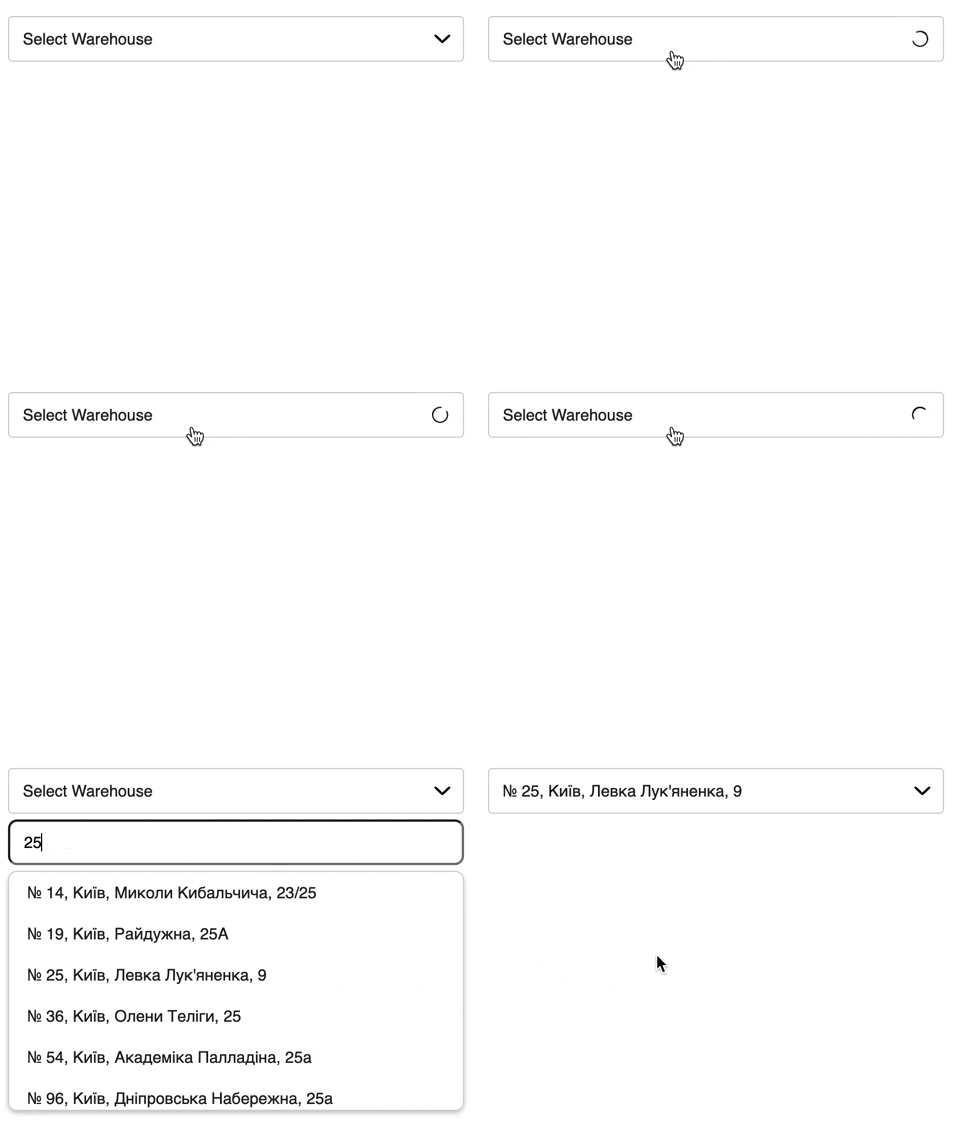
This select is filterable and it filters passed `options` on user input.
- If passed `city` `NpCitySelect` will fetch all warehouses for this city when mounted
```javascript
NpCitySelect({
apiKey: API_KEY,
input: {
name: 'city',
placeholder: 'Select City',
},
button: {
text: 'Select City',
},
root: document.querySelector('#city'),
});
```
### NpWarehouseSelect:
| Name | Type | Description |
| :-------: | :-------------------------------------: | :-------------------------: |
| `city?` | `string` | if passed select will fetch warehouses for this city |
This select is filterable and it filters passed `options` on user input.
- If passed `city` `NpCitySelect` will fetch all warehouses for this city when mounted
 ```javascript
NpCitySelect({
apiKey: API_KEY,
input: {
name: 'city',
placeholder: 'Select City',
},
button: {
text: 'Select City',
},
root: document.querySelector('#city'),
city: 'Київ'
});
```
### Shared Properties:
List of configuration properties when you creating selects
| Name | Type | Description |
| :-------: | :-------------------------------------: | :-------------------------: |
| `root` | `HTMLElement` | root html element |
| `apiKey` | `string` | Your `NovaPoshta` `API_KEY` |
| `input?` | `{ name: string, placeholder: string }` | input props |
| `button?` | `{ text: string }` | button props |
| `placeholder?` | `{ text: string }` | placeholder props |
| `options?` | `{ label: string; value: string }[]` | initial list of options |
| `getOption?` | `(item: ApiResponse) => {label: string, value: string}[]` | method to extract property and value from ApiResponse |
### Hooks:
| Name | Type | Description |
| :---------: | :----------------------: | :----------------------------: |
| `onMounted` | `(select) => void` | called after select is mounted |
| `onSelect` | `(item, select) => void` | called when item is selected. |
| `onOpen` | `(select) => void` | called when select opened, if `onOpen` returns false, select will not be opened |
| `onInput` | `(value: string, select) => void` | called when input value changes |
### Methods
| Name | Type | Description |
| :-----------: | :---------------------------: | :----------------------: |
| `validate` | `() => boolean` | validates select |
| `getFiltered` | `() => {label: string, value: string}[]` | returns filtered options |
| `setFiltered` | `(options: {label: string, value: string}[]) => void` | set filtered options |
| `getOptions` | `() => {label: string, value: string}[]` | returns all options |
| `setOptions` | `(options: {label: string, value: string}[]) => void` | set all options |
| `setOpen` | `(open: boolean) => void` | open or close select |
| `getOpen` | `() => boolean` | return is select open |
| `setDisabled` | `(disabled: boolean) => void` | disable or enable select |
| `getDisabled` | `() => boolean` | returns is select disabled |
| `getValue` | `() => string` | get input value |
| `setValue` | `(value: string) => string` | set input value |
| `setLoading` | `(loading: boolean) => void` | set select loading |
| `getLoading` | `() => boolean` | get is select loading |
### Styling
#### ClassNames:
| Class | Type |
| :---------------: | :---------------: |
| `.np-select` | Select classs |
| `.np-select__button` | Select button |
| `.np-select__input` | Select input |
| `.np-select__box` | Options box class |
| `.np-select__option` | Option class |
#### Active states:
| Class | Type |
| :---------------: | :---------------: |
| `.np-select[aria-invalid='true']` | Invalid/error class |
| `.np-select[aria-busy='true']` | Loading class |
| `.np-select[aria-disabled='true']` | Disabled class |
| `.np-select.open` | Select open class |
| `.np-select__option.selected` | Option selected class |
#### CSS variables:
| Name | Description | Default Value |
| :-----------------------: | :---------------:| :-----------: |
| `--np-select-error` | Error color | `tomato` |
| `--np-select-white` | White color | `#fff` |
| `--np-select-text` | Text color | `#221f1f` |
| `--np-select-active` | Active color | `#e5f5ec` |
| `--np-select-disabled` | Disabled color. | `#d2d2d2` |
| `--np-select-box-shadow` | Box shadow color | `#221f1f40` |
### Example usage:
```javascript
import NpSelect from 'np-select';
NpSelect.NpCitySelect({
root: document.querySelector('#city'),
apiKey: API_KEY,
input: {
name: 'city',
},
button: {
text: 'Select City',
},
});
NpSelect.NpWarehouseSelect({
root: document.querySelector('#warehouse'),
apiKey: API_KEY,
input: {
name: 'warehouse',
},
button: {
text: 'Select Warehouse',
},
});
```
### Common cases:
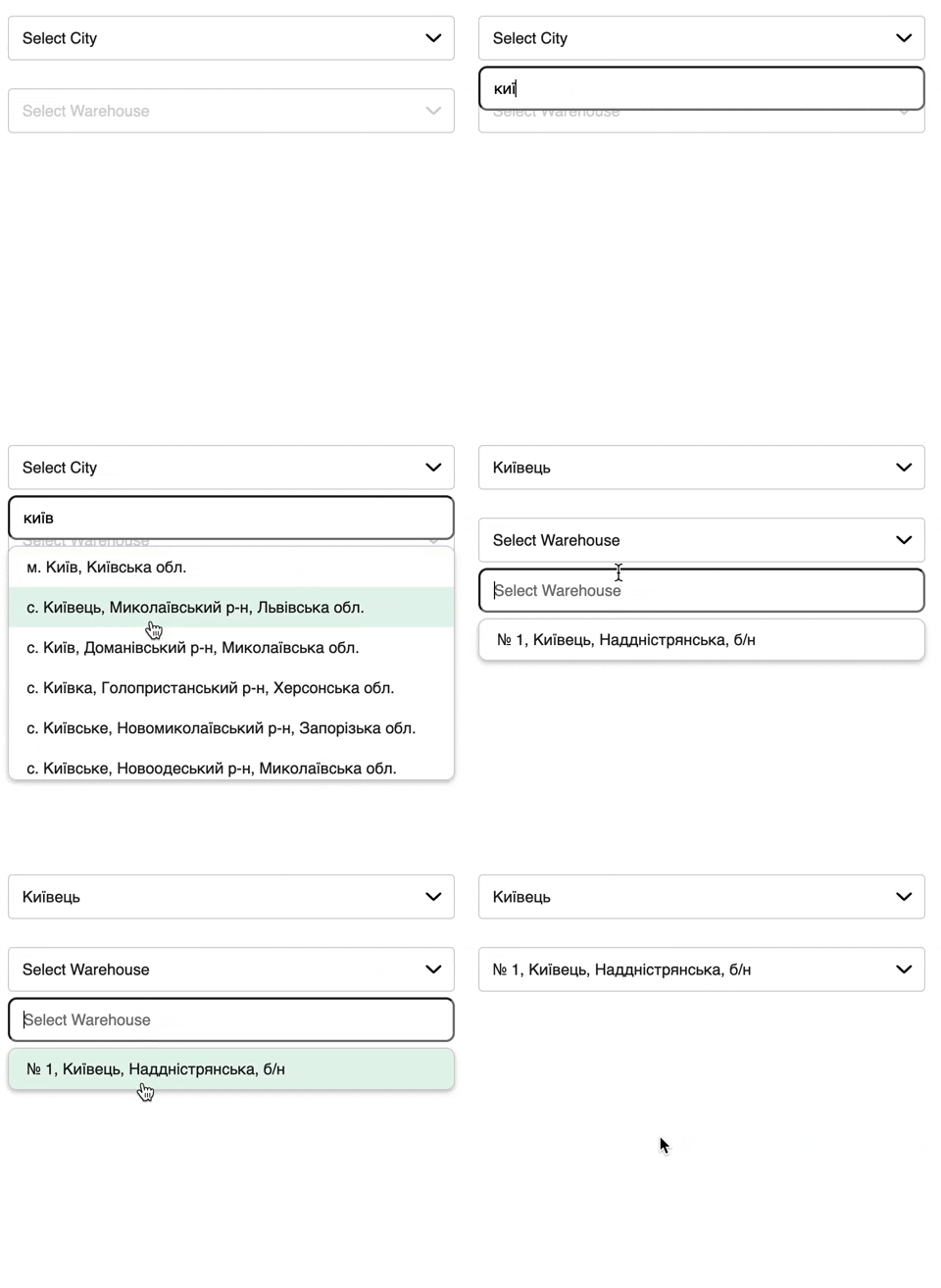
#### Warehouse select disabled untill city is not selected:
Most common case:
```javascript
NpCitySelect({
apiKey: API_KEY,
input: {
name: 'city',
placeholder: 'Select City',
},
button: {
text: 'Select City',
},
root: document.querySelector('#city'),
city: 'Київ'
});
```
### Shared Properties:
List of configuration properties when you creating selects
| Name | Type | Description |
| :-------: | :-------------------------------------: | :-------------------------: |
| `root` | `HTMLElement` | root html element |
| `apiKey` | `string` | Your `NovaPoshta` `API_KEY` |
| `input?` | `{ name: string, placeholder: string }` | input props |
| `button?` | `{ text: string }` | button props |
| `placeholder?` | `{ text: string }` | placeholder props |
| `options?` | `{ label: string; value: string }[]` | initial list of options |
| `getOption?` | `(item: ApiResponse) => {label: string, value: string}[]` | method to extract property and value from ApiResponse |
### Hooks:
| Name | Type | Description |
| :---------: | :----------------------: | :----------------------------: |
| `onMounted` | `(select) => void` | called after select is mounted |
| `onSelect` | `(item, select) => void` | called when item is selected. |
| `onOpen` | `(select) => void` | called when select opened, if `onOpen` returns false, select will not be opened |
| `onInput` | `(value: string, select) => void` | called when input value changes |
### Methods
| Name | Type | Description |
| :-----------: | :---------------------------: | :----------------------: |
| `validate` | `() => boolean` | validates select |
| `getFiltered` | `() => {label: string, value: string}[]` | returns filtered options |
| `setFiltered` | `(options: {label: string, value: string}[]) => void` | set filtered options |
| `getOptions` | `() => {label: string, value: string}[]` | returns all options |
| `setOptions` | `(options: {label: string, value: string}[]) => void` | set all options |
| `setOpen` | `(open: boolean) => void` | open or close select |
| `getOpen` | `() => boolean` | return is select open |
| `setDisabled` | `(disabled: boolean) => void` | disable or enable select |
| `getDisabled` | `() => boolean` | returns is select disabled |
| `getValue` | `() => string` | get input value |
| `setValue` | `(value: string) => string` | set input value |
| `setLoading` | `(loading: boolean) => void` | set select loading |
| `getLoading` | `() => boolean` | get is select loading |
### Styling
#### ClassNames:
| Class | Type |
| :---------------: | :---------------: |
| `.np-select` | Select classs |
| `.np-select__button` | Select button |
| `.np-select__input` | Select input |
| `.np-select__box` | Options box class |
| `.np-select__option` | Option class |
#### Active states:
| Class | Type |
| :---------------: | :---------------: |
| `.np-select[aria-invalid='true']` | Invalid/error class |
| `.np-select[aria-busy='true']` | Loading class |
| `.np-select[aria-disabled='true']` | Disabled class |
| `.np-select.open` | Select open class |
| `.np-select__option.selected` | Option selected class |
#### CSS variables:
| Name | Description | Default Value |
| :-----------------------: | :---------------:| :-----------: |
| `--np-select-error` | Error color | `tomato` |
| `--np-select-white` | White color | `#fff` |
| `--np-select-text` | Text color | `#221f1f` |
| `--np-select-active` | Active color | `#e5f5ec` |
| `--np-select-disabled` | Disabled color. | `#d2d2d2` |
| `--np-select-box-shadow` | Box shadow color | `#221f1f40` |
### Example usage:
```javascript
import NpSelect from 'np-select';
NpSelect.NpCitySelect({
root: document.querySelector('#city'),
apiKey: API_KEY,
input: {
name: 'city',
},
button: {
text: 'Select City',
},
});
NpSelect.NpWarehouseSelect({
root: document.querySelector('#warehouse'),
apiKey: API_KEY,
input: {
name: 'warehouse',
},
button: {
text: 'Select Warehouse',
},
});
```
### Common cases:
#### Warehouse select disabled untill city is not selected:
Most common case:
 ```javascript
const warehouseSelect = NpWarehouseSelect({
apiKey: API_KEY,
input: {
name: 'warehouse',
placeholder: 'Select Warehouse',
},
button: {
text: 'Select Warehouse',
},
root: document.querySelector('#warehouse'),
onMounted: select => select.setDisabled(true),
});
NpCitySelect({
apiKey: API_KEY,
input: {
name: 'city',
placeholder: 'Select City',
},
button: {
text: 'Select City',
},
root: document.querySelector('#city'),
onSelect: async (item, select) => {
const warehouses = await select.api.getNpWarehouses(item.value);
warehouseSelect.setOptions(warehouses);
warehouseSelect.setDisabled(false);
warehouseSelect.setOpen(true);
},
});
});
```
#### Validate select on form submit:
Library provides error styles for select, which you can modify with `css`.
```javascript
form.addEventListener('submit', e => {
e.preventDefault();
const isValid = warehouseSelect.validate();
if (!isValid) {
return;
}
});
```
#### Validate multiple selects on form submit:
For this case you can use utility method `validateMultiple()`
```javascript
form.addEventListener('submit', e => {
e.preventDefault();
const isValid = NpSelect.validateMultiple([warehouseSelect, citySelect]);
if (!isValid) {
return;
}
});
```
#### Get select value:
Getting value as easy as getting it from `` element, or using `getValue` method
```javascript
form.addEventListener('submit', e => {
e.preventDefault();
const isValid = NpSelect.validate(citySelect);
if (!isValid) {
return;
}
// Using getValue
const city = citySelect.getValue();
// Using form data
const form = new FormData(e.target);
const city = form.get('city');
// Using querySelector
const city = document.querySelector('[name="city"]').value;
});
```
```javascript
const warehouseSelect = NpWarehouseSelect({
apiKey: API_KEY,
input: {
name: 'warehouse',
placeholder: 'Select Warehouse',
},
button: {
text: 'Select Warehouse',
},
root: document.querySelector('#warehouse'),
onMounted: select => select.setDisabled(true),
});
NpCitySelect({
apiKey: API_KEY,
input: {
name: 'city',
placeholder: 'Select City',
},
button: {
text: 'Select City',
},
root: document.querySelector('#city'),
onSelect: async (item, select) => {
const warehouses = await select.api.getNpWarehouses(item.value);
warehouseSelect.setOptions(warehouses);
warehouseSelect.setDisabled(false);
warehouseSelect.setOpen(true);
},
});
});
```
#### Validate select on form submit:
Library provides error styles for select, which you can modify with `css`.
```javascript
form.addEventListener('submit', e => {
e.preventDefault();
const isValid = warehouseSelect.validate();
if (!isValid) {
return;
}
});
```
#### Validate multiple selects on form submit:
For this case you can use utility method `validateMultiple()`
```javascript
form.addEventListener('submit', e => {
e.preventDefault();
const isValid = NpSelect.validateMultiple([warehouseSelect, citySelect]);
if (!isValid) {
return;
}
});
```
#### Get select value:
Getting value as easy as getting it from `` element, or using `getValue` method
```javascript
form.addEventListener('submit', e => {
e.preventDefault();
const isValid = NpSelect.validate(citySelect);
if (!isValid) {
return;
}
// Using getValue
const city = citySelect.getValue();
// Using form data
const form = new FormData(e.target);
const city = form.get('city');
// Using querySelector
const city = document.querySelector('[name="city"]').value;
});
```