## Node Tao

**`TAO`** is a simple, lightweight and very fast embedded JS templating. It emphasizes great performance, security, and developer experience.
### 🌟 Features
- 🚀 Super Fast
- 🔧 Configurable
- 🔥 Caching
- ⚡️ Support for partials
- 📝 Easy template syntax (no prefix needed)
- 💻 Developer experience
- 🧩 Support for local and global helpers
- 🛡️ Security by design
- 🟦 [Official VS Code Extension](#vscode)
## Get Started
Define a template `simple.html` inside a view directory `templates`
```html
Hi <%= name %>!
```
```javascript
import { Tao } from 'tao';
const tao = new Tao({ views: path.join(__dirname, 'templates') });
const res = tao.render('simple', { name: 'Tao' });
console.log(res); // Hi Tao!
```
## Helpers
Helpers are functions that can be used inside a template. Helpers can be **local** (only available in a particular `render`) or **global** (available everywhere on the instance).
```typescript
import { Tao } from 'tao';
const tao = new Tao({ views: path.join(__dirname, 'templates') });
// Global helper
function nPlusTwo(n: number) {
return n + 2;
}
// Global helper need to be registered on the instance
tao.defineHelpers({ nPlusTwo });
// Define a dedicated interface for data and helpers passed to the template
interface SimpleData {
name: string;
nPlusOne: (n: number) => number;
}
// Render a template
app.get('/', (req, res) => {
// Local helper
function nPlusOne(n: number) {
return n + 1;
}
// Data and helpers are merged into a single object
const res = tao.render('simple', { name: 'Tao', nPlusOne });
console.log(res); // Hi Tao!
});
```
Usage:
```javascript
// simple.html
<%= nPlusOne(1) %>
```
NB: _Always escape (=) the output of a helper function when it includes user-controlled data._
It is also possible to register helpers on `globalThis` without providing them to the template engine, but it can lead to name collision.
## Include
In your template, you might want to include other templates:
```html
Hi <%= name %>!
<%~ include('article', { phone: 'Tao T9' }) %>
```
Child components will inherit from **data** provided in the parent component.
## Template prefix options
There are three differents template prefixes:
```html
<% const age = 33; %>
<%= `Age: ${age}` %>
<%~ include('product') %>
```
NB: _Those prefix are configurable in the options._
## Template paths resolution
`TAO` will recursively add all templates matching the containing `views` path definition
```javascript
import { Tao } from 'tao';
const tao = new Tao({ views: path.join(__dirname, 'templates') });
```
...such that following structure is ok :
```
| /templates
| - simple.html ✔️
| /products
| - article.html ✔️
| /...
| - nested.html ✔️
```
By default, `fileResolution` is set to `flexible`, which means that you can just provide the _unique end of the path_:
```javascript
const res = tao.render('nested'); // accepted ✔️
const res = tao.render('products/.../nested'); // not necessary ❌
```
`TAO` will successfully identify the nested templates without providing the subfolder(s).
## Programmatically defined templates
You might want to define programmatically templates:
```javascript
const headerPartial = `
`;
tao.loadTemplate('@header', headerPartial);
const rendered = tao.render('@header', { title: 'Computer shop' });
```
## Cache Storage
`TAO` uses cache stores to manage caching. You might want to interact with those stores to retrieve or delete an entry:
```javascript
tao.helpersStore.remove('myHelperFn');
```
## Security by design
By default, `TAO` assume you are running your app in production, so no error will be thrown, such that error stack traces are not visible in your browser. Errors will be displayed in your editor console, and visual error representation (see developer experience) is available in your browser by setting `debug: true` at option initialisation.
## 🟦 Official VS Code Extension
This extension provides Typescript hovering and validation along other tags or structure completions.
Make sure to link your template with an interface to activate Typescript support:
```typescript
const template = tao.render('user-dashboard', userData);
```
[](https://marketplace.visualstudio.com/items?itemName=ManuC.tao-vscode-extension)
## Developer experience
All methods, properties are correctly typed and documented, so you should get help from your editor.
In case of an error, a visual representation is available in your browser, giving you all the details and the precise line of the error (if available).
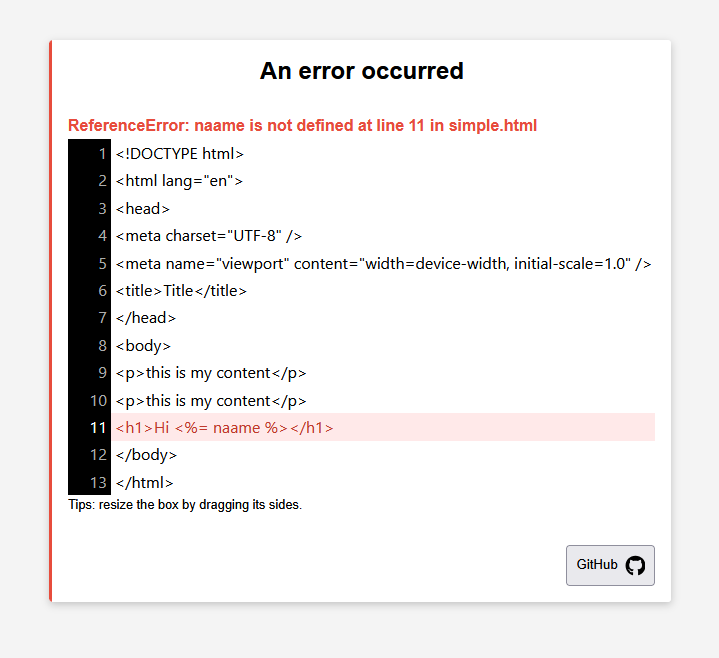
NB: _set `development: true` to activate this option. Do not activate this option in production._
### DevTools widget
When `development: true` is set, a floating **Tao DevTools** button (`τ`) appears in the bottom-right corner of every rendered page. Clicking it opens a panel that shows:
| Field | Description |
| -------------------- | -------------------------------------------------------------- |
| **Template** | Name of the rendered template |
| **Render time** | Rendering time in ms |
| **Cache** | Whether the template cache is enabled or disabled |
| **Cache hit** | Whether this render was served from cache |
| **Children** | Included sub-templates for this render |
| **Data keys** | Number of data keys passed to the template |
| **Helpers** | Number of local helpers passed to the template |
| **Mapped templates** | Full list of all templates discovered in the `views` directory |
## Integration with Web Framework
Fastify:
```typescript
import { Tao } from 'node-tao';
import Fastify from 'fastify';
const fastify = Fastify();
const tao = new Tao({ views: 'src', development: true });
declare module 'fastify' {
interface FastifyReply {
html(payload: string): FastifyReply;
}
}
fastify.decorateReply('html', function (payload: string) {
return this.type('text/html').send(payload);
});
fastify.get('/tao', (request, reply) => {
const result = tao.render('test', { name: 'Fastify' });
return reply.html(result);
});
try {
await fastify.listen({ port: 3000 });
} catch (err) {
fastify.log.error(err);
process.exit(1);
}
```
Express:
```typescript
import express from 'express';
import { Tao } from 'node-tao';
export const app = express();
app.use(express.json());
const tao = new Tao({ views: 'src', development: true });
app.get('/tao', (req, res) => {
const result = tao.render('test', { name: 'Express' });
res.send(result);
});
app.listen(3000, () => {
console.log('listening on *:3000');
});
```
## FAQs
Some words about this library
It started as a fork of `eta`, but became a dedicated library because the changes made were too significant. If you know `eta`, the API will be familiar.
If you want to compare tao with eta
- **Tao set security by design**: Stack traces are not visible in the browser. Increased security in files mapping.
- **Increased developer experience**: Visual error representation, metrics, configuration options are checked.
- **Immutability**: Data provided in the template is immutable, ie. template data modification does not affect original data.
- **Clearer API**: Scope is well defined and restricted, which also improves security. Clean code practices are enforced.
- **Clearer template syntax**: No prefix are needed.
- **Helpers**: Global and local helpers, which are clearer and more suitable for little template logic.
- **Flexible template path resolution**: With `fileResolution` mode set to `flexible`, only end unique paths can be provided, which increases file path readability (aka. `namespaces`).
- **Vscode extension**: Official vscode extension.
- **Performance**: Various performance optimization.
- **Lexer**: A lexer offers more accuracy and is more scalable.
- **Testing**: Modern and up to date numerous tests.
Choices
- **No async support**: Supporting async rendering (e.g., `await include`) within templates encourages placing too much logic in the view layer and can be considered as an _anti-pattern_. Templates should be responsible for displaying data, while controllers should handle logic. Async behavior in templates would also require error handling (e.g., `try/catch`), adding complexity and possible errors. Async logic in template make it impossible de optimize through a `Promise.all` or any parallelism, hard to test and debug. In short: if you have async data, fetch it beforehand and render it synchronously (or use client side Javascript).
- **No `layouts`**: Layouts are essentially includes and add unnecessary complexity to the rendering process.
- **No `rmWhitespace`**: Stripping whitespace at the template level yields negligible HTML size savings. Using compression (e.g., via Nginx or other proxies) is far more effective and scalable.
_If you think those features are absolutely necessary, please open a new discussion on github and provide an example._
## Change logs
V0.0.2: Fix node modules exclusion in files matching for the error template.
V0.0.3: Data exchange for the official extension, and various improvements.
V0.0.4: Fix NaN or Infinity value provided inside an object into the template.
V0.0.5: Fix character escape triggering an invalid js syntax.
V1.0.0: Transforming the basic template expression extraction (inherited from ETA) to a lexer. Adding a widget to developer experience. Render method accepts now a generic and two params, the second param containing data and helpers.
V1.0.2: Improved error management. More modern error template in case of an error when `development` is set to `true`. Removed `inclusion error` which was triggering false positive.
## Credits
- Syntax and some parts of compilation were based on `eta` in the versions < 1.0.0.