# node-network-tab v2
> A local request tracer for Node.js. Captures every byte your process
> sends and receives, correlates inbound to outbound into one
> collapsible trace, and shows it in a fast modern terminal UI you
> actually want to keep open.
[](https://www.npmjs.com/package/node-network-tab)
[](https://github.com/rohit-jsfreaky/node-network-tab/actions)
[](LICENSE)
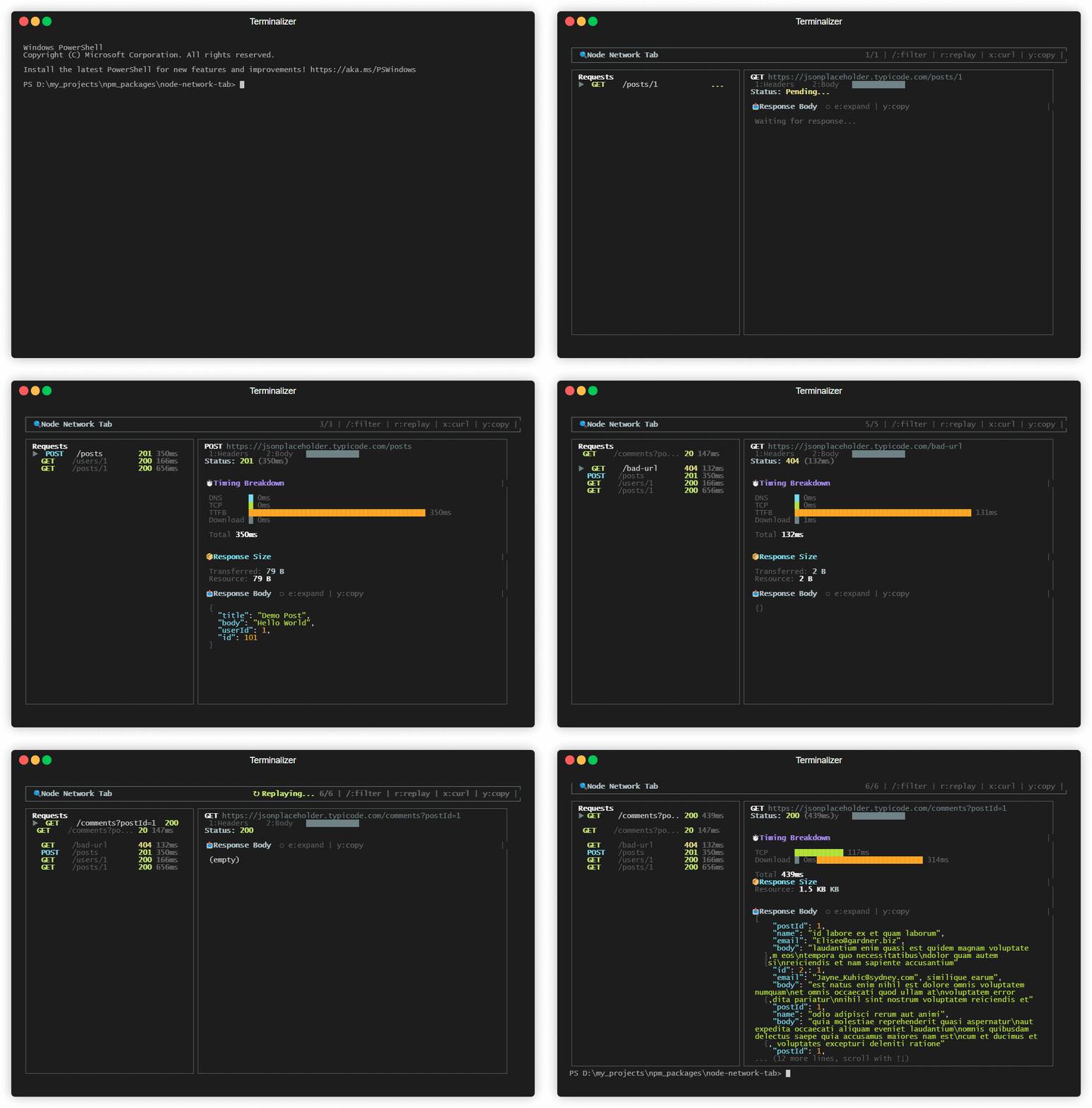
## What's new in v2
- **Inbound + outbound capture, correlated.** Each inbound HTTP request
becomes the root of a trace; every outbound `fetch` / `http` /
`https` / `http2` / `undici` call inside the handler is grouped under it.
- **Real filter DSL.** `status:5xx host~stripe duration:>500ms body:contains("rate_limited")`.
- **Body intelligence.** GraphQL split view, JWT decode, multipart
parts list, form-urlencoded table, hex dump for binary, syntax-highlighted JSON.
- **Diff view.** Pick two requests with `d` twice; see URL / header /
body diffs side by side.
- **Edit-and-replay.** `i` opens an inline editor; `Ctrl+S` resends
the modified request. New trace appears linked via `replayOf`.
- **Command palette & help overlay.** `:` for fuzzy actions, `?` for
searchable keybindings.
- **6 truecolor themes** with auto light/dark detection: gruvbox,
nord, solarized-dark/light, default-dark/light. Press `T` to cycle.
- **Live waterfall** under the main pane shows recent requests over
a sliding 10-second window.
- **Mouse + OSC-8 hyperlinks + Kitty keyboard protocol** in capable
terminals (Kitty, WezTerm, Ghostty, iTerm2, Windows Terminal).
- **SQLite persistence on by default** — your captures survive
restarts. `node-network-tab history` lists past sessions.
- **Auto-redaction with audit log.** Authorization, Cookie, AWS keys,
Stripe keys, JWTs, GitHub PATs all masked. Press `R` to reveal one
request; reveals are logged.
- **Production-safe.** Refuses to start in prod via multi-signal
detection (NODE_ENV, K8s, Lambda, Vercel, etc.).
- **Supply-chain hardened.** OIDC trusted publishing, SLSA-L3
provenance, CycloneDX SBOM attached to every release. No
postinstall scripts.
## Install
```sh
npm install --save-dev node-network-tab
```
Required: Node 20+ (full feature set on Node 22+).
## Quick start
The recommended way — preload via `--import` so capture sees the very
first module load:
```sh
# Your app, instrumented:
node --import node-network-tab/register ./server.js
# In a second terminal, open the viewer:
npx node-network-tab
```
CommonJS apps:
```sh
node -r node-network-tab/register ./server.js
```
Or in-file:
```js
import "node-network-tab/start"; // must be the first import
```
## Keybindings (press `?` in the viewer)
| Key | What it does |
|---|---|
| `/` or `f` | Open filter (DSL: `status:5xx host~stripe …`) |
| `j` / `k` / arrows | Navigate |
| `Enter` | Expand/collapse trace group |
| `[` `]` | Prev/next sibling in trace |
| `1` `2` `3` | Headers / Body / Response tabs |
| `Tab` / `Shift+Tab` | Cycle tabs |
| `e` / `E` | Toggle expand (full-screen detail) |
| `r` | Replay selected request |
| `i` | Open Edit & Replay panel (insert mode) |
| `d` | Diff: 1st = pick, 2nd = compare, 3rd = clear |
| `x` | Copy as cURL |
| `y` | Copy current tab content |
| `R` | Reveal redacted secrets (audited) |
| `p` | Pin selected (survives clear) |
| `P` | Toggle preserve-on-clear |
| `s` | Pause / resume capture |
| `T` | Cycle theme |
| `c` | Clear |
| `:` | Command palette (fuzzy) |
| `?` | Help overlay |
| `q` | Quit |
## Filter DSL
Real grammar — no more "is this the path or the method?" guesswork.
```
status:5xx class match
status:>=400 status:<500 numeric ops
host:stripe.com exact
host~stripe substring
path~/v1/charges
method:POST
duration:>500ms
size:>1MB
header:authorization=* presence
body:contains("rate_limited")
trace:errors traces with any error
direction:inbound
kind:fetch
AND, OR, NOT, parens, -prefix for negation.
status:5xx AND host~stripe -path:/health
```
## CLI
```sh
npx node-network-tab # open viewer attached to most recent session
npx node-network-tab list # list running sessions
npx node-network-tab attach # attach to a specific session
npx node-network-tab doctor # diagnostic report
npx node-network-tab history # list persisted sessions on disk
npx node-network-tab export out.har # export active session as HAR 1.2
npx node-network-tab import in.har # open a HAR file (offline viewer)
```
## Configuration
`.networktabrc.json` in your project root (resolved by walking up from
cwd):
```json
{
"redact": {
"headers": ["x-internal-token"],
"bodyKeys": ["user.ssn"],
"patterns": ["INTERNAL-[A-Z0-9]{16}"]
},
"persistencePath": "/tmp/nnt-mysession.sqlite"
}
```
Env vars:
| Variable | Effect |
|---|---|
| `NODE_NETWORK_TAB_MODE` | `metadata` (≤2% overhead), `default`, `verbose` |
| `NODE_NETWORK_TAB_MAX_BODY_BYTES` | Per-body cap (default 262144) |
| `NODE_NETWORK_TAB_MAX_TOTAL_BODY_BYTES` | Per-process cap (default 100MB) |
| `NODE_NETWORK_TAB_MAX_LOGS` | Ring buffer size (default 200) |
| `NODE_NETWORK_TAB_FORCE` | `1` to bypass the production guard |
| `NODE_NETWORK_TAB_NO_REDACT` | `1` to disable default redaction (tests only) |
| `NODE_NETWORK_TAB_NO_PERSIST` | `1` to disable SQLite persistence |
| `NODE_NETWORK_TAB_CAPTURE_WS` | `1` to capture WebSocket frame contents |
| `NODE_NETWORK_TAB_THEME` | `gruvbox` / `nord` / `solarized-dark` / `solarized-light` / `default-dark` / `default-light` |
| `NODE_NETWORK_TAB_GRAPHICS` | Override image protocol detection |
| `NODE_NETWORK_TAB_INLINE_UI` | `1` to render the TUI in the same terminal as your app |
## Adapters
| Adapter | Captures |
|---|---|
| `core-http` | `http.request`, `https.request`, `http.get`, `https.get`, `globalThis.fetch` |
| `undici-channels` | Direct `undici.fetch`, `undici.request`, Pool / Agent calls via `node:diagnostics_channel` |
| `core-http2` | `http2.connect` client streams (HTTP/2, gRPC) |
| `inbound-http` | Server-side `http.createServer` — opens the trace, runs handler in AsyncLocalStorage scope |
| `ws` | `globalThis.WebSocket` connection lifecycle; frame contents opt-in |
## Security
See [`docs/SECURITY.md`](docs/SECURITY.md) for the full redaction list,
reveal audit log, production-guard rules, and instructions for
verifying releases with `cosign`.
## Examples
Runnable apps in [`examples/`](examples/):
- **`examples/express`** — inbound + outbound correlation
- **`examples/streaming-sse`** — OpenAI-streaming shape (SSE)
- **`examples/fetch-demo`** — zero-config five-request smoke
## How v2 differs from v1
v1 was a 50-log circular buffer with a flat list, a heuristic
"is-this-a-method-or-a-path" filter, world-readable IPC, and no
redaction. v2:
- Captures **inbound** and **outbound** correlated via AsyncLocalStorage.
- Real DSL parser with error positions.
- UDS / named-pipe IPC, mode 0600, token-handshake authentication.
- Default redaction with audit log.
- SQLite persistence across restarts.
- 6 themes, mouse, inline images, OSC-8 links, Kitty kbd.
- HAR 1.2 export/import.
- 5 capture adapters covering http, https, fetch, undici, http2, inbound, ws.
- 100+ acceptance tests, CI matrix on Linux/macOS/Windows × Node 20/22/24.
- OIDC publish + provenance + SBOM.
## Migrating from v1
The public API surface is unchanged. The only thing you need to do is
switch from `import 'node-network-tab/start'` to
`node --import node-network-tab/register`, so capture sees the very
first module load. Everything else (env vars, exports, viewer command)
is forward-compatible.
## Contributing
See [docs/REDESIGN-2026.md](docs/REDESIGN-2026.md) for architecture and
[docs/V2-LAUNCH-PLAN.md](docs/V2-LAUNCH-PLAN.md) for the roadmap. Open
issues welcome.
## License
MIT — see [LICENSE](LICENSE).