
The package manager and intelligent project bootstrapper for AI-assisted software development.
Bootstrap your AI development environment in one command — Noah understands your project and configures the best Skills, Rules, and workflows for Cursor, Claude Code, Windsurf, and more.
> **Continuous improvement.** Noah is under active development. The CLI, registry, and DX keep evolving — expect frequent updates, new packages, and polish as the roadmap ships.




```bash
npx noah-cursor bootstrap
# or: npx noah bootstrap
```
**Recommended for first-time users.** Clone a repo, run bootstrap, and Noah detects your stack, scores project health, and shows recommended packages — then asks before installing. Confirm to install and write `noah.config.json`, or skip and choose packages yourself.
---
## Intelligent Project Bootstrap
One command prepares your entire AI development environment.
```bash
noah bootstrap
```
Noah automatically:
- ✓ Detects your framework and tooling
- ✓ Analyses project architecture
- ✓ Scores project health
- ✓ Recommends the best Rules and Skills
- ✓ Installs AI workflow packages
- ✓ Generates `noah.config.json`
- ✓ Configures your AI assistant
No searching. No manual configuration. Just clone your project and bootstrap.
### Example
```text
$ noah bootstrap
────────────────────────────
Scanning repository...
✓ Laravel 12
✓ Vue 3
✓ PostgreSQL
✓ Docker
✓ GitHub Actions
Project Health
Architecture 92%
Security 88%
Testing 34%
Documentation 26%
Recommended Packages
✓ Laravel Enterprise
✓ Testing Workflow
✓ Security Standards
✓ Docker Optimisation
? Install 4 recommended package(s)? (Y/n)
Installing...
Done.
Workspace ready.
```
### How it works
```text
Clone Repository
↓
noah bootstrap
↓
Detect Stack
↓
Analyse Project
↓
Recommend Packages
↓
Install AI Workflows
↓
Generate noah.config.json
↓
Ready to Develop
```
---
## Why Noah Cursor?
Unlike traditional prompt registries, Noah understands your project before installing anything.
With a single command, Noah can:
- Detect your technology stack
- Analyse project health
- Recommend the best AI workflow packages
- Configure your AI coding assistant
- Generate a reproducible workspace configuration
### Why it's different
| Traditional Registry | Noah Cursor |
| -------------------- | ----------- |
| Browse packages manually | Automatically understands your project |
| Search for prompts | Recommends the right packages |
| Install one resource at a time | Bootstraps the entire AI development environment |
| Static downloads | Intelligent project analysis |
| Manual configuration | Zero-configuration onboarding |
---
## Features
1. **Intelligent Project Bootstrap** — detect, recommend, install, ready
2. **Interactive Terminal UI** — browse Skills, Rules, Prompts, MCP, Presets
3. **Project Detection** — frameworks, tooling, CI, Docker, AI config
4. **AI Workflow Package Manager** — install / update / uninstall / lockfile
5. **Smart Recommendations** — stack-aware package suggestions
6. **Multi-AI Assistant Support** — Cursor, Claude Code, Windsurf, and more
7. **Registry Browser** — fuzzy search, preview, trending
8. **Skills & Rules Installation** — battle-tested agent workflows
9. **Team Workspace Configuration** — `noah.config.json` + `sync`
10. **Versioned AI Packages** — pins, presets, dependencies
---
## Quick start
Requires **Node.js 20+**.
```bash
# Recommended — bootstrap your AI environment from the project
npx noah-cursor bootstrap
# Or install globally
npm install -g noah-cursor
noah bootstrap
```
The registry ships inside the package. Nothing to clone for official assets.
### Other ways to install packages
```bash
# Interactive browse (Skills / Rules / Prompts / MCP / Presets)
npx noah-cursor browse
# Install by package name
npx noah-cursor install commit-push
npx noah-cursor install laravel-api --target claude
npx noah-cursor install laravel-enterprise
```
---
## Demo
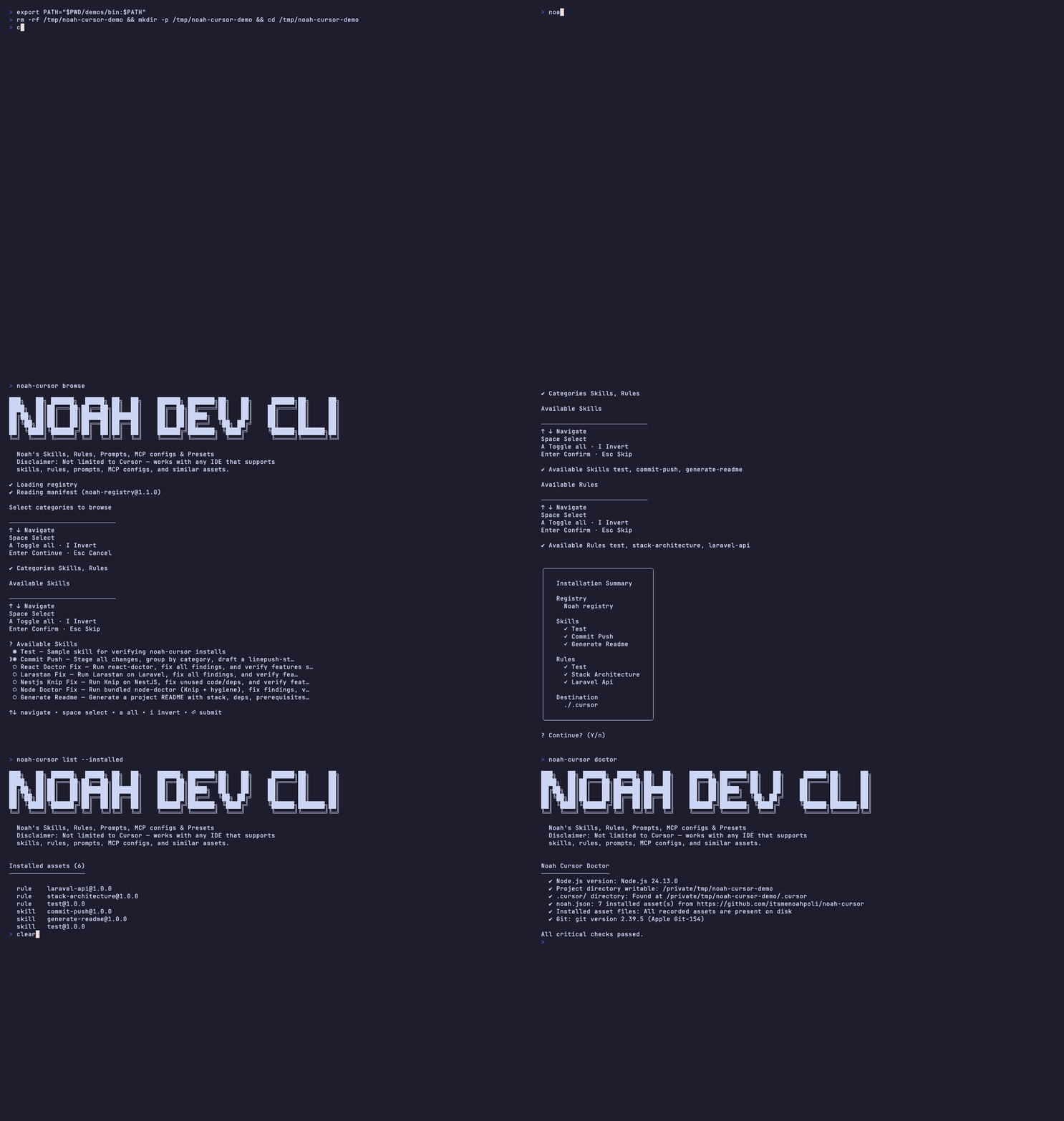
Marketing site: [GitHub Pages](https://itsmenoahpoli.github.io/noah-cursor/)
---
## Built for your stack



Curated Skills & Rules for React dashboards, Laravel APIs, Next/Nuxt marketing sites, NestJS, and Node — selected automatically when you bootstrap, or installed by name when you prefer.
---
## Works with your IDE
Built for **Cursor** first. Same registry, different project folder via `--ide` or `--target`.
| IDE | Flag | Project folder |
| --- | ---- | -------------- |
| **Cursor** | `--ide cursor` **(default)** | `.cursor/` |
| Windsurf | `--ide windsurf` | `.windsurf/` |
| Claude Code | `--ide claude-code` / `--target claude` | `.claude/` |
| Continue | `--ide continue` | `.continue/` |
| VS Code | `--ide vscode` | `.vscode/` |
| Cline | `--ide cline` | `.cline/` |
| Gemini CLI | `--ide gemini` | `.gemini/` |
| Codex CLI | `--ide codex` | `.codex/` |
| Roo Code | `--ide roo` | `.roo/` |
| Aider | `--ide aider` | `.aider/` |
```bash
noah bootstrap --target claude
noah install commit-push --ide windsurf
```
---
## What you get
### Skills — agent workflows you can reuse
| Skill | Stack | What it does |
| ----- | ----- | ------------ |
| `commit-push` | Git | Stage, group by category, draft a clean commit, push |
| `generate-readme` | Docs | Generate README with stack, deps, prerequisites, setup |
| `react-doctor-fix` | React | Run react-doctor, fix findings, verify no regressions |
| `larastan-fix` | Laravel | Run Larastan on Laravel, fix, verify |
| `nestjs-knip-fix` | NestJS | Knip on NestJS — unused code/deps out, features intact |
| `node-doctor-fix` | Node.js | Bundled node-doctor (Knip + hygiene) for generic Node |
### Rules — stack guidance for your agent
| Rule | Stack | For |
| ---- | ----- | --- |
| `stack-architecture` | Multi | Choosing React SPA vs Laravel API vs Next/Nuxt marketing |
| `react-spa-dashboard` | React | React + TypeScript + TanStack Query dashboards |
| `laravel-api` | Laravel | Headless Laravel APIs (Sanctum-ready) |
| `nextjs-marketing` | Next.js | Next.js App Router marketing / branding sites |
| `nuxt-marketing` | Nuxt | Nuxt 3+ marketing / branding sites |
### Presets — one install, many packages
| Preset | Includes |
| ------ | -------- |
| `laravel-enterprise` | Laravel API + Larastan + README + git + architecture |
| `react-performance` | React SPA rules + react-doctor + git + architecture |
Prompts and MCP configs are supported by the CLI — more shipping as the registry grows.
---
## Commands
| Command | Description |
| ------- | ----------- |
| **`bootstrap`** | **Detect stack → recommend → confirm → install → write workspace (flagship)** |
| `analyze` / `doctor` | Project analysis and health scores |
| `wizard` | Interactive “what are you building?” setup |
| `browse` | Interactive Skills / Rules / Prompts / MCP / Presets |
| `install` / `i` | Install by package name (`id`, `type/id`, `@version`) |
| `add` | Install via `--skill` / `--rule` / … flags |
| `search` / `preview` | Fuzzy search and package preview |
| `list` / `update` / `uninstall` | Manage installed packages |
| `workspace` / `sync` | Team `noah.config.json` + sync |
| `explain` / `upgrade` | Package explain + upgrade assistant |
| `trending` | Trending packages by downloads / rating |
| `dashboard` / `diff` / `try` / `undo` / `new` | DX extras |
Use `--ide` or `--target` on install / bootstrap / doctor. Default: `cursor`.
### Bootstrap & project-aware flow
```bash
noah bootstrap # recommended entrypoint (asks before install)
noah bootstrap -y # skip confirmation and install
noah bootstrap --all # recommend all matches (not just top 5)
noah bootstrap --dry-run
noah analyze
noah doctor
noah wizard
```
### Browse & install
```bash
noah browse
noah browse --browse-skills
noah install laravel-api
noah install rule/laravel-api@1.0.0 --target claude
noah install laravel-enterprise
```
### Team sync
```bash
noah workspace init
noah workspace add rule/laravel-api
noah sync -y
# noah.config.json + noah.lock stay in sync on install
```
---
## Project layout after bootstrap
```
your-project/
.cursor/ # AI assets (or .claude/, .windsurf/, …)
skills/
rules/
noah.json # per-IDE install ledger
noah.config.json # team workspace package list
noah.lock # pinned versions
```
User preferences (favorites, recent, auth) live in `~/.noah/`.
---
## Build your own registry assets
This repo is both the **CLI** and the **registry**:
```
manifest.json
skills/ rules/ prompts/ mcp/ presets/
```
Add a package folder + `manifest.json` entry, then open a PR. Manifest fields can include `tags`, `downloads`, `rating`, `verified`, `dependsOn`, and `changelog`.
---
## Development
```bash
npm install
npm run build # TypeScript + bundle registry → dist
npm test
npm run dev -- bootstrap
```
`npm run build` copies the registry into `dist/noah-registry/` so published installs never need GitHub access for official assets.
---
## Vision
> Noah Cursor isn't just a package installer.
>
> It is an intelligent developer experience platform that understands your project, recommends best practices, and prepares your AI coding assistant automatically.
The long-term vision is to become **the package manager for AI-assisted software development** — project-aware, workflow-focused, and zero-config for teams who ship with AI every day.
---
## Contributing
Ideas for Skills, Rules, or MCP configs? Open an issue or PR. The best assets are ones you already use on real projects.
Noah is continuously improved; feedback and PRs shape what ships next.
## Feedback & requests
📧 **Email:** [patrickpolicarpio08@gmail.com](mailto:patrickpolicarpio08@gmail.com)
Whether it's a Skill you want added, a Rule for your stack, a bug report, or an idea to improve bootstrap — send a note.
## Support
If Noah saves you time, consider supporting on Ko-fi — it helps keep the CLI and registry maintained.


Scan to support on Ko-fi
## License
MIT © [Noah Poli](https://github.com/itsmenoahpoli)