# 🌙 NightlyWeb

NightlyWEb is a lightweight and customizable CSS and JavaScript library for adding dark mode functionality to your website. With just a few lines of code, you can enhance user experience by providing a visually comfortable dark mode option.

## Features

✨ **Easy Integration**: Simple integration with NightlyWeb CDN.

🌈 **Customizable**: Tailor the dark mode to match your website's design.

🕶️ **User-Friendly**: Enhance user experience by providing a visually friendly dark mode.

🚀 **Lightweight**: Minimal impact on page load times.

## Getting Started

### Installation

Include the CSS and JS in your HTML file:

```html
<link rel="stylesheet" href="https://cdn.jsdelivr.net/npm/nightlyweb@1.0.1/dist/nightlyweb.min.css">
```
```html
<script src="https://cdn.jsdelivr.net/npm/nightlyweb@1.0.1/dist/nightlyweb.min.js"></script>
```

## Usage

Initialize NightlyWeb by adding the following code:
```html
<!-- Dark mode toggle switch div -->
<div class="NightlyWeb">
    <input type="checkbox" id="darkModeToggle">
    <label for="darkModeToggle"></label>
</div>
```
- add this few lines of code to anywhere in your html body tag.
That's it! NightlyWEb will now toggle between light and dark modes.
- you can the toggle button on the top right corner of your web page.

## Customization

If you want to change the position or size of the toggle button then >
```CSS
/* Toggle switch styles */
.NightlyWeb {
  z-index: 999999999;
  position: fixed;
  top: 10px;
  right: 10px;
  cursor: pointer;
  user-select: none;
}
```
- simply add this code to your .css file and customize as your desired position and size.

---

## Example
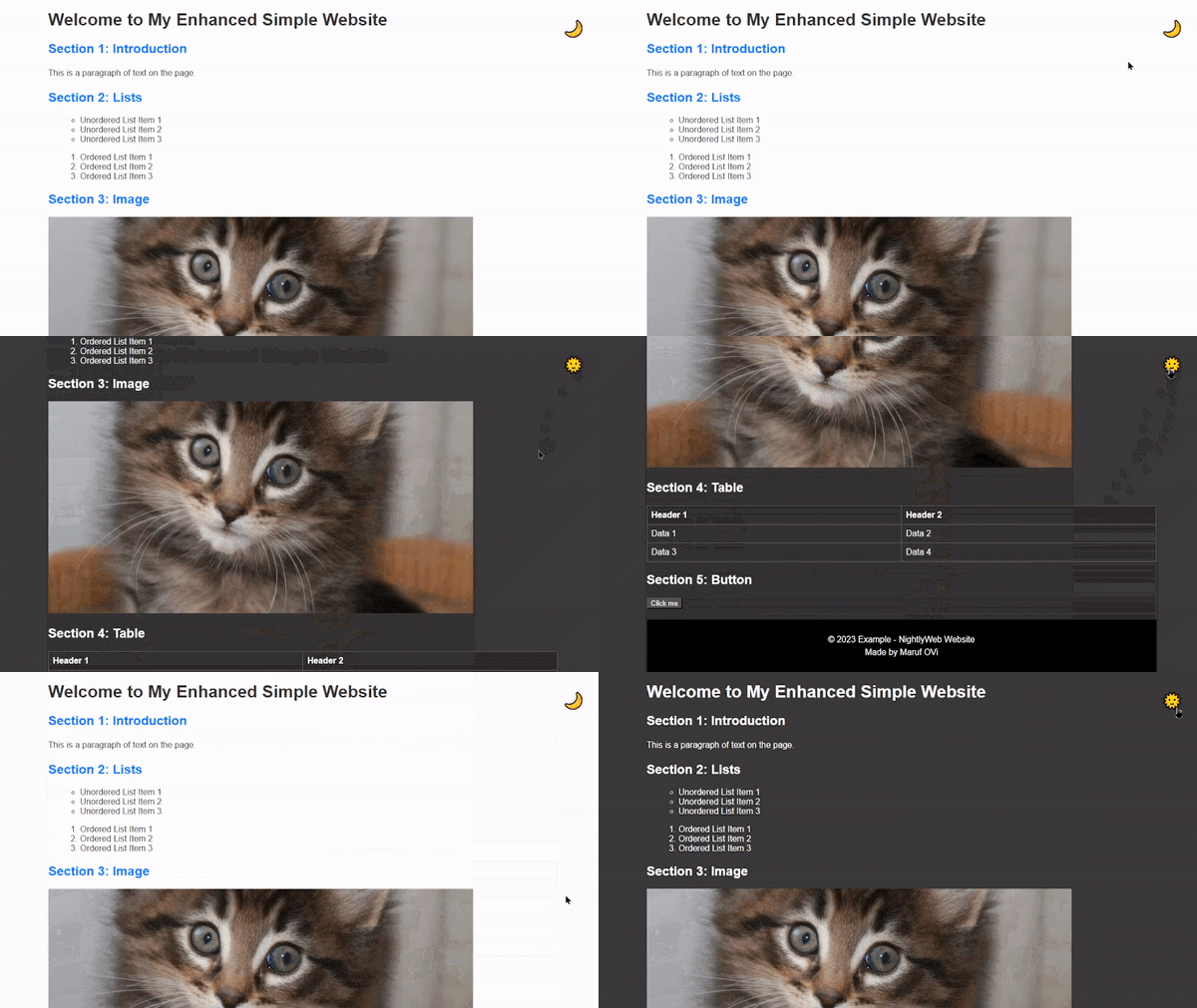

![Preview image of NightlyWeb](https://ik.imagekit.io/iamovi/NightlyWeb/preview.gif?updatedAt=1701702546353)
```html
<!DOCTYPE html>
<html lang="en">
  <head>
    <meta charset="UTF-8" />
    <meta name="viewport" content="width=device-width, initial-scale=1.0" />
    <title>Example - NightlyWeb</title>
    <link rel="stylesheet" href="https://cdn.jsdelivr.net/npm/nightlyweb@1.0.1/dist/nightlyweb.min.css" />
    <style>
      body {
        font-family: Arial, sans-serif;
        margin: 20px auto;
        max-width: 960px;
      }
      h2 {
        color: #007bff;
      }
      p {
        line-height: 1.5;
      }
      ul {
        list-style-type: circle;
        margin-left: 20px;
      }
      ol {
        list-style-type: decimal;
        margin-left: 20px;
      }
      img {
        max-width: 100%;
        height: auto;
      }
      table {
        border-collapse: collapse;
        width: 100%;
      }
      table,
      th,
      td {
        border: 1px solid #dddddd;
        text-align: left;
        padding: 8px;
      }
      th {
        background-color: #f2f2f2;
      }
      footer {
        margin-top: 20px;
        padding: 10px;
        background-color: #f2f2f2;
        text-align: center;
      }
    </style>
  </head>
  <body>
    <!-- Dark mode toggle switch div -->
    <div class="NightlyWeb">
      <input type="checkbox" id="darkModeToggle" />
      <label for="darkModeToggle"></label>
    </div>

    <h1>Welcome to My Enhanced Simple Website</h1>

    <h2>Section 1: Introduction</h2>
    <p>This is a paragraph of text on the page.</p>

    <h2>Section 2: Lists</h2>
    <ul>
      <li>Unordered List Item 1</li>
      <li>Unordered List Item 2</li>
      <li>Unordered List Item 3</li>
    </ul>

    <ol>
      <li>Ordered List Item 1</li>
      <li>Ordered List Item 2</li>
      <li>Ordered List Item 3</li>
    </ol>

    <h2>Section 3: Image</h2>
    <img src="https://placekitten.com/800/400" alt="Cute Kitten" />

    <h2>Section 4: Table</h2>
    <table>
      <tr>
        <th>Header 1</th>
        <th>Header 2</th>
      </tr>
      <tr>
        <td>Data 1</td>
        <td>Data 2</td>
      </tr>
      <tr>
        <td>Data 3</td>
        <td>Data 4</td>
      </tr>
    </table>

    <h2>Section 5: Button</h2>
    <button type="button">Click me</button>

    <footer>
      <p>
        &copy; 2023 Example - NightlyWeb Website <br />
        Made by Maruf OVi
      </p>
    </footer>
    <script src="https://cdn.jsdelivr.net/npm/nightlyweb@1.0.1/dist/nightlyweb.min.js"></script>
  </body>
</html>
```
## Missed Tag

If you notice any html tag or your custom is missed then >
```CSS
body.dark-mode [add_missed_tag] {
  background-color: #333333;
}
```
- simply replace the `[add_missed_tag]` with the `actual missed` tag.

---

## License

NightlyWeb is licensed under the [MIT License](LICENSE).


🚀 Happy coding with NightlyWeb! 🌙