# International Telephone Input
[](https://greenkeeper.io/)
[](https://travis-ci.org/webcat12345/ngx-intl-tel-input) [](https://badge.fury.io/js/ngx-intl-tel-input) [](https://www.npmjs.com/package/ngx-intl-tel-input)
[](https://waffle.io/webcat12345/ngx-intl-tel-input/metrics)
An Angular package for entering and validating international telephone numbers. It adds a flag dropdown to any input, detects the user's country, displays a relevant placeholder and provides formatting/validation methods.
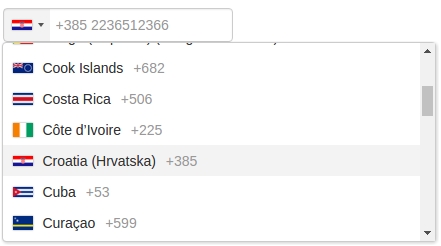
## Documentation
https://webcat12345.github.io/ngx-intl-tel-input/overview.html
## Pull requests are welcome!!!
#### Merged pull requests
https://github.com/webcat12345/ngx-intl-tel-input/pull/3
## Installation
To install this library, run:
```bash
$ npm install ngx-intl-tel-input --save
```
This library depends on `BsDropdownModule` from `ngx-bootstrap/dropdown`.
To install this library, run:
```bash
$ npm install ngx-bootstrap --save
```
Then import `BsDropdownModule` at `AppModule`. (more details see : http://valor-software.com/ngx-bootstrap/#/dropdowns)
```typescript
import { BsDropdownModule } from 'ngx-bootstrap/dropdown';
@NgModule({
...
imports: [
...
BsDropdownModule.forRoot()
...
],
...
})
export class AppModule { }
```
## Consuming library
Injecting StyleSheet
Inside `angular-cli.json`
```json
"styles": [
"../node_modules/ngx-intl-tel-input/resource/intl-tel-input.css"
],
```
From your Angular `AppModule`:
```typescript
// Import your library
import { NgxIntlTelInputModule } from 'ngx-intl-tel-input';
@NgModule({
...
imports: [
...
NgxIntlTelInputModule
...
],
...
})
export class AppModule { }
```
Once library is imported, you can use components in your Angular application:
```xml
{{phone_number}}
```
### Parameters
| Input | Description |
| ------ | ------ |
| value | Phone number |
| preferredCountries | https://github.com/webcat12345/ngx-intl-tel-input/pull/3 |
## Development
To generate all `*.js`, `*.d.ts` and `*.metadata.json` files:
```bash
$ npm run build
```
To lint all `*.ts` files:
```bash
$ npm run lint
```
## License
MIT © [webcat12345](mailto:webcat91@gmail.com)