<h1 align="center">Angular Google Maps Places Autocomplete</h1>

<p align="center">
  <img src="https://lekhmanrus.github.io/ngx-google-maps-places/icons/ngx-google-maps-places.svg"
       alt="Angular Google Maps Places Logo" width="275px" height="275px" />
  <br />
  <em>
    Angular library that provides a powerful and customizable Google Maps Places Autocomplete component for your Angular applications.
    <br />
    Compatible with Angular **>= 18.x.x**. See <a href="#versioning">Versioning</a>.
  </em>
  <br />
</p>

<p align="center">
  <a href="https://lekhmanrus.github.io/ngx-google-maps-places/"><strong>Demo</strong></a>
  <br />
</p>


[![Build](https://github.com/lekhmanrus/ngx-google-maps-places/actions/workflows/build.yml/badge.svg)](https://github.com/lekhmanrus/ngx-google-maps-places/actions/workflows/build.yml)
[![Publish](https://github.com/lekhmanrus/ngx-google-maps-places/actions/workflows/publish.yml/badge.svg)](https://github.com/lekhmanrus/ngx-google-maps-places/actions/workflows/publish.yml)
[![npm version](https://img.shields.io/npm/v/ngx-google-maps-places-autocomplete.svg)](https://www.npmjs.com/package/ngx-google-maps-places-autocomplete)
[![npm](https://img.shields.io/npm/dm/ngx-google-maps-places-autocomplete.svg)](https://www.npmjs.com/package/ngx-google-maps-places-autocomplete)


![Example](https://raw.githubusercontent.com/lekhmanrus/ngx-google-maps-places/main/assets/animation.gif)


<hr />


## Features

* Easy integration with Angular Reactive Forms
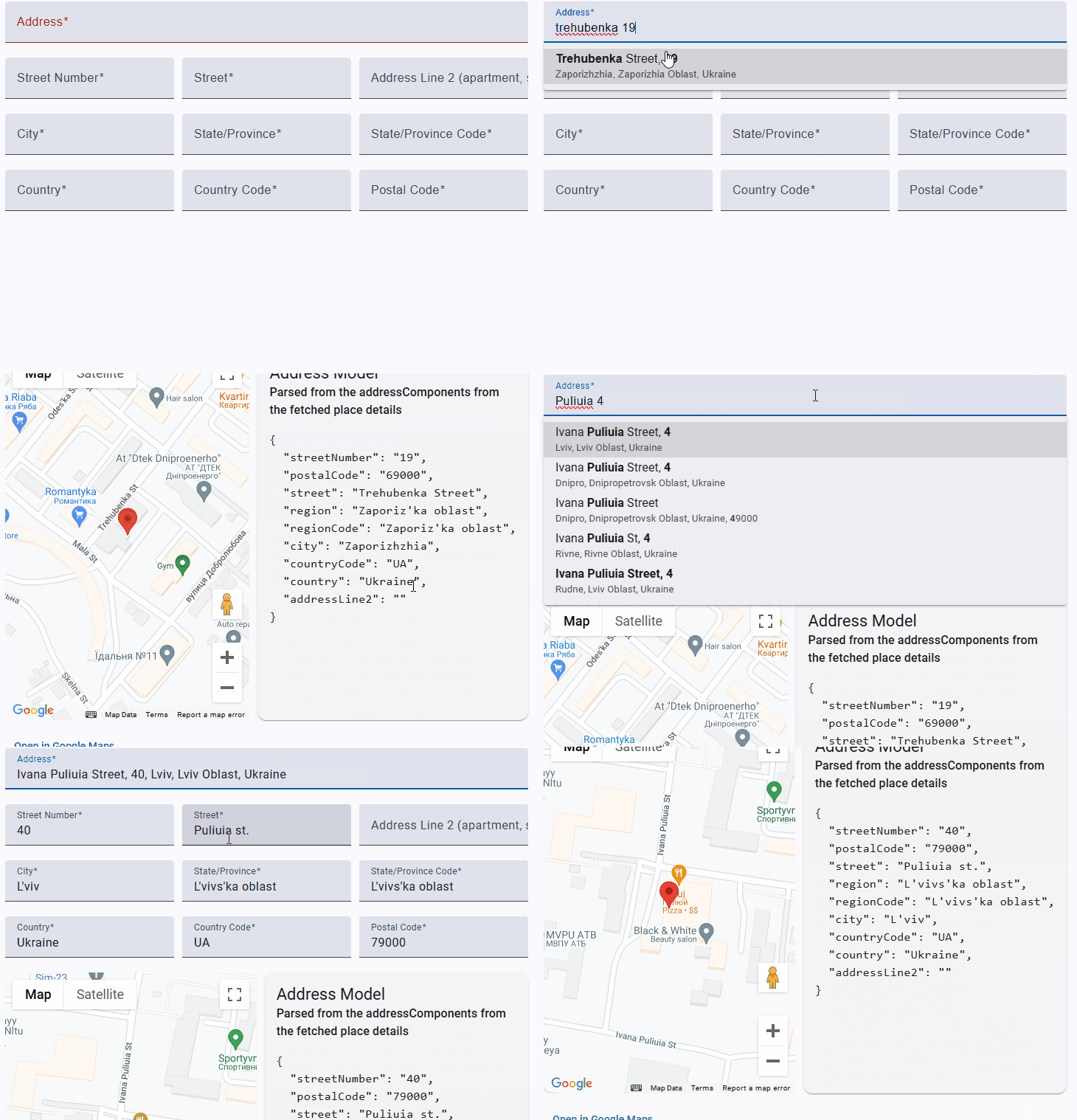
* Autocomplete suggestions for Google Maps Places
* Customizable options for place types, countries, and more


## Installation

```sh
npm install --save ngx-google-maps-places-api ngx-google-maps-places-autocomplete
```


## Getting the API Key

Follow [these steps](https://developers.google.com/maps/gmp-get-started) to get an API key that can be used to load Google Maps.


## Loading the API

Include the [Dynamic Library Import script](https://developers.google.com/maps/documentation/javascript/load-maps-js-api#dynamic-library-import) in the `index.html` of your app. When a Google Map is being rendered, it'll use the Dynamic Import API to load the necessary JavaScript automatically.

```html
<!-- index.html -->
<!DOCTYPE html>
<body>
  ...
  <script>
    (g=>{var h,a,k,p="The Google Maps JavaScript API",c="google",l="importLibrary",q="__ib__",m=document,b=window;b=b[c]||(b[c]={});var d=b.maps||(b.maps={}),r=new Set,e=new URLSearchParams,u=()=>h||(h=new Promise(async(f,n)=>{await (a=m.createElement("script"));e.set("libraries",[...r]+"");for(k in g)e.set(k.replace(/[A-Z]/g,t=>"_"+t[0].toLowerCase()),g[k]);e.set("callback",c+".maps."+q);a.src=`https://maps.${c}apis.com/maps/api/js?`+e;d[q]=f;a.onerror=()=>h=n(Error(p+" could not load."));a.nonce=m.querySelector("script[nonce]")?.nonce||"";m.head.append(a)}));d[l]?console.warn(p+" only loads once. Ignoring:",g):d[l]=(f,...n)=>r.add(f)&&u().then(()=>d[l](f,...n))})({
      v: "weekly",
      key: YOUR_API_KEY_GOES_HERE
    });
  </script>
</body>
</html>
```

**Note:** the component also supports loading the API using the [legacy script tag](https://developers.google.com/maps/documentation/javascript/load-maps-js-api#use-legacy-tag), however it isn't recommended because it requires all of the Google Maps JavaScript to be loaded up-front, even if it isn't used.


## Import

* Import the `NgxGoogleMapsPlacesAutocompleteModule` in your Angular module:

    ```ts
    import { NgModule } from '@angular/core';
    import { NgxGoogleMapsPlacesAutocompleteModule } from 'ngx-google-maps-places-autocomplete';

    @NgModule({
      imports: [
        NgxGoogleMapsPlacesAutocompleteModule,
        // ... other imports
      ],
      // ... declarations, providers, etc.
    })
    export class AppModule { }
    ```

* Or, directly import the `NgxGoogleMapsPlacesAutocompleteDirective` in your Angular standalone component/directive:

    ```ts
    import { ChangeDetectionStrategy, Component } from '@angular/core';
    import { NgxGoogleMapsPlacesAutocompleteDirective } from 'ngx-google-maps-places-autocomplete';

    @Component({
      changeDetection: ChangeDetectionStrategy.OnPush,
      selector: 'app-root',
      standalone: true,
      imports: [
        NgxGoogleMapsPlacesAutocompleteDirective
      ],
      templateUrl: './app.component.html',
      styleUrl: './app.component.scss'
    })
    export class AppComponent { }
    ```


## Usage

Use the `ngxGoogleMapsPlacesAutocomplete` directive within an `matAutocomplete` input element:

```html
<mat-form-field>
  <mat-label>Address</mat-label>
  <input type="text"
         placeholder="Pick your address"
         aria-label="Address"
         matInput
         formControlName="address"
         [matAutocomplete]="addressAutocomplete"
         ngxGoogleMapsPlacesAutocomplete
         #placesAutocomplete="ngxGoogleMapsPlacesAutocomplete" />
  <!--
    In addition to ngxGoogleMapsPlacesAutocomplete above you can use the following inputs/outputs like:
      [shouldLoadPlaceDetails]="true"
      [fetchFields]="[ 'addressComponents', 'location', 'googleMapsURI' ]"
      [placesAutocompleteRequest]="{ includedRegionCodes: [ 'UA' ] }"
      [placesAutocompleteDebounceTime]="575"
      (optionsLoad)="onSuggestionsLoaded($event)"
      (placeDetailsLoad)="onPlaceDetailsLoaded($event)"
  -->
  <mat-autocomplete autoActiveFirstOption #addressAutocomplete="matAutocomplete">
    @for (option of placesAutocomplete.options$(); track option.prediction.placeId) {
      <mat-option [value]="option">
        <div matLine class="text-main" [innerHtml]="option.formattedMainHtml"></div>
        <small matLine class="text-secondary" [innerHtml]="option.formattedSecondaryHtml">
        </small>
      </mat-option>
    }
  </mat-autocomplete>
</mat-form-field>
```


## Versioning

Library tested for Angular / CDK / Material versions **>= 18.x.x**.

Versions are consistent with major Angular version. E.g.:

Use `v18.x.x` with Angular `18.x.x`.


## Dependencies

* Angular
* Angular CDK
* Angular Material
* RxJs
* [ngx-google-maps-places-api](https://github.com/lekhmanrus/ngx-google-maps-places/tree/main/projects/ngx-google-maps-places-api)


## API reference


## API reference

### NgxGoogleMapsPlacesAutocompleteDirective

Selector: `input[matAutocomplete][ngxGoogleMapsPlacesAutocomplete]`, `textarea[matAutocomplete][ngxGoogleMapsPlacesAutocomplete]`

Exported as: `ngxGoogleMapsPlacesAutocomplete`

**Properties**

| Name                | Description                                                              |
|---------------------|--------------------------------------------------------------------------|
| **Input**           |                                                                          |
| `shouldLoadPlaceDetails: boolean` | Determines whether place details should be loaded for the selected autocomplete suggestion. Default is `true`. |
| `fetchFields: string[] \| undefined` | List of fields to be fetched at place details request. Default is `undefined`, which will result in passing `[ 'addressComponents' ]` to Google Places API. |
| `placesAutocompleteRequest: Omit<google.maps.places.AutocompleteRequest, 'input'> \| undefined` | An input property that specifies the options for the Google Maps Places Autocomplete request. This property allows the user to customize the autocomplete request, such as setting the location bias, types of places to return, or other parameters. If this property is not set, the default autocomplete request options will be used. See [google.maps.places.AutocompleteRequest](https://developers.google.com/maps/documentation/javascript/reference/autocomplete-data#AutocompleteRequest) interface. |
| `placesAutocompleteDebounceTime: number \| null` | An input property that specifies the debounce time (in milliseconds) for the input event that triggers the autocomplete suggestions. If this property is not set, the default debounce time of 725 milliseconds will be used. |
| **Output**          |                                                                          |
| `optionsLoad: OutputEmitterRef<NgxGoogleMapsPlacesAutocompleteSuggestion[]>` | An event that is emitted when the options for the autocomplete suggestions have been loaded. |
| `placeDetailsLoad: OutputEmitterRef<NgxGoogleMapsPlacesAutocompletePlaceDetails \| null>` | An observable signal that holds the current list of autocomplete suggestions. The suggestions are of type `NgxGoogleMapsPlacesAutocompleteSuggestion[]`. |
| **Properties**      |                                                                          |
| `options$: WritableSignal<NgxGoogleMapsPlacesAutocompleteSuggestion[]>` | An observable signal that holds the current list of autocomplete suggestions. The suggestions are of type `NgxGoogleMapsPlacesAutocompleteSuggestion[]`. |
| `placeDetails$: WritableSignal<NgxGoogleMapsPlacesAutocompletePlaceDetails \| null>` | An observable signal that holds the current place details for the selected autocomplete suggestion. The place details are of type `NgxGoogleMapsPlacesAutocompletePlaceDetails` or `null` if the place details could not be loaded. |


**Methods**

* `displayFn` <br /> Displays the text of a Google Maps Places Autocomplete suggestion.

| Name                                                    | Description                                                          |
|---------------------------------------------------------|----------------------------------------------------------------------|
| **Parameters**                                          |                                                                      |
| `suggestion: NgxGoogleMapsPlacesAutocompleteSuggestion \| string` | The Google Maps Places Autocomplete suggestion or a string to display. |
| **Returns**                                             |                                                                      |
| `string`                                                | The text of the suggestion, or an empty string if the suggestion is null or does not have a text property. |


## Build

Run `ng build ngx-google-maps-places-autocomplete` to build the project. The build artifacts will be stored in the `dist/` directory.


## Running unit tests

Run `ng test ngx-google-maps-places-autocomplete` to execute the unit tests via [Jest](https://jestjs.io/).


## Contributing

Contributions are welcome! Please feel free to submit a Pull Request.