<h1 align="center">Angular Google Maps Places API</h1>

<p align="center">
  <img src="https://lekhmanrus.github.io/ngx-google-maps-places/icons/ngx-google-maps-places.svg"
       alt="Angular Google Maps Places Logo" width="275px" height="275px" />
  <br />
  <em>
    Angular library that provides a seamless integration with <a href="https://developers.google.com/maps/documentation/places/web-service/op-overview" target="_blank">new Google Maps Places API</a>, offering easy-to-use services for place details retrieval and management in Angular applications.
    <br />
    Compatible with Angular **>= 18.x.x**. See <a href="#versioning">Versioning</a>.
  </em>
  <br />
</p>

<p align="center">
  <a href="https://lekhmanrus.github.io/ngx-google-maps-places/"><strong>Demo</strong></a>
  <br />
</p>


[![Build](https://github.com/lekhmanrus/ngx-google-maps-places/actions/workflows/build.yml/badge.svg)](https://github.com/lekhmanrus/ngx-google-maps-places/actions/workflows/build.yml)
[![Publish](https://github.com/lekhmanrus/ngx-google-maps-places/actions/workflows/publish.yml/badge.svg)](https://github.com/lekhmanrus/ngx-google-maps-places/actions/workflows/publish.yml)
[![npm version](https://img.shields.io/npm/v/ngx-google-maps-places-api.svg)](https://www.npmjs.com/package/ngx-google-maps-places-api)
[![npm](https://img.shields.io/npm/dm/ngx-google-maps-places-api.svg)](https://www.npmjs.com/package/ngx-google-maps-places-api)

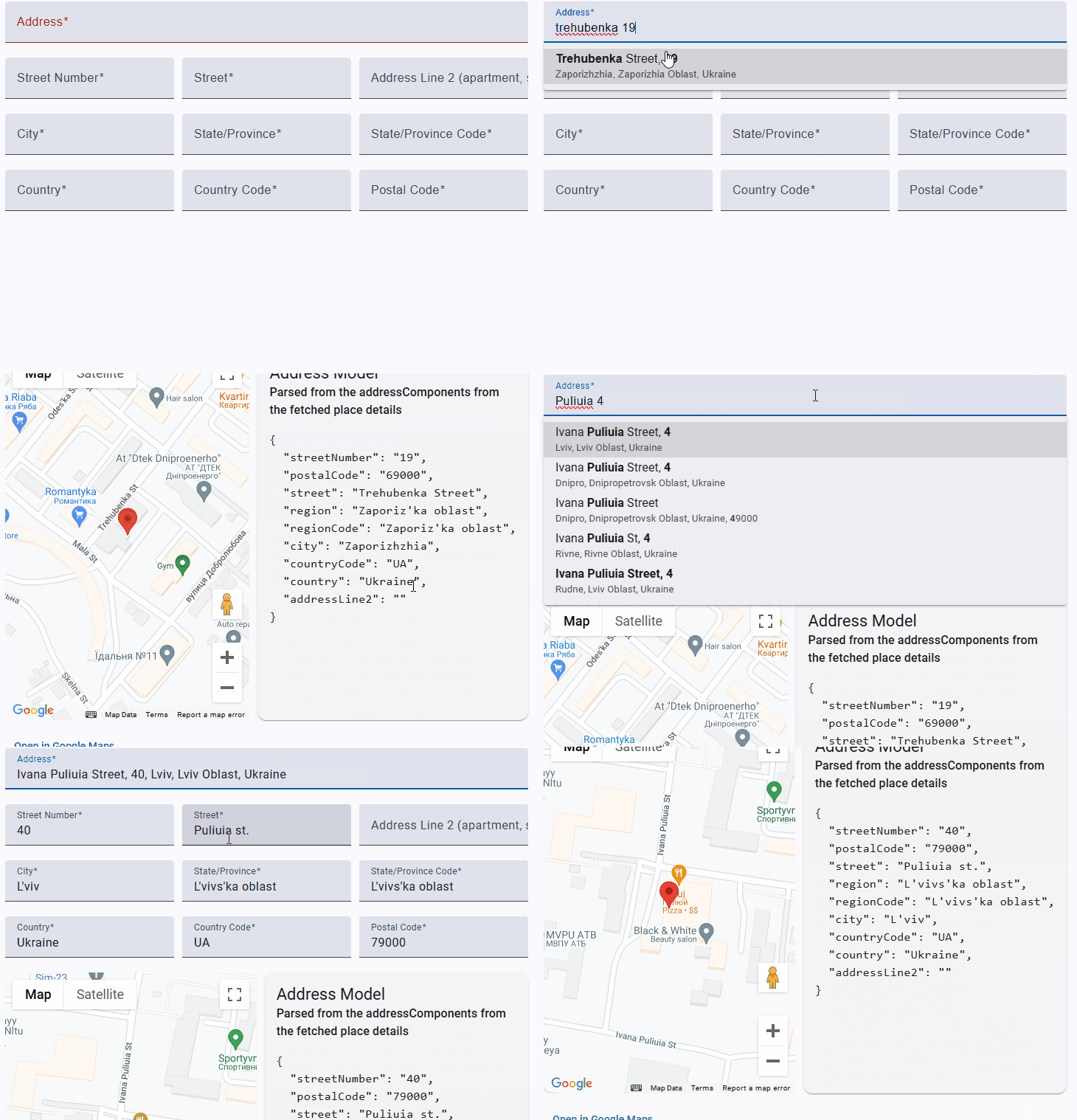

![Example](https://raw.githubusercontent.com/lekhmanrus/ngx-google-maps-places/main/assets/animation.gif)


<hr />


## Features

* Autocomplete suggestions for places
* Place details fetching
* Address component parsing


## Installation

```sh
npm install --save ngx-google-maps-places-api
```


## Getting the API Key

Follow [these steps](https://developers.google.com/maps/gmp-get-started) to get an API key that can be used to load Google Maps.


## Loading the API

Include the [Dynamic Library Import script](https://developers.google.com/maps/documentation/javascript/load-maps-js-api#dynamic-library-import) in the `index.html` of your app. When a Google Map is being rendered, it'll use the Dynamic Import API to load the necessary JavaScript automatically.

```html
<!-- index.html -->
<!DOCTYPE html>
<body>
  ...
  <script>
    (g=>{var h,a,k,p="The Google Maps JavaScript API",c="google",l="importLibrary",q="__ib__",m=document,b=window;b=b[c]||(b[c]={});var d=b.maps||(b.maps={}),r=new Set,e=new URLSearchParams,u=()=>h||(h=new Promise(async(f,n)=>{await (a=m.createElement("script"));e.set("libraries",[...r]+"");for(k in g)e.set(k.replace(/[A-Z]/g,t=>"_"+t[0].toLowerCase()),g[k]);e.set("callback",c+".maps."+q);a.src=`https://maps.${c}apis.com/maps/api/js?`+e;d[q]=f;a.onerror=()=>h=n(Error(p+" could not load."));a.nonce=m.querySelector("script[nonce]")?.nonce||"";m.head.append(a)}));d[l]?console.warn(p+" only loads once. Ignoring:",g):d[l]=(f,...n)=>r.add(f)&&u().then(()=>d[l](f,...n))})({
      v: "weekly",
      key: YOUR_API_KEY_GOES_HERE
    });
  </script>
</body>
</html>
```

**Note:** the component also supports loading the API using the [legacy script tag](https://developers.google.com/maps/documentation/javascript/load-maps-js-api#use-legacy-tag), however it isn't recommended because it requires all of the Google Maps JavaScript to be loaded up-front, even if it isn't used.


## Usage

Inject the `NgxGoogleMapsPlacesApiService` in your Angular component/directive/etc:

```ts
import { Directive, inject } from '@angular/core';
import { NgxGoogleMapsPlacesApiService } from 'ngx-google-maps-places-api';

@Directive({
  selector: 'app-test',
  standalone: true
})
export class AppTestDirective {
  private readonly _ngxGoogleMapsPlacesApiService = inject(NgxGoogleMapsPlacesApiService);
  // Use the service methods
}
```


## Versioning

Library tested for Angular versions **>= 18.x.x**.

Versions are consistent with major Angular version. E.g.:

Use `v18.x.x` with Angular `18.x.x`.


## Dependencies

* Angular
* RxJs


## API reference

### NgxGoogleMapsPlacesApiService

**Methods**

* `refreshToken` <br /> Refreshes the Google Maps Places autocomplete session token. The session token is used to associate autocomplete suggestions with a particular session. This method creates a new session token and stores it in the service.

* `fetchSuggestions` <br /> Fetches autocomplete suggestions from the Google Maps Places API based on the provided request or input string.

| Name                                                               | Description                                                                  |
|--------------------------------------------------------------------|------------------------------------------------------------------------------|
| **Parameters**                                                     |                                                                              |
| `requestOrInput: google.maps.places.AutocompleteRequest \| string` | The autocomplete request object or an input string to fetch suggestions for. |
| **Returns**                                                        |                                                                              |
| `Observable<google.maps.places.AutocompleteSuggestion[]>`          | An observable that emits an array of autocomplete suggestions.               |

* `fetchPlaceDetails` <br /> Fetches the details of a Google Maps place based on an autocomplete suggestion or place prediction.

| Name                                                                                                      | Description                                                           |
|-----------------------------------------------------------------------------------------------------------|-----------------------------------------------------------------------|
| **Parameters**                                                                                            |                                                                       |
| `suggestionOrPrediction: google.maps.places.AutocompleteSuggestion \| google.maps.places.PlacePrediction` | The autocomplete suggestion or place prediction to fetch details for. |
| `fields: string[]`                                                                                        | An optional array of fields to fetch for the place. Defaults to `[ 'addressComponents' ]`. |
| **Returns**                                                                                               |                                                                       |
| `Observable<google.maps.places.Place \| null>`                                                            | An observable that emits the fetched place details, or null if the place prediction is invalid. |

* `parseAddressComponents` <br /> Parses the address components of a Google Maps place and returns an `AddressModel` object.

| Name                                      | Description                                                         |
|-------------------------------------------|---------------------------------------------------------------------|
| **Parameters**                            |                                                                     |
| `place: google.maps.places.Place \| null` | The Google Maps place object to parse the address components from.  |
| **Returns**                               |                                                                     |
| `AddressModel \| null`                    | An `AddressModel` object containing the parsed address components, or `null` if the place is null or has no address components. |

* `applyBoldToMatches` <br /> Applies bold formatting to the matched text within the provided `FormattableText` (see [FormattableText](https://developers.google.com/maps/documentation/places/web-service/reference/rest/v1/places/autocomplete#formattabletext))..

| Name                                                          | Description                                                 |
|---------------------------------------------------------------|-------------------------------------------------------------|
| **Parameters**                                                |                                                             |
| `formattableText: google.maps.places.FormattableText \| null` | The `FormattableText` object containing the text and match information. |
| **Returns**                                                   |                                                             ****|
| `string`                                                      | The formatted text with the matched portions wrapped in `<b>` tags. |


## Build

Run `ng build ngx-google-maps-places-api` to build the project. The build artifacts will be stored in the `dist/` directory.


## Running unit tests

Run `ng test ngx-google-maps-places-api` to execute the unit tests via [Jest](https://jestjs.io/).


## Contributing

Contributions are welcome! Please feel free to submit a Pull Request.