 # Alert message notifier
## For Angular 17 + (standalone component)
[](https://www.jsdelivr.com/package/npm/ngx-alert-message)
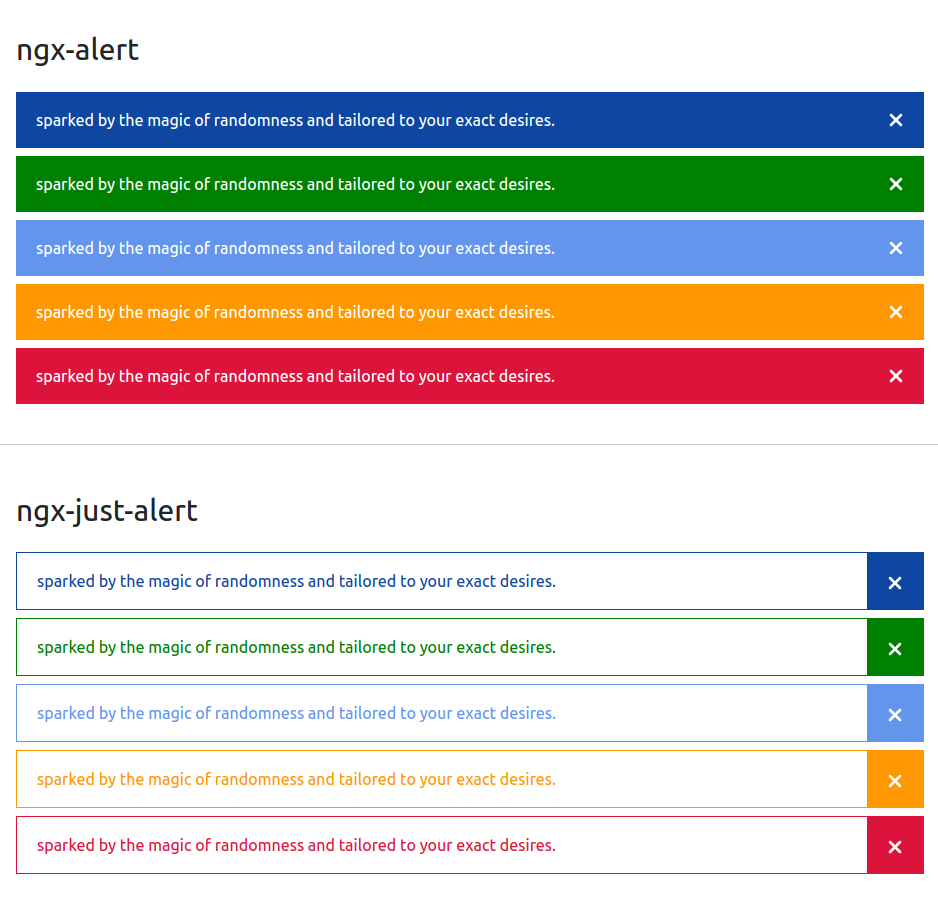
Alert component for angular projects. Creative alert message with mutiple color variance.
[
# Alert message notifier
## For Angular 17 + (standalone component)
[](https://www.jsdelivr.com/package/npm/ngx-alert-message)
Alert component for angular projects. Creative alert message with mutiple color variance.
[ ](https://www.beforepost.com/package/ngx/ngx-alert-message)
## Import
Import the module on your `your-component.component.ts` file as follow.
```TS
import { AlertComponent, JustAlertComponent } from 'ngx-alert-message';`
```
Then import the module as follow on imports array
```TS
@Component({
selector: '...',
templateUrl: '...',
styleUrls: ['...'],
standalone: true,
imports: [AlertComponent, JustAlertComponent]
})
```
## For animation
```TS
import { provideAnimations } from '@angular/platform-browser/animations';
bootstrapApplication(AppComponent, {
providers: [
importProvidersFrom(BrowserModule),
provideAnimations() // Import this
],
}).
catch((err) => console.error(err));
```
## Using
After importing this library with `npm install ngx-alert-message`,
## just alert module
```
```
```
close : (required) value shoule be `true | false`
mode : (required) value shoule be `primary | success | danger | info | warning`
text : (required) value shoule be `anything...`
```
](https://www.beforepost.com/package/ngx/ngx-alert-message)
## Import
Import the module on your `your-component.component.ts` file as follow.
```TS
import { AlertComponent, JustAlertComponent } from 'ngx-alert-message';`
```
Then import the module as follow on imports array
```TS
@Component({
selector: '...',
templateUrl: '...',
styleUrls: ['...'],
standalone: true,
imports: [AlertComponent, JustAlertComponent]
})
```
## For animation
```TS
import { provideAnimations } from '@angular/platform-browser/animations';
bootstrapApplication(AppComponent, {
providers: [
importProvidersFrom(BrowserModule),
provideAnimations() // Import this
],
}).
catch((err) => console.error(err));
```
## Using
After importing this library with `npm install ngx-alert-message`,
## just alert module
```
```
```
close : (required) value shoule be `true | false`
mode : (required) value shoule be `primary | success | danger | info | warning`
text : (required) value shoule be `anything...`
```
 ---
## Alert module
```
```
```
close : (optional) value shoule be `true | false`
mode : (optional) value shoule be `primary | success | danger | info | warning`
text : (optional) value shoule be `anything...`
```
---
[](https://www.beforepost.com/package/ngx/ngx-alert-message)
---
---
## Alert module
```
```
```
close : (optional) value shoule be `true | false`
mode : (optional) value shoule be `primary | success | danger | info | warning`
text : (optional) value shoule be `anything...`
```
---
[](https://www.beforepost.com/package/ngx/ngx-alert-message)
---