# ng2-simplert
Angular 2 Simple Alert Component (SweetAlert Inspired)
We use icon from [SweetAlert](https://github.com/t4t5/sweetalert)
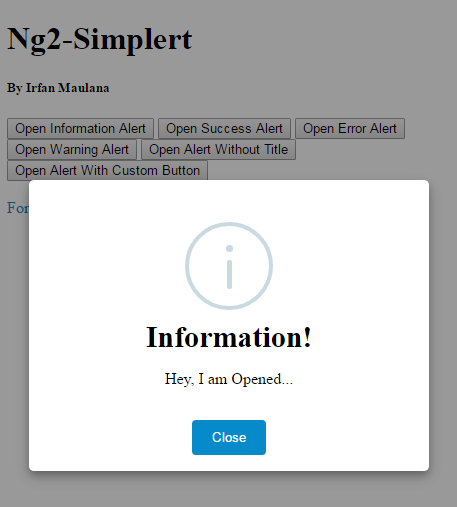
## Demo
https://mazipan.github.io/ng2-simplert/
## Download
```
npm install ng2-simplert --save
-- OR --
yarn add ng2-simplert
```
Or download latest release here : https://github.com/mazipan/ng2-simplert/releases
## Module Declaration
```typescript
....
import { SimplertComponent } from './simplert.component';
import { SimplertService } from './simplert.component.service';
...
@NgModule({
declarations: [
...
SimplertComponent
],
imports: [
...
],
providers: [
SimplertService
]
})
```
See here : https://github.com/mazipan/ng2-simplert/blob/master/src/app/app.module.ts
## Usage in component
```typescript
....
import { SimplertService } from './simplert.component.service';
...
@Component({
selector: 'app-root',
template: `
`
})
export class AppComponent {
constructor(private _simplertService: SimplertService){}
showPopup(title: string, message: string){
this._simplertService.openPopupBlock(title, message);
}
}
```
See here : https://github.com/mazipan/ng2-simplert/blob/master/src/app/app.component.ts
## Exposed Attribute
You can add this attribute below in :
| Attribute | Parameter | Description |
|--------------------------- |----------------------- |--------------------------------------------------- |
| [isUseRadius] | booleanParam: boolean | true : will use radius, false : not use radius |
| [isUseIcon] | booleanParam: boolean | true : will use icon, false : not use icon |
## Exposed Method
You can access this below method from SimplertService :
| Method Name | Parameter | Description |
|--------------------------- |----------------------- |--------------------------------------------------- |
| openPopupBlock | title: string | Title of alert (can be empty) |
| | message: string | Message of alert (can be HTML syntax) |
| openPopupBlockWithType | title: string | Title of alert (can be empty) |
| | message: string | Message of alert (can be HTML syntax) |
| | type: string | info (default), success, warning, error |
| changeShown | booleanParam: boolean | true : show, false : hide |
| setTitle | title: string | Title of alert (can be empty) |
| setMessage | message: string | Message of alert (can be HTML syntax) |
| setType | type: string | info (default), success, warning, error |
| setColorBtn | btnColor: string | string hex color (default: #068AC9) |
## License
MIT License
Hope will usefull for you all.
Question ? please email : mazipanneh@gmail.com