<div align="center">
  <img src="https://raw.githubusercontent.com/signorprestito/img/master/angular_google_maps_logo_small.png">
</div>
<div align="center">
  <h1>ng-world-map-svg</h1>

  <p>
    <strong>An Angular 7 plugin that allows:</strong></p>
</div>
<div>
  <p>
<div>1. create a google map with overlay the svg image of the countries indicated and the various places to display</div>
<div>2. create a svg image of a country with the relative places to display.</div>
  </p>
  </div>
  <br/>
  <br/>
</div>

## Installing
```sh
$ npm i ng-world-map-svg
```

**Adding angular material**

Great now that we are sure the application loaded, you can stop it pressing “Ctrl + c” in the console you are running it, so we can add Angular Material to our application through the schematics.
```sh
$ ng add @angular/material
```

For more details click <a target="_blank" href="https://medium.com/@ismapro/first-steps-with-angular-7-with-angular-cli-and-angular-material-d69f55d8ac51">here</a>. 

## Setup
```js
...
import { SvgMapModule, ICustomConfig} from "ng-world-map-svg";
...

@NgModule({
  imports: [
    ...
    SvgMapModule.forRoot(<ICustomConfig>{
      country : ["IT"],
      googleAPIKey : "YOUR-API-KEY"
    })
  ],
  ...
  bootstrap: [AppComponent]
})
export class AppModule { }
```

<a href="https://developers.google.com/maps/documentation/javascript/get-api-key">Click here</a> to get API Key.

## Basic Usage
**my.component.html**

```html
<map-svg></map-svg>
```

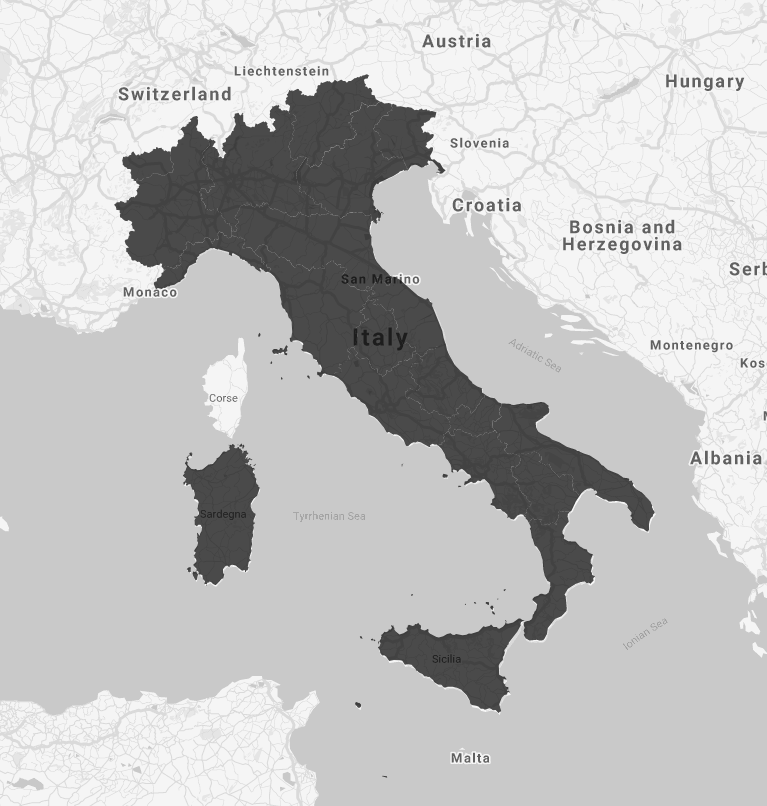
<div align="center"><img src="https://raw.githubusercontent.com/signorprestito/img/master/Italy.png" /></div>

## Advanced Usage - Without google map and with custom settings 
**app.module.ts**
```js
...
import { SvgMapModule, ICustomConfig} from "ng-world-map-svg";
...

@NgModule({
  imports: [
    ...
    SvgMapModule.forRoot(<ICustomConfig>{
      country : ["IT"],
      countryColors:["lightgray"],
      googleAPIKey : "YOUR-API-KEY"
    })
  ],
  ...
  bootstrap: [AppComponent]
})
export class AppModule { }
```
**my.component.html**

```html
<map-svg [settings]="settings"></map-svg>
```
**my.component.ts**

```js
import { Component } from '@angular/core';
import { SettingsVM } from 'ng-world-map-svg';

export class AppComponent {
  settings: SettingsVM = new SettingsVM();
  
  constructor() { }

  ngOnInit() {
  
   //Google Map settings
    this.settings.googleMap = false;
    //Stroke settings
    this.settings.strokeCountryColor = "azure";
    this.settings.strokeCountryWidth = "1px";
    //Marker color setting
    this.settings.markerColor = "orange";

    this.settings.listPoints = [
      { city: 'Torino', address: 'Via dell\'Arsenale 35', type: 'marker' },
      { city: 'Bari', address: 'Via Giovanni Amendola 162/A', type: 'info' }
    ];
  }
  
}
```

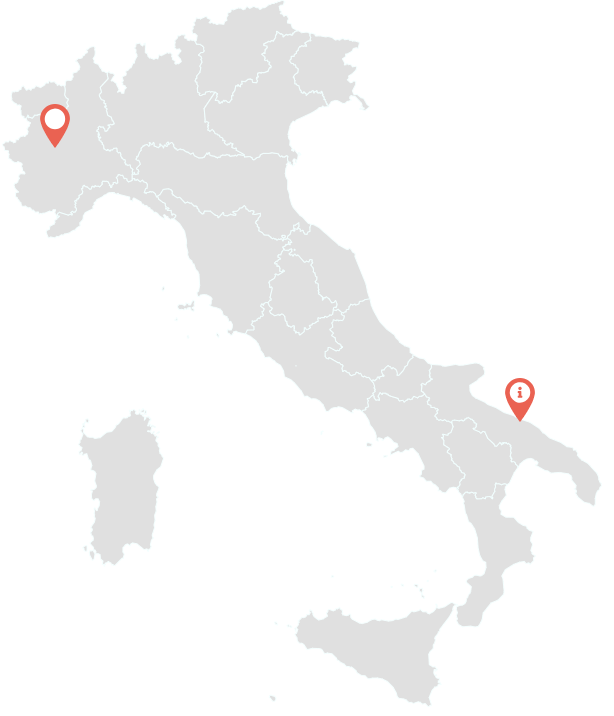
<div align="center"><img src="https://github.com/signorprestito/img/blob/master/italy_without.png?raw=true" /></div>

## Advanced Usage - With custom settings 
**app.module.ts**
```js
...
import { SvgMapModule, ICustomConfig} from "ng-world-map-svg";
...

@NgModule({
  imports: [
    ...
    SvgMapModule.forRoot(<ICustomConfig>{
      //Multiple countries array
      country : ["IT","UK"],
      countryColors: ["green","red"],
      googleAPIKey : "YOUR-API-KEY"
    })
  ],
  ...
  bootstrap: [AppComponent]
})
export class AppModule { }
```
**my.component.html**

```html
<map-svg [settings]="settings"></map-svg>
```
**my.component.ts**

```js
import { Component } from '@angular/core';
import { SettingsVM } from 'ng-world-map-svg';

export class AppComponent {
  settings: SettingsVM = new SettingsVM();
  
  constructor() { }

  ngOnInit() {
  
   //Google Map settings
    this.settings.googleMap = true;
    this.settings.zoomMap = 6;
    this.settings.styleGoogleMap = "silver";
    //Stroke settings
    this.settings.strokeCountryColor = "black";
    this.settings.strokeCountryWidth = "1px";
    //Marker color setting
    this.settings.markerColor = "black";

    this.settings.listPoints = [
      { city: 'Torino', address: 'Via dell\'Arsenale 35', type: 'marker' },
      { city: 'Bari', address: 'Via Giovanni Amendola 162/A', type: 'info' },
      { city: 'London', address: 'NCP Car Park London Bridgedge', type: 'parking' }
    ];
  }
  
}
```

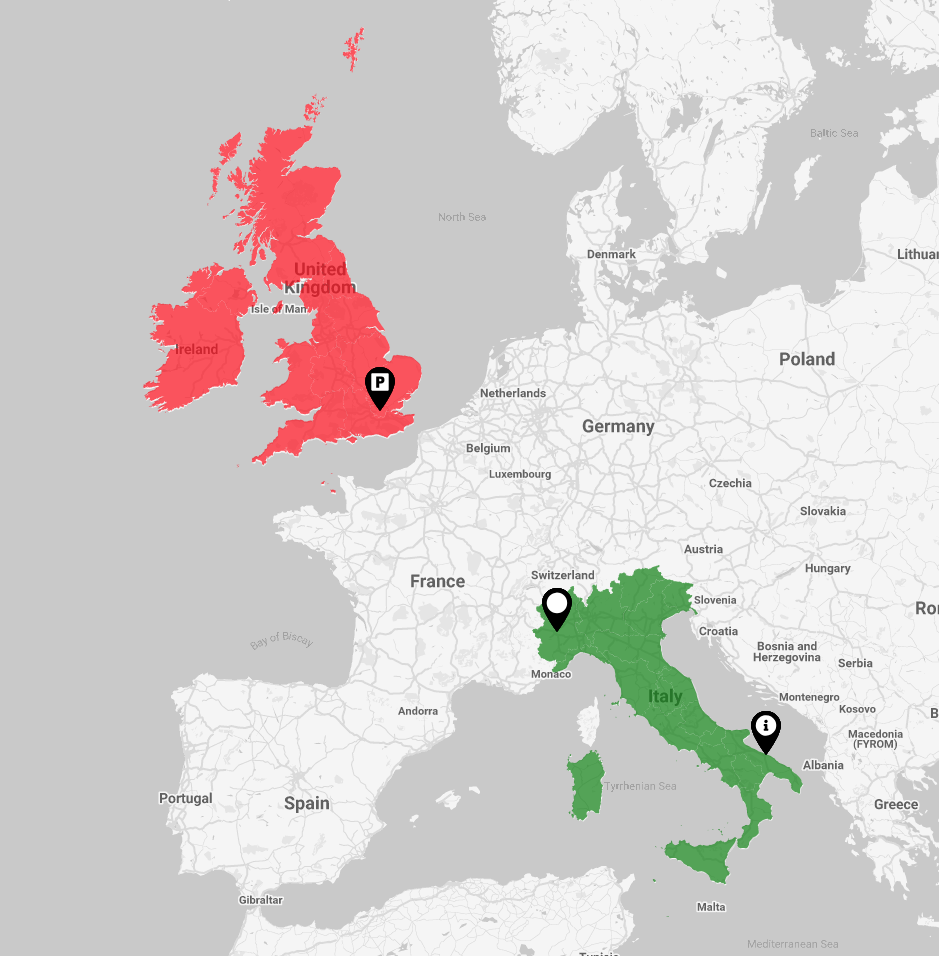
<div align="center"><img src="https://raw.githubusercontent.com/signorprestito/img/master/it_uk_2.png" /></div>

## Advanced Usage - With custom settings and modal 
**my.component.html**

```html
<map-svg [settings]="settings" [templatePoint]="pointTemplate" [templateArea]="areaTemplate"></map-svg>
<ng-template #pointTemplate let-point="data">
    Custom template for {{point?.city}}.
    <br>
    Address: {{point.address}}
  </ng-template>

  <ng-template #areaTemplate let-area="dataArea">
    Custom template for {{area}}.
  </ng-template>
```
**my.component.ts**

```js
import { Component} from '@angular/core';
import { SettingsVM } from 'ng-world-map-svg';

export class AppComponent {
  settings: SettingsVM = new SettingsVM();
  
  constructor() { }

  ngOnInit() {
    //Google Map settings
    this.settings.googleMap = true;
    this.settings.zoomMap = 6;
    this.settings.styleGoogleMap = "silver";
    //Stroke settings
    this.settings.strokeCountryColor = "black";
    this.settings.strokeCountryWidth = "1px";
    //Marker color setting
    this.settings.markerColor = "orange";
    //Modal settings
    this.settings.openModal = true;
    this.settings.modalWidth = 50;
    

    this.settings.listPoints = [
      { city: 'Torino', address: 'Via dell\'Arsenale 35', type: 'marker' },
      { city: 'Bari', address: 'Via Giovanni Amendola 162/A', type: 'info' },
      { city: 'London', address: 'NCP Car Park London Bridgedge', type: 'parking' }
    ];
  }
  
}
```
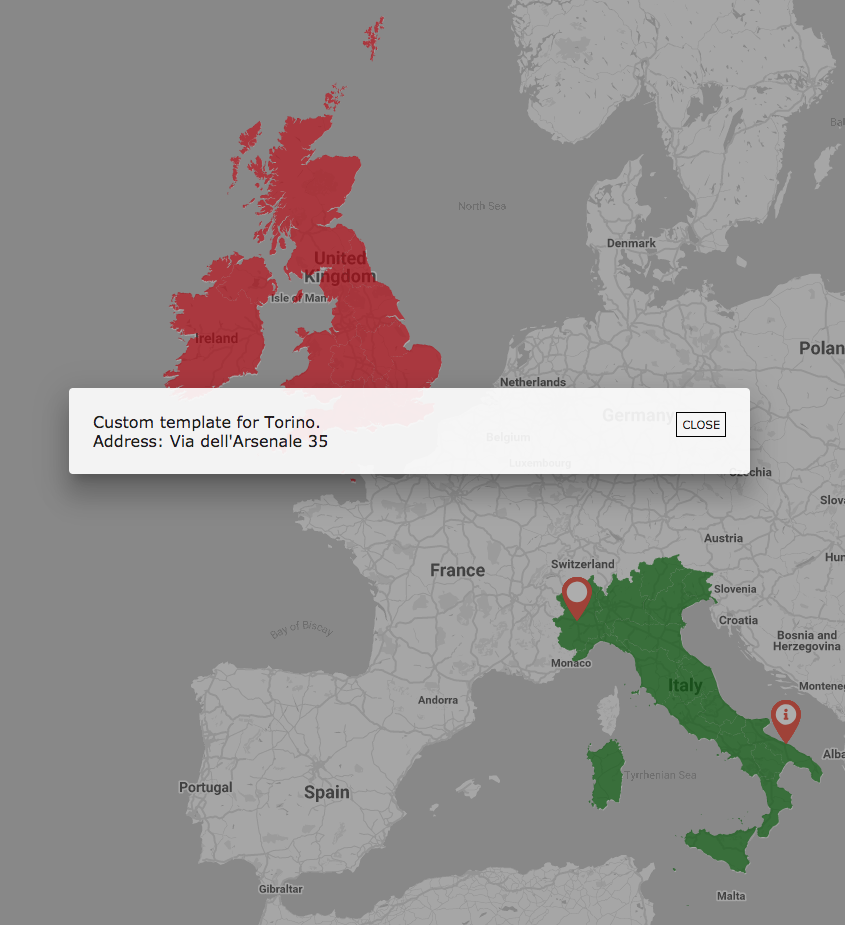
<div align="center"><img src="https://raw.githubusercontent.com/signorprestito/img/master/screen_modal.png" /></div>

## ICustomConfig Attributes Map
<table>
  <tr>
    <th align="left">Options</th>
    <th align="left">Type</th>
    <th align="left">Default</th>
  </tr>
  <tr>
    <td><a href="#country-details">country</a></td>
    <td><code>string[]</code></td>
    <td><code>[]</code></td>
  </tr>
  <tr>
    <td><a href="#country-colors-details">countryColors</a></td>
    <td><code>string[]</code></td>
    <td><code>[]</code></td>
  </tr>
  <tr>
    <td>googleAPIKey</td>
    <td><code>string</code></td>
    <td><code>''</code></td>
  </tr>
</table>

## SettingsVM Attributes Map
<table>
  <tr>
    <th align="left">Options</th>
    <th align="left">Type</th>
    <th align="left">Default</th>
  </tr>
  <tr>
    <td><a href="#google-map-details">googleMap</a></td>
    <td><code>boolean</code></td>
    <td><code>true</code></td>
  </tr>
  <tr>
    <td><a href="#zoom-map-details">zoomMap</a></td>
    <td><code>number</code></td>
    <td><code>6</code></td>
  </tr>
  <tr>
    <td><a href="#style-google-map-details">styleGoogleMap</a></td>
    <td><code>string</code></td>
    <td><code>silver</code></td>
  </tr>
  <tr>
    <td><a href="#stroke-country-color-details">strokeCountryColor</a></td>
    <td><code>string</code></td>
    <td><code>white</code></td>
  </tr>
  <tr>
    <td><a href="#stroke-country-width-details">strokeCountryWidth</a></td>
    <td><code>string</code></td>
    <td><code>1px</code></td>
  </tr>
  <tr>
    <td><a href="#marker-color-details">markerColor</a></td>
    <td><code>string</code></td>
    <td><code>orange</code></td>
  </tr>
  <tr>
    <td><a href="#list-points-details">listPoints</a></td>
    <td><code><a href="#point-vm-details">PointVM</a>[]</code></td>
    <td><code>true</code></td>
  </tr>
  <tr>
    <td><a href="#open-modal-details">openModal</a></td>
    <td><code>boolean</code></td>
    <td><code>false</code></td>
  </tr>
  <tr>
    <td><a href="#modal-width-details">modalWidth</a></td>
    <td><code>number</code></td>
    <td><code>30</code></td>
  </tr>
</table>

#### <a name="point-vm-details"></a> 
## PointVM Attributes Map
<table>
  <tr>
    <th align="left">Options</th>
    <th align="left">Type</th>
    <th align="left">Default</th>
  </tr>
  <tr>
    <td><a href="#city-details">city</a></td>
    <td><code>string</code></td>
    <td><code>''</code></td>
  </tr>
  <tr>
    <td><a href="#address-details">address</a></td>
    <td><code>string</code></td>
    <td><code>''</code></td>
  </tr>
  <tr>
    <td><a href="#type-marker-details">type</a></td>
    <td><code>string</code></td>
    <td><code>marker</code></td>
  </tr>
</table>

## ICustomConfig Attributes Map Details
#### <a name="country-details"></a>`country`
This value indicates the code of the country to be displayed.

<table>
  <tr>
    <th align="left">Value</th>
    <th align="left">Type</th>
    <th align="left">Country</th>
  </tr>
  <tr>
    <td>IT</td>
    <td><code>string</code></td>
    <td>Italy</td>
  </tr>
  <tr>
    <td>UK</td>
    <td><code>string</code></td>
    <td>United Kingdom</td>
  </tr>
  <tr>
    <td>USA</td>
    <td><code>string</code></td>
    <td>USA</td>
  </tr>
  <tr>
    <td>F</td>
    <td><code>string</code></td>
    <td>France</td>
  </tr>
  <tr>
    <td>D</td>
    <td><code>string</code></td>
    <td>Germany</td>
  </tr>
  <tr>
    <td>E</td>
    <td><code>string</code></td>
    <td>Spain</td>
  </tr>
  <tr>
    <td>N</td>
    <td><code>string</code></td>
    <td>Netherlands</td>
  </tr>
  <tr>
    <td>PRT</td>
    <td><code>string</code></td>
    <td>Portugal</td>
  </tr>
  <tr>
    <td>CHE</td>
    <td><code>string</code></td>
    <td>Switzerland</td>
  </tr>
  <tr>
    <td>IND</td>
    <td><code>string</code></td>
    <td>India</td>
  </tr>
  <tr>
    <td>BRA</td>
    <td><code>string</code></td>
    <td>Brazil</td>
  </tr>
  <tr>
    <td>J</td>
    <td><code>string</code></td>
    <td>Japan</td>
  </tr>
  <tr>
    <td>AUS</td>
    <td><code>string</code></td>
    <td>Australia</td>
  </tr>
  <tr>
    <td>A</td>
    <td><code>string</code></td>
    <td>Austria</td>
  </tr>
  <tr>
    <td>HR</td>
    <td><code>string</code></td>
    <td>Croatia</td>
  </tr>
  <tr>
    <td>CZ</td>
    <td><code>string</code></td>
    <td>Czech Republic</td>
  </tr>
  <tr>
    <td>DK</td>
    <td><code>string</code></td>
    <td>Denmark</td>
  </tr>
  <tr>
    <td>EST</td>
    <td><code>string</code></td>
    <td>Estonia</td>
  </tr>
  <tr>
    <td>FIN</td>
    <td><code>string</code></td>
    <td>Finland</td>
  </tr>
  <tr>
    <td>IS</td>
    <td><code>string</code></td>
    <td>Island</td>
  </tr>
  <tr>
    <td>IRL</td>
    <td><code>string</code></td>
    <td>Ireland</td>
  </tr>
  <tr>
    <td>PL</td>
    <td><code>string</code></td>
    <td>Poland</td>
  </tr>
</table>

## SettingsVM Attributes Map Details
#### <a name="google-map-details"></a>`googleMap`
If the value is <code>true</code> the google map is displayed along with the customized map of the various countries. If the value is <code>false</code>, only the first nation image of the <code><a href="#country-details">country</a></code> array is displayed.

#### <a name="zoom-map-details"></a>`zoomMap`
This value sets the zoom level of the google map.

#### <a name="style-google-map-details"></a> `styleGoogleMap`
This value sets the style of the google map. Allowed values are:
- `silver`
- `retro`
- `dark`
- `night`
- `aubergine`

#### <a name="stroke-country-color-details"></a>`strokeCountryColor`
This value sets the color of the line that separates the various areas of the displayed countries. It is used only if <a href="#google-map-details"><code>googleMap</code></a> is set to <code>false</code>.

#### <a name="stroke-country-width-details"></a>`strokeCountryWidth`
This value sets the <code>width</code> of the line that separates the various areas of the displayed countries. It is used only if <a href="#google-map-details"><code>googleMap</code></a> is set to <code>false</code>.

#### <a name="marker-color-details"></a>`markerColor`
This value sets the color of the map marker. Allowed values are:
- `orange`
- `white`
- `black`

#### <a name="list-points-details"></a>`listPoints`
This array contains the list of the various points to display on the map. it's an array of <code><a href="#point-vm-details">PointVM</a></code> type.

#### <a name="open-modal-details"></a>`openModal`
If the value is <code>true</code> when a marker or area is clicked, a modal is opened that uses the template that is passed to it. If it is <code>false</code>, the value in output is received through <code>(clickPoint)</code> and <code>(clickArea)</code>

#### <a name="modal-width-details"></a>`modalWidth`
This value sets the width of the modal. It is used only if <a href="#open-modal-details"><code>openModal</code></a> is set to <code>true</code>. Note that this value is in percentage.

## PointVM Attributes Map Details
#### <a name="type-marker-details"></a> `type`
This value indicates the type of pin to be used for places. Allowed values are:
- `marker`
- `info`
- `parking`
- `restaurant`

#### <a name="city-details"></a> `city`
This value indicates the city.

#### <a name="address-details"></a> `address`
This value indicates the address of place.