# Next use contextual routing
[![Build status][ci-badge]][ci]
[![Test coverage report][coveralls-badge]][coveralls]
[![Npm version][npm-badge]][npm]
[![Bundle size][bundlephobia-badge]][bundlephobia]
## Intro
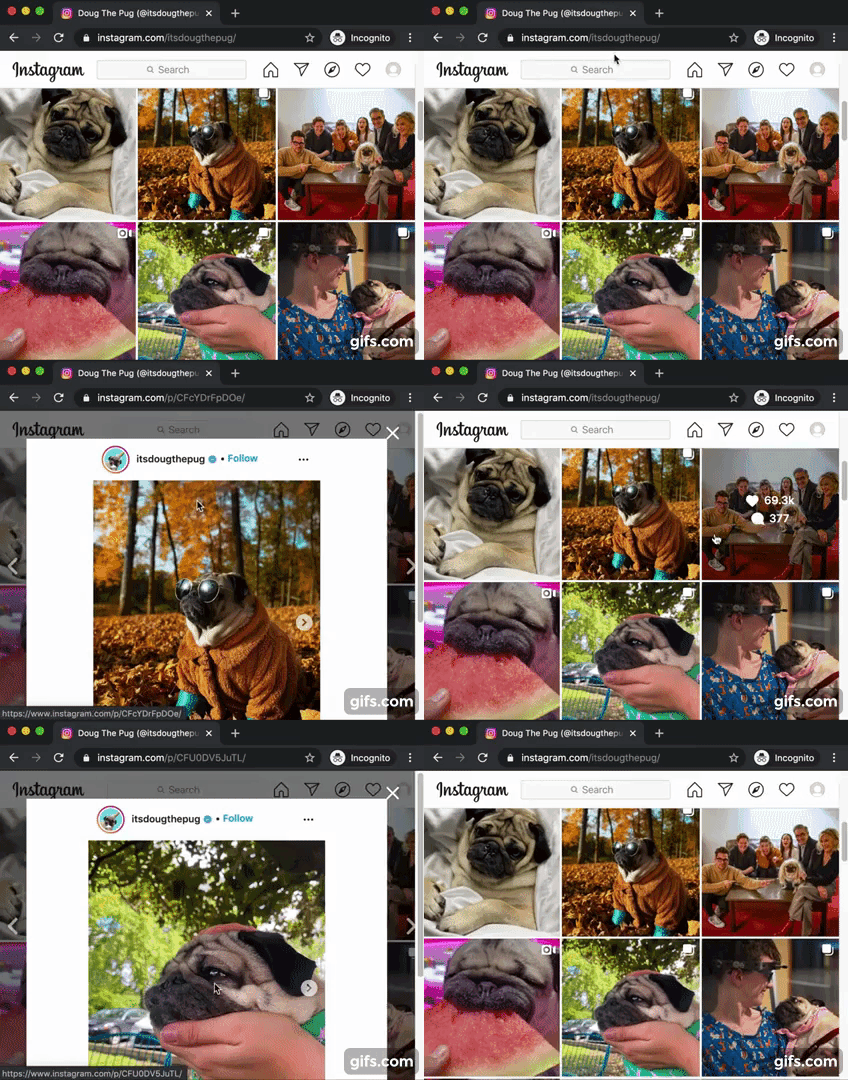
React hook that generates round trip hrefs to enable [contextual routing][next-docs-contextual-routing] for [Next.js][next]. Take a look to the [demo 👈][demo].
[](https://www.youtube.com/watch?v=4NR2uOBsIu4)
### With Next links
```js
import React from 'react';
import Link from 'next/link';
import { useContextualRouting } from 'next-use-contextual-routing';
function MyPage() {
const { makeContextualHref, returnHref } = useContextualRouting();
return (
);
}
```
## Why?
Contextual routing presents 2 challenges:
- Persist a href string able to keep the initial page state consistent throughout the whole contextual navigation
- Persist the url to return to when contextual routing is terminated
**Next use contextual routing** abstracts these responsibilities as a React hook.
It also works in statically exported apps and supports navigation with browsers' back button.
## API
```ts
const { makeContextualHref, returnHref } = useContextualRouting();
```
#### makeContextualHref
```ts
const makeContextualHref: (
extraParams?: Record
) => string;
```
The function returns the path to provide as `href` to start or keep alive contextual navigation. The generated path describes the state of the page to keep alive while contextual navigation is active.
It optionally accepts an object describing **extra parameters** to append to contextual navigation `href`.
Array values from the current router query, such as catch-all route segments, are serialized as repeated query parameters. Since a query string can't express a one-item array, a single-segment catch-all reaches the page as a string: normalize it with `[router.query.slug].flat()`. Extra parameters replace existing query values with the same key.
#### returnHref
```ts
const returnHref: string;
```
The path to return to to close contextual navigation.
## Next.js versions support
| Next use contextual routing | Next.js |
| --------------------------- | -------------- |
| v2.2.0 | v9.X -> v12.X |
| v3.0.0 | v13.X |
| v3.2.0 + | v13.X -> v14.X |
| v4.0.0 + | v15.X -> v16.X |
## Notes
### Naming
**Contextual routing** pattern is also known as:
- Modal route
- [Route as modal][next-docs-contextual-routing]
- [Snowlift][twitter-pattern-name]
- Instagram style modal routing
### Scroll behaviour on refresh
When using **Contextual routing**, default browsers scroll behaviour on page refresh might produce undesired results. If the case, setting [`history.scrollRestoration`][history-scroll-restoration-docs] to `manual` could improve user experience.
```js
history.scrollRestoration = 'manual';
```
### Devnote: deploy Next.js on GitHub pages
https://www.viget.com/articles/host-build-and-deploy-next-js-projects-on-github-pages
[ci-badge]: https://github.com/toomuchdesign/next-use-contextual-routing/actions/workflows/ci.yml/badge.svg
[ci]: https://github.com/toomuchdesign/next-use-contextual-routing/actions/workflows/ci.yml
[npm]: https://www.npmjs.com/package/next-use-contextual-routing
[npm-badge]: https://img.shields.io/npm/v/next-use-contextual-routing.svg
[coveralls-badge]: https://coveralls.io/repos/github/toomuchdesign/next-use-contextual-routing/badge.svg?branch=master
[coveralls]: https://coveralls.io/github/toomuchdesign/next-use-contextual-routing?branch=master
[next]: https://nextjs.org/
[next-docs-contextual-routing]: https://github.com/vercel/next.js/tree/v9.5.3/examples/with-route-as-modal
[twitter-pattern-name]: https://twitter.com/swyx/status/1245891685927682049
[history-scroll-restoration-docs]: https://developer.mozilla.org/en-US/docs/Web/API/History/scrollRestoration
[demo]: https://toomuchdesign.github.io/next-use-contextual-routing/
[bundlephobia-badge]: https://badgen.net/bundlephobia/minzip/next-use-contextual-routing
[bundlephobia]: https://bundlephobia.com/result?p=next-use-contextual-routing