 [](https://github.com/cliffano/nestor/actions?query=workflow%3ACI)
[](https://libraries.io/npm/nestor)
[](https://github.com/cliffano/nestor/actions?query=workflow%3ACodeQL)
[](https://coveralls.io/r/cliffano/nestor?branch=main)
[](https://snyk.io/test/github/cliffano/nestor)
[](https://www.npmjs.com/package/nestor)
[](https://github.com/cliffano/nestor/actions?query=workflow%3ACI)
[](https://libraries.io/npm/nestor)
[](https://github.com/cliffano/nestor/actions?query=workflow%3ACodeQL)
[](https://coveralls.io/r/cliffano/nestor?branch=main)
[](https://snyk.io/test/github/cliffano/nestor)
[](https://www.npmjs.com/package/nestor)
Nestor
------
Nestor is a node.js [Jenkins](https://jenkins-ci.org) API and CLI.
Installation
------------
npm install -g nestor
Usage
-----
Trigger a build:
nestor build
Trigger a parameterised build:
nestor build ["param1=value1¶m2=value2"]
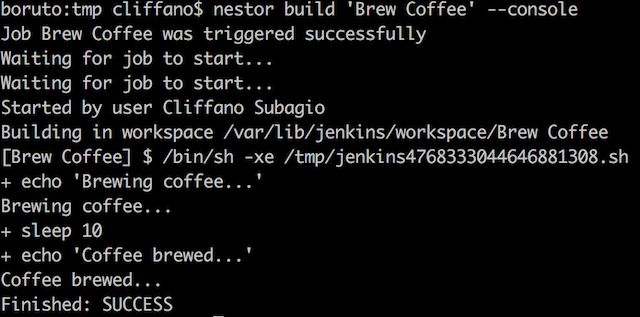
Trigger a build followed by console output:
nestor build --console
Trigger a build, wait for 5 seconds, then display console output:
nestor build --pending 5000 --console
Trigger a parameterised build followed by console output:
nestor build ["param1=value1¶m2=value2"] --console
Display latest build console output:
nestor console
Display console output of a particular build number:
nestor console [build_number]
Stop currently running build:
nestor stop
View status of all jobs:
nestor dashboard
View job status reports:
nestor job
Enable a job:
nestor enable
Disable a job:
nestor disable
Create a new job with a specified config.xml:
nestor create
Update an existing job with a specified config.xml:
nestor update
Copy an existing job1 to a new job2:
nestor copy
Delete an existing job:
nestor delete
Fetch the config.xml of an existing job: (experimental)
nestor config
Create a new view with a specified config.xml: (experimental)
nestor create-view
Update an existing view with a specified config.xml: (experimental)
nestor update-view
Fetch the config.xml of an existing view: (experimental)
nestor fetch-view-config
View queued jobs:
nestor queue
View executors' status (running builds):
nestor executor
Discover Jenkins instance running on a specified host:
nestor discover
View Jenkins version number:
nestor ver
View builds feed of all jobs:
nestor feed
View builds feed of a job:
nestor --job feed
Monitor build status and notify Ninja Blocks RGB LED device:
export NINJABLOCKS_TOKEN=
nestor ninja
Note: `` in the examples is a part of your Jenkins job URL after the first `job/`.
For example, if you use nested folders on Jenkins and your URL is `/job/myproject/job/releases/job/master`,
then you should pass `myproject/job/releases/job/master` as ``.
Programmatically:
import Nestor from "nestor";
const nestor = new Nestor(
'http://user:pass@host:port/path'
);
// trigger a standard build
nestor.buildJob('job', '', function (err, result) {
});
// trigger a parameterised build
nestor.buildJob('job', 'param1=value1¶m2=value2', function (err, result) {
});
Check out [lib/jenkins](https://github.com/cliffano/nestor/blob/master/lib/jenkins.js) for other available methods.
NOTE: Starting from version 2.0.0, Nestor started using [Swaggy Jenkins](https://github.com/cliffano/swaggy-jenkins) as an API client.
Configuration
-------------
### Jenkins URL
Set Jenkins URL in JENKINS_URL environment variable (defaults to http://localhost:8080):
(*nix)
export JENKINS_URL=http://user:pass@host:port/path
(Windows)
set JENKINS_URL=http://user:pass@host:port/path
As an alternative to password, you can use Jenkins API token instead. Jenkins API token can be found on Jenkins user configuration page.
If http_proxy or https_proxy environment variable is set, then Nestor will automatically use it.
If you want authentication details to be prompted interactively:
JENKINS_URL=http://host:port/path nestor --interactive build job
Jenkins URL can also be specified as an arg:
nestor --url http://user:pass@host:port/path dashboard
### SSL client certificate authentication
Set JENKINS_CERT and JENKINS_KEY
(*nix)
export JENKINS_CERT=certificate.pem
export JENKINS_KEY=key.pem
(Windows)
set JENKINS_CERT=certificate.pem
set JENKINS_KEY=key.pem
When you have both key and certificate in one file, currently you have to set both ENV variables to the same file
(*nix)
export JENKINS_CERT=combined.pem
export JENKINS_KEY=combined.pem
(Windows)
set JENKINS_CERT=combined.pem
set JENKINS_KEY=combined.pem
It is possible to specify a custom CA. Just set the JENKINS_CA env variable
(*nix)
export JENKINS_CA=custom.ca.pem
(Windows)
set JENKINS_CA=custom.ca.pem
Translation
-----------
To add a new language translation:
1. Create a locale JSON file in conf/locales/ directory, with the locale's [ISO 639-1 code](http://en.wikipedia.org/wiki/List_of_ISO_639-1_codes) as file name.
2. Copy paste the content of the existing non-English locale file (anything other than en.json) and modify the translation values accordingly.
3. Test by executing a command with LANG environment variable, e.g. `LANG= nestor dashboard`
Contribution
------------
When opening an issue to report a bug, please provide the following information:
* node.js version: `node --version`
* npm version: `npm --version`
* Nestor version: `nestor --version`
* Jenkins version: `nestor ver`
Thanks in advance for reporting an issue, opening a feature request, or even better, a pull request!
Colophon
--------
[Developer's Guide](https://cliffano.github.io/developers_guide.html#nodejs)
Build reports:
* [Code complexity report](https://cliffano.github.io/nestor/complexity/plato/index.html)
* [Unit tests report](https://cliffano.github.io/nestor/test/mocha.txt)
* [Test coverage report](https://cliffano.github.io/nestor/coverage/c8/index.html)
* [Integration tests report](https://cliffano.github.io/nestor/test-integration/cmdt.txt)
* [API Documentation](https://cliffano.github.io/nestor/doc/jsdoc/index.html)
Articles:
* [Nestor – A Faster And Simpler CLI For Jenkins](https://blog.cliffano.com/2011/10/22/nestor-a-faster-and-simpler-cli-for-jenkins/)
* [Monitor Jenkins From The Terminal](https://blog.cliffano.com/2013/09/13/monitor-jenkins-from-the-terminal/)
* [Using Node.js To Discover Jenkins On The Network](https://blog.cliffano.com/2011/08/04/using-nodejs-to-discover-jenkins-on-the-network/)
Videos:
* [Jenkins World 2017: Bringing Jenkins Remote Access API To The Masses](https://www.youtube.com/watch?v=D93t1jElt4Q)
* [Evolution of nestor (Gource Vizualisation)](https://www.youtube.com/watch?v=omwXDBnjp5A) by Landon Wilkins
Presentations:
* [Bringing Jenkins Remote Access API To The Masses](https://www.slideshare.net/cliffano/bringing-jenkins-remote-access-api-to-the-masses)
Related Projects:
* [nestor-buildlight](https://github.com/cliffano/nestor-buildlight) - CLI for Jenkins build light notifier
* [nestor-lifx](https://github.com/cliffano/nestor-lifx) - CLI for Jenkins LIFX notifier
* [nestor-ninjablocks](https://github.com/cliffano/nestor-ninjablocks) - CLI for Jenkins Ninja Blocks notifier