
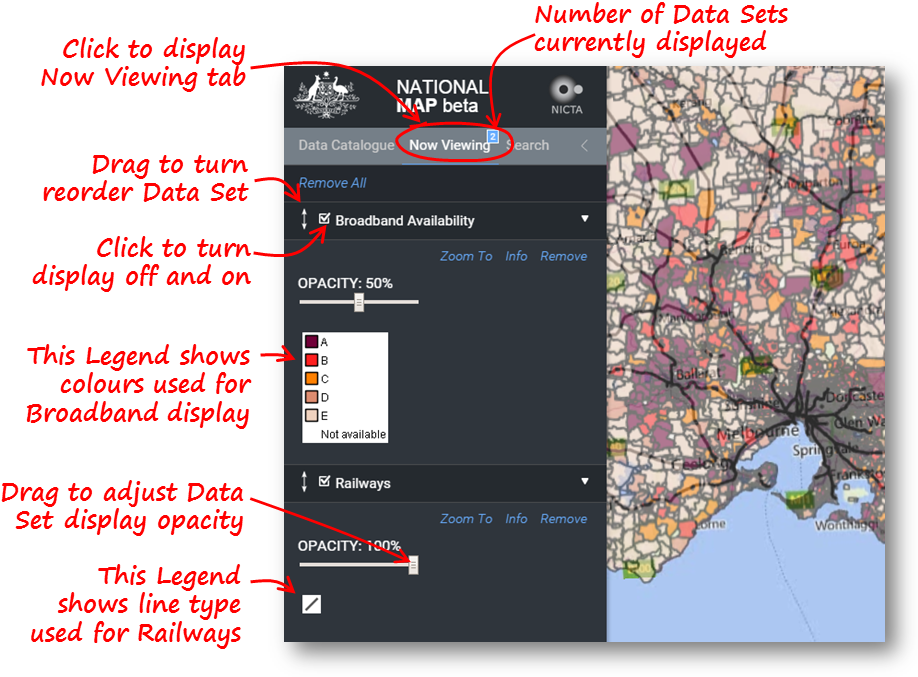
Click on the Now Viewing tab to see the legend provided by the Data Owner for the Data Sets you selected for display using the Data Catalogue tab. The number of selected Data Sets is always displayed over the tab name.
Reordering Display Levels |
Drag the |
Turning Off a Layer |
Click on the Check box to temporarily turn the display of a Data Set on or off. |
Adjusting Opacity |
Drag the OPACITY slider to change the opacity of the display of that Data Set. 0% means the Data Set will not be visible. 100% means the base map and all of the Data Sets listed below this one will be hidden in the area where there are data in this Data Set. |
Show Data Set Metadata |
Click Info to see the Metadata for the related Data Set, including the licence which says what you can and can't do with the data. Some of the displayed infomation may be very specific to the Data Set and quite technical. |
Remove Data Set |
Click Remove to remove the related Data Set from the list of displayed Data Sets. If you want to see it again, you will need to return to the Data Catalogue tab. Click Remove All to remove the display of all data sets from the National Map view. |
Zoom To Data Set |
Click Zoom To to show a map view which just encloses all data available in this Data Set. (This has the same effect as clicking on the Data Set name in the Data Catalogue tab.) |
 up or down to change
the display order of the related Data Set. This affects the sequence in which the Data Sets are added to the Map View. Those
added later may obscure those added earlier.
up or down to change
the display order of the related Data Set. This affects the sequence in which the Data Sets are added to the Map View. Those
added later may obscure those added earlier.