[English](README.md) | 日本語
# Nanox
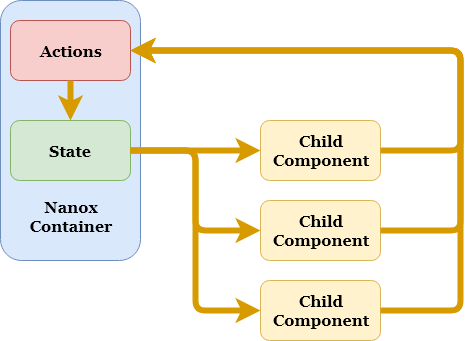
NanoxはReactを使用した小規模プロジェクト用のフレームワークです。
素のReactだと物足りないがReduxのような規模は必要ないケースでの使用を想定しています。
使用感としてはHyperapp(v1)に近い感じに仕上がっています。
* [特徴](#%E7%89%B9%E5%BE%B4)
* [インストール](#%E3%82%A4%E3%83%B3%E3%82%B9%E3%83%88%E3%83%BC%E3%83%AB)
* [使用方法](#%E4%BD%BF%E7%94%A8%E6%96%B9%E6%B3%95)
* [サンプル](#%E3%82%B5%E3%83%B3%E3%83%97%E3%83%AB)
* [アクションの仕様](#%E3%82%A2%E3%82%AF%E3%82%B7%E3%83%A7%E3%83%B3%E3%81%AE%E4%BB%95%E6%A7%98)
* [高度な使用方法](#%E9%AB%98%E5%BA%A6%E3%81%AA%E4%BD%BF%E7%94%A8%E6%96%B9%E6%B3%95)
* [ライセンス](#%E3%83%A9%E3%82%A4%E3%82%BB%E3%83%B3%E3%82%B9)
## 特徴
* 低い学習コスト
* 目的に応じた複数のstate更新方法を提供
* ビューとアクションを分離するのでビュー単体、アクション単体でのテストがしやすい
## インストール
```sh
$ npm install nanox
```
## 使用方法
### STEP 1 - アクションの作成
まず、ビュー内で使用するアクションを作成します。
```js
const myActions = {
// incrementというアクション名
increment(count) {
// state内の更新したい部分だけを返す
return {
count: this.state.count + count
};
},
// decrementというアクション名
decrement(count) {
// 非同期処理の場合はPromiseを返す
return new Promise((resolve, reject) => {
setTimeout(() => {
// resolveでstate内の更新したい部分だけを指定する
resolve({
count: this.state.count - count
});
}, 1000);
});
}
};
export default myActions;
```
### STEP 2 - 子コンポーネントを作成
STEP 1で作成したアクションを受け取ってビュー内で使用する子コンポーネントを作成します。
以下の例ではprops経由でアクションを受け取っていますが、Contextを使用する形でも問題ありません。
```js
const CounterComponent = ({ actions, count }) => {
// クリックハンドラでアクションを実行
return (
{count}
);
};
export default CounterComponent;
```
### STEP 3 - Nanoxコンテナを作成
アクションや子コンポーネントを管理するNaxoxコンテナを作成します。
```js
// Reactをインポート
import React from 'react';
import ReactDOM from 'react-dom';
// Nanoxをインポート
import Nanox from 'nanox';
// STEP 1で作成したアクションリストをインポート
import myActions from './actions';
// STEP 2で作成した子コンポーネントをインポート
import CounterComponent from './counter';
// Nanoxを継承したReactコンテナを作成
class MainContainer extends Nanox {
constructor(props) {
super(props);
this.state = { count: 0 };
}
render() {
// 子コンポーネントの呼び出し時にthis.actionsをpropsに渡す
return ;
}
}
```
### STEP 4 - Nanoxコンテナのマウント
STEP 3で作成したNanoxコンテナをDOMにマウントします。
この時にSTEP 1で作成したアクションをprops経由で登録します。
```js
ReactDOM.render(
// STEP 1で作成したアクションリストをNanoxコンテナに登録
,
document.getElementById('app')
);
```
## サンプル

* [このリポジトリのexample.html](example.html)
* [シンプルなカウンタープロジェクト](https://github.com/ktty1220/nanox-example)
## アクションの仕様
### アクションではstateの一部かそれをresolveするPromiseオブジェクトを返すようにする
#### :x: __Bad__: 数値を返す
```js
const myActions = {
foo(x, y, z) {
return x + y + z;
}
};
```
#### :heavy_check_mark: __Good__: stateの一部を返す
```js
const myActions = {
foo(x, y, z) {
return {
count: x + y + z
};
}
};
```
#### :heavy_check_mark: __Good__: Promiseオブジェクトを返す(stateの一部をresolveする)
```js
const myActions = {
foo(x, y, z) {
return new Promise((resolve, reject) => {
resolve({
count: x + y + z
});
});
}
};
```
#### :heavy_check_mark: __Good__: 何も返さない(stateには何の影響もありません)
```js
const myActions = {
foo(x, y, z) {
console.log(x, y, z);
}
}
```
### アクション内で現在のstateを参照する方法
アクション内では`this.state`で最新のstateを取得できます。
```js
class MainContainer extends Nanox {
constructor(props) {
super(props);
// Nanoxコンテナでstateを作成
this.state = {
count: 0,
waiting: false
};
}
.
.
.
}
```
```js
const myActions = {
increment(count) {
// アクション内で現在のstateを取得する
const currentState = this.state; // => {
// count: 0,
// waiting: false
// }
.
.
.
}
};
```
##### 補足
`this.state`はNanoxコンテナの最新stateのコピーなので、この値を直接変更してもNanoxコンテナのstateには何の影響もありません。
## 高度な使用方法
### `this.query()`によるstateの更新
アクション内ではstateの一部を返す方法の他に、`this.query()`を使用することによってMongoDBのようなクエリでstateを更新することもできます。
```js
class MainContainer extends Nanox {
constructor(props) {
super(props);
// Nanoxコンテナでstateを作成
this.state = {
fruits: [ 'apple', 'banana', 'cherry' ]
};
},
.
.
.
};
```
```js
const myActions = {
addLemon() {
// アクション内で$pushコマンドによる配列の値の追加をthis.query()で指定してその戻り値を返す
return this.query({
fruits: {
$push: [ 'lemon' ] // => stateは[ 'apple', 'banana', 'cherry', 'lemon' ]になる
}
});
},
.
.
.
};
```
使用できるコマンドは[こちら](https://github.com/kolodny/immutability-helper#available-commands)になります。
また、上記コマンドの他にもユーザー定義のコマンドを登録する事もできます。
```js
ReactDOM.render(
// Nanoxコンテナのマウント時にcommands propsに$incrementコマンドを登録する
target + value
}}
/>,
document.getElementById('app')
);
```
```js
const myActions = {
increment() {
// アクション内で$incrementコマンドを使用可能
return this.query({
// value = 1, target = this.state.count
count: { $increment: 1 }
});
},
.
.
.
};
```
ユーザー定義コマンドの作成方法の詳細は[こちら](https://github.com/kolodny/immutability-helper#adding-your-own-commands)を参照してください。
#### 補足
`this.query()`の中で通常のstate値直接指定を混在させることはできません。
```js
// Bad
return this.query({
name: 'foo',
history: {
$push: [ 'change name' ]
}
});
```
上記のように、state値直接指定と更新コマンドを同時に行いたい場合は、state値直接指定の部分を$setコマンドにします。
```js
// Good
return this.query({
name: { $set: 'foo' },
history: {
$push: [ 'change name' ]
}
});
```
### アクションチェーン
ビュー内でアクションを呼び出すとPromiseオブジェクトを返すので、複数のアクションを順番に実行することができます。
何か長い処理を行う場合にまずローディングインジケータを表示して、それらが完了したらインジケーターを消去するといったケースに使用します。
また、アクション内で発生したエラーを`catch`で補足できます。
```js
return (
);
```
### state更新前フック
アクションよってstateが更新される直前に実行されるフック処理をNanoxコンテナに登録する事ができます(`onSetState()`メソッド)。
このフック処理で`false`を返すとそのstate更新は中止されます。
```js
class MainContainer extends Nanox {
.
.
.
onSetState(data, type) {
// data = 更新されようとしているstate部分もしくは更新コマンド
// type = 'state'もしくは'query'
if ( ... ) {
// falseを返すとこのstate更新はブロックされる
return false;
}
}
.
.
.
};
```
`onSetState()`の引数である`data`は更新されようとしているstate部分のコピーなので、この値を直接変更しても更新内容が変わることはありません。
### TypeScriptでの使用方法
[こちら](__tests__/check.tsx)を参考にしてください。
## ライセンス
[MIT](http://www.opensource.org/licenses/mit-license)
© 2019 [ktty1220](mailto:ktty1220@gmail.com)