# NaifJs Concepts
- Dialog system
- [Stateful multi-turn dialogues](#stateful-multi-turn-dialogues)
- [Architecture](#architecture)
- State-machine based dialog manager
- [Dialogue as a state-machine](dialogue-as-a-state-machine)
- [State tracker](#state-tracker)
- What is a dialog unit?
- [Dialog Unit](#dialog-unit)
- [Coding a dialogue with a javascript domain specific language](#coding-a-dialogue-with-a-javascript-domain-specific-language)
- [Requests and responses](#requests-and-responses)
- Whats is an Application?
- [Dialog application](#dialog-application)
- [Sessions](#dialog-application)
## Stateful multi-turn dialogues
A dialogue is an exchange of words between two or more people, speaking a natural language.
In a human-computer interaction context, dialogue takes place between two systems:
the user (A) and a computer program B, usually called *chatbot* or *conversational agent*
(I prefer to say *dialog system*, or *conversational application*).
Consider this simple turn-taking:
> A > what time is it?
> B < it's half past seven.
It's a dialogue?
In a broad sense yes, but it's a special case of conversation because it finish after just a single back and forth exchange.
I call *0-state dialogue* this *single-turn* scenario, because the conversation is apparently *stateless*.
So I prefer to define as dialogue a *multi-turn* *stateful* turn-taking between two systems.
> A > Is it expected to rain today?
> B < There’s no rain today, there’s sunshine and the temperature is 18 degrees centigrade.
>
> A > Well, how about tomorrow?
> B < It will rain tomorrow.
In the exchange of sequences here above,
the topic of the conversation concerns the weather forecast.
The initial question of system A (the user) brings system B (the chatbot) to an *internal state*,
which maintains the topic of discussion,
so that the subsequent user request is understood in the specific context "weather forecast".
This is an example of elementary multi-turn conversation (I call *state-1*).
It is therefore possible to model more complex dialog as a finite state machine,
where two interacting systems (for example A is a human being and B is a chatbot),
evolve into successive conversational states.
## Architecture
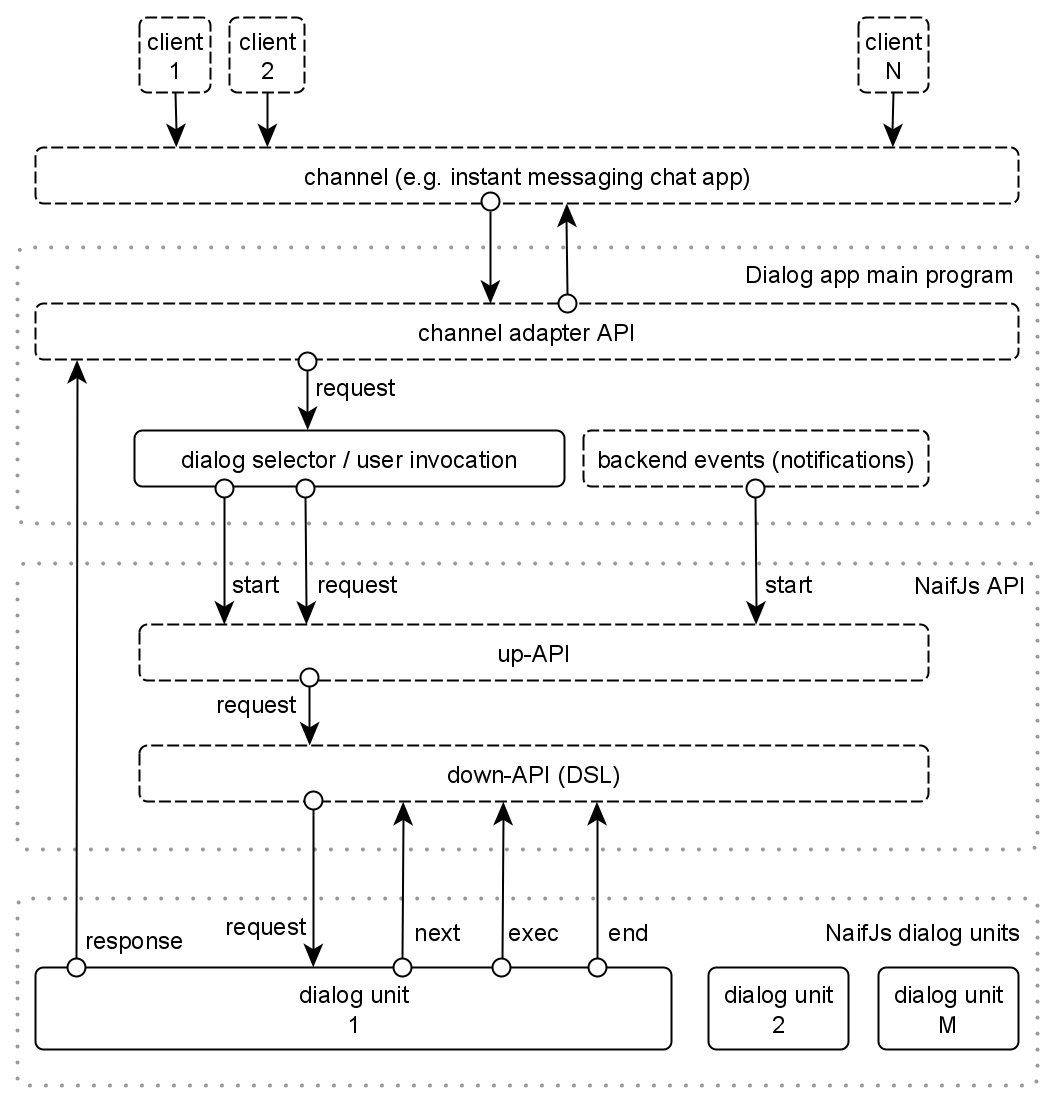
The general architecture of a dialog system based on NaifJs is shown in figure 1.
|  |
|:--:|
| figure 1: Dialogue system architecture, using NaifJs |
We consider a multiuser scenario where many users can interact the dialogue system.
The main software components are:
- The channel
It's where users interact.
It could be by example an instant messaging platform, a group chat platform, an email client, etc.
- The channel adapter API
The outside interface component of the main program is the channel API
that allow to send and receive messages to the channel.
ASR/TTS (speech transcript / text-to-speech) sub-modules
could be part of this component if messages include voice processing.
A message containing different types of multimodal data is an inbound `request` to the dialog system.
Backwards, dialog system outbound `response` message is translated by the adapter following the specific message data types.
> A multi-channel application is realized with a dialog system backend
> that's able to manage more than one channel in parallel.
- The dialog selection/activation
NaifJs is built on the idea that user interacts with the dialog system activating, one at a time,
a specific task-oriented or topic-oriented conversational workflow,
that I call *dialog unit*, each one implemented as a dedicated state machine.
There are two distinct kind of events that trigger a new dialog:
- *Pull events* (user sentence invocation)
The core logic of the main application program must contain a dialog selector
that activates (`start`) a corresponding dialog unit (*pull mode*).
A common case is that a dialog unit is triggered when a specific *invocation sentence* that user input,
is matched by the dialog selector module (a sort of main node).
- *Push events* (backend logic trigger)
Another way to activate the dialogue is an event generated by some backend logic.
It's common to push user with notification-based conversations,
maybe following agent-initiative-based logic,
by example events generated by some cron-based logic (*pull mode*).
- The dialogue manager
The NaifJs dialog manager passes inbound channel requests to underlying dialog units,
is in charge to schedule a track the internal state of a dialog
and at least send outbound responses to the channel adapter.
- The conversational application (project)
An application (or project) is made by:
- a main program containing the invocation logic of *dialog units*.
- a set of (standalone or interconnected) dialog units,
"self-consistent" finite state machines (FSM), single *units* of conversational logic
that accomplish some specific application workflows,
micro-skills that accomplish specific tasks.
## Dialog as a state-machine
NaifJs is a dialog manager that implements dialog management
modeling a conversation as a finite state machine
([FSM](https://en.wikipedia.org/wiki/Finite-state_machine)),
A conversation in NaifJs can be thought of as traversing the state machine's nodes,
to be considered as a graph of *states*.
### State representation
Each *node* (or *state*) of the graph has an associated unique identifier (*stateid*),
a string label identifying both the state machine (the dialog unit)
and the specific state inside the dialog unit):
```
const stateid = 'myDialogUnit.myState'
```
Where:
- `myDialogUnit` is the name of the state machine
(corresponding to a unique dialogue unit file: `myDialogUnit.js`)
- `myState` is the name of the javascript function handler `myState()`
### Input and output states
In each state machine there are two different kind of nodes:
- *input state*
It's a *wait node* of "understanding" and local processing of input requests (user *utterances*).
The inbound user sentence is matched with some kind of [pattern matching](patternmatching.md)
(e.g. Regular Expressions) and each matched *intent* triggers an *action* (any backend logic).
Lastly, a response message is feed back to user.
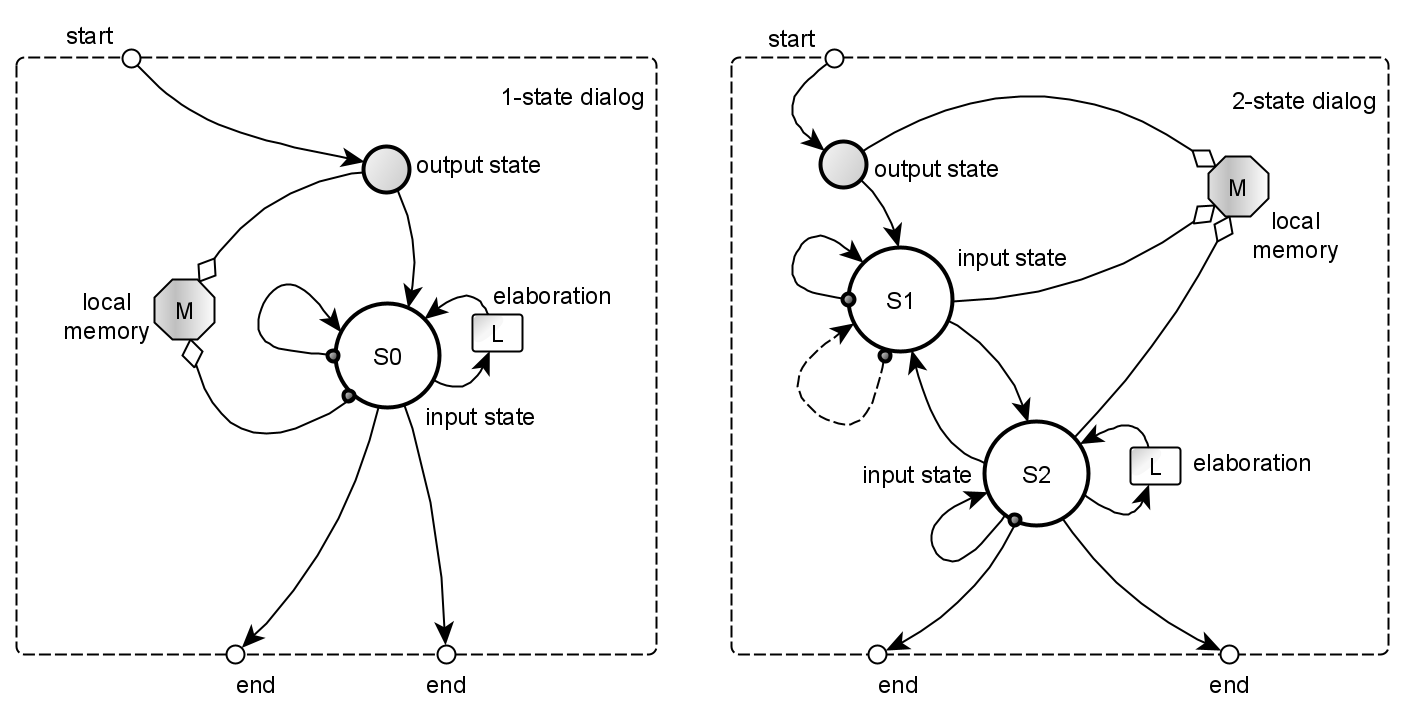
See nodes *S1* and *S2* in figure 2.
The input state is triggered with `next('myDialogueUnit.myInputState')` DSL.
- *output state*
It's an execution node that makes some backend elaboration and produce a message/prompt (response) to the user.
The output state can be considered as the *action* part of previous described input state.
It's triggered with `exec('myDialogueUnit.myOutputputState')` DSL.
### "Rule-based" state transitions
Transitions between states take places for two kind of events:
- External events
These are the `start` of the state-machine and any successive `request`.
A dialogue is initially activated by a caller program (with `start` function)
that activate the initial state (an output state, in current implementation).
The node performs some kind of logic (L, in figure 2), usually (but non perforce)
feedback a `response` to the user and can store contextual (shared) memory variables (M).
The response to the user is any kind of message
(can be a text, a voice message, an image or audio/video content).
- Internal events
Transitions between any successive internal node is decided by programmer,
that explicitly move
- to the target output state with `exec` function
- to the target input state with `next` function
> 👉 State transitions are deterministic and "rule-based",
> being programmed by developer,
> in the action part of [pattern matching](patternmatching.md) rules.
|  |
|:--:|
| figure 2: at the left a *1-state* *dialogue unit*, containing an *output state*, an *input state*, a local memory. At the right a *2-state* dialogue unit, containing 2 input states, an input state, a local memory. |
## State tracker
The engine is just a *conversation state* scheduler/tracker.
As soon a dialogue state machine is activated from a main program (acting as a *main state*),
the NaifJs engine track the conversation state (*stateid*) and schedule next state.
The incoming user request event (the user utterance as text), run a state handler function.
```javascript
// dialog manager set a specific state-machine state
naif.start('myDialogUnit.myState')
// when user talk to the agent:
naif.request(user, utterance)
```
To progress the dialogue flow, the initial (output) state usually send some reply to the user
and activates a subsequent input state (using `next` DSL function),
in which the dialogue manager analyzes the user's response (a sentence in natural language)
and performs a contextual interpretation based on a [pattern matching](patternmatching.md) (PM).
> The dialogue manager is agnostic with respect
> to the NLU mechanism and for simplicity and efficiency
> the parsing has been implemented with the use of regular expressions (regexp).
In the case of a positive pattern match,
the input node performs some processing and a response is given to the user.
The response could be textual, a synthetic voice speech or other multimedia audio/video content.
The current state can evolve into a successive input state (using `next` API),
a successive output state (using `exec` API) or might not change
(*loopback*, see the dotted lines in figure 3),
based on a dialog flow programmed by the designer.
The dialog flow finally ends, when developer terminate the conversation,
exiting the state machine (with `end` API).
|  |
|:--:|
| figure 3: at the left, the *1-state* dialogue unit, where the input state is detailed. |
## Dialog Unit
To complete a specific task (a workflow),
a multi-turn conversation is implemented as a network of micro-dialogues,
called *dialog units*, each containing a graph of nodes that completes a *contextual*
(related to in a specific domain and task) conversation workflow.
A dialog unit is a finite state machine (FSM),
a single *unit* of conversational logic allowing accomplish any specific application workflow.
> 👉 From coder point of view, each dialog unit is a standalone file,
> exporting a module that implement a single state machine, or micro-dialogue,
> that has an entry point (the initial state) and one or more ends.
>
> These dialog units modules could be concatenated each other, resulting a complex dialogue.
> Each dialogue unit can receive input parameters, following a sort of functional programming model.
|  |
|:--:|
| figure 4: a more complex state machine, made by 2 interconnected dialogue units. |
### Session variables
Each dialogue unit has a *short-term memory* made by persistent variables
with local scope to the unit itself, but shared among all dialog units part of the same application.
> 👉 More details in [variables](variables.md) and [sessions](session.md) docs.
### Writing a dialogue with a javascript DSL
To write a *dialogue unit* in NaifJs, the developer just write vanilla javascript code,
added by NaifJs internal [domain specific language (DSL)](API.md#down-dialogue-api) functions
that define how input and output states (nodes) of the state machine are interconnected.
Each state machine correspond to a dialog unit, an unique javascript module file
containing a list of functions (handlers) for each *input state*,
and *output state* of the designed state machine.
### Requests and responses
NaifJs is a backend dialog manager engine, multi-user, channel agnostic, message agnostic.
The dialog engine interacts with the external system, receiving and sending messages.
The platform is pretty agnostic regarding media contents in `request` and `response` messages.
> 👉 Read more [here](requestresponse.md).
### A simple example of a dialog unit
Suppose we want to implement a simple dialog unit
that ask the user his name, and terminates.
As soon the dialog is activated (with `naif.start('getUserName.askName')`),
the output state `askName` handler is triggered.
The state simply prompt the user and goto the input state with `next(getName)`.
Note that `say` and `ask` are specialized versions of generic `response` function.
> The example dialogue is a 1-state,
> because it contains just a single input state handler (`getname`).
Here below the basic code:
```javascript
// dialog unit file: getUserName.js
const getUserName = { askName, getName }
// output state
function askName() {
ask('Hello! What\'s your name?')
next('getUserName.askName')
}
// input state
function getName(sentence) {
switch (take(sentence)) {
// pattern 1: reply to greetings
case match( /hi|hello|good morning|good afternoon/i ):
ask('Hi there! What\'s your name?')
break
// pattern 2: regexp rule to get a first name (e.g. Anna Lisa, Giorgio La Malfa)
case match( /^(my name is |name me |i\'m )?(?[A-Z][a-z]{1,}(\\s[A-Z][a-z]{1,})*)/i ):
say(`Nice to meet you, ${slots().firstName}?`)
end()
break
// fallback
default:
say( 'I do not understand.' )
ask( 'What is your name?' )
break
}
}
module.exports = getUserName
```
## [Dialog application](application.md)
An application (or project) is made by:
- a main program containing the invocation logic of *dialog units*.
- a set of dialogue units files,
currently contained in a single specified directory,
implementing all workflows of a specific application.
See:
- 👉 [An application example (Telegram Bot)](application.md#an-application-example--Telegram-Bot-)
- 👉 [Sessions](sessions.md)
- 👉 [Project examples](../examples/README.md)
---
[top](#) | [home](../README.md) | [index](index.md)