# myass





MY ASSertion framework. Magic free. 0 Dependencies.
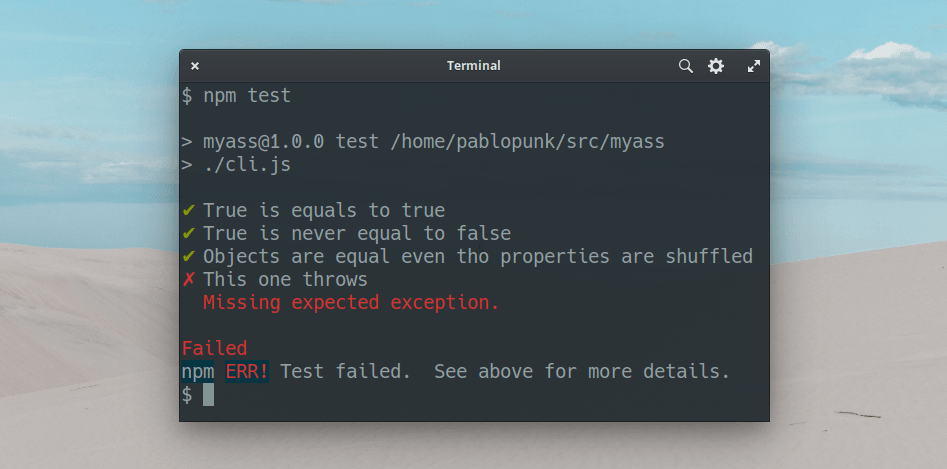
- [How to install](#install)
- [Features](#features)
- [Usage](#usage)
- [API](#api)
## Install
```bash
npm install myass
```
## Features
- Asynchronous
- Incredibly lightweight
- 0 dependencies
- No fancy features, focus on assertions
- Simple and beautiful output
- Fail fast
## Usage
You can use all the methods that the native `assert` has ([see docs](https://nodejs.org/api/assert.html)) but there are some [additional functions](#api) available.
Create one of this entry points for your tests:
- `test.js`
- `tests.js`
- `test/index.js`
- `tests/index.js`
```js
const test = require('myass')
test('True is equals to true', async (t) => {
t.is(true, true)
})
test('True is never equal to false', async (t) => {
t.notEqual(true, false)
})
test('Objects are equal even tho properties are shuffled', async (t) => {
t.is({ foo: 'bar', bar: 'foo' }, { bar: 'foo', foo: 'bar' })
})
test('This one throws', async (t) => {
t.throws(() => t.is(1, 1))
})
test('This will throw too', async (t) => {
t.throws(() => {
throw new Error()
})
})
```
`myass` is also a cli, so you can just call it like this:
```json
"scripts": {
"test": "myass"
}
```
Another cool feature is that `myass` runs tests like a script, so you
can execute the file directly `node test.js` and it would still work.
## API
> If you use **typescript**, `myass` has typings!
The module is a function that takes a name and a test function:
```js
myass(name, (t) => {})
```
> name: string
This argument is the name of the test you are about to provide. It will be shown in the output whenever that test fails or succeeds.
> t: object
I named it `t` but you can use whatever name you want for this argument. It contains all the necessary functions to run your assertions. As mentioned, you can use all the available functions in node's `assert` module. _myass_ also provides some helpers that makes it easier to code:
### `t.is(value, expected)`
Shortcut for [`deepStrictEqual`](https://nodejs.org/api/assert.html#assert_assert_deepstrictequal_actual_expected_message).
```js
test('Objects are equal', async (t) => {
t.is({ foo: 'bar' }, { foo: 'bar' }) // passes
})
```
### `t.true(value)` or `t.false(value)`
Passes if `value` is `true` or `false`. Notice that **it has to be true**, not _truthy_.
```js
test('True is true', async (t) => {
t.true(true) // passes
})
test('False is false', async (t) => {
t.false(false) // passes
})
```
### `t.regex(value, regex)` or `t.regex(regex, value)`
Checks if given `value` matches the given `regex`.
```js
test('Matches regex', async (t) => {
t.regex('abcdef', /abcdef/) // passes
t.regex(new RegExp('foo'), 'bar') // won't pass
})
```
There's also `t.notRegex` to test a string NOT to match a regular expression.
## License
MIT
## Author
|  |
| ---------------------------------------------------------------------------- |
| [Pablo Varela](https://pablo.life) |