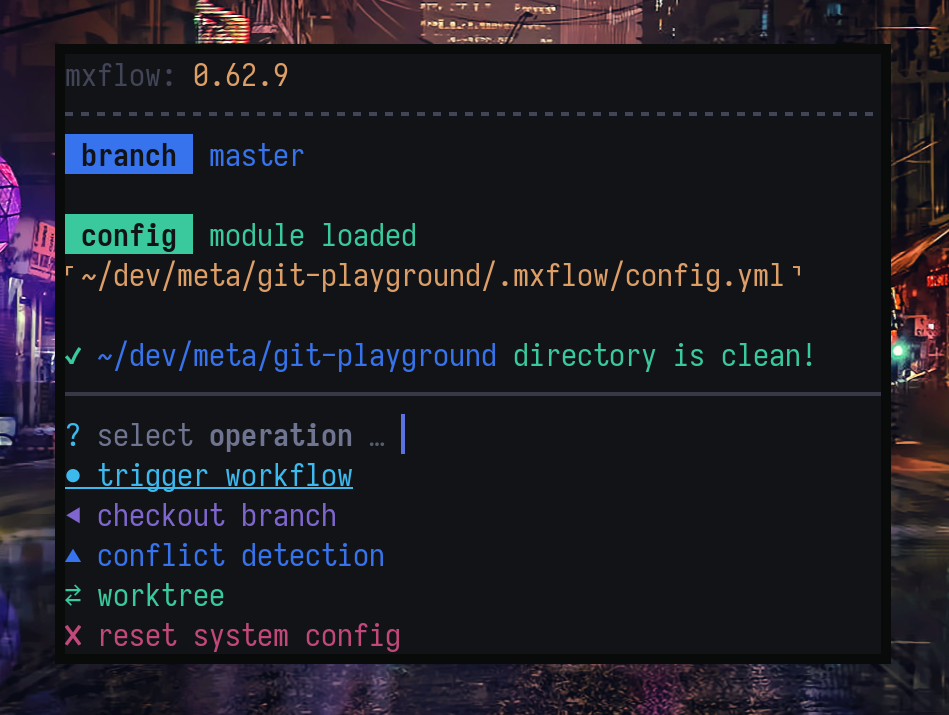
:zap: A Beautiful, Friendly, General purpose CLI task runner :rocket:
`mxflow` is a CLI task runner which configured via a YAML config file.
It searches for a `.mxflow/config.yml` in the current directory and parent directories recursively up which it then parses for commands and arguments
## Why?
- Internal processes can get **complicated** or too **repetitive**.
- It's hard to **streamline** complex workflows across **teams**.
- Existing task-runners are too focused on a specific **use-case/environment** or have **complicated config** files or are **not friendly**!
---
## Major Features
- **Interactive first** - works with/without arguments; prompt missing arguments
- **Extensive config** - group commands under a workflow, use argument variables in commands
- **Shell completion** - dynamic shell completion based on the closest config file
- **Confirmation** - add `confirm` prefix to any **_step command_** to add confirmation prompt
- **Project / System config** - searches for a `.mxflow/config.yml` in the current directory and parent directories recursively up, so you can have different configs based on the current directory
---
# Requirements
- Node 16+
---
# Installation
Install the package, globally:
```bash
sudo npm i -g mxflow
```
Setup shell tab completion:
```bash
mxflow --setup-completion
```
> make sure to run this command **once**, in case you have ran this command more than once, you can run the `mxflow --clean-completion` to clean.
# Usage
```bash
mxflow [] [] []
```
# CLI Options
```markdown
init | init sample configuration
trigger | non-interactive workflow trigger
version, --version | show version
help, --help | help menu
-v, --verbose | verbose logs
-F, --force | bypass confirmation prompts
--setup-completion | setup shell tab completion
--clean-completion | cleanup tab completion
```
# Examples
For a fully interactive experience;
```bash
mxflow # or mxf
```
To bypass _confirmation_ prompts;
```bash
mxflow --force
```
To interactively select a workflow to trigger;
```bash
mxflow trigger
```
To trigger a particular workflow interactively;
```bash
mxflow trigger create-flight
```
To trigger a particular workflow with arguments;
```bash
mxflow trigger create-flight --taskId my-tsk --description my-desc --force
```
---
# Config
`.mxflow/config.yml`
> `mxflow trigger foobar --foo fval --bar bar-xorg`
```yaml
# The CLI Version
version: 0.60.0
# The milliseconds to wait between commands
sleep: 1000
# Should exit upon first error code faced
exit_on_error: false
# Config Workflows
workflows:
# Workflow name
foobar:
# Workflow description
description: example placeholder
# Checks to run before workflow. Possible checks are: [git-clean]
checks:
- git-clean
# Variables to collect to be available later on steps
args:
# Variable name
- name: foo
# Variable type. Possible types are: [string, number]
type: string
- name: bar
type: string
# Regex to test argument input
regex: ^bar+\w
# The default value for the variable
default: barxorg
# Set a different name for the variable
export: barx
# Steps are list of commands to execute
steps:
# Variable name or its export are available with braces
- echo {foo} world
# Variable export
- echo goodbye {foo} {barx} cruel world
# the `current-branch` is a special variable; always available
- echo git branch is {current-branch}
# Appending `confirm` will add a confirmation step before the following command
- confirm shutdown -h now
# Its possible to use system environment variable; resolved at runtime
- echo AWS_PROFILE $AWS_PROFILE
# Or use braces syntax; it will resolve before execution
- echo AWS_PROFILE {AWS_PROFILE}
```
---
Config Reference
`version` - config version
`exit_on_error` - _(optional)_ should exit on any command with a non-zero exit code, default is `false`
`sleep` - _(optional)_ adds a delay between each command, default is `1000`
`workflows` - object with workflows
Workflow Reference
`description` - workflow description
`checks` - checks to run before workflow.
Possible checks are: `[git-clean]`
`args` - list of arguments
`args[*].name` - what user inputs as argument
`args[*].type` - validation type; `string | number`
`args[*].export` - _(optional)_ the exported variable, default is `args[*].name`
`args[*].default` - _(optional)_ the default value, if any
`args[*].regex` - _(optional)_ validation pattern
`steps` - list of commands to run
`steps[*]` - the command to run, any shell command string, with some specials commands
> note: you can write a `cd` pre-step to change `cwd` of the following command
> note: you can add a `confirm` prefix to add confirmation prompt
> note: at the moment there are some git commands: `checkout-branch, list-logs, log-bugtracker`. Check [wiki](https://github.com/metaory/mxflow-cli/wiki/Git-Workflow-Sample) for usage example
Config Variables
Example: `echo foo {variable} bar`
- Argument variables
- `args` - `export` or `name`
- Environment variables
- `environment` - system environment variables
- `.env` - variables defined in the `.env` file
- git variables
- `{current-branch}` - current active branch
- workflow
- `{workflow}` - current active workflow
Real-world Use-cases
- [git-workflow](https://github.com/metaory/mxflow-cli/wiki/Git-Workflow-Sample)
---
# Roadmap
- [x] project based config file
- [ ] plugin system for dynamic lists
- [x] argument mode
- [x] argument autocomplete
- [x] support `.env` file import
---