## Muz Doraemon 哆啦 A 梦

哆啦 A 梦。基于 Uni-App 的 VUE3 组件库——Жидзин（Zidjin）矢争系列组件库。

> 注意：文档编撰格式参考 [Element UI](https://element.eleme.cn) 组件文档。

### 安装

推荐使用 npm 的方式安装。

```shell
npm install muz-doraemon
```

### 引入

全局引入，在 pages.json 中写入以下内容：

```json
{
    "pages": [],
    "globalStyle": {
        "navigationStyle": "custom" // 启用自定义导航条
    },
    "easycom": {
        "autoscan": true, // 自动查找安装、引用、注册符合“components/组件名称/组件名称.vue”目录结构的组件。
        "custom": {
            "^muz-(.*)": "muz-doraemon/src/muz-$1/muz-$1.vue" // 自定义组件正则匹配规则，如果需要匹配node_modules内的vue文件，需要使用packageName/path/to/vue-file-$1.vue形式的匹配规则
        }
    }
}
```

局部引入，在 vue 页面文件中写入以下内容

```js
import {MuzItem, MuzListArea, ...} from 'muz-doraemon';
export default {
    components: {
        MuzItem,
		MuzListArea,
		...
    },
};
```

### Doraemon 哆啦 A 梦

哆啦 A 梦的组件百宝箱。

#### 基础用法

[^图像示例]: 注：图像示例统一 800×300 像素，特殊除外。

```vue
<template>
    <muz-doraemon :list="list"></muz-doraemon>
</template>

<script>
import {MuzDoraemon} from 'muz-doraemon';
export default {
    data: ()=>({
        list: [
            ...
        ],
    })
};
</script>
```

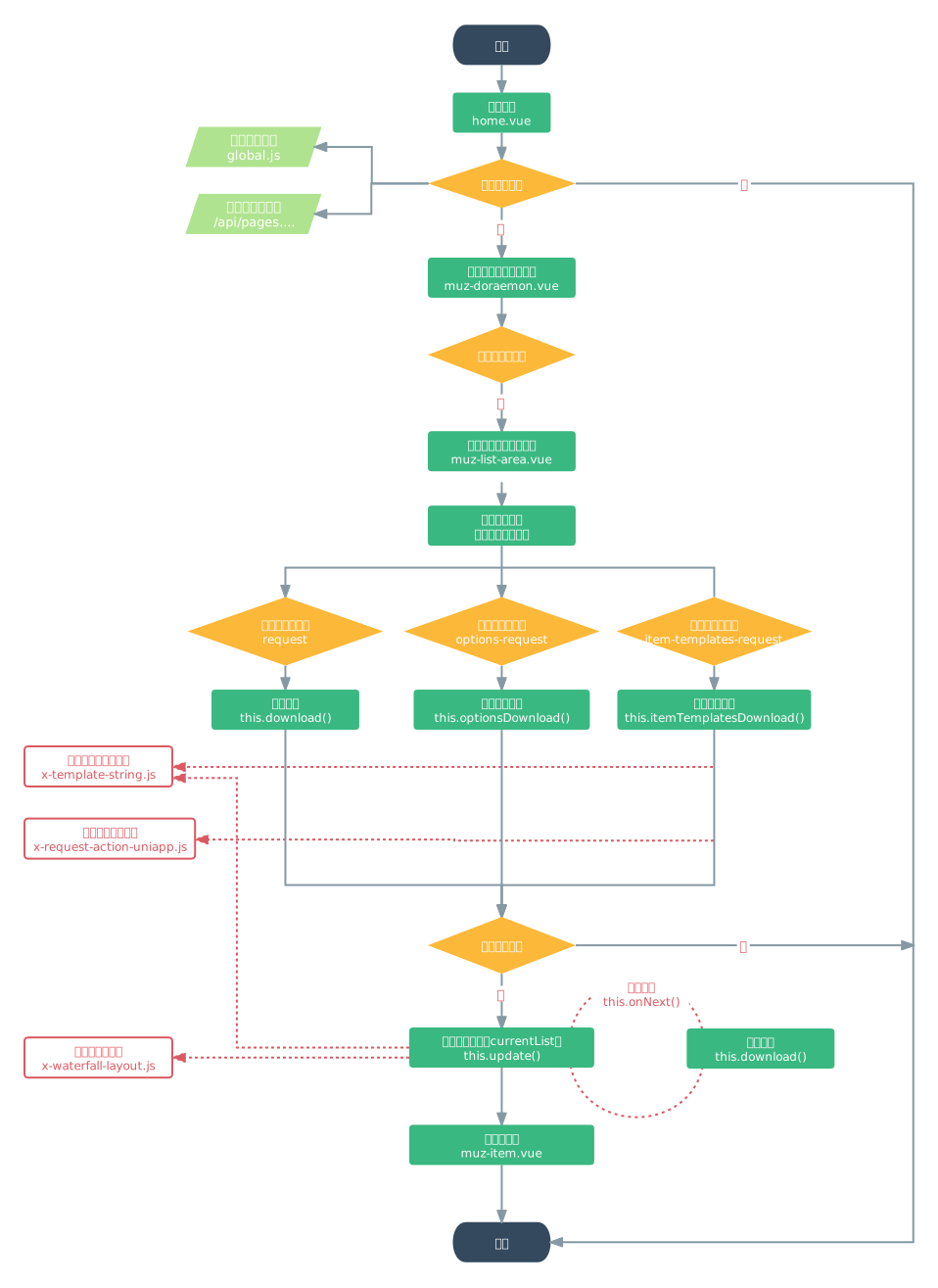
#### UML 流程图

<img src=".\doc\uml-doraemo.svg" style="width:60%;" />

#### Doraemon Attributes

| 参数       | 说明                                     | 类型          | 可选值             | 默认值 |
| ---------- | ---------------------------------------- | ------------- | ------------------ | ------ |
| root-url   | 根域名。小程序/APP 需要添加域名          | string        | —                  | —      |
| share-info | 分享信息                                 | object        | {}                 | —      |
| page-param | 传入页面参数，用于定制化不同页面过滤结果 | object        | {page,id,nav,page} | —      |
| list       | 组件化的列表配置                         | array<object> | —                  | —      |
| editable   | 启用编辑<br />适用：tl-form              | boolean       | true               | false  |

#### Option of List

| 参数                                                                | 说明                                   | 类型                 | 可选值                                                                                                                                                             | 默认值 |
| ------------------------------------------------------------------- | -------------------------------------- | -------------------- | ------------------------------------------------------------------------------------------------------------------------------------------------------------------ | ------ |
| show                                                                | 是否显示                               | boolean              | false                                                                                                                                                              | true   |
| component                                                           | 组件名称。<br />符合渲染配置化的组件。 | string               | muz-divider, <br />muz-background, <br />muz-tab-bar, <br />muz-classify, <br />muz-item, <br />muz-list-area, <br />muz-item-area<br />muz-order-bar<br />tl-form | —      |
| classes                                                             | 自定义类名                             | string               | —                                                                                                                                                                  | —      |
| styles                                                              | 自定义样式。<br />作用于组件根标签。   | object               | 例：{fontSize: "14px",},                                                                                                                                           | —      |
| config                                                              | 组件配置。<br />详见本文组件。         | object               | —                                                                                                                                                                  | —      |
| list<br />适用：muz-classify                                        | 分类列表                               | array<object>        | 详见 muz-classify 组件                                                                                                                                             |        |
| item<br />适用：muz-item                                            | 条数据模版                             | object               | 详见 muz-item 组件                                                                                                                                                 |        |
| itemTemplate<br />适用：muz-list-area, <br />　　　 muz-item-area   | 条数据模版。<br />详见：Item 条数据    | object               | 详见 muz-item 组件                                                                                                                                                 | —      |
| itemTemplateSet<br />适用：muz-list-area                            | 条数据模版集合。                       | object<name, object> | 详见 muz-item 组件                                                                                                                                                 | —      |
| request<br />适用：muz-list-area, <br />　　　 muz-item-area        | 组件数据请求配置                       | object               | 详见：muz-list-area Option of Request (请求选项)                                                                                                                   | —      |
| optionsRequest<br />适用：muz-list-area, <br />　　　 muz-item-area | 多组选项的请求配置                     | array<object>        | 详见：muz-list-area Option of Request (请求选项)                                                                                                                   |        |

#### Doraemon Slot

| 名称                                              | 说明                                             |
| ------------------------------------------------- | ------------------------------------------------ |
| <custom-slot><br />新版已弃用，原因：不支持小程序 | 自定义插槽。<br />详见：条数据 <custom-key>.slot |

### Background 背景

背景组件。

#### 基础用法

[^图像示例]: 注：图像示例统一 800×300 像素，特殊除外。

```vue
<template>
    <muz-background :config="config" />
</template>

<script>
import { ZjTable } from 'zj-element';
export default {
    data: () => ({
        config: {
            backgroundImage: '/images/bg.png',
        },
    }),
};
</script>
```

#### Background Attributes

| 参数    | 说明       | 类型   | 可选值 | 默认值 |
| ------- | ---------- | ------ | ------ | ------ |
| classes | 自定义类名 | string | —      | —      |
| styles  | 自定义样式 | object | —      | —      |
| config  | 组件配置   | object | —      | —      |

#### Option of Config

| 参数            | 说明     | 类型        | 可选值 | 默认值 |
| --------------- | -------- | ----------- | ------ | ------ |
| backgroundImage | 背景图片 | string<url> | —      | —      |

### Top-Bar 顶部栏

顶部栏

#### 基础用法

[^图像示例]: 注：图像示例统一 800×300 像素，特殊除外。

```vue
<template>
    <muz-plus-bar title="标题" :is-search="true" />
</template>

<script>
import { ZjTable } from 'zj-element';
export default {
    data: () => ({}),
};
</script>
```

#### Nav-Bar Attributes

| 参数            | 说明               | 类型    | 可选值 | 默认值 |
| --------------- | ------------------ | ------- | ------ | ------ |
| title           | 标题               | sring   | —      | 标题   |
| rtext           | 右侧文件           | sring   | —      | —      |
| root            | 是否根页，无返回   | boolean | true   | false  |
| is-search       | 是否显示搜索       | boolean | true   | false  |
| is-add          | 是否显示添加       | boolean | true   | false  |
| is-edit         | 是否显示编辑       | boolean | true   | false  |
| is-delete       | 是否显示删除       | boolean | true   | false  |
| is-scan         | 是否显示扫码       | boolean | true   | false  |
| is-fIlter       | 是否显示过滤       | boolean | true   | false  |
| is-more         | 是否显示更多       | boolean | true   | false  |
| is-with         | 是否显示分享？？？ | boolean | true   | false  |
| is-left-search  | 是否显示右侧搜索   | boolean | true   | false  |
| is-plus         | 是否显示加号       | boolean | true   | false  |
| is-customize    | 是否左侧自定义     | boolean | true   | false  |
| customize-title | 自定义内容 文字    | sring   | —      | —      |
| is-off          | 是否显示左侧关闭   | boolean | true   | false  |
| is-dropdown     | 是否显示下拉       | boolean | true   | false  |
| dropdownDelete  | 下拉的删除         | boolean | true   | false  |
| dropdownEdit    | 下拉的编辑         | boolean | true   | false  |
| dropdownWith    | 下拉的分享？？？   | boolean | true   | false  |

### Tab-Bar 标签栏

标签栏

#### 基础用法

```vue
<template>
    <muz-tab-bar v-if="it.component === 'muz-tab-bar'" :default="it.default" :page-param="currentParam" :config="it.config" :request="it.request" @tab="onTab" />
</template>

<script>
export default {
    data: () => ({}),
};
</script>
```

#### Tab-Bar Attributes

| 参数      | 说明               | 类型             | 可选值 | 默认值 |
| --------- | ------------------ | ---------------- | ------ | ------ |
| classes   | 自定义类名         | string           | —      | —      |
| styles    | 自定义样式         | object           | —      | —      |
| default   | 选中高亮显示       | [String, Number] | —      | —      |
| pageParam | 界面传参数         | Object           |        |        |
| config    | 当前激活的导航按钮 | Object           | —      | —      |
| request   | 请求导航条配置     | Object           |        |        |

#### Option of Config

| 参数        | 说明             | 类型          | 可选值                                                         | 默认值 |
| ----------- | ---------------- | ------------- | -------------------------------------------------------------- | ------ |
| nodeLabel   | 节点标签键名     | string        | —                                                              | show   |
| nodeValue   | 节点值键名       | string        | —                                                              | value  |
| nodeShow    | 节点显示键名     | string        | —                                                              | show   |
| unshiftList | 头部插入标签列表 | Array[Object] | [{value: "全部",}] <br />注意：value 与 valueNode 的值保持一致 | —      |
| appendList  | 尾部插入标签列表 | Array[Object] | [{value: "其他",}]<br />注意：value 与 valueNode 的值保持一致  | —      |

### Nav-Bar 导航栏

导航栏

#### 基础用法

[^图像示例]: 注：图像示例统一 800×300 像素，特殊除外。

```vue
<template>
    <muz-nav-bar current-nav="home" :nav-list="list"></muz-nav-bar>
</template>

<script>
import {ZjTable} from 'zj-element';
export default {
    data: ()=>({
        list: [
            {
                key: 'home',
                icon: '/static/icons/icon-home.svg',
                activeIcon: '/static/icons/icon-home-color.svg',
                title: '首页',
                url: '/pages/home/home',
            },
            {
                key: 'me',
                icon: '/static/icons/icon-me.svg',
                activeIcon: '/static/icons/icon-me-color.svg',
                title: '我',
                url: '/pages-me/me/me',
            },
        ]，
    })
};
</script>
```

#### Nav-Bar Attributes

| 参数             | 说明                                          | 类型          | 可选值                                                                                                                                                  | 默认值 |
| ---------------- | --------------------------------------------- | ------------- | ------------------------------------------------------------------------------------------------------------------------------------------------------- | ------ |
| classes          | 自定义类名                                    | string        | —                                                                                                                                                       | —      |
| styles           | 自定义样式                                    | object        | —                                                                                                                                                       | —      |
| current-nav      | 当前激活的导航按钮                            | string        | —                                                                                                                                                       | —      |
| current          | 当前激活的下标按钮                            | number        | —                                                                                                                                                       | -1     |
| nav-list         | 导航条配置                                    | array<object> | {<br/> key: 'me',<br/> icon: '/static/icon-me.svg',<br/> activeIcon: '/static/icon-me-color.svg',<br/> title: '我',<br/> url: '/pages-me/me/me',<br/>}, | —      |
| request          | 请求导航条配置                                |               |                                                                                                                                                         |        |
| close-url-active | 关闭自动检查激活<br />即根据 Url 地址匹配激活 | boolean       | true                                                                                                                                                    | false  |
| is-tab-mode      | 启用标签，暂时弃用                            | boolean       | true                                                                                                                                                    | false  |

### Order-Bar 订单栏

订单栏

#### 基础用法

[^图像示例]: 注：图像示例统一 800×300 像素，特殊除外。

```vue
<template>
    <muz-order-bar current-nav="home" :nav-list="list"></muz-nav-bar>
</template>

<script>
import {MuzOrderBar} from 'muz-doraemon';
export default {
    data: ()=>({})
};
</script>
```

#### Order Attributes

| 参数         | 说明                           | 类型          | 可选值             | 默认值 |
| ------------ | ------------------------------ | ------------- | ------------------ | ------ |
| classes      | 自定义类名                     | string        | —                  | —      |
| styles       | 自定义样式                     | object        | —                  | —      |
| item         | 订单条数据配置                 | object        | 详见 muz-item 组件 | —      |
| config       | 配置                           | object        | —                  | —      |
| all-checked  | 是否全选                       | boolean       | true               | false  |
| checked-list | 已选择列表数据                 | array<object> | —                  | —      |
| page-param   | 页面参数<br />用于接受页面传参 | object        | —                  | —      |

#### Option of Config

| 参数             | 说明                                                 | 类型    | 可选值 | 默认值  |
| ---------------- | ---------------------------------------------------- | ------- | ------ | ------- |
| height           | 订单栏高度                                           | number  | —      | 100     |
| nodePrice        | 价格节点键<br />用于前端统计总价                     | string  | —      | 'price' |
| nodeKey          | 主键节点键<br />用于生成已选 ID 列表，默认 id        | string  | —      | 'id'    |
| fixed            | 小数点位数                                           | number  | —      | 2       |
| showCheck        | 是否显示全选框                                       | boolean | true   | false   |
| openCheckStorage | 开启全选写入缓存<br />缓存 key 名默认为 checked-list | boolean | true   | false   |
| split            | 指定返回已选 ID 列表的分割符                         | string  | —      | ','     |

### Classify 分类图标

分类图标组件。

#### 基础用法

[^图像示例]: 注：图像示例统一 800×300 像素，特殊除外。

```vue
<template>
    <muz-classify :config="it.config" :list="list" @classify="onClassify" />
</template>

<script>
export default {
    data: () => ({
        config: {
            backgroundImage: '/images/bg.png',
        },
    }),
};
</script>
```

#### Classify Attributes

| 参数     | 说明         | 类型          | 可选值                                                                             | 默认值 |
| -------- | ------------ | ------------- | ---------------------------------------------------------------------------------- | ------ |
| classes  | 自定义类名   | string        | —                                                                                  | —      |
| styles   | 自定义样式   | object        | —                                                                                  | —      |
| title    | 分类大标题   | string        | —                                                                                  | —      |
| subtitle | 副标题       | string        | —                                                                                  | —      |
| config   | 组件配置     | object        | —                                                                                  | —      |
| list     | 分类列表     | array<object> | 例：[{<br/> icon: '/icon/news.svg',<br/> text: '投标报价',<br/> value: '',<br/>}], | —      |
| row      | 每行显示个数 | number        | —                                                                                  | 5      |

#### Option of Config

| 参数        | 说明         | 类型    | 可选值                | 默认值 |
| ----------- | ------------ | ------- | --------------------- | ------ |
| noBorder    | 是否无边     | boolean | true                  | false  |
| isCircle    | 是否圆形图标 | boolean | true                  | false  |
| isLeftAlign | 是否左对齐   | boolean | true                  | false  |
| thumb       | 图标大小     | string  | medium / small / mini | medium |

#### Option of List

| 参数                        | 说明                                           | 类型                      | 可选值 | 默认值 |
| --------------------------- | ---------------------------------------------- | ------------------------- | ------ | ------ |
| icon                        | 图标地址<br />如果不传则默认显示文本第一个字符 | string<url>               | —      | —      |
| text                        | 文本，分类名称                                 | string                    | —      | —      |
| subtitle                    | 副标题，分类副标题                             | string                    | —      | —      |
| to<br />或 url(歧义,将弃用) | 跳转链接                                       | string<url>               | —      | —      |
| emit                        | 自定义信号                                     | string, object<emit, ...> | —      | —      |

#### Event

| 事件名称 | 说明                 | 回调参数                                                     |
| -------- | -------------------- | ------------------------------------------------------------ |
| clicks   | 点击触发，代替 click | —                                                            |
| classify | 点击分类图标时触发   | ( item: 目前的点击对象 )                                     |
| emit     | 点击分类图标时触发   | ( emit: 信号名称, item: 目前的点击对象, config: 信号包配置 ) |

### Divider 分隔行

分隔行组件。

#### 基础用法

[^图像示例]: 注：图像示例统一 800×300 像素，特殊除外。

```vue
<template>
    <muz-divider :config="it.config" />
</template>

<script>
import { ZjTable } from 'zj-element';
export default {
    data: () => ({
        config: {
            backgroundImage: '/images/bg.png',
        },
    }),
};
</script>
```

#### Divider Attributes

| 参数    | 说明       | 类型   | 可选值 | 默认值 |
| ------- | ---------- | ------ | ------ | ------ |
| classes | 自定义类名 | string | —      | —      |
| styles  | 自定义样式 | object | —      | —      |
| config  | 组件配置   | object | —      | —      |

#### Option of Config

| 参数                        | 说明                                     | 类型        | 可选值   | 默认值   |
| --------------------------- | ---------------------------------------- | ----------- | -------- | -------- |
| title                       | 分隔行标题                               | string      | —        | —        |
| to<br />或 url(歧义,将弃用) | 点击标题的跳转地址<br />需启用 clickable | string<url> | —        | —        |
| backgroundImage             | 背景图片                                 | string<url> | —        | —        |
| clickable                   | 启动跳转                                 | boolean     | false    | true     |
| mode                        | 跳转模式                                 | string      | redirect | navigate |

### Menu 菜单列表

菜单列表

#### 基本用法

```vue
<template>
    <muz-menu :list="list" thumb-size="medium"></muz-menu>
</template>

<script>
export default {
    data: () => ({
        list: [
            {
                text: '我的发布',
                rightText: '全部',
                icon: '',
                to: '/pages/timeline/timeline',
                config: {
                    noBorder: true,
                    isLeftAlign: true,
                    thumb: 'min',
                },
                children: [
                    {
                        text: '报名中',
                        icon: '/static/icons/icon-bid-clock.svg',
                        to: '',
                    },
                ],
            },
            {
                group: '隐私',
                children: [
                    {
                        text: '俄友圈权限',
                    },
                ],
            },
        ],
    }),
};
</script>
```

#### Muz-Menu Attributes

| 参数      | 说明           | 类型          | 可选值     | 默认值 |
| --------- | -------------- | ------------- | ---------- | ------ |
| classes   | 自定义类名     | string        | —          | —      |
| styles    | 自定义样式     | object        | —          | —      |
| list      | 分类列表       | array<object> | —          | —      |
| thumbSize | 自定义图标大小 | object        | —          | —      |
| list-type | 列表类型       | string        | card, menu | menu   |

-   list-type 为 card 时，实际调用的是 muz-classify 做为内置组件

#### Option of List

| 参数      | 说明                                                       | 类型          | 可选值                          | 默认值 |
| --------- | ---------------------------------------------------------- | ------------- | ------------------------------- | ------ |
| groupName | 分组名称                                                   | string        | —                               | —      |
| icon      | 菜单图标                                                   | string        | —                               | —      |
| text      | 菜单文本                                                   | string        | —                               | —      |
| subtitle  | 副标题                                                     | string        | —                               | —      |
| sidenote  | 右侧旁注                                                   | string        | —                               | —      |
| to        | 跳转路径                                                   | string        | —                               | —      |
| thumbSize | 图标尺寸                                                   | string        | large, medium, small, mini, min | medium |
| noBorder  | 是否有边框                                                 | boolean       | true                            | false  |
| config    | 配置项<br />仅适用：<br />详见：Classify 分类图标 “config” | object        | —                               | —      |
| children  | 子菜单列表<br />同 Option of List                          | array<object> | —                               | —      |

#### Option of List's Config

| 参数        | 说明       | 类型    | 可选值 | 默认值 |
| ----------- | ---------- | ------- | ------ | ------ |
| noBorder    | 是否有边框 | boolean | true   | false  |
| isLeftAlign | 是否左对齐 | boolean | true   | false  |
| thumb       | 跳转路径   | string  | —      | —      |

### Casket 匣子盒

匣子盒

#### 基本用法

```vue
<template>
    <muz-casket :raw-item="item" :open-check="true" :checked="isChecked(item.id)" @checked="onChecked"></muz-casket>
</template>

<script>
export default {
    data: () => ({
        item: {
            id: 23, title: '中华'
        },
        casketSelected：{}
    }),
    computed: {
        isChecked() {
            return id => !!this.casketSelected[id];
        },
    }
};
</script>
```

#### Muz-Casket Attributes

| 参数                  | 说明                               | 类型    | 可选值 | 默认值 |
| --------------------- | ---------------------------------- | ------- | ------ | ------ |
| classes               | 自定义类名                         | string  | —      | —      |
| styles                | 自定义样式                         | object  | —      | —      |
| checked               | 选中状态                           | boolean | true   | false  |
| open-check            | 开启选框                           | boolean | true   | false  |
| node-key              | 指定主键节点名称                   | string  | —      | id     |
| raw-item              | 数据源<br />指定匣子需要包裹的数据 | object  | —      | —      |
| disabled-check        | 待开发                             | —       | —      | —      |
| disabled-swipe-action | 待开发                             | —       | —      | —      |
| auto-close            | 待开发                             | —       | —      | —      |
| options               | 待开发                             | —       | —      | —      |
| duration              | 待开发                             | —       | —      | —      |

### Item 条数据

该组件为原生结构式 Vue 组件（struct as data）。

#### 基本用法

```vue
<template>
    <muz-item :item="item" @item="onClick" />
</template>

<script>
export default {
    components: {
        MuzItem: () => 'muz-item', // 注：微信小程序不支持此组件懒加载方式
    },
    data: () => ({
        item: {
            title: {
                text: '标题 Один Один',
                hot_tip: '热门',
            },
            bars: [{ type: 'bit', text: '这是文字' }],
        },
    }),
};
</script>
```

#### 高级用法示例

限定性：1、组件限于展示，不处理复杂逻辑，但有信号事件。2、

```json
<template>
	<muz-item :item="item" @item="onClick" />
</template>

<script>
	export default {
        components: {
            MuzItem: () => 'muz-item',  // 注：微信小程序不支持此组件懒加载方式
        },
        data: () => ({
            item: {
                id: 283576, // 自定义参数，仅用于信号触发的数据传值等
                title: {
                    text: "标题 Один Один", hot_tip: "热门",
                },
                lead: {
                    cover: { url: "http://i.muztak.cn/images/yellow-river.jpg", hot_tip: "棒", },
                    avatar: { url: "http://i.muztak.cn/images/yellow-river.jpg", },
                    bars: [
                        {
                            list:[
                                { type: "title", text: "今天节日活动拼团的，可以过来看看看。Расцветали яблони и груши, Поплыли туманы над рекой.", hot_tip: "热门",},
                            ]
                        },
                        {
                            list:[
                                [
                                    { type: "author", icon: "http://i.muztak.cn/images/yellow-river.jpg", text: "滕户纱织", emit: "author", },
                                    { type: "rank", icon: "http://i.muztak.cn/images/icon-rank.png", },
                                ],
                                [
                                    { type: "price", icon_code: "r", text: 2500, unit: "卢布", emit: "author", },
                                ]
                            ]
                        },
                        {
                            list:[
                                { type: "summary", text: "今天节日活动拼团的，可以过来看看看。Расцветали яблони и груши, Поплыли туманы над рекой. Выходила на берег катюша, На высокий берег на крутой.",},
                            ]
                        },
                        {
                            list:[
                                [
                                    { type: "tags", list: ['同城', '圣诞节'], },
                                ],
                                [
                                    { type: "bit", icon_code: "M", text: 75, label: "共", unit: "评",},
                                    { type: "bit", icon: "http://i.muztak.cn/images/icon-heart.svg", text: 284, label: "共", unit: "赞", emit: "like", },
                                ]
                            ]
                        },
                        {
                            list:[
                                { type: "five-star", text: 4.5, },
                                { type: "time", icon: "http://i.muztak.cn/images/icon-time-color.svg", text: 18357, mode: "timestamp",},
                            ]
                        },
                        {
                            list:[
                                [
                                ],
                                [
                                    { type: "button", text: '电话', color: 'indigo', emit: 'call'},
                                ]
                            ]
                        },
                        {
                            list:[
                                { type: "button", text: '1', color: 'red', emit: 'call1'},
                                { type: "button", text: '2', color: 'orange', emit: 'call2'},
                                { type: "button", text: '3', color: 'green', emit: 'call3'},
                                { type: "button", text: '4', color: 'blue', emit: 'call4'},
                                { type: "button", text: '5', color: 'purple', emit: 'call5'},
                            ]
                        },
                    ],
                },
                video:{
                    text: "黄河水",
                    cover: "http://i.muztak.cn/images/yellow-river.jpg",
                    url: "http://i.muztak.cn/videos/landscape-arctic.mp4",
                    danmuku: [{text: "红色走一波", timestamp: 74848}, ],//弹幕
                },
                swiper: {
                    list: [
                        {
                            url: "http://i.muztak.cn/images/yellow-river.jpg",
                            text: "中国 黄河",
                        },
                        {
                            url: "http://i.muztak.cn/images/landscape-arctic.jpg",
                            text: "俄罗斯 北极",
                        },
                        {
                            url: "http://i.muztak.cn/images/landscape-arctic.jpg",
                            text: "俄罗斯 北极",
                        }
                    ],
                },
                //九图式
                sudoku: {
                    list: [
                        'http://i.muztak.cn/images/landscape-arctic.jpg',
                        'http://i.muztak.cn/images/landscape-arctic.jpg',
                        'http://i.muztak.cn/images/landscape-arctic.jpg',
                        'http://i.muztak.cn/images/landscape-arctic.jpg',
                        'http://i.muztak.cn/images/landscape-arctic.jpg',
                        'http://i.muztak.cn/images/landscape-arctic.jpg',
                        'http://i.muztak.cn/images/landscape-arctic.jpg',
                        'http://i.muztak.cn/images/landscape-arctic.jpg',
                        'http://i.muztak.cn/images/landscape-arctic.jpg',
                        'http://i.muztak.cn/images/landscape-arctic.jpg',
                        'http://i.muztak.cn/images/landscape-arctic.jpg',
                    ],
                },
                //薛定谔式
                schrodinger: {
                    list: [
                        {
                            image: "http://i.muztak.cn/images/avatar-live.jpg",
                            burn: false,   //阅后即焚
                            auth: false,   //授权查看
                            text: '公开照片',  //是否授权
                        },
                        {
                            image: "http://i.muztak.cn/images/avatar-live.jpg",
                            burn: true,   //阅后即焚
                            burned: false, //是否焚毁
                            text: '阅后即焚',  //是否授权
                        },
                        {
                            image: "http://i.muztak.cn/images/avatar-live.jpg",
                            burn: true,   //阅后即焚
                            burned: true, //是否焚毁
                            text: '已焚毁',  //是否授权
                        },
                        {
                            image: "http://i.muztak.cn/images/avatar-live.jpg",
                            auth: true,   //授权查看
                            authed: false,  //是否授权
                            text: '红包',  //是否授权
                        },
                        {
                            image: "http://i.muztak.cn/images/avatar-live.jpg",
                            auth: true,   //授权查看
                            authed: true,  //是否授权
                            text: '已支付',  //是否授权
                        },
                        {
                            image: "http://i.muztak.cn/images/avatar-live.jpg",
                            burn: true,   //阅后即焚
                            auth: true,   //授权查看
                            burned: false, //是否焚毁
                            authed: false,  //是否授权
                            text: '红包阅后即焚',  //是否授权
                            icon: 'http://i.muztak.cn/images/icon-house.svg', // 不写单位也可以放图标
                            price: 12, // 价格
                            unit: '币', // 单位
                        },
                        {
                            image: "http://i.muztak.cn/images/avatar-live.jpg",
                            burn: true,   //阅后即焚
                            auth: true,   //授权查看
                            burned: true, //是否焚毁
                            authed: true,  //是否授权
                            text: '已焚毁',  //是否授权
                        },
                    ],
                },
                //胶卷式
                kodak: {
                    list: [
                        'http://i.muztak.cn/images/yellow-river.jpg',
                        'http://i.muztak.cn/images/yellow-river.jpg',
                        'http://i.muztak.cn/images/yellow-river.jpg',
                        'http://i.muztak.cn/images/yellow-river.jpg',
                        'http://i.muztak.cn/images/yellow-river.jpg',
                        'http://i.muztak.cn/images/yellow-river.jpg',
                        'http://i.muztak.cn/images/yellow-river.jpg',
                        'http://i.muztak.cn/images/yellow-river.jpg',
                        'http://i.muztak.cn/images/yellow-river.jpg',
                        'http://i.muztak.cn/images/yellow-river.jpg',
                        'http://i.muztak.cn/images/yellow-river.jpg',
                    ],
                },
                alltext: {
                    text: "　　今天“<b>节日活动拼团</b>”的，可以过来看看看。<p>Расцветали яблони и груши, Поплыли туманы над рекой. </p><p>Выходила на берег катюша, На высокий берег на крутой. Выходила на берег катюша, На высокий берег на крутой. Выходила на берег катюша, На высокий берег на крутой. Выходила на берег катюша, На высокий берег на крутой. </p>"
                },
                bars: [
                    {
                        list:[
                            [
                                { type: "tags", list: ['同城', '圣诞节'], },
                            ],
                            [
                                { type: "bit", icon_code: "M", text: 75, unit: "评", },
                                { type: "bit", icon_code: "L", text: 284, unit: "赞", },
                            ]
                        ]
                    },
                    {
                        list:[
                            [
                            ],
                            [
                                { type: "button", text: '加微信', color: 'green', emit: 'call'},
                            ]
                        ]
                    },
                ],


                description: "今天节日活动拼团的，可以过来看看看。Сегодня хороший день.",
                introduce: "今天节日活动拼团的，可以过来看看看。Расцветали яблони и груши, Поплыли туманы над рекой. Выходила на берег катюша, На высокий берег на крутой.",
            },
        })
    }
</script>
```

#### Muz-Item Attributes

| 参数     | 说明                            | 类型   | 可选值 | 默认值 |
| -------- | ------------------------------- | ------ | ------ | ------ |
| classes  | 自定义类名                      | string | —      | —      |
| styles   | 自定义样式                      | object | —      | —      |
| root-url | 根域名。小程序/APP 需要添加域名 | string | —      | —      |
| item     | 条数据配置                      | object | —      | —      |
| raw-item | 原始数据                        | object | —      | —      |

#### Option of Item

> 注意：文本统一键名 text！！！，链接统一键名 url！！！

| 参数                              | 说明                                                                                                                                                        | 类型               | 可选值                                           | 默认值                          |
| --------------------------------- | ----------------------------------------------------------------------------------------------------------------------------------------------------------- | ------------------ | ------------------------------------------------ | ------------------------------- |
| **title**                         | **=== 标题区配置 ===**                                                                                                                                      | **object**         | **—**                                            | **—**                           |
| title.text<br />原：title.title   | 大标题                                                                                                                                                      | string             | —                                                | —                               |
| title.hot_tip                     | 标题热点提示（右侧红条）                                                                                                                                    | string             | "热门"                                           | —                               |
| title.styles                      | 自定义样式                                                                                                                                                  | object             | {color: red}                                     | —                               |
| **description**                   | **=== 描述文字 ===**                                                                                                                                        | **string**         | **—**                                            | **—**                           |
| **introduce**<br />没有呢         | **=== 介绍文字 ===**                                                                                                                                        | **string**         | **—**                                            | **—**                           |
| **summary**                       | **=== 摘要配置 === **                                                                                                                                       | **object**         | **—**                                            | **—**                           |
| summary.text                      | 摘要文字                                                                                                                                                    | string             | —                                                | —                               |
| **description**                   | **=== 描述配置 === **                                                                                                                                       | **object**         | **—**                                            | **—**                           |
| description.text                  | 描述文字                                                                                                                                                    | string             | —                                                | —                               |
| **alltext**                       | **=== 全文区配置 === **                                                                                                                                     | **object**         | **—**                                            | **—**                           |
| alltext.text                      | 全部文字                                                                                                                                                    | string<html>       | —                                                | —                               |
| **lead**                          | **=== 领头区配置 ===**                                                                                                                                      | **object**         | **—**                                            | **—**                           |
| lead.cover.url                    | 封面地址（矩形）                                                                                                                                            | string<url>        | —                                                | —                               |
| lead.cover.hot_tip                | 封面热点提示（右上三角）                                                                                                                                    | string             | "棒"                                             | —                               |
| lead.cover.aspect                 | 封面外形                                                                                                                                                    | string             | square, pinkie                                   | rectangle                       |
| lead.avatar.url                   | 作者头像（中圆）                                                                                                                                            | string<url>        | —                                                | —                               |
| lead.avatar.aspect                | 尺寸样式                                                                                                                                                    | string             | large, medium, small, mini                       | big                             |
| lead.bars....                     | 横条，见 bars                                                                                                                                               | array<object>      | —                                                | —                               |
| **bars**                          | **=== 横条区配置 ===**<br />详见：Option of Bars                                                                                                            | **array<object>**  | **—**                                            | **—**                           |
| **cover**                         | **=== 封面配置 ===**                                                                                                                                        | **object**         | **—**                                            | **—**                           |
| cover.url                         | 封面地址                                                                                                                                                    | string<url>        | —                                                | —                               |
| cover.text                        | 封面文字                                                                                                                                                    | string             | —                                                | —                               |
| cover.aspect                      | 封面外形                                                                                                                                                    | string             | square                                           | rectangle                       |
| cover.emit                        | 封面信号                                                                                                                                                    | string             | —                                                | —                               |
| **video**                         | **=== 视频区配置 ===**                                                                                                                                      | **object**         | **—**                                            | **—**                           |
| video.text<br />原：video.title   | 视频标题                                                                                                                                                    | string             | —                                                | —                               |
| video.cover                       | 视频封面                                                                                                                                                    | string<url>        | —                                                | —                               |
| video.url                         | 视频地址。支持 mp4,avi                                                                                                                                      | string<url>        | —                                                | —                               |
| video.danmuku                     | 视频弹幕。只是个想法，还没实现……                                                                                                                            | string             | [{text: "红色走一波", <br />timestamp: 74848}, ] | —                               |
| **swiper**                        | **=== 轮播区配置 ===**                                                                                                                                      | **object**         | **—**                                            | **—**                           |
| swiper.emit                       | 轮播图信号                                                                                                                                                  | string             | —                                                | —                               |
| swiper.autoplay                   | 轮播图自动播放                                                                                                                                              | boolean            | true                                             | false                           |
| swiper.mode                       | 轮播图图片模式                                                                                                                                              | string             | aspectFill                                       | aspectFit, scaleToFill 等 14 种 |
| swiper.styles                     | 轮播图样式                                                                                                                                                  | object             | {color: 'red'}                                   | —                               |
| swiper.list                       | 轮播图列表<br />详见：Option of Swiper                                                                                                                      | array<object>      | —                                                | —                               |
| isPreview                         | 是否支持预览                                                                                                                                                | boolean            | true                                             | false                           |
| **sudoku**                        | **=== 九图区配置 ===**                                                                                                                                      | **object**         | **—**                                            | **—**                           |
| swiper.list                       | 图片地址数组                                                                                                                                                | array<url>         | 例：['/images/1.jpg', ...]                       | —                               |
| **schrodinger**                   | **=== 薛定谔图配置 ===**                                                                                                                                    | **object**         | **—**                                            | **—**                           |
| schrodinger.list                  | 图片列表                                                                                                                                                    | array<object>      | —                                                | —                               |
| **kodak**                         | **=== 柯达胶卷图配置 ===**                                                                                                                                  | **object**         | **—**                                            | **—**                           |
| kodak.list                        | 图片地址数组                                                                                                                                                | array<url>         | 例：['/images/1.jpg', ...]                       | —                               |
| **emit**                          | **=== 信号配置 ===**                                                                                                                                        | **object, string** | **—**                                            | **—**                           |
| emit.emit                         | 自定义信号名                                                                                                                                                | string             | —                                                | —                               |
| emit.url<br />支持：muz-area-list | 信号触发后的跳转地址。<br />注意：需配合 muz-area-list 组件使用，原因是考虑到 muz-item 组件的闭合性原则，所以只在更高级的组件中使用“模版字符串”等高级功能。 | string<url>        | —                                                | —                               |
| config.cancelBubble               | 取消冒泡事件<br />即取消"item"事件                                                                                                                          | boolean            | false                                            | true                            |
| **<custom-key>**                  | **=== 自定义键配置 ===**                                                                                                                                    | string             | —                                                | —                               |
| <custom-key>.slot                 | 自定义槽名                                                                                                                                                  | string             | —                                                | —                               |

#### Option of Bars in Item

| 参数              | 说明                                                                                                                   | 类型                                            | 可选值                                                                                                                                         | 默认值              |
| ----------------- | ---------------------------------------------------------------------------------------------------------------------- | ----------------------------------------------- | ---------------------------------------------------------------------------------------------------------------------------------------------- | ------------------- |
| type              | 数据类型                                                                                                               | string                                          | bit, <br />title, <br />author, <br />rank, <br />summary, <br />description<br />tags, <br />five-star, <br />time, <br />price, <br />button | bit                 |
|                   |                                                                                                                        |                                                 |                                                                                                                                                |                     |
| text              | 显示文本                                                                                                               | string, number                                  | —                                                                                                                                              | —                   |
| text              | 评星星级<br />适用：five-star                                                                                          | number                                          | 0.0~5.0 (step: 0.5)                                                                                                                            | —                   |
| hot_tip           | 热点提示<br />适用：title                                                                                              | string                                          | "棒"                                                                                                                                           | —                   |
| icon              | 图标地址<br />适用：author, rank, price, bit, time                                                                     | string<url>                                     | —                                                                                                                                              | —                   |
| icon_code         | 图标字体代码<br />适用：author, rank, price, bit                                                                       | string<url>                                     | "r"卢布, <br />"M"评论, <br />"L"爱心                                                                                                          | —                   |
| label             | 标签（前辍）<br />适用：title, bit, price                                                                              | string                                          | —                                                                                                                                              | —                   |
| unit              | 单位（后辍）<br />适用：price, bit                                                                                     | string                                          | "卢布"                                                                                                                                         | —                   |
| zero              | 价格为空或零时的占位符<br />适用：price                                                                                | string                                          | —                                                                                                                                              | —                   |
| emit              | 信号名，事件<br />适用：title, bit, author, <br />暂不支持：price, button, tags                                        | string                                          | —                                                                                                                                              | —                   |
| list              | 多个标签<br />适用：tags                                                                                               | string<br />array<string><br />array<object>    | "同城 ;圣诞节" 或<br />['同城', '圣诞节'] 或<br />[{tag: '同城', color: 'red'}]                                                                | —                   |
| split             | 分割符<br />适用：tags                                                                                                 | string                                          | —                                                                                                                                              | ";"                 |
| mode              | 模式。设定 text 值是时间戳或文本<br />适用：time                                                                       | string                                          | timestamp                                                                                                                                      | date                |
| format            | 格式化。<br />适用：time                                                                                               | string                                          | yyyy-mm-dd HH:ii:ss.fff                                                                                                                        | yyyy-mm-dd HH:ii:ss |
| color             | 按钮<br />适用：title, bit, tags, button                                                                               | string                                          | indigo, red, <br />orange, green, <br />blue, purple                                                                                           |                     |
| labelColor        | 按钮<br />适用：title, price                                                                                           | string                                          | indigo, red, <br />orange, green, <br />blue, purple                                                                                           |                     |
| list              | 横条区一行数据。<br />1 个元素左对齐，<br />2 个元素两端对齐，<br />3+个元素两头分散对齐，<br />选项配置与 Bars 相同。 | array<object><br />或<br />array<array<object>> |                                                                                                                                                |                     |
| desensitize       | 大于 0，从字符首位向后替换几位，<br />小于 0，从字符末尾向前替换几位<br />等于 0，不做处理<br />适用：author           | number                                          | —                                                                                                                                              | 0                   |
| desensitizeHolder | 替换字符，配合 desensitize 使用<br />适用：author                                                                      | string                                          | —                                                                                                                                              | "\*"                |

#### Option of Swiper's List in Item

| 参数                | 说明       | 类型        | 可选值 | 默认值 |
| ------------------- | ---------- | ----------- | ------ | ------ |
| url                 | 轮播图地址 | string<url> | —      | —      |
| text<br />原：title | 轮播图文本 | string      | —      | —      |

#### Option of Schrodinger's List in Item

| 参数   | 说明         | 类型        | 可选值 | 默认值 |
| ------ | ------------ | ----------- | ------ | ------ |
| image  | 图片地址     | string<url> | —      | —      |
| burn   | 是否阅后即焚 | boolean     | true   | false  |
| burned | 是否已焚毁   | boolean     | true   | false  |
| auth   | 是否授权查看 | boolean     | true   | false  |
| authed | 是否已授权   | boolean     | true   | false  |
| text   | 图上文字     | string      | —      | —      |
| icon   | 价格前的图标 | string<url> | —      | —      |
| price  | 图片价格     | number      | —      | —      |
| unit   | 价格后的单位 | string      | —      | —      |

#### Event

| 事件名称 | 说明                                                  | 回调参数                                               |
| -------- | ----------------------------------------------------- | ------------------------------------------------------ |
| item     | 点击条数据任一位置触发                                | item - 条数据配置（结构配置）                          |
| emit     | 自定义事件触发<br />Todo 仅实现了根信号，各元素待开发 | {emit, config, node}<br />- 信号名, 信号配置, 触发节点 |

### List-Area 列表区渲染

该组件基于 muz-item 进行列表区域渲染，自动请求相关数据。

#### 基本用法

```vue
<template>
    <muz-list-area :config="it.config" :request="request" :options-request="optionsRequest" :page="request.page" :limit="request.limit" :item-template="itemTemplate" :item-function="itemFunction" />
</template>

<script>
export default {
    components: {
        MuzItem: () => 'muz-item', // 注：微信小程序不支持此组件懒加载方式
    },
    data: () => ({
        config: {},
        request: {
            url: '/api/news_list',
            rootUrl: 'http://xx.cn',
            method: 'GET',
            param: {},
            headers: {},
            page: 1,
            limit: 10,
            showMore: false,
            nodeStatus: 'err',
            nodeStatusValue: 0,
            nodeData: 'data.list',
        },
    }),
};
</script>
```

#### List-Area Attributes

| 参数                   | 说明                                                               | 类型                        | 可选值                                           | 默认值 |
| ---------------------- | ------------------------------------------------------------------ | --------------------------- | ------------------------------------------------ | ------ |
| classes                | 自定义类名                                                         | string                      | —                                                | —      |
| styles                 | 自定义样式                                                         | object                      | —                                                | —      |
| page                   | 当前页数<br />注：哆啦 A 梦需在 request 配置                       | number                      | —                                                | 1      |
| limit                  | 每页限制条数<br />注：哆啦 A 梦需在 request 配置                   | number                      | —                                                | 10     |
| config                 | 列表区配置                                                         | object                      | —                                                | —      |
| page-param             | 传入页面参数，用于定制化不同页面过滤结果                           | object                      | —                                                | —      |
| append-list            | 附加列表                                                           | array<object>               | —                                                | —      |
| item-template          | 条数据模版。<br />详见：Item 条数据                                | object                      | —                                                | —      |
| item-template-set      | 条数据模版集合。<br />item-template 的集合，常用配置多展示样式     | object                      | {news: ...}                                      | —      |
| item-function          | 条数据函数。<br />编历每条数据时调用该函数序列化为 muz-item 配置。 | function                    | function(item){<br /> return {title: xxx}<br />} | —      |
| request                | 组件数据请求配置<br />详见：Option of Request                      | object, <br />function 待加 | —                                                | —      |
| options-request        | 多组选项的请求配置<br />详见：Option of Options-Request            | array<object>               | —                                                | —      |
| item-templates-request | 条数据模版集请求配置<br />详见：Option of Item-Templates-Request   | array<object>               | —                                                | —      |
| extend-options-param   | 扩展选项参数                                                       | object                      | —                                                | —      |

#### Option of Config

| 参数                                                                    | 说明                           | 类型                 | 可选值              | 默认值 |
| ----------------------------------------------------------------------- | ------------------------------ | -------------------- | ------------------- | ------ |
| debug                                                                   | 开启调试，控制台输出序列化结果 | boolean              | true                | false  |
| onClickUrl                                                              | 点击跳转地址                   | string<url>          | —                   | —      |
| nodeTemplate<br />适用：item-template-set, <br />item-templates-request | 条数据展示模板的节点键名       | string               | —                   | show   |
| openCheck                                                               | 启用选框                       | boolean              | true                | false  |
| nodeKey                                                                 | 主键节点名                     | string               | —                   | —      |
| emits                                                                   | 信号触发后的配置集             | object<emit, object> | {click: {url: ...}} | —      |
| contentNoMoreText                                                       | 配置无更多数据时候的文字       | string               | —                   | —      |

#### Option of Request

-   适用于 `request` 请求属性
-   适用于 `optionsRequest` 选项列表请求属性
-   适用于 `itemTemplatesRequest` 条数据模板请求属性

| 参数                                                           | 说明                                                                                                                                                                                                                                     | 类型        | 可选值                                | 默认值        |
| -------------------------------------------------------------- | ---------------------------------------------------------------------------------------------------------------------------------------------------------------------------------------------------------------------------------------- | ----------- | ------------------------------------- | ------------- |
| rootUrl                                                        | 根域名或 IP 地址。<br />建议：结尾不要加"/"。在 App、小程序等非代理模式时用。                                                                                                                                                            | string<url> | —                                     | —             |
| url                                                            | 请求地址。<br />建议：省略域名时应以"/"开头，与 rootUrl 拼接完整地址。                                                                                                                                                                   | string<url> | —                                     | —             |
| method                                                         | 请求方法                                                                                                                                                                                                                                 | string      | GET, POST, PUT, DELETE                | GET           |
| param                                                          | 请求参数                                                                                                                                                                                                                                 | object      | —                                     | —             |
| headers                                                        | 自定义请求头。<br />注意：1、Web 端 GET 为`Content-Type: ''`，即删除键<br />小程序端 GET 为`Content-Type: application/text`<br />所有 POST 为`Content-Type: application/json`<br />2、Web 端为`authorization`，小程序端为`Authorization` | object      | 例：{<br /> authorization: xxx<br />} | —             |
| showMore                                                       | 是否显示更多                                                                                                                                                                                                                             | boolean     | false                                 | true          |
| page<br />适用：Request 选项                                   | 当前页数                                                                                                                                                                                                                                 | number      | —                                     | 1             |
| limit<br />适用：Request 选项                                  | 每页限制条数                                                                                                                                                                                                                             | number      | —                                     | 10            |
| options_key<br />适用：Options-Request 选项                    | 指定创建的数据选项节点键名<br />注：不要与条数据已存在的键名冲突，<br />该值将在遍历序列化时追添至条数据。                                                                                                                               | options_key | 例：category_options                  | —             |
| templateName<br />适用：Item-Templates-Request                 | 自定义模块展示名称（节点值）                                                                                                                                                                                                             | string      | 例：news                              | —             |
| nodeStatus                                                     | 响应的状态码节点键名                                                                                                                                                                                                                     | string      | —                                     | err           |
| nodeStatusValue                                                | 响应的状态码成功的键值                                                                                                                                                                                                                   | string      | —                                     | 0             |
| nodeData                                                       | 响应的结果数据节点键名                                                                                                                                                                                                                   | string      | 例：data.list                         | data          |
| nodeTemplate<br />删除！！！<br />适用：Item-Templates-Request | 条数据展示模板的节点键名<br />20230325 删除，移到主 config 中了                                                                                                                                                                          | string      | —                                     | show          |
| needToken                                                      | 是否需要令牌（Token）<br />仅支持 Bearer 令牌                                                                                                                                                                                            | boolean     | true                                  | false         |
| tokenKey                                                       | 从缓存中获取 Token 令牌的键名                                                                                                                                                                                                            | string      | —                                     | token         |
| storage                                                        | 从缓存中获取用户信息                                                                                                                                                                                                                     | array       |                                       | ["user_info"] |

> 注：node 节点键名支持对象操作符"."点、支持数组操作符"[]，支持多层子树。"

#### Option of Emits in Config

| 参数 | 说明     | 类型        | 可选值 | 默认值 |
| ---- | -------- | ----------- | ------ | ------ |
| url  | 跳转地址 | string<url> | —      | —      |

#### Event

| 事件名称 | 说明                                                                                                                                                                                                                                                                                              | 回调参数                                                                        |
| -------- | ------------------------------------------------------------------------------------------------------------------------------------------------------------------------------------------------------------------------------------------------------------------------------------------------- | ------------------------------------------------------------------------------- |
| item     | 点击条数据任一位置触发                                                                                                                                                                                                                                                                            | item - 当前条数据参数<br />注：这点与 muz-item 不同                             |
| emit     | 条数据的自定义事件触发。<br />注意：自定义事件默认会关闭条数据的"item"冒泡事件，并使条数据的 onClickUrl 属性失效，此时需要通过配置条数据的 config.url 属性来设置新 url。如果希望恢复冒泡事件，设置条数据配置 cancelBubble 属性为 false，那时 onClickUrl 和新 url 都会生效，当然这种需求十分少见。 | ({emit, config, node}, param)<br />{信号名, 信号配置, 触发节点}, 当前条数据参数 |

### Item-Area 条数据区渲染

该组件基于 muz-item 进行条数据区域渲染，自动请求相关数据。

#### 基本用法

```vue
<template>
    <muz-item-area :config="it.config" :request="concatObject(it.request, 'param', this.pageParam)" :options-request="it.optionsRequest" :item-template="it.item" />
</template>

<script>
export default {
    components: {
        MuzItemArea: () => 'muz-item-area',  // 注：微信小程序不支持此组件懒加载方式
    },
    data: () => ({
        // 与muz-list-area相同
        ...
    })
}
</script>
```

#### Item-Area Attributes

| 参数                       | 说明                                               | 类型          | 可选值 | 默认值 |
| -------------------------- | -------------------------------------------------- | ------------- | ------ | ------ |
| config                     | 条数据配置                                         | object        | —      | —      |
| page                       | 当前页数<br />注：哆啦 A 梦需在 request 选项       | number        | —      | 1      |
| limit                      | 每页限制条数<br />注：哆啦 A 梦需在 request 选项   | number        | —      | 10     |
| request                    | 组件数据请求配置<br />详见：List-Area 列表区渲染   | object        | —      | —      |
| options-request            | 多组选项的请求配置<br />详见：List-Area 列表区渲染 | array<object> | —      | —      |
| item-template<br />或 item | 条数据模版。<br />详见：Item 条数据                | object        | —      | —      |

### Chat-List 聊天列表

聊天记录列表，待开发

-   基本使用

```vue
<muz-chat-list :list="list" />

<script>
export default{
	data: () => ({
		list: [
            {user_id:01 ,author/nickname: '想摆烂',avatar:'(http://i.cn/1111.jpg)' ,mode: 'mine', type: 'text', content: '每天为这几个臭钱而奔波', Url:'',timestamp: 1651212271},

            {user_id:02 ,author/nickname: '海琴烟',avatar:'(http://i.cn/1111.jpg)' ,mode: 'their', type: 'video', content: '我饿了!', Url:'[](http://i.cn/1111.mp4)',timestamp: 1651212282},

            {user_id:01 ,author/nickname: '想摆烂',avatar:'(http://i.cn/1111.jpg)' ,mode: 'their', type: 'image', content: '我饿了!',Url:'[](http://i.cn/1111.jpg)' ,timestamp: 1651212290},

            {user_id:02 ,author/nickname: '海琴烟',avatar:'(http://i.cn/1111.jpg)' ,mode: 'mine', type: 'sound', content: '饿，巨饿',Url:'http://i.cn/1111.mp3' ,timestamp: 1651215871},

        ],
	})
}
</script>
```

-   list 属性

| 参数            | 说明           | 类型   | 默认值 | 可选值                    |
| --------------- | -------------- | ------ | ------ | ------------------------- |
| user_id         | 用户唯一标识   | number | -      | -                         |
| author/nickname | 用户发送的消息 | string | -      | -                         |
| avatar          | 用户头像       | string | -      | -                         |
| mode            | 自己/对方      | sting  | -      | mine/their                |
| type            | 用户输入的类型 | string | -      | text，video，image，sound |

-   mode 属性

| 参数  | 说明 | 类型   | 默认值 | 可选值 |
| ----- | ---- | ------ | ------ | ------ |
| mine  | 自己 | string |        | -      |
| their | 对方 | string |        | -      |

-   type 属性

| 参数  | 说明   | 类型   | 默认值 | 可选值 |
| ----- | ------ | ------ | ------ | ------ |
| text  | 纯文本 | string | -      | -      |
| video | 视频   | string | -      | -      |
| image | 图片   | string | -      | -      |
| sound | 语音   | string | -      | -      |

-   Props 属性

| 参数     | 说明                         | 类型               | 默认值                      | 可选值 |
| -------- | ---------------------------- | ------------------ | --------------------------- | ------ |
| list     | 数据表头                     | Array[Object, ...] | 见下表                      | 见下表 |
| formData | 生成 key-value 对象。需 sync | Object             | {headers.key:headers.value} | /      |
| onlyRead | 表单只读                     | Boolean            | false                       | true   |

-   headers 属性中的字段数据(Item)参数

| 键    | 说明     | 类型          | 必选 | 默认值 | 可选值     |
| ----- | -------- | ------------- | ---- | ------ | ---------- |
| key   | 键名     | String        | 是   | /      | 例："sex"  |
| label | 标签文字 | String        | 否   | /      | 例："姓名" |
| value | 值       | String\|Array | 否   | /      | /          |

```js
/**
 * function XTemplateString::format 对模板字符串进行编译，格式化为结果字符串
 * @param {object} item 给定需要格式化的Key-Value对象。
 * @param {string} text 要格式化的字符串文本
 * @desc
 * @return {string} 格式化完成后字符串
 * @example
 *   模板语法糖：
 *   一、基础版——直接引用值。语法：{{key}}
 *   例子：
 *       param={category_id: 35, category_value: "杭州西湖区"};
 *       str="类别ID：{{category_id}}，类别值：{{category_value}}。";
 *       XTemplateString.format(param, str);
 *       结果 ==> "类别ID：35，类别值：杭州西湖区。"
 *   二、高级版——管道选项值。即指定列表对象、标签键、值键，找到引用值。语法：{{valueKey:key|options[labelKey]}}
 *   例子：
 *       param={category_id: 35, category_list: [{value: 27, label: "杭州上城区"}, {value: 35, label: "杭州西湖区"}]};
 *       str="类别：{{ value: category_id | category_list[label] }}"
 *       XTemplateString.format(param, str);
 *       结果 ==> "类别：杭州西湖区。"
 *   三、高级版——强制转换值。即指定来源键、目标键，生成数组对象。语法：{{(Array<targetKey:sourceKey>)valueKey)}}
 *   例子：
 *       param={photo_list: [{link: '/images/a.jpg', label: "杭州上城区"}, {link: '/images/b.jpg', label: "杭州西湖区"}]};
 *       str="{{ (Array< url: link, text: label >)photo_list }}"
 *       str2="{{ (Array< :link >)photo_list }}"
 *       XTemplateString.format(param, str);
 *       结果 ==> "[{url: '/images/a.jpg', text: "杭州上城区"}, {url: '/images/b.jpg', text: "杭州西湖区"}]"
 *       XTemplateString.format(param, str2);
 *       结果 ==> "['/images/a.jpg', '/images/b.jpg']"
 */
```

### 版本说明

**V3.0.1.20230302-alpha**

正式发布支持 Vue3 版本的 Muz-Doraemon 组件。

### 参考文献

#### [uni-list](https://uniapp.dcloud.io/component/list?id=list) 组件

app 端 nvue 专用组件。在 app-nvue 下，如果是长列表，使用 list 组件的性能高于使用 view 或 scroll-view 的滚动。原因在于 list 在不可见部分的渲染资源回收有特殊的优化处理。

原生渲染的资源回收机制，与 webview 渲染不同。webview 不需要数据有规则格式，长页面处于不可视的部分，其渲染资源会自动回收，除非 webview 使用区域滚动而不是页面滚动。所以 vue 页面只要不用 scroll-view，就不需要关注这个问题。而原生渲染则必须注意。

**如果需要跨端，建议使用 uni-ui 的 uni-list 组件，它会自动处理 webview 渲染和原生渲染的情况，在 app-nvue 下使用 list 组件，而在其他平台则使用页面滚动。详见https://ext.dcloud.net.cn/plugin?id=24**