# multiview
[](https://travis-ci.org/arjunmehta/multiview)
Spawn multiple processes and channel their outputs into separate little column views.

This package provides:
- **a CLI tool to spawn multiple processes and concurrently view their output.**
- **a Node module to do the same.**
And provides the ability to:
- **handle ANSI color output from processes. (Currently does not support cursor position ANSI codes)**
- **present all spawned process outputs neatly into columns.**
- **choose display efficiency modes.**
- **handle process exit codes.**
- **initiate multiple instances and aggregate their output.**
There are two ways of using multiview: as a **[CLI tool](#the-cli-tool-basic-usage)**, or as a **[Node module](#the-module-basic-usage)**:
## The CLI Tool: Basic Usage
### Installation
```bash
npm install -g multiview
```
### CLI Usage Example
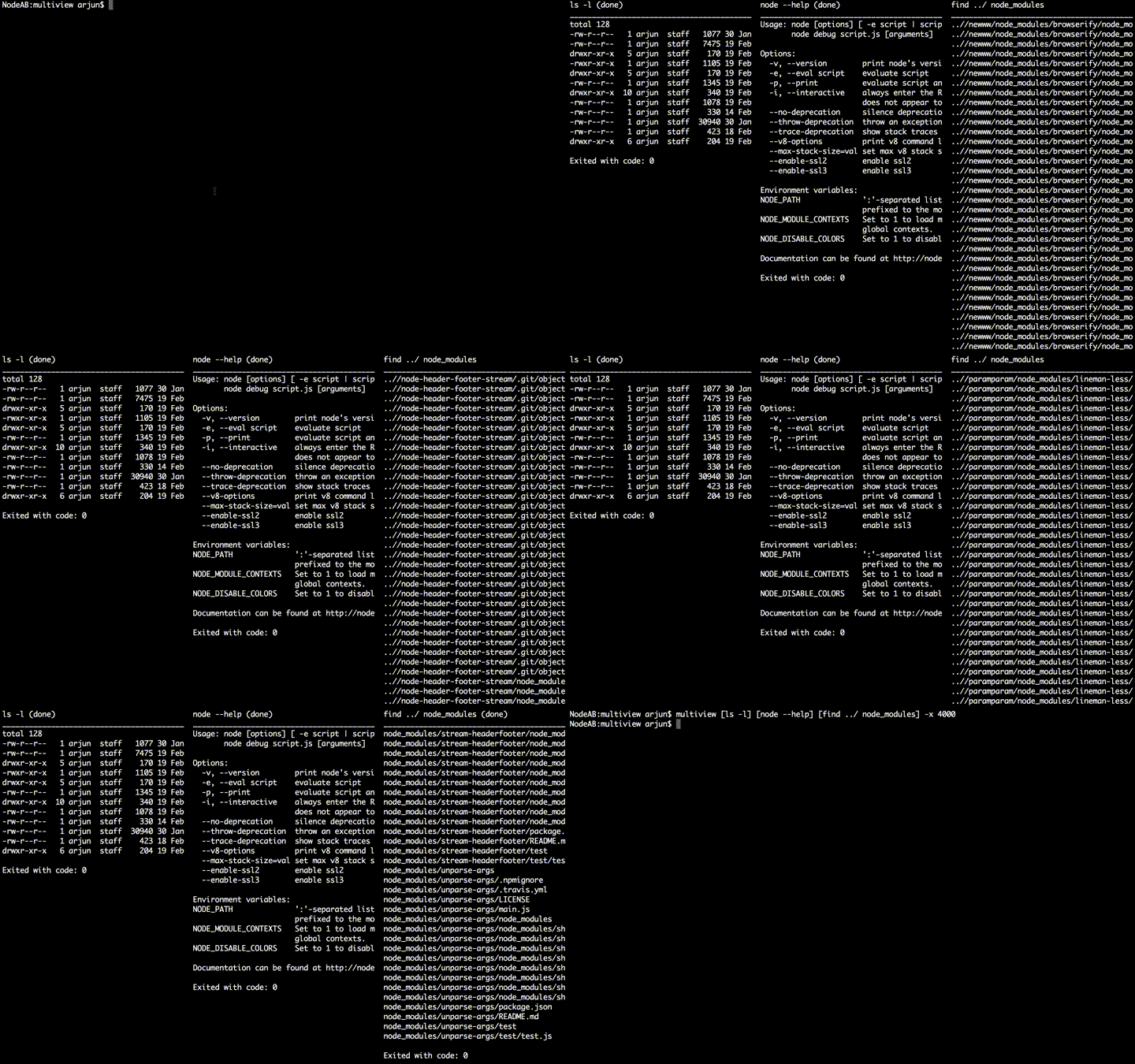
The CLI tool can spawn multiple processes and will separate their outputs into columns. Just execute the cli command `multiview` and place each sub-command into its own square brackets `[]`.
The following example will spawn 3 processes, and exit automatically, 4 seconds after the last process exits:
```bash
multiview [ ls -l ] [ node --help ] [ find ../ node_modules ] -x 4000
```
 #### Exit Codes
If any of the spawned processes exit with an error code other than `0`, multiview will exit with the first non-zero exit code received once all processes have completed.
#### Piping within Sub-commands
If you want to pipe together a series of commands and have the output in a single multiview column you'll need to wrap your UNIX pipe in quotes or escape with a backslash.
```bash
multiview [ ls -al \| grep '^d' ] [ node --help ] [ ps auxwww '|' grep node ] -x 4000
```
### CLI Usage Example (UNIX Piping)
The CLI tool also supports piping using standard UNIX piping conventions. Just pipe to a new instance of `multiview -s`/`multiview --stream` to capture its output. Then execute a final multiview instance to display. Like so:
```bash
(ls -l | multiview -s) & (node --help | multiview -s) & (find ../ node_modules | multiview -s) & multiview
```
**Note:** *This method can't capture process name, exit codes, and can't differentiate between stdout/stderr.*
## The CLI Tool: Advanced Usage
Basic usage should be enough for most. But there are a few options available for more advance use cases.
### AutoExit
#### Option: --autoexit, -x [delay]
By default, multiview will stay open until the user presses `q` or `ctrl+c`.
When this option is set, multiview will automatcially exit with an error code. The error code is determined by the first non-zero exit code received from a spawned process. If all processes exit with no errors (`0`), multiview will also exit with `0`. This is great for use with continuous integration systems and testing.
Optionally provide a number (in milliseconds) for how long to wait to exit after the last process has finished.
```bash
multiview [ ls -l ] [ node --help ] [ find ../ node_modules ] -x 5000
```
### Print Logs
#### Option: --print, -p
By default, multiview will exit back to the terminal view before it was launched, hiding all column output.
When the `print` option is set, multiview will print the output of each process linearly to the terminal. This is useful for troubleshooting during testing.
### Efficient Mode
#### Option: --efficient, -e
By default, when the output column of a process gets filled to the bottom, all previous output is pushed up, just like you'd expect from a standard terminal. This is, however, quite inefficient to render, though that inefficiency is generally not felt by most users.
However, if you are connected remotely and bandwidth is an issue, or if you are spawning processes with a lot of output that can be taxing to print to the terminal – there are multiple processes writing non-linearly to the screen after all – it is recommended you set multiview to `efficient` mode. This option resets the cursor at the top of the column when output reaches the bottom of the output column.
```bash
multiview [ ls -l ] [ node --help ] [ find ../ node_modules ] -e
```
### Buffer Size
#### Option: --buffer, -b
The number of lines that are buffered to be rendered at a time is set using the `buffer` option. This can speed up the printing of really long outputs. The same value sets the number of lines that are printed with the `print` option.
If you have a lot of output and want to print it all, you can set this value to a very high number, but this could greatly slow down the rendering speed of the output.
```bash
multiview [ ls -l ] [ node --help ] [ find ../ node_modules ] -b 200
```
### Stream Instances
#### Option: --stream, -s
Instead of displaying the output of spawned processes, stream instances of multiview stream the output of spawned processes to a receiving multiview instance where they can be aggregated.
Essentially, you can create multiple stream instances of multiview, spawning multiple processes each, and have their output display on a single receiving multiview instance!! This is great for scalability.
```bash
multiview [ ls -l ] [ node --help ] [ find ../ node_modules ] -s & multiview
```
### Channels
#### Option: --channel, -c [channel name]
Channels allow you to have different sets of processes going to different display instances. To use channels, both your stream instances and display instance need to be set to the same channel:
```bash
multiview [ ls -l ] [ node --help ] [ find ../ node_modules ] -s -c channelA & multiview -c channelA
```
By default, multiview runs on a channel called `multiview_main`
### Full Usage Information
```
Usage: multiview [command(s)] [options]
OPTIONS
-x, --autoexit [delay] Exit automatically after all processes have finished. (default delay: 500ms)
-p, --print Linearly print results of each stream after exiting.
-e, --efficient Render process output efficiently – great for remote connections
-b, --buffer Limit the number of lines buffered for each process. (default: 2000)
-s, --stream [stream name] Stream the output of this instance to a display instance. (default name: the stream's PID)
-c, --channel Specify a channel name. (default: multiview_main)
-h, --help Display usage information
-V, --version Display current version
```
## The Module: Basic Usage
Multiview can also be used as a module in your Node projects. The module can spawn new processes (using the `child_process.spawn` syntax) and will display their output in a neat column view.
### Installation
```bash
npm install --save multiview
```
### Include
```javascript
var mv = require('multiview')()
```
### Spawn Processes
Each call to `mv.spawn()` creates a new process which behaves like a regular `child_process.spawn` instance, but its output it placed into a column, and exit codes are captured.
```javascript
mv.spawn('ls', ['-l'])
mv.spawn('node', ['--help']);
mv.spawn('find', ['../', 'node_modules'])
```
## The Module: Advanced Usage
### Multiview Streams
In addition to spawning processes, you can also create special named streams on your multiview instance. You can write/pipe any text data to these streams and they will show up in their own column.
```javascript
var mvstream = mv.stream('List contents of current directory')
var spawn = child_process.spawn('ls');
spawn.stdout.pipe(mvstream)
```
#### Exit Streams
Multiview streams have a special `exit()` method that takes an `code` parameter. This will exit the stream and multiview will emit an `exit` event with the exit code. This can let you pass exit codes from `child_process.spawn` instance`s for example, or from remote streams or events that might use similar exit codes.
```javascript
spawn.on('exit', function(code){
mvstream.exit(code)
})
```
### Global Stream Exit Events
When a process or a stream exits, an `exit` event is emitted on the main multiview instance. This carries the multiview stream instance and the exit code passed to that stream. If `mv.spawn` was used, the exit code for the spawned process will be used.
```javascript
mv.on('exit', function(stream, code){
console.log('process stream exited with code:', code)
})
```
### Efficient Display
When you first include the `multiview` package in your project, you can pass in global options to the instance.
`efficient` mode is currently the only option `:D`. Refer to the [CLI's efficient mode](#efficient-mode) for a description of what this does.
```javascript
var mv = require('multiview')({
efficient: true
})
```
## License
```
The MIT License (MIT)
Copyright (c) 2015 Arjun Mehta
```
#### Exit Codes
If any of the spawned processes exit with an error code other than `0`, multiview will exit with the first non-zero exit code received once all processes have completed.
#### Piping within Sub-commands
If you want to pipe together a series of commands and have the output in a single multiview column you'll need to wrap your UNIX pipe in quotes or escape with a backslash.
```bash
multiview [ ls -al \| grep '^d' ] [ node --help ] [ ps auxwww '|' grep node ] -x 4000
```
### CLI Usage Example (UNIX Piping)
The CLI tool also supports piping using standard UNIX piping conventions. Just pipe to a new instance of `multiview -s`/`multiview --stream` to capture its output. Then execute a final multiview instance to display. Like so:
```bash
(ls -l | multiview -s) & (node --help | multiview -s) & (find ../ node_modules | multiview -s) & multiview
```
**Note:** *This method can't capture process name, exit codes, and can't differentiate between stdout/stderr.*
## The CLI Tool: Advanced Usage
Basic usage should be enough for most. But there are a few options available for more advance use cases.
### AutoExit
#### Option: --autoexit, -x [delay]
By default, multiview will stay open until the user presses `q` or `ctrl+c`.
When this option is set, multiview will automatcially exit with an error code. The error code is determined by the first non-zero exit code received from a spawned process. If all processes exit with no errors (`0`), multiview will also exit with `0`. This is great for use with continuous integration systems and testing.
Optionally provide a number (in milliseconds) for how long to wait to exit after the last process has finished.
```bash
multiview [ ls -l ] [ node --help ] [ find ../ node_modules ] -x 5000
```
### Print Logs
#### Option: --print, -p
By default, multiview will exit back to the terminal view before it was launched, hiding all column output.
When the `print` option is set, multiview will print the output of each process linearly to the terminal. This is useful for troubleshooting during testing.
### Efficient Mode
#### Option: --efficient, -e
By default, when the output column of a process gets filled to the bottom, all previous output is pushed up, just like you'd expect from a standard terminal. This is, however, quite inefficient to render, though that inefficiency is generally not felt by most users.
However, if you are connected remotely and bandwidth is an issue, or if you are spawning processes with a lot of output that can be taxing to print to the terminal – there are multiple processes writing non-linearly to the screen after all – it is recommended you set multiview to `efficient` mode. This option resets the cursor at the top of the column when output reaches the bottom of the output column.
```bash
multiview [ ls -l ] [ node --help ] [ find ../ node_modules ] -e
```
### Buffer Size
#### Option: --buffer, -b
The number of lines that are buffered to be rendered at a time is set using the `buffer` option. This can speed up the printing of really long outputs. The same value sets the number of lines that are printed with the `print` option.
If you have a lot of output and want to print it all, you can set this value to a very high number, but this could greatly slow down the rendering speed of the output.
```bash
multiview [ ls -l ] [ node --help ] [ find ../ node_modules ] -b 200
```
### Stream Instances
#### Option: --stream, -s
Instead of displaying the output of spawned processes, stream instances of multiview stream the output of spawned processes to a receiving multiview instance where they can be aggregated.
Essentially, you can create multiple stream instances of multiview, spawning multiple processes each, and have their output display on a single receiving multiview instance!! This is great for scalability.
```bash
multiview [ ls -l ] [ node --help ] [ find ../ node_modules ] -s & multiview
```
### Channels
#### Option: --channel, -c [channel name]
Channels allow you to have different sets of processes going to different display instances. To use channels, both your stream instances and display instance need to be set to the same channel:
```bash
multiview [ ls -l ] [ node --help ] [ find ../ node_modules ] -s -c channelA & multiview -c channelA
```
By default, multiview runs on a channel called `multiview_main`
### Full Usage Information
```
Usage: multiview [command(s)] [options]
OPTIONS
-x, --autoexit [delay] Exit automatically after all processes have finished. (default delay: 500ms)
-p, --print Linearly print results of each stream after exiting.
-e, --efficient Render process output efficiently – great for remote connections
-b, --buffer Limit the number of lines buffered for each process. (default: 2000)
-s, --stream [stream name] Stream the output of this instance to a display instance. (default name: the stream's PID)
-c, --channel Specify a channel name. (default: multiview_main)
-h, --help Display usage information
-V, --version Display current version
```
## The Module: Basic Usage
Multiview can also be used as a module in your Node projects. The module can spawn new processes (using the `child_process.spawn` syntax) and will display their output in a neat column view.
### Installation
```bash
npm install --save multiview
```
### Include
```javascript
var mv = require('multiview')()
```
### Spawn Processes
Each call to `mv.spawn()` creates a new process which behaves like a regular `child_process.spawn` instance, but its output it placed into a column, and exit codes are captured.
```javascript
mv.spawn('ls', ['-l'])
mv.spawn('node', ['--help']);
mv.spawn('find', ['../', 'node_modules'])
```
## The Module: Advanced Usage
### Multiview Streams
In addition to spawning processes, you can also create special named streams on your multiview instance. You can write/pipe any text data to these streams and they will show up in their own column.
```javascript
var mvstream = mv.stream('List contents of current directory')
var spawn = child_process.spawn('ls');
spawn.stdout.pipe(mvstream)
```
#### Exit Streams
Multiview streams have a special `exit()` method that takes an `code` parameter. This will exit the stream and multiview will emit an `exit` event with the exit code. This can let you pass exit codes from `child_process.spawn` instance`s for example, or from remote streams or events that might use similar exit codes.
```javascript
spawn.on('exit', function(code){
mvstream.exit(code)
})
```
### Global Stream Exit Events
When a process or a stream exits, an `exit` event is emitted on the main multiview instance. This carries the multiview stream instance and the exit code passed to that stream. If `mv.spawn` was used, the exit code for the spawned process will be used.
```javascript
mv.on('exit', function(stream, code){
console.log('process stream exited with code:', code)
})
```
### Efficient Display
When you first include the `multiview` package in your project, you can pass in global options to the instance.
`efficient` mode is currently the only option `:D`. Refer to the [CLI's efficient mode](#efficient-mode) for a description of what this does.
```javascript
var mv = require('multiview')({
efficient: true
})
```
## License
```
The MIT License (MIT)
Copyright (c) 2015 Arjun Mehta
```