# moldui
### The visual editor for **real codebases.**
Drag, resize, swap, edit text in your browser. Claude writes the code.
[](https://www.npmjs.com/package/moldui)
[](https://www.npmjs.com/package/moldui)
[](./LICENSE)
[**moldui.vercel.app**](https://moldui.vercel.app) · [**npm**](https://www.npmjs.com/package/moldui) · [**Issues**](https://github.com/Manavarya09/moldui/issues)
---
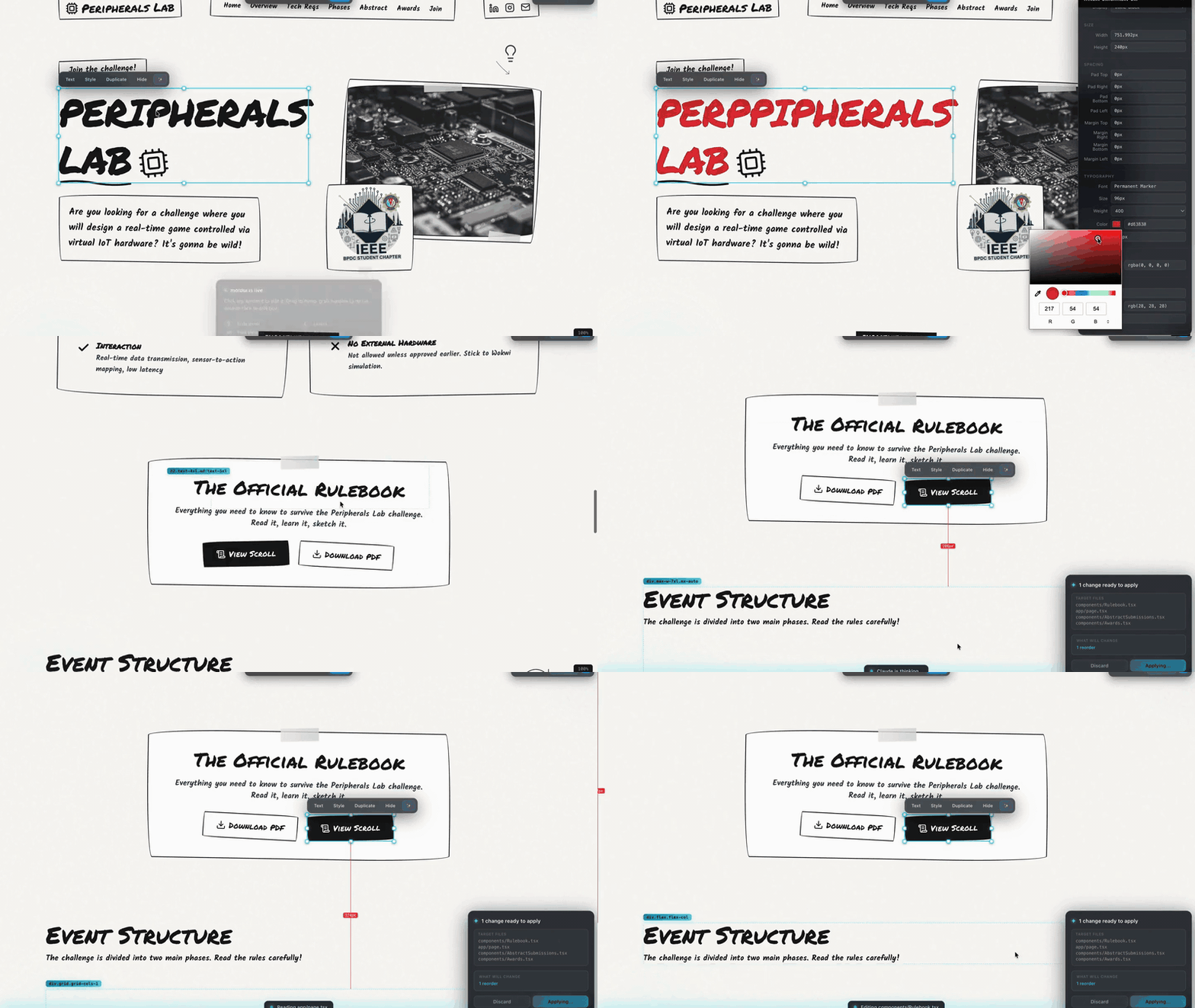
```bash
npx moldui
```
Zero config. Auto-detects your dev server. Opens the browser.
Every visual change becomes a real commit in your real code.
[Watch the full 45s demo with audio →](https://github.com/Manavarya09/moldui/raw/main/.github/assets/moldui-launch.mp4)
---
## The 30-second pitch
Every web dev has had this moment:
> *"This button needs 8 more pixels of padding."*
Then you open your IDE, find the component, hunt the Tailwind class, tweak, save, switch tabs, squint, tweak again. Six steps for two pixels.
**moldui kills that loop.** Grab the button. Drag the corner. Done. Claude rewrites the source file, HMR reloads, you move on.
No plugin to install in your project. No framework lock-in. Works with **Next.js, Vite, Vue, Svelte, Django, Rails, Laravel, Flask, plain HTML**.
## Install & run
```bash
# 1. Start your dev server (any framework)
npm run dev
# 2. In a second terminal
npx moldui
```
That's it. The browser opens with your app plus the editor overlay injected.
## What it does
**Spatial editing that actually feels like a design tool.** Not another "properties panel" bolted onto a preview.
- Click to select. Shift-click for multi-select.
- **Drag to reorder.** Alt-drag to **swap** two elements (they literally exchange positions in your source).
- 8-handle resize. Arrow keys nudge 1px. Shift+Arrow for 10px.
- Double-click text to edit inline — works on buttons, spans, links, headings.
- Full style panel: layout, typography, colors (with eyedropper + recent colors), spacing, borders, shadows. **One-click presets** for 4/8/16/24px.
- **Layers panel** (press `L`) — Figma-style DOM tree.
- **Cmd+K palette** — fuzzy search any element on the page.
- **AI chat** (`Cmd+/`) — natural language edits ("make this more modern").
- **Spacing guides** — hover while selected, see exact pixel distances between elements.
- **Lock elements** — right-click → Lock, prevents accidental selection.
- Viewport frames (375/768/1024/1280) with device chrome, not just width resize.
- Zoom with `Cmd+Scroll` like Figma canvas.
**And the AI part.** When you click Save:
1. Changes get **compressed** — 20 resize drags on one card coalesce into one change (keeps original `from`, latest `to`). Typical batch goes from 8KB to 1.5KB.
2. A batch file is written to `.moldui/batch-{timestamp}.json`
3. moldui spawns `claude` headless with `--output-format stream-json`
4. Claude reads the batch, edits your actual source files
5. You see live progress **inside the browser overlay**: `Reading page.tsx` → `Editing...` → `✓ Applied, 2 files changed`
6. Auto-generated git commit message suggested in the terminal
No context switch. No "go run /slash-command in another window."
## How it works
```
┌──────────────┐ WebSocket ┌──────────────┐ spawn('claude') ┌─────────────┐
│ Browser │ ──────────► │ moldui proxy │ ───────────────► │ Claude Code │
│ + overlay │ │ (Node.js) │ stream-json │ (edits your │
└──────────────┘ └──────────────┘ │ source) │
▲ │ └─────────────┘
│ ▼ │
│ .moldui/batch.json │
│ │
└──── live progress events ───────────────────────────────────┘
(Reading, Editing, Applied)
```
1. Proxy wraps your dev server and injects a vanilla-JS editor inside a Shadow DOM
2. You edit visually — changes apply instantly as CSS overrides in the browser
3. Click **Save** → batch file written to `.moldui/`
4. Click **Apply with Claude** in the overlay → `spawn('claude', ['-p', prompt, '--output-format', 'stream-json', '--verbose'])`
5. Claude reads the batch, maps DOM descriptors to source files, makes minimal edits
6. Your framework's HMR picks up the real file change and reloads
## vs the alternatives
| | **moldui** | Lovable | Webflow | v0 | Anthropic Preview |
|---|:---:|:---:|:---:|:---:|:---:|
| Works on **your existing codebase** | ✓ | — | — | — | ✓ |
| **Any framework, any language** | ✓ | — (React only) | — | — | ✓ |
| **True drag and drop** | ✓ | — (props panel) | ✓ | — | — |
| Resize handles | ✓ | — | ✓ | — | — |
| **Alt-drag swap** | ✓ | — | — | — | — |
| Multi-select + bulk edit | ✓ | — | ✓ | — | — |
| Cross-AI (Claude/Cursor/Gemini/Copilot) | ✓ | — | — | — | — |
| Works outside a desktop app | ✓ | n/a (hosted) | n/a (hosted) | n/a (hosted) | — |
| Open source | ✓ | — | — | — | — |
| Free | ✓ | $$ | $$$ | $$ | $$ |
## Framework support
Battle-tested against:
Next.js
App + Pages |
Vite
React/Vue/Svelte |
SvelteKit |
Nuxt |
Angular |
| Django |
Rails |
Laravel |
Flask |
Static HTML |
If your framework serves HTML, moldui works. The proxy doesn't care what rendered it.
## Cross-AI support
The auto-apply feature needs **Claude Code** installed to run headlessly. But the batch format is AI-agnostic — any assistant can apply your edits by reading `.moldui/INSTRUCTIONS.md`.
| AI | Auto-apply | Manual apply |
|---|:---:|:---:|
| **Claude Code** | ✓ (default) | `/moldui-sync` |
| **Cursor** | — | ask "apply moldui changes" |
| **GitHub Copilot** | — | ask "apply moldui" |
| **Gemini CLI** | — | reads `GEMINI.md` |
| **Windsurf** | — | reads `.windsurfrules` |
| **Aider** | — | reads `.aider.conf.yml` |
| **Cline** | — | reads `.clinerules` |
## Keyboard reference
| | |
|---|---|
| Click / Shift+Click | Select / multi-select |
| Double-click | Edit text inline |
| Drag | Move or reorder |
| **Alt+Drag** | **Swap two elements** |
| Arrow keys | Nudge 1px (Shift = 10px) |
| `S` | Style panel |
| `L` | Layers panel |
| `W` | Welcome card |
| `?` | Full shortcut cheatsheet |
| `Cmd+K` | Element search |
| `Cmd+/` | AI chat |
| `Cmd+Z` / `Cmd+Shift+Z` | Undo / Redo |
| `Cmd+S` | Save to source |
| `Cmd+Enter` | Apply pending batch |
| `Cmd+Scroll` / `Cmd+0` | Zoom / reset zoom |
## Claude Code plugin
If you use Claude Code, install the plugin for tightest integration:
```
claude plugin install Manavarya09/moldui
```
This wires `/moldui-sync` into Claude and enables the **auto-apply** flow — clicking Save in the browser triggers Claude headlessly, no terminal context-switch.
## Roadmap
- [x] v1 — drag, resize, text, styles, undo, save
- [x] v2.0 — multi-select, layers, Cmd+K palette, AI chat, viewport frames
- [x] v2.2 — glassmorphism theme, token optimization
- [x] v2.3 — headless auto-sync, Apply panel, AI Suggest, Alt-drag swap
- [x] v2.4 — spacing presets, element lock, commit message generator, all-blue theme
- [ ] v3 — collaborative editing (multiplayer), Figma two-way sync, plugin ecosystem
## Contributing
See [CONTRIBUTING.md](./CONTRIBUTING.md). Core rules:
- Editor stays vanilla JS (no framework deps)
- Shadow DOM only (no style leaks)
- Every change must be undoable
- Minimal diffs, match existing code style
## Something to keep in mind
moldui sits between you and your codebase. It's doing a lot of automation: injecting scripts, writing batch files, spawning Claude, rewriting source. I've tried to make it boring and predictable, but **read the diffs before you commit.** That's what the suggested commit-message prompt is for — a quick `git diff` before `git commit -am "..."`.
## License
[MIT](./LICENSE) © masyv
---
If moldui shipped a feature you wished existed — [star the repo](https://github.com/Manavarya09/moldui). It genuinely helps.
**[Site](https://moldui.vercel.app)** · **[npm](https://www.npmjs.com/package/moldui)** · **[Issues](https://github.com/Manavarya09/moldui/issues)**