
[](https://github.com/ericfortis/mockaton/actions/workflows/test.yml)
[](https://codecov.io/github/ericfortis/mockaton)
*No API state should be too difficult to test*
### [Docs](https://mockaton.com) | [Changelog](https://mockaton.com/changelog) | [Skills](skills/mockaton/SKILL.md) | [Use Cases](https://mockaton.com/use-cases)
## Overview
Mockaton is a local HTTP mock server. With it, you can test API states
that are difficult to reproduce from an actual backend.
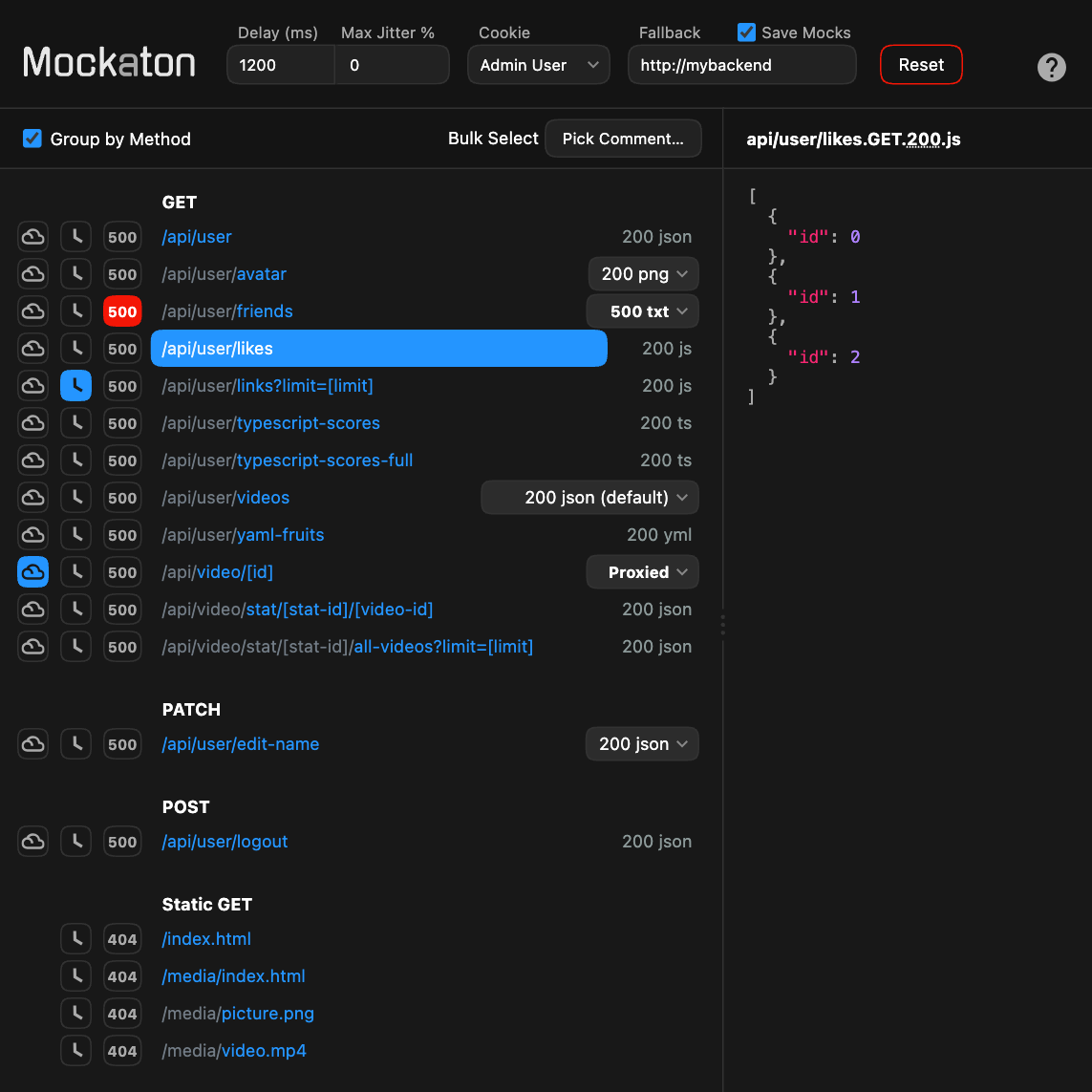
For example, to quickly trigger an error on an endpoint, click the 500 button.
Then, unclick it to test your retry logic.
Similarly, pick a mock variant from the dropdown, say to respond with a 423 (locked account).
Or click the clock button 🕓 to delay a response so you can test spinners.
## Dashboard
Besides the dashboard, there’s a [programmatic API](https://mockaton.com/api),
which is handy for setting up tests.
## Demo (Docker)
This will spin up Mockaton with the [sample directory](./mockaton-mocks)
included in this repo mounted on the container.
```sh
git clone https://github.com/ericfortis/mockaton.git --depth 1
cd mockaton
make docker
```
Test it:
```sh
curl localhost:2020/api/user
```
# Installation ([more options ↗](https://mockaton.com/installation))
```sh
npm install -g mockaton
```
Mockaton is a Node.js app with no dependencies.
## Skills
```sh
npx skills add ericfortis/mockaton
```
## Basic Usage
```sh
mockaton --port 2020 my-mocks-dir
```
Mockaton will serve the files on the given directory. It's a file-system based router in which
filenames can have dynamic parameters and comments. For paraments use square brackets `[]`,
and for comments use parentheses `()`. Comments are handy because this way each route
can have different mock file variants. Similarly, each route can have different response status
code variants.
| Route | Filename | Description |
| -----| -----| ---|
| /api/company/123 | api/company/[id].GET.200.ts | `[id]` is a dynamic parameter. `.ts`, and `.js` are sent as JSON by default. |
| /media/avatar.png | media/avatar.png | Statics assets don't need the above extension. |
| /api/login | api/login(invalid attempt).POST.401.ts | Anything within parenthesis is a comment. They are ignored when routing. You can add many comments, `foo(c0)(c1).png` |
| /api/login | api/login(default).GET.200.ts | `(default)` is a special comment. Otherwise, the first mock variant in alphabetical order wins. |
| /api/login | api/login(locked out user).POST.423.json | `.json` is allowed too. |
## How to scrape your backend APIs?
There’s a sister [Browser Extension](https://mockaton.com/scraping) that lets
you download in bulk all your API responses following Mockaton's filename convention.
## How to create mocks?
Write it to your mocks directory. TypeScript files are sent as JSON by default.
```sh
mkdir -p my-mocks-dir/api
echo "export default { name: 'John' }" > my-mocks-dir/api/user.GET.200.ts
```
Alternatively, there’s a [write-mock API](https://mockaton.com/api).
### Example A: JSON
For JSON responses, you can use TypeScript (or JS) and `export default` an Object, Array, or
String.
- **Route:** /api/company/123
- **Filename:** api/company/[id].GET.200.ts
```ts
interface Company {
name: string
}
export default {
name: 'Acme, Inc.'
} satisfies Company
```
### Example B: Non-JSON
- **Route:** /api/company/123
- **Filename:** api/company/[id].GET.200.xml
```xml
Acme, Inc.
```
### Example C: [Function Mocks](https://mockaton.com/function-mocks)
With a function mock you can do pretty much anything you could do with a normal backend handler.
For example, you can handle complex logic, URL parsing, saving to a database, etc.
- **Route:** /api/company/abc/user/999
- **Filename:** api/company/[companyId]/user/[userId].GET.200.ts
```ts
import { IncomingMessage, OutgoingMessage } from 'node:http'
import { parseSegments } from 'mockaton'
export default async function (req: IncomingMessage, response: OutgoingMessage) {
const { companyId, userId } = parseSegments(req.url, import.meta.filename)
const foo = await getFoo()
return JSON.stringify({
foo,
companyId,
userId,
name: 'Acme, Inc.'
})
}
```
## Docs
- [Configuration](https://mockaton.com/config): CLI and mockaton.config.js
- [API](https://mockaton.com/api): Programatically, you can delay a route, select a different mock file, etc.
 *No API state should be too difficult to test*
### [Docs](https://mockaton.com) | [Changelog](https://mockaton.com/changelog) | [Skills](skills/mockaton/SKILL.md) | [Use Cases](https://mockaton.com/use-cases)
## Overview
Mockaton is a local HTTP mock server. With it, you can test API states
that are difficult to reproduce from an actual backend.
For example, to quickly trigger an error on an endpoint, click the 500 button.
Then, unclick it to test your retry logic.
Similarly, pick a mock variant from the dropdown, say to respond with a 423 (locked account).
Or click the clock button 🕓 to delay a response so you can test spinners.
## Dashboard
*No API state should be too difficult to test*
### [Docs](https://mockaton.com) | [Changelog](https://mockaton.com/changelog) | [Skills](skills/mockaton/SKILL.md) | [Use Cases](https://mockaton.com/use-cases)
## Overview
Mockaton is a local HTTP mock server. With it, you can test API states
that are difficult to reproduce from an actual backend.
For example, to quickly trigger an error on an endpoint, click the 500 button.
Then, unclick it to test your retry logic.
Similarly, pick a mock variant from the dropdown, say to respond with a 423 (locked account).
Or click the clock button 🕓 to delay a response so you can test spinners.
## Dashboard