# MidiParser.js
[](https://github.com/colxi/midi-parser-js)
[](https://github.com/colxi/midi-parser-js)
[](https://www.npmjs.com/package/midi-parser-js)
MidiParser is a Javascript **Binary MIDI file** reader for the browser and Node which converts a MIDI binary data structure to **a JSON object**, making it much easier to iterate over and interact with.
- Tiny and dependency free
- Browser & Node Compatible
- Supported data input :
- ```BASE64``` encoded Midi data
- ```UINT8``` arrayBuffer, obtained when reading or fetching a .mid binary.
- ```FileInput Element``` in the Browser
- Custom Midi Messages
## Example
A simple example parsing a MIDI file in Node ...
```javascript
let midiParser = require('midi-parser-js');
let fs = require('fs')
// read a .mid binary (as base64)
fs.readFile('./test.mid', 'base64', function (err,data) {
// Parse the obtainer base64 string ...
var midiArray = midiParser.parse(data);
// done!
console.log(midiArray);
});
```
Example in Browser...
```html
```
If you want to see it in action, you can test it [Here](https://colxi.info/midi-parser-js/test/test-es6-import.html)
## Syntax:
```javascript
MidiParser.parse( input [, callback] );
```
**- input** : Accepts any of the supported Data Sources : `FileInputElement | uint8Array | base64String`
**- callback** : Callback to be executed when data is parsed. Only required when input is a `FileInputElement`.
---
## Handle Custom messages ( sysEx, non-standard...)
By default, the library ignores the sysEx, and non-standard messages, simply converting their values to integers (when possible).
However you can provide a custom hook function to be executed when any non-standard message is found, and process it by your own, returning the resulting value.
```javascript
MidiParser.customInterpreter = function( msgType, arrayBuffer, metaEventLength){ /* your code */ }
```
**- msgType** : Hex value of the message type
**- arrayBuffer** : Dataview of the midi data. You have to extract your value/s from it, moving the pointer as needed.
**- metaEventLength** : A length greater than 0 indicates a received message
> If you want the default action to be executed, return **false**
## Output JSON anatomy :
The returned JSON object contains all the attributes of the MIDI file (format type, time division, track count... ) as properties. The tracks and the MIDI events related to each track are container inside the `track` property.
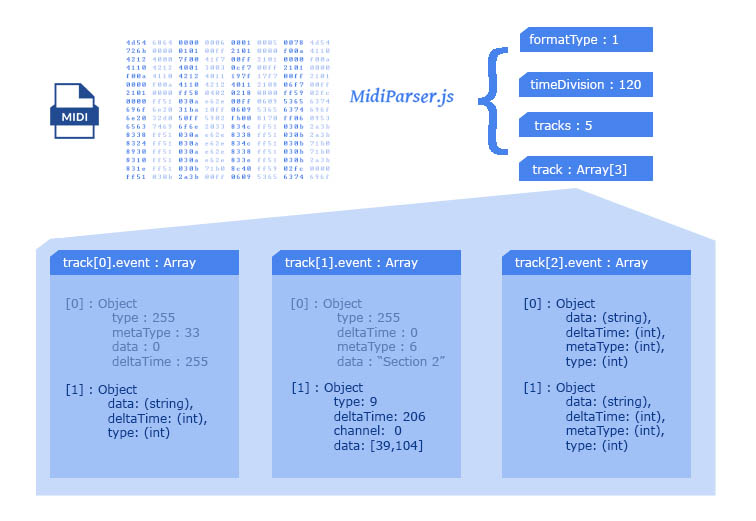
The following JSON object represents a MIDI file with **3 tracks** and **4 events** in **Track 0**
```javascript
outputObject{
....formatType: 0|1|2, // Midi format type
....timeDivision: (int), // song tempo (bpm)
....tracks: (int), // total tracks count
....track: Array[
........[0]: Object{ // TRACK 1!
............event: Array[ // Midi events in track 1
................[0] : Object{ // EVENT 1
....................data: (string),
....................deltaTime: (int),
....................metaType: (int),
....................type: (int)
................},
................[1] : Object{...}, // EVENT 2
................[2] : Object{...}, // EVENT 3
................[3] : Object{...} // EVENT 4
............]
........},
........[1] : Object{...}, // TRACK 2
........[2] : Object{...} // TRACK 3
....]
}
```
If you want to read the data from **Event 2** of **Track 0** , you should use the following keypath :
```javascript
outputObject.track[0].event[2].data;
```
---
## Distribution & Installation :
The following distribution channels are available :
**- NPM** : Install using the following command :
```bash
$ npm install midi-parser-js -s
```
**- GIT** : You can clone the repository :
```bash
$ git clone https://github.com/colxi/midi-parser-js.git
```
**-ZIP** : Or download the package in a ZIP file from
> [GITHUB LATEST PACKAGE RELEASE PAGE](https://github.com/colxi/midi-parser-js/releases/latest)
**-CDN** : Include the latest release of this library in your HTML head using the CDN :
> Warning : Not recommended for production enviroments!
```html
```
## Importing
This package is shipped with support to Node CommonJS and ES6 Modules. Use the appropiate method accoordintg to your enviroment.
```javascript
// ES6 Module Import :
import {MidiParser} from './midi-parser.js';
// CommonJS Node Import :
let MidiParser = require('midi-parser-js');
```
---
## Bonus : MIDI File Format Specifications :
MIDI Binary Encoding Specifications in https://github.com/colxi/midi-parser-js/wiki/MIDI-File-Format-Specifications